

Figma Design Agent vs. Figma MCP: What’s the Difference?
Figma Design Agent and Figma MCP are two different AI tools built by Figma. The Design Agent generates and edits designs directly on the Figma canvas. Figma MCP connects Figma’s design data to AI coding tools so developers can turn approved designs into code.
Most website teams need both, at different stages of the same project.
Key Takeaways
- Figma Design Agent works inside Figma. You prompt it to generate layouts, apply your design system, and revise screens in natural language.
- Figma MCP (the Dev Mode MCP Server) works outside Figma. It feeds design context, components, and variables into coding tools like Cursor, GitHub Copilot, and Claude Code.
- Figma’s own guidance: use the agent when you’re designing on the canvas, and use MCP to move work between code and Figma. Neither tool replaces strategy, UX judgment, accessibility review, or SEO work.
Source: Figma.
What Is the Figma Design Agent?
Figma Design Agent is an AI assistant built into the Figma canvas. You describe a change in plain language, and the agent generates layouts, revises content, applies styles, or explores design directions for you.
This design agent is available to Full seat users on Professional, Organization, and Enterprise plans. Collab and Dev seats can use it in drafts. Starter, Education, and Government plans aren’t included, and the agent doesn’t consume AI credits during beta.
Additionally, the agent reads your Figma files, components, variables, and design system before making changes. That gives it more usable context than a general AI tool working from a screenshot or a short text prompt.
A web design team can use the Figma Design Agent to:
- Generate homepage and landing page concepts.
- Create variations of a service page.
- Apply approved typography, colors, and components.
- Build mobile and tablet versions of a layout.
- Add loading, empty, and error states.
- Explore light and dark mode designs.
- Update copy across multiple frames.
- Organize layers and apply naming conventions.
- Summarize scattered feedback and turn it into a revised draft.
For example, an agency could ask the agent for three homepage directions for a B2B client. The team then compares those directions against the client’s goals, audience, brand, content, and conversion actions.
The agent still needs a professional designer to check its output. It can produce a screen that looks polished but doesn’t support the user journey, fit the actual content, or meet accessibility requirements.
For a broader look at where AI fits into the build process, check out these benefits, tools, and best practices.
What Is Figma MCP?
Figma MCP connects Figma to external AI agents and development tools. MCP stands for Model Context Protocol, an open standard that gives AI tools structured access to information from other applications.
Basically, the Figma Dev Mode MCP Server runs locally through the Figma desktop app and connects to coding tools including GitHub Copilot in VS Code, Cursor, Windsurf, and Claude Code. It’s one example of MCP implementation for AI agents, applied specifically to design work.
Before MCP, the only way to hand a design to an AI coding tool was a screenshot or a basic API response. That approach loses information. An AI tool might see a card and miss that it’s the approved card component. It might approximate a brand color instead of using the correct design token.
Figma MCP passes along:
- Components
- Variables
- Styles
- Design tokens
- Layout relationships
- Assets
- Code mappings (through Code Connect)
For a website project, developers can use Figma MCP to:
- Generate frontend code from approved designs.
- Pull Figma components directly into an AI coding environment.
- Bring a live website’s HTML into Figma as editable layers for review.
- Compare a coded page against the approved design.
- Send implementation fixes back into the Figma file.
Read our full technical walkthrough in this guide.

Figma Design Agent vs. Figma MCP
Figma’s own product team put it: use the agent when you’re working on the canvas, and use MCP to move work between code and Figma.
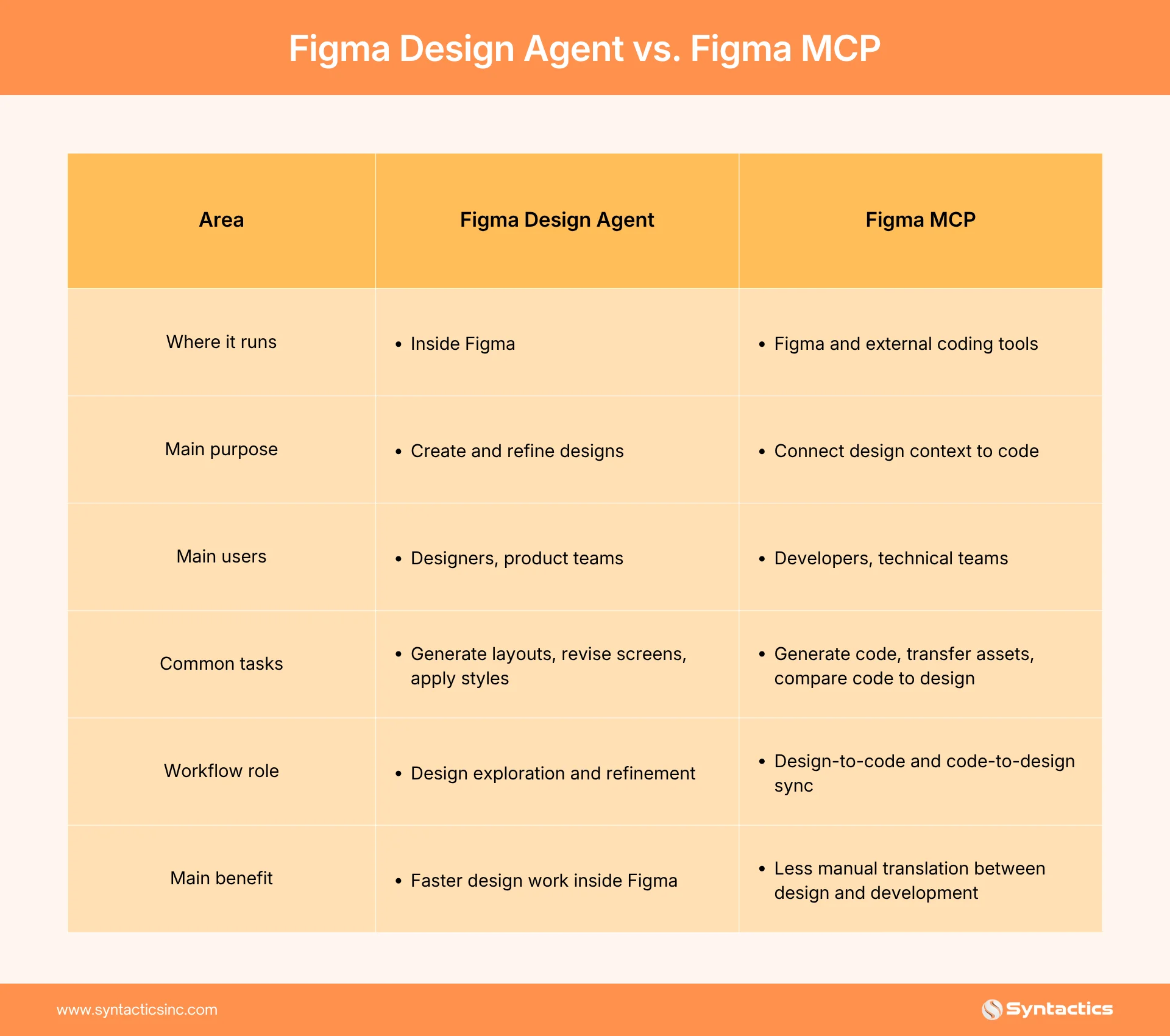
The Design Agent helps you work on the design while Figma MCP helps you move design context between Figma and code. A website development team typically uses the Design Agent during planning and design, then switches to MCP during frontend development and implementation review.
Which Tool Does Your Website Project Need?
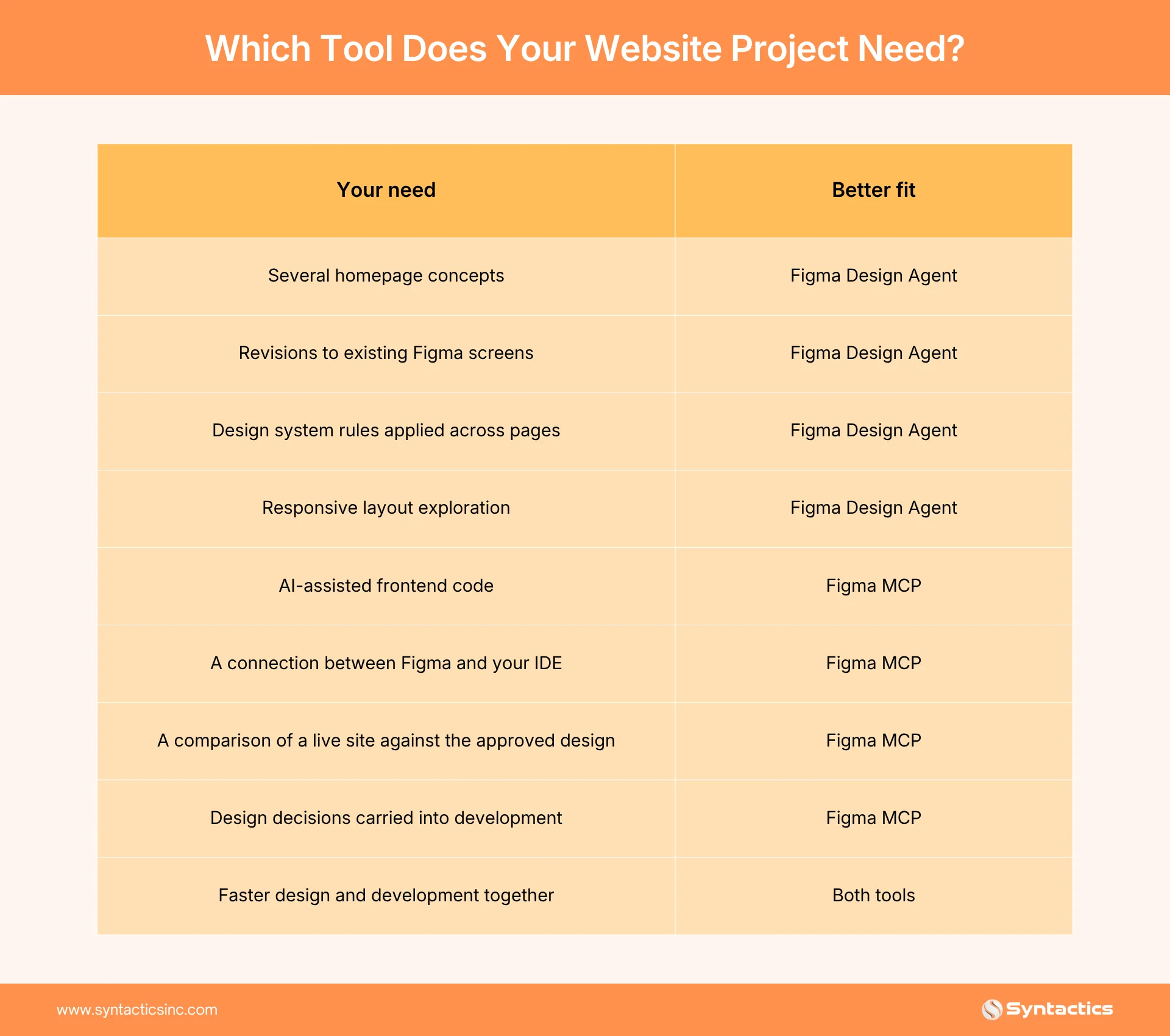
If you’re still settling on the website’s visual direction, start with the Design Agent. If your designs are approved and your main concern is implementation, Figma MCP does more for you. A full website project usually needs both.
How They Work Together
1. Define the website requirements.
Before you open either tool, your team should nail down business goals, target users, main pages, primary conversion actions, required content, brand requirements, and CMS needs. This gives the design team a basis for judging AI-generated concepts.
2. Explore design directions.
Use the Design Agent to generate homepage, service page, or landing page directions. Compare the options on brand fit, content hierarchy, user experience, conversion potential, mobile usability, and accessibility.
3. Apply the design system.
Ask the agent to use your approved components, variables, typography, colors, and spacing rules. Clear component names such as Primary Button or Pricing Card give the agent useful context. Names like Frame 1337 don’t.
4. Prepare the design for development.
The designer and developer should review the selected design together before the build starts. Check responsive layouts, content length, component reuse, form behavior, navigation states, and accessibility.
5. Connect the design to code.
The developer opens Figma MCP from a compatible coding environment. The AI coding tool can now reference the actual Figma file, components, variables, tokens, and assets, not just a flat image.
6. Review the live implementation.
Once the developer builds the page, compare it against the Figma design. Figma’s code-to-canvas workflow can bring the working interface back into Figma, so the whole team reviews the real result, not just a static mockup.
7. Refine and repeat.
Update the design in Figma and carry approved changes back into development. Developers can also bring updated code back into Figma when they need design input. This keeps design and code in sync instead of letting them drift apart.
How does this affect your timeline? Here’s a breakdown of how long it takes to build a website with AI.
Benefits for Website Projects
Figma Design Agent
- Faster prototyping. The agent helps a team compare initial directions faster, which speeds up discovery and concept development. The benefit is bigger when the team already has a clear brief and a structured design system.
- More consistent interfaces. The agent applies your reusable components and variables when it generates or edits a screen. That keeps buttons, cards, forms, and navigation consistent across pages and makes future updates easier.
Figma MCP
- Fewer handoff problems. Traditional handoffs rely on screenshots, exported assets, and written notes, and details get lost. Figma MCP gives developers and coding tools direct access to the relevant components, colors, typography, spacing, and interaction states.
- Earlier technical feedback. Developers can flag technical problems before a design becomes expensive to change, because MCP gives them real component and token data instead of a flat screenshot. Designers can also review a working interface earlier, once the code-to-canvas workflow brings it back into Figma.
Both Tools
- More efficient revisions. A designer can ask the Design Agent to update one component or content pattern instead of editing every frame by hand. Developers can lean on Figma MCP’s connected design context to cut repetitive translation work on the code side.
Keep in mind that faster launch times still depend on scope, content readiness, approvals, integrations, and testing.
The prompts you write for either tool matter as much as the tool itself. See our guide here to get more consistent output.

What AI Tools Cannot Handle Alone
Website Strategy
The tools can generate a layout, but they don’t understand your business model, sales process, or competitive position. Your team still defines goals, audience segments, page priorities, and conversion paths.
User Experience
A visually polished page can still confuse users. A designer still needs to check navigation, information hierarchy, and task completion.
Technical Development
Generated code needs a human review for semantic HTML, security, performance, browser compatibility, and error handling.
Accessibility
A site can match its Figma file exactly and still fail accessibility checks. Review heading structure, keyboard navigation, focus states, form labels, color contrast, and touch target sizes.
Search Optimization
Neither tool manages crawlable content, metadata, canonical URLs, structured data, internal links, or Core Web Vitals. That’s still your development team’s job.
For more on how these decisions affect visibility in AI search, see our breakdown here.

How to Prepare Your Figma Workflow for AI
AI output quality depends on the context these tools have. Before a major website project, organize your Figma system around:
- Clear layer and component names
- Reusable components
- Auto layout
- Design tokens
- Documented component states
- Responsive rules
- Accessibility annotations
- Code Connect mappings between Figma components and your production codebase
Code Connect maps Figma components to matching code components, which reduces the chance of an AI coding tool guessing the wrong implementation.
Questions to Ask a Web Development Agency
- How do you use Figma during website planning and development?
- How do you move approved designs into frontend implementation?
- Do you use reusable components and design tokens?
- How do you review AI-generated code before it ships?
- How do you test accessibility?
- How do you measure Core Web Vitals?
- How do you protect confidential project information?
- How do you manage design and development changes mid-project?
- Can you support the website after launch?
- How will you measure the website’s business performance?
A qualified agency should walk you through this clearly and explain how design, development, content, SEO, testing, and post-launch support fit together.
Choose the Right Web Design and Development Partner
Figma Design Agent and Figma MCP speed up website workflows, but tools alone don’t create effective websites. You need a team that connects AI-assisted workflows to business strategy, user experience, technical development, accessibility, and SEO.
Design Agent helps your team explore and refine designs inside Figma. Figma MCP helps developers carry those decisions into code. Together, they support faster collaboration when your project has the right systems and review process behind them.
Syntactics can help you plan, design, develop, and improve a website that supports your business goals. Our web design and development services combine responsive design, user-focused experiences, technical implementation, performance, accessibility, and ongoing support.
Building that structure the right way is what we focus on for every client.
Get Design and Functionality
Specific to your Brand!

Frequently Asked Questions
Do I need Figma MCP if I already use the Figma Design Agent?
It depends on your role. The Design Agent covers design work inside Figma. If you also need to turn that design into code, or connect Figma to an IDE like Cursor or VS Code, you need Figma MCP too.
Does Figma MCP work with any AI coding tool?
It works with tools that support the Model Context Protocol, including GitHub Copilot in VS Code, Cursor, Windsurf, and Claude Code. Check your specific coding tool’s documentation to confirm support.
Is the Figma Design Agent available on every Figma plan?
No. It’s available to Full seat users on Professional, Organization, and Enterprise plans. Collab and Dev seats can use it in drafts. Starter, Education, and Government plans aren’t included.
Does using these tools replace a designer or developer?
No. Figma has said both tools are built to work alongside your team, not instead of it. A designer still needs to judge whether an AI-generated layout fits the user journey and content. A developer still needs to review generated code before it ships.
Will using the Design Agent or MCP slow down my website launch?
Not directly, but they don’t guarantee a faster one either. Your launch timeline still depends on scope, content readiness, stakeholder approvals, and QA, regardless of which AI tools you use.

About Ladymieh Naallatan
Related News:

How to Fix Failed Custom Software Implementations

How to Choose A Web Hosting Solution
What Web Design and Development Has to Offer

Best SEO-Friendly CMS for Your Website: Top Picks

WordPress Web Designer: A Worthwhile Investment








Comment 0