

How to Make Your Website Ready for AI Agents: An MCP Implementation Guide
AI agents can now book appointments, make purchases, and fill out forms without any human interaction, thanks to the Model Context Protocol (MCP). Anthropic introduced MCP in November 2024. It’s an open standard that lets AI systems connect safely to tools and data businesses already use.
If your website handles transactions, bookings, search, or forms, MCP decides what an AI agent can do there. Without it, agents may just send the customer elsewhere.
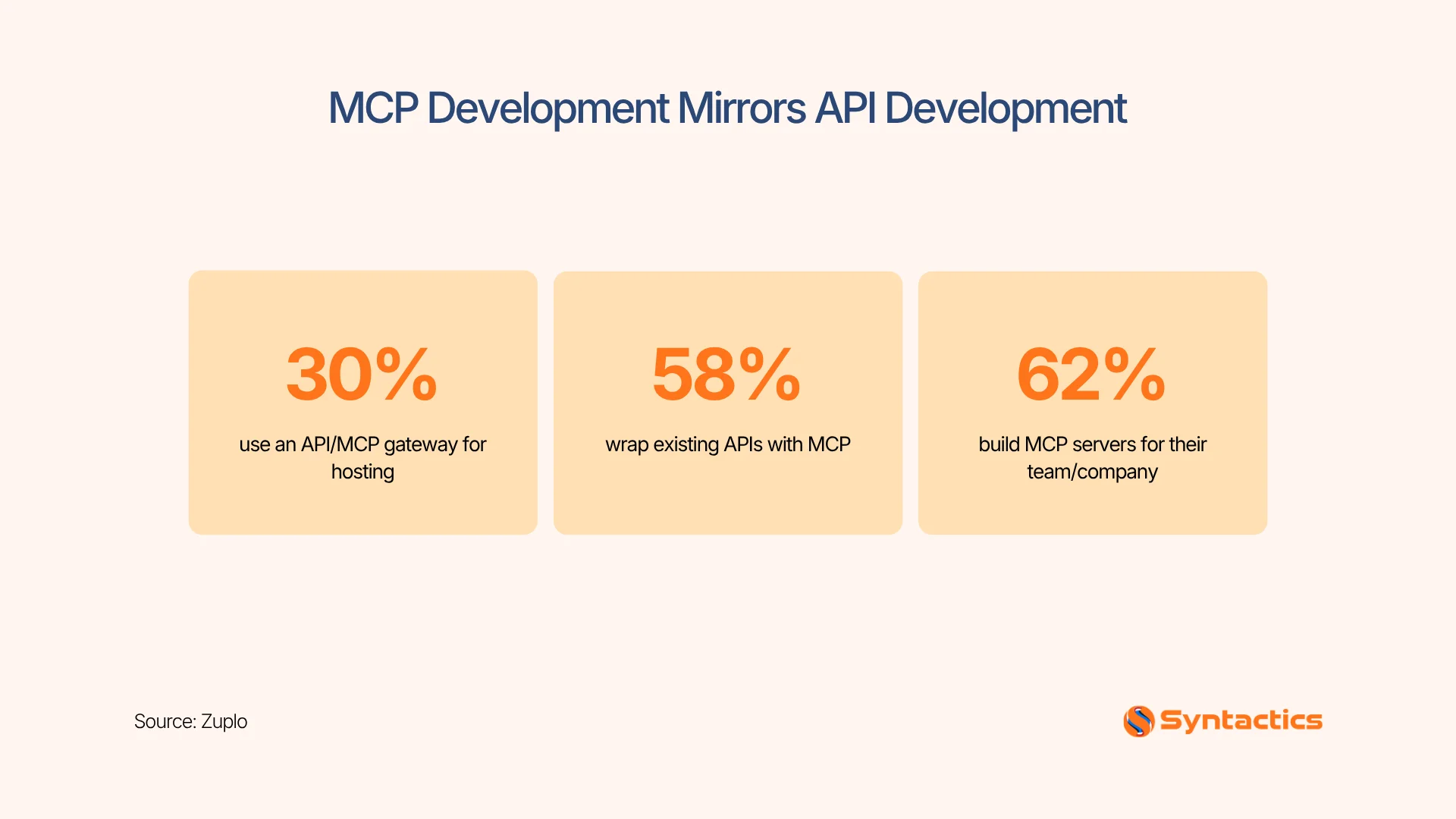
Source: Zuplo.
Key Takeaways
- MCP gives AI agents a standard way to find and safely use the actions your website already supports. You don’t need to build a custom integration for every AI tool.
- Transactions, bookings, search, and form submissions each need their own MCP setup, since the risk level and required safeguards differ for each.
- You control how much autonomy an agent gets. Spending limits, hold times, and form sensitivity levels help keep people involved when it’s important.
- Clean, structured data and an existing API layer are prerequisites. MCP builds on top of what you already have; it doesn’t replace the need for it.
- Security discipline (scoped permissions, rate limits, audit logs) matters more here than in most integrations, since agents can act, not just read.
- Businesses that skip MCP risk being invisible to AI agents shopping, booking, or researching on a customer’s behalf.
What MCP Actually Changes on Your Website
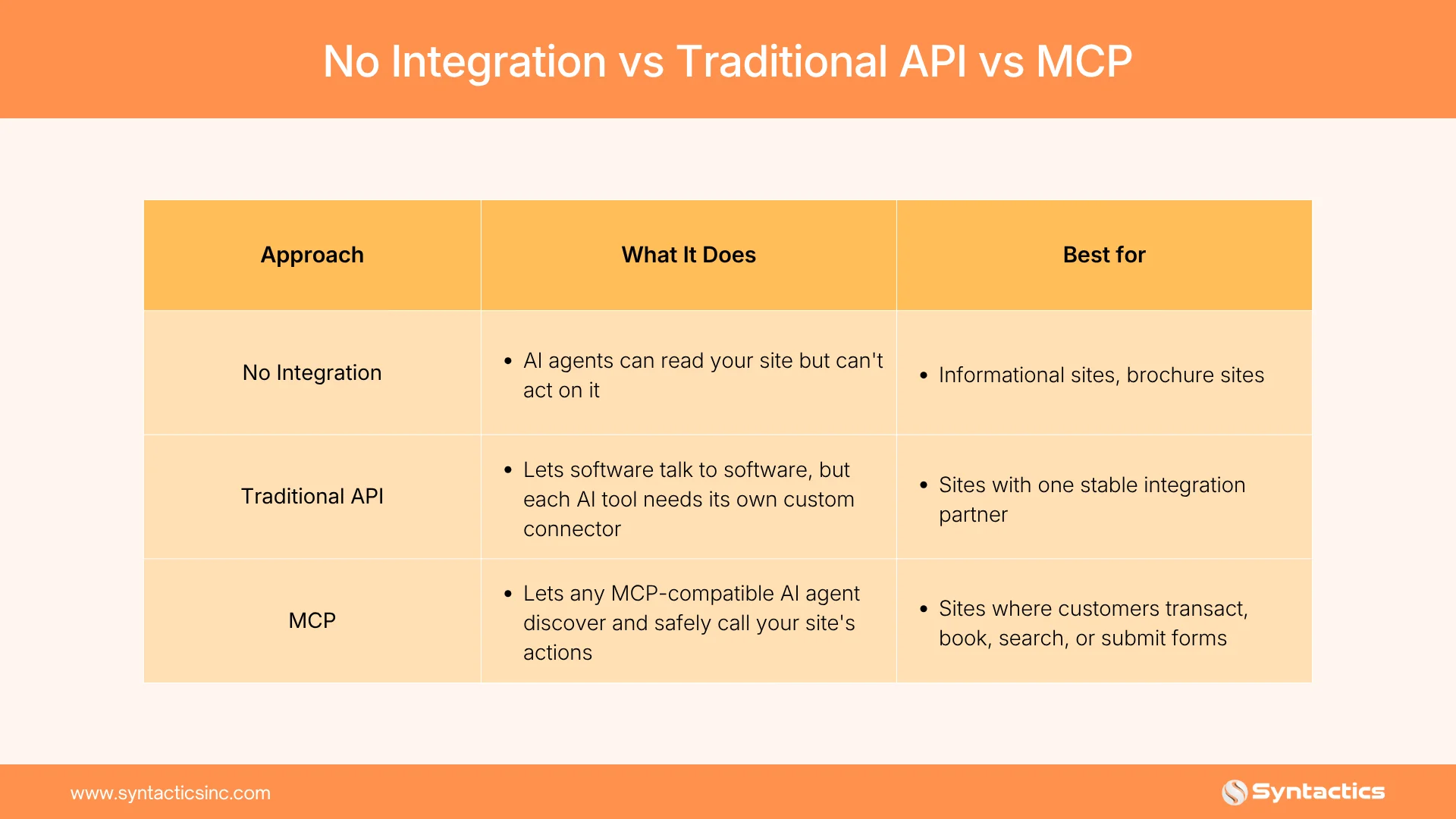
Before MCP, connecting an AI tool to a business system meant building a custom integration for every combination of AI model and software. Developers called this the N times M problem. For example, ten AI apps talking to ten business tools could mean up to a hundred separate integrations to manage.
MCP solves this by using a single shared protocol. Your website describes its features once, and any MCP-compatible AI agent can use them. This protocol is also being used, appearing like Figma’s MCP integration for web development.
By early 2026, Anthropic, OpenAI, and Google DeepMind had all adopted MCP, according to Wikipedia’s MCP overview. Gartner projects that 40% of enterprise apps will run task-specific AI agents by the end of the year, up from less than 5% before. That’s why action-driven websites should start planning for this now.
Where MCP Shows Up First: Four Core Use Cases
The best way to understand MCP is by looking at the tasks your website already handles. Here’s how it works for transactions, bookings, search, and form submissions.
How MCP Handles Transactions on Your Website
With MCP, an AI agent can complete a purchase for a customer, not just describe your product. Your checkout process becomes a specific action the agent can use. Clear rules decide what the agent can do without needing a person to confirm.
Here’s how to implement them:
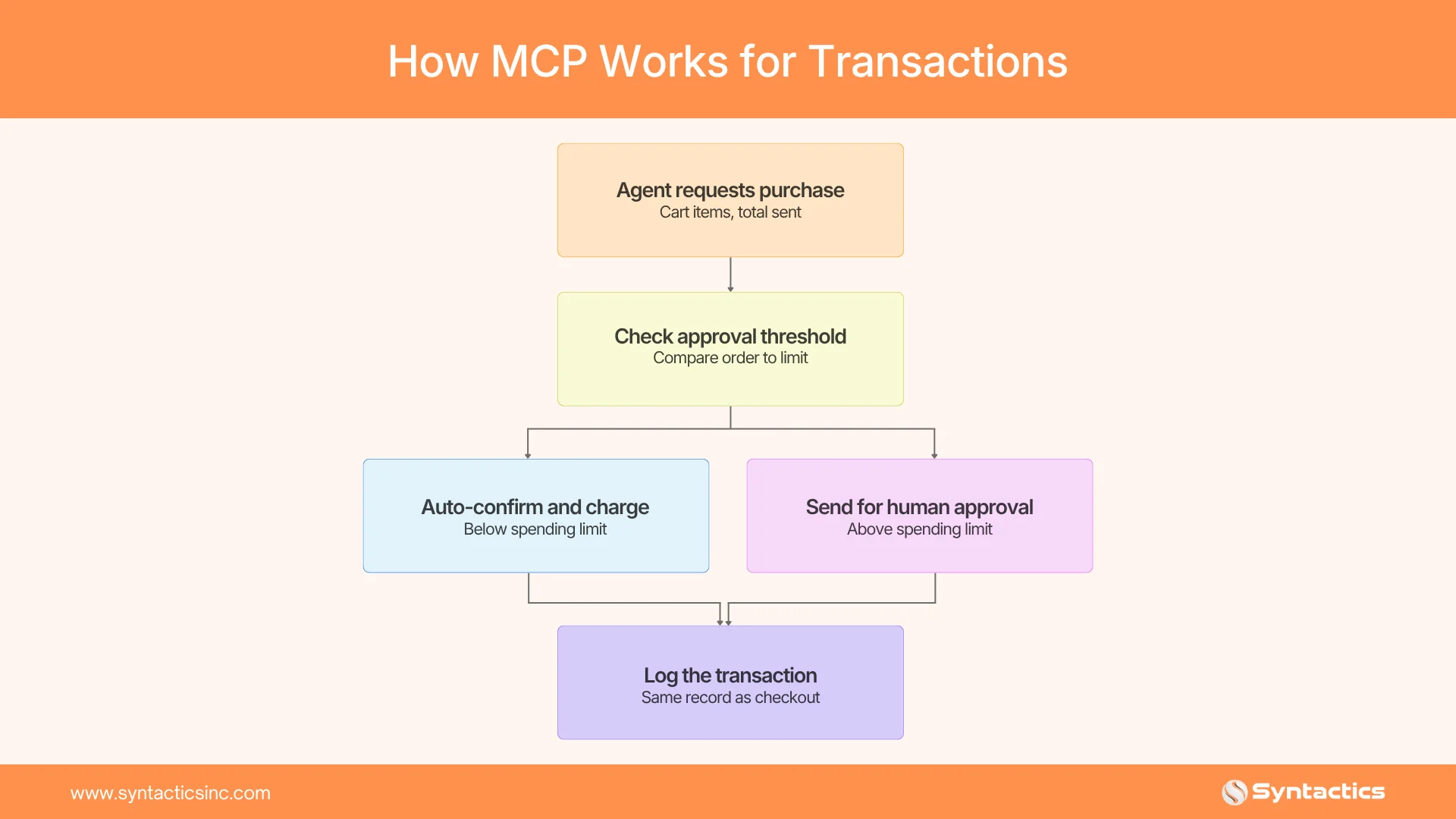
- Map your checkout flow into discrete steps: add to cart, apply discount, confirm shipping, authorize payment. Decide which steps an agent can trigger and which need human approval.
- Connect your existing payment processor’s API to an MCP server rather than building payment logic from scratch. Most major processors already support token-based authorization per PCI Security Standards Council guidance, keeping card data out of the agent’s hands.
- Set a spending threshold for agent-completed purchases. A $15 reorder can go through automatically, while a $1,500 order still requires confirmation.
- Log every agent-initiated transaction the same way you’d log a human checkout, so you can trace and reverse anything that goes wrong.
The good thing is that you always control payment authorization. You choose if an agent can add items to a cart or finish the payment. A person might still need to approve the last step.

MCP for Bookings and Reservations: Letting AI Agents Check and Reserve Availability
For appointment- or reservation-based businesses, MCP turns live availability into something an AI agent can read directly. It no longer has to guess from an outdated page.
Here’s how:
- Point your MCP server at the same calendar or scheduling system your team already uses, such as Calendly or a practice.
- Build the availability check and the booking confirmation into one action, not two. This stops an agent from reserving a slot based on data that’s already gone stale.
- Set a short hold window, typically 2 to 5 minutes, on any slot an agent is actively booking. That keeps a human browsing the same page from grabbing it mid-transaction.
- Route cancellations and reschedules through the same MCP action a human-facing cancellation would use, so your calendar never has two sources of truth.
The trickiest part is managing real-time conflicts, since both agents and people can try to book the same slot. Following the steps above helps keep your calendar accurate for everyone.
MCP for Site Search: Turning Your Search Bar into an AI-readable Tool
Search becomes far more useful to an AI agent when it’s presented as a structured action. Otherwise, the agent has to guess how to fill in a text box.
How to implement it:
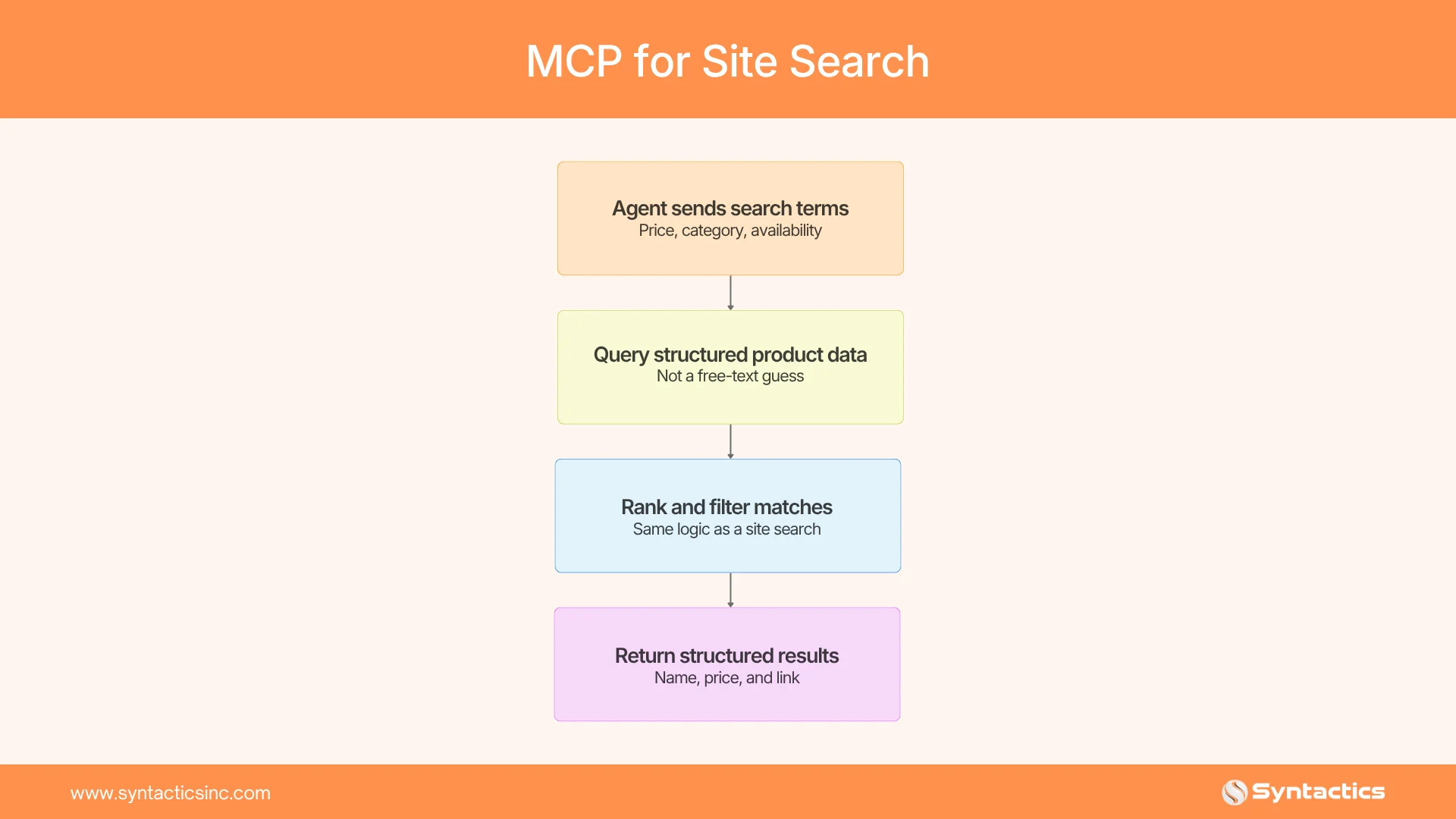
- Define your search tool’s parameters explicitly: price range, category, availability, location. This lets an agent ask a precise question and get a precise answer, instead of relying on free text.
- Clean up your product or service data before you expose it. Missing prices, discontinued items, or inconsistent categories will feed an agent bad answers just as easily as they’d confuse a human. The same discipline applies to structuring content for AI RAG systems, since both rely on clean, retrievable data.
- Return structured results: name, price, availability, direct link. Skip the marketing copy, since the agent needs data it can act on, not prose to interpret.
- Cap the result set and rank by relevance, the same way you would for a human search page. That keeps an agent from sorting through hundreds of loosely matched items.
The biggest challenge point here is incomplete or outdated product and inventory data. If your search index isn’t clean, an AI agent will either return poor results or skip your site in favor of a competitor’s.
MCP for Form Submissions: Which Forms are Safe to Open to AI Agents
Not every form should be open to AI agents. Contact and lead-generation forms are usually safe, since humans review the submissions. Forms related to legal agreements, account changes, or sensitive personal data need extra care.
These are the steps to follow:
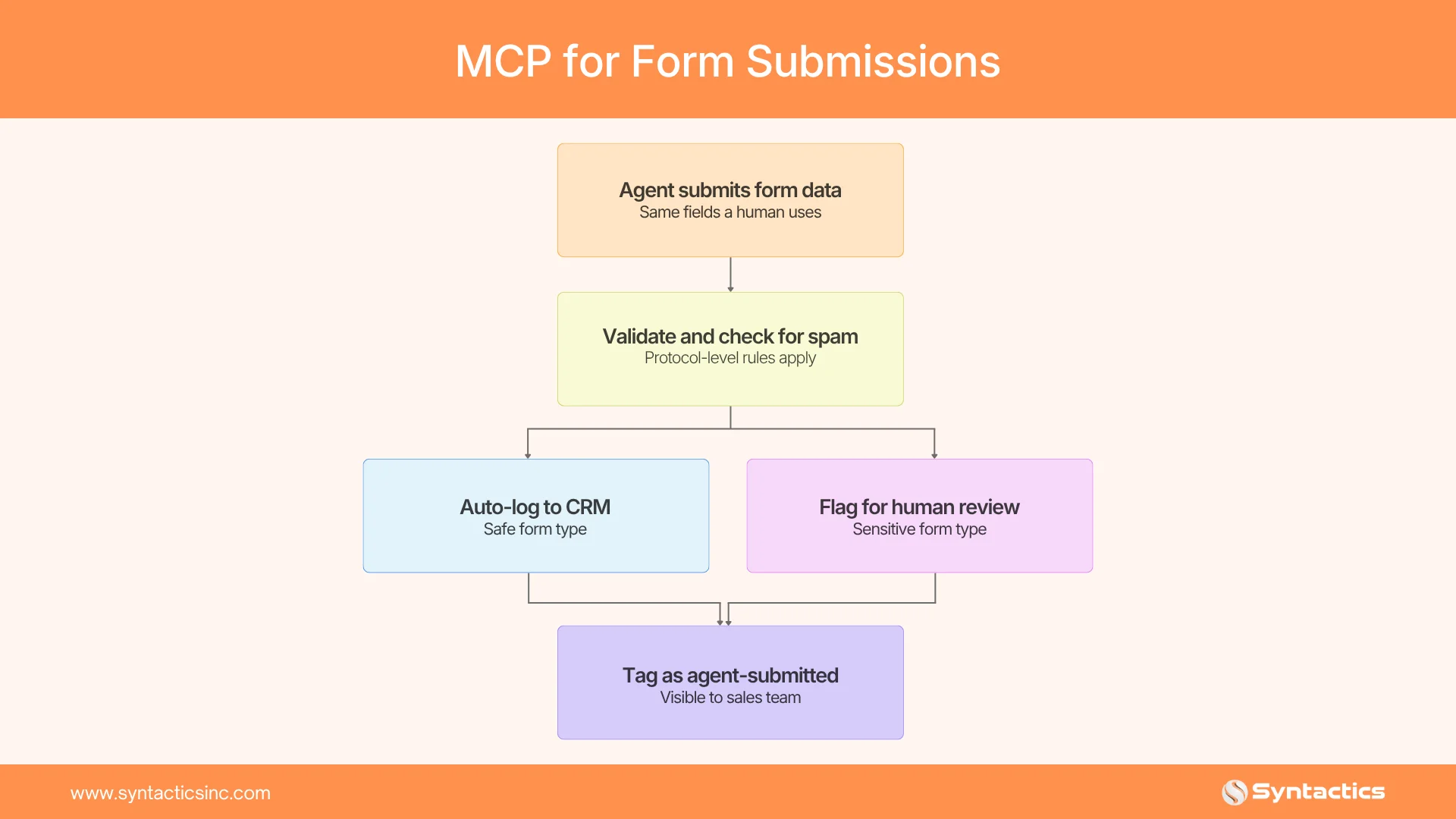
- Audit every form on your site and sort it into one of three buckets. Safe to expose: contact forms, newsletter signups. Expose with review: quote requests, lead forms. Keep human-only: legal, account, and payment detail changes.
- Build required-field validation into the MCP tool definition itself, not just the front-end form. This prevents an agent from submitting an incomplete or malformed entry, as a broken script might.
- Add spam and abuse protections you’d want for any high-volume automated traffic, following OWASP’s automated threat guidance on rate limits and pattern checks. A form open to agents is easier to flood.
- Route agent-submitted leads into your CRM with a visible tag or source field. That way, your sales team knows a submission came from an AI agent and can weigh it accordingly.
Validation still needs to happen at the protocol level, just as it would for a human filling out the form. These extra safeguards against automated spam were never a concern when only humans could type into a text field.
Security Considerations Before You Turn This On
MCP is still a young standard, and security gaps have already surfaced. In April 2026, security researchers disclosed a critical MCP vulnerability affecting hundreds of thousands of server instances. It was tied to how some servers handled local process execution.
The takeaway for business owners isn’t to avoid MCP. Instead, use the same care you would for any system that can act on your customers’ behalf:
- Give agents scoped permissions, not full account access.
- Rate-limit and monitor for unusual agent activity, the same way you’d watch for bot abuse today.
- Log every agent-initiated action, so you have a clear audit trail if something goes wrong.
For a deeper technical reference, see OWASP’s agentic AI mitigations guide.
Is Your Website Ready for MCP Integration?
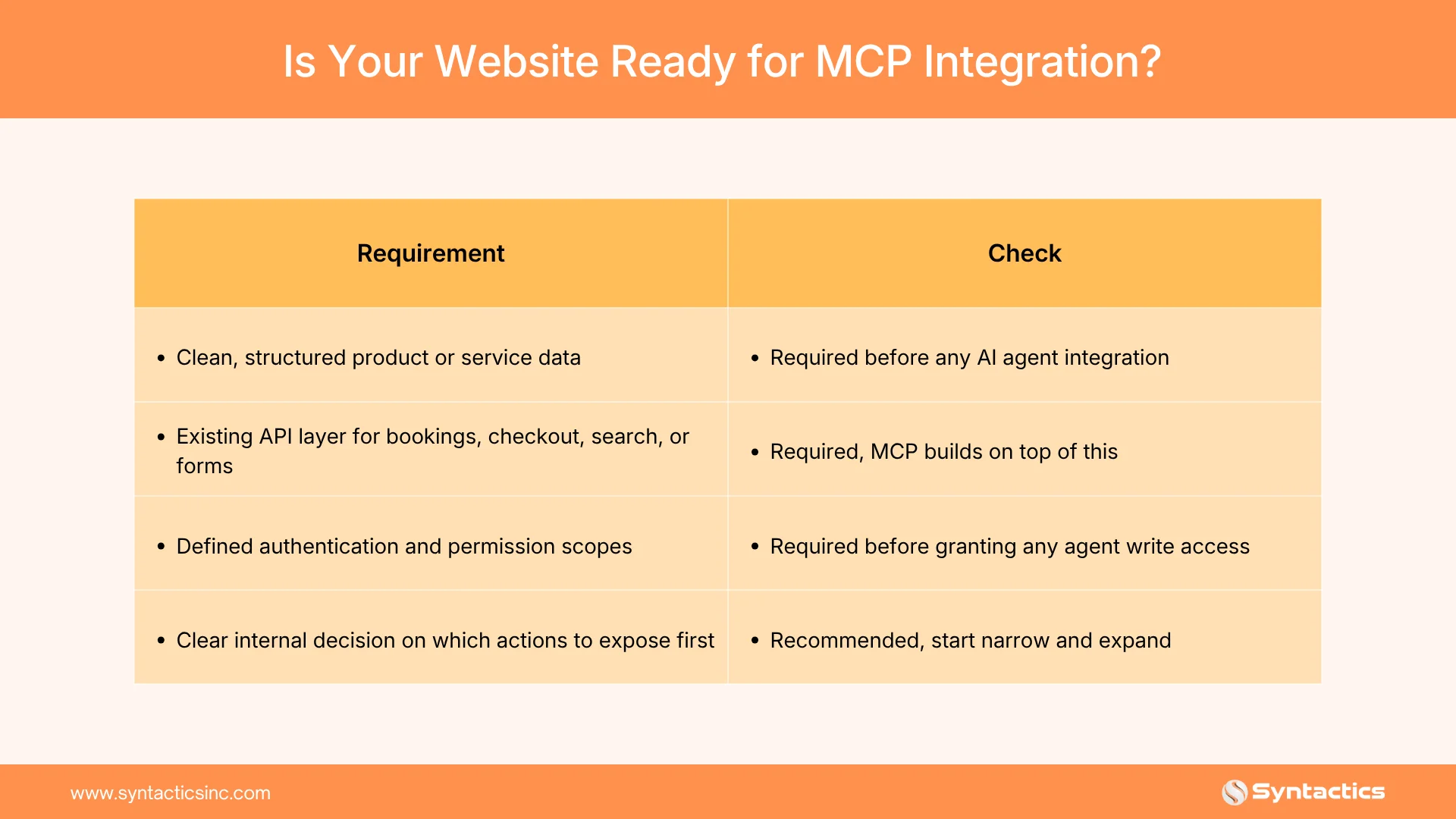
If you’re missing the first two, MCP implementation isn’t the next step. A clean data and API foundation is.
Final Thoughts
MCP is still new, but it’s clear where things are headed. AI agents are already booking, buying, searching, and filling out forms for people. If your website can’t work with agents, you won’t lose customers in an obvious way; they’ll just move on to a site that can.
You don’t have to open up every action right away. Start with the use case that fits your customers’ current behavior, like search, booking, checkout, or lead forms. Set up the right protections, then expand once you see how agents use your site.
If your current site wasn’t designed for this kind of extension, that’s usually the main obstacle, not MCP itself.
Syntactics, Inc. is a web design and development company in the Philippines. We build custom business websites, covering information architecture, full-stack development, and e-commerce or booking systems. That foundation is already in place when you’re ready to add AI agent integration.
Get Design and Functionality
Specific to your Brand!
- Build a website that's mobile-friendly and responsive.
- Custom designs aligned with your brand.
- Optimized for SEO and user experience.
- Scalable and feature-rich solutions.

Frequently Asked Questions
Does MCP replace my existing API?
No. MCP sits on top of your API, providing AI agents with a standard way to discover and call it.
Can a small or mid-sized business use MCP, or is it only for enterprise sites?
Small and mid-sized businesses can use it too. The main requirement is clean, structured data and a working API layer, not a large engineering team.
What breaks if I don’t implement MCP?
Nothing breaks immediately. But an AI agent may simply skip your site for a competitor’s if it can’t complete the action there.
How long does MCP implementation typically take?
It depends on how many actions you expose and how clean your existing systems are. A single well-defined use case, such as exposing search, can move much faster than a full transaction-and-booking rollout.

About Ladymieh Naallatan
Related News:

Signs that Your Business is Ready for Automation










Comment 0