

Inside Laravel MCP 1.0: A New Approach to AI Application Development
Laravel MCP 1.0 is the first stable release of Laravel’s package for building Model Context Protocol servers. Released on September 15, 2026, it supports a new protocol update from July 2026, dropping old session rules for a simpler, stateless design. Laravel MCP 1.0 also adds searchable tool lists, caching hints, and stricter login security.
For your organization, this means a more stable way to connect approved AI agents to your systems.
Key Takeaways
- Laravel MCP 1.0 supports MCP protocol revision 2026-07-28, which drops the old session-based handshake.
- Stateless requests make it easier to scale MCP servers across many instances and load balancers.
- Searchable tool catalogs keep large tool libraries out of the AI model’s short-term memory until needed.
- OAuth login rules now require PKCE, plus a new Client ID Metadata Document option for registering apps.
- MCP Apps support lets tools show interactive screens, not just plain text.
- Teams upgrading from version 0.9 should review new header rules and session changes before deploying.
What Laravel MCP Does
The Model Context Protocol gives AI apps a standard way to find and use tools from other systems. A Laravel MCP server can offer tools, files, and prompts that an AI assistant uses during a task.
Laravel MCP gives your development team a Laravel-friendly way to build these servers. Developers install the package with Composer, publish routes, and generate servers with a few commands. Then they connect the servers over the web or run them locally.
Your AI assistant doesn’t get open access to your app by default. Developers still decide which tools exist, choose what data each tool accepts, and which users can reach it.
The Biggest Change: No More Session Handshake
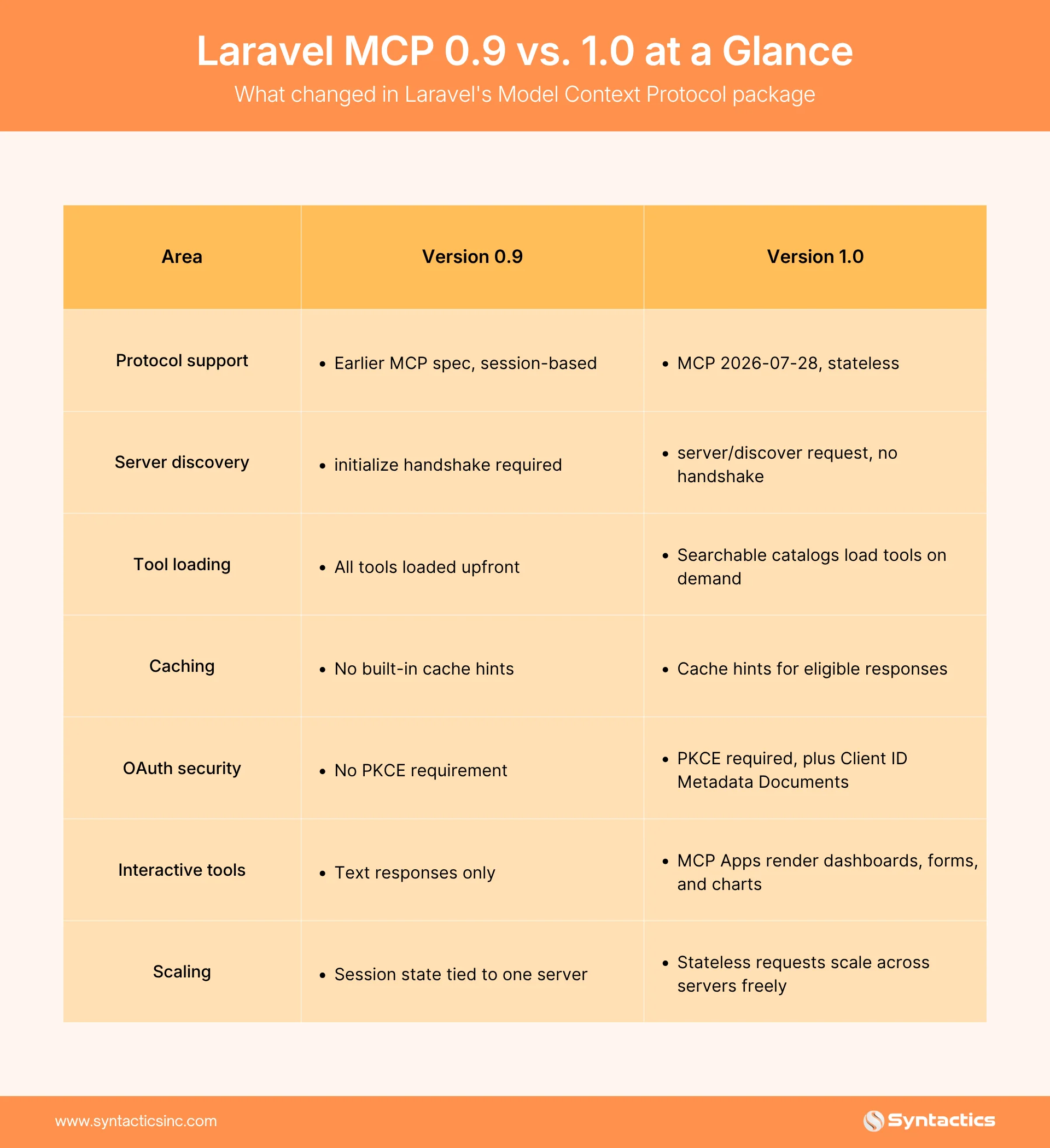
Laravel MCP 1.0 supports MCP’s 2026-07-28 update, which removes the old sign-in process and session tracking. Clients now use a method called server/discover, which checks what a server supports before sending any other request.
MCP’s maintainers explain the reasoning behind this shift: dropping session tracking lets a server scale across many machines without holding onto memory of past requests. A closer look from the Agentic AI Foundation adds that this design makes load balancing and server swaps easier. No server needs to remember which client it spoke with before.
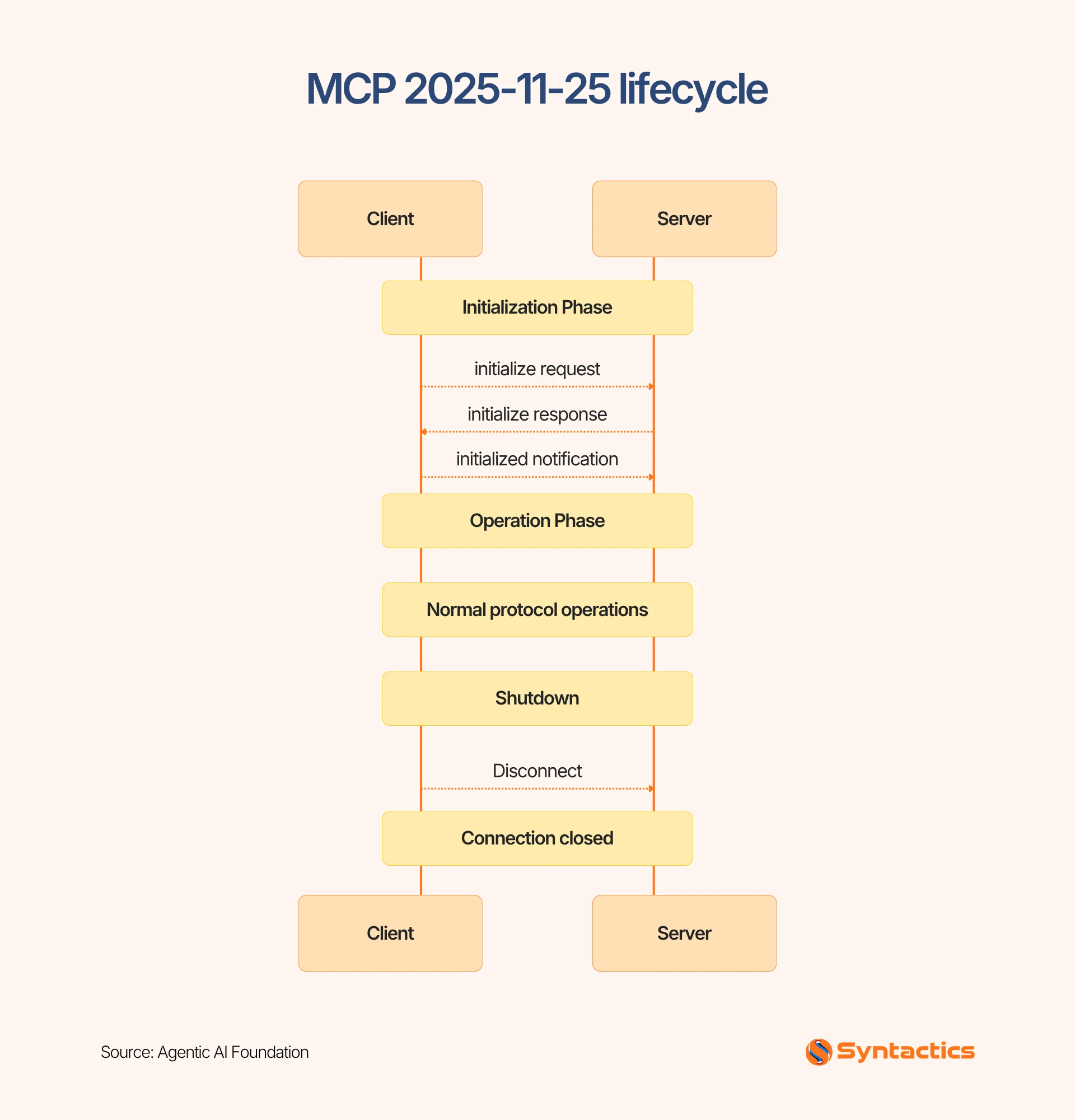
Source: Agentic AI Foundation
For engineering teams, this benefit shows up during deployment. A load balancer can send a request to any available server. No shared memory needs to stay in sync across servers. But your team requires a place to store data for longer tasks, like approvals or multi-step processes. The protocol itself no longer handles that job.
Searchable Tools Keep AI Costs Down
Every tool definition sent to an AI model uses up space in its short-term memory, often called a context window. This space limits how much information the model can process at once. Laravel MCP 1.0 solves this with searchable tool catalogs.
Developers keep common tools in the main list and place rarer tools behind a search function instead. Laravel’s documentation describes two tools that make this work: search_tools finds matching tools by name or purpose, and execute_tools runs the ones a search returns.
This setup helps teams manage large tool libraries. The AI model does not need to load every tool up front. A tool hidden behind search still needs strong access controls, since an AI agent can still find and use it that way.
Security Gets a Harder Edge
Laravel MCP 1.0 requires OAuth login servers to support PKCE, a security step that protects the login process from interception. The framework also supports Client ID Metadata Documents. With this option, an app’s identity lives at a web address instead of a manually registered ID, according to Laravel’s documentation.
This matters because MCP tools can reach highly confidential systems. An assistant that reads a customer record carries one level of risk. One that changes a subscription or issues a refund carries a higher risk. But Client ID Metadata Documents replace an older registration method that the new MCP spec is phasing out.
Before rolling out MCP servers, review who can access each one. Check which tools change data and which only read it. Decide whether risky actions need a person to approve them first. Laravel also lets developers label tools as read-only, risky, or repeatable, which helps AI clients understand what each tool does. Treat these labels as a helpful hint, not a replacement for real access controls.

A Smaller, More Flexible Protocol Core
A new extensions system ranks among the three biggest changes in the 2026-07-28 update. Features like Tasks and MCP Apps now live outside the protocol’s core. They exist as optional add-ons instead of required parts every server must support.
This design keeps simple, tools-only servers light and fast. More advanced setups can add features only when they need them. Laravel MCP 1.0 supports MCP Apps through this system, letting a tool show an interactive dashboard, form, or chart instead of plain text.
The protocol maintainers call this a deliberate trade-off. A small core means fewer features every server must support. Optional extensions let advanced use cases grow without weighing down the basic protocol.
What This Means for Your Organization
Laravel MCP 1.0 gives your team a connection layer. This update doesn’t build an AI strategy for you, but it starts with picking the right workflows to automate.
Focus on tasks where employees waste time switching between systems or repeating the same data entry. Common candidates include:
- Customer service: pull an account record, review recent activity, draft a response.
- Sales: retrieve account details, summarize recent interactions, prepare a follow-up.
- Operations: check inventory levels, flag exceptions, draft a replenishment request.
- Finance: gather invoice details and route items for review.
- IT support: search internal documentation and open an approved service ticket.
Start with read-only tools first. Measure accuracy, time saved, and permission failures before adding tools that write data. A three-month pilot with one workflow teaches you more than a rollout across five departments at once. A small pilot also gives your security team a smaller area to review.
Where to Start
Laravel MCP 1.0 gives your team a stable, production-ready foundation if you run Laravel apps and want to connect approved AI clients to your data. Start with one narrow, read-only use case. Confirm your login setup supports PKCE. Review the upgrade guide if you are moving from version 0.9, since session rules and request headers both changed.
The technology handles the connection between your AI client and your Laravel app. Your team still owns the harder questions, such as:
- Which workflows deserve automation?
- Who approves the riskier ones?
- How will you measure whether the investment paid off?
Getting the Foundation Right
Laravel MCP 1.0 gives your team a stable way to connect AI clients to Laravel systems. The protocol handles the connection itself. Your team still owns the workflow choices, the access controls, and the security review that make a rollout safe.
Syntactics, Inc. works on projects like this as one of our areas of expertise in web design and development in the Philippines. Our team builds and maintains Laravel applications and helps clients think through the access controls and rollout plans a project like this needs. You get a Laravel application safely connected to approved AI assistants, with access controls your team can trust.
Get Design and Functionality
Specific to your Brand!
Frequently Asked Questions
What is Laravel MCP 1.0?
Laravel MCP 1.0 is the first stable version of Laravel’s package for building Model Context Protocol servers. The release lets AI clients call tools, read files, and use prompts from a Laravel app.
What changed between version 0.9 and 1.0?
Version 1.0 adds support for the MCP 2026-07-28 update. Key changes include a stateless design, searchable tool catalogs, cache hints, and a stricter login rule called PKCE.
Does upgrading to Laravel MCP 1.0 require code changes?
Teams moving from 0.9 should check new header rules on requests, since old session-tracking tools no longer exist. Older clients using the previous sign-in method still work without changes.
Is Laravel MCP secure enough for production use?
The framework supports modern OAuth login rules, Client ID Metadata Documents, and labels that flag risky tools. Real security still depends on how your team limits access inside the app itself.
What is a searchable tool catalog?
A searchable tool catalog keeps rarely used tools out of an AI model’s short-term memory. The AI client searches for the right tool by name, then calls it when needed.
Should our business start with read-only or read-write tools?
Start with read-only tools first. Measure accuracy and permission failures on a small pilot before connecting tools that write data.

About Ladymieh Naallatan
Related News:

Psychological Design Principles for Landing Pages










Comment 0