WordPress 7.1.4, published on October 28, 2026, fixes 12 security issues and refreshes the bundled root certificates. The announcement recommends that website owners install the update immediately. This guide explains each fix in plain language, walks you through a safe update, and shows why an unpatched site hurts your search traffic.
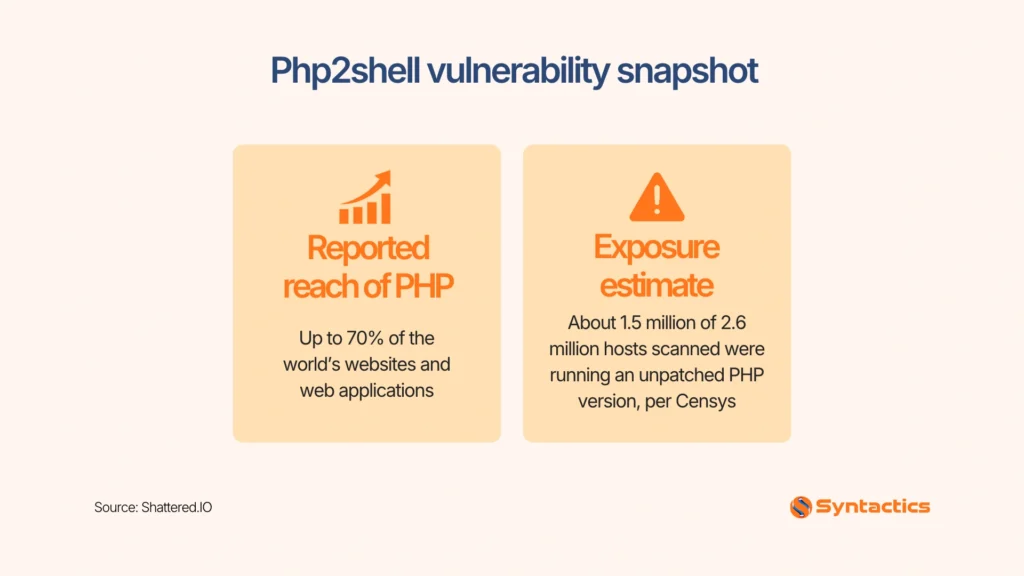
Source: Shattered.IO.
Key Takeaways
- WordPress 7.1.4 is a short-cycle security release. WordPress recommends updating immediately.
- The post lists 12 security entries and one certificate update. The post names no new features.
- Eight entries involve stored XSS, where harmful code hides inside site content.
- The upgrade process had a weakness allowing remote code execution on your server.
- Back up first, update second, then test your key pages.
- Only the newest WordPress version gets active support, so old sites need an upgrade plan.
What WordPress 7.1.4 Fixes
The WordPress 7.1.4 announcement credits security researchers and members of the WordPress Security Team for the reports. Each fix falls into one of five groups.
Remote Code Execution During Upgrades
A weakness in the upgrade process lets an attacker run code on your server during the update window. Security teams treat remote code execution as the most serious class of flaw. OWASP describes code injection attacks as flaws that let an attacker run their own commands. Those commands can reach your files, database, and visitors.
Server software carries similar risks, so read about the PHP 8.5.12 security release.
Stored XSS Across Blocks, Logins, and Privacy Tools
Stored cross-site scripting, or XSS, makes up most of this release. Cross-site scripting attacks inject harmful scripts into trusted pages. In the stored version, the script waits inside your site until someone opens the affected page.
The announcement names these entry points:
- Specially crafted block markup
- The Categories block
- Playlist and image blocks
- Next and previous comment pagination blocks
- Customizer selective refresh
- Several spots in the Interactivity API
- Privacy data removal requests
- User logins built to carry code
Attackers use stored XSS to steal login sessions, redirect visitors to scam pages, or alter what a page shows. Admins face the highest risk because their sessions carry the most access.
Denial of Service in the Interactivity API
A stored flaw in the Interactivity API lets an attacker make a site unavailable. Denial-of-service attacks crash a service or drain its resources until real visitors lose access. Downtime costs you leads. Search crawlers also hit error pages during an outage.
Data Exposure Fixes
Two fixes protect private information. Unauthenticated visitors found unpublished Customizer changes, exposing draft design work before launch. Separately, users with limited permissions could read notes attached to posts they weren’t allowed to edit. Notes between teammates deserve the same privacy as the post.
Root Certificate Update
WordPress bundles a list of trusted root certificates. Certificates prove a secure connection is genuine. Release 7.1.4 updates the bundle after the eMudhra revocation. You take no extra action. The update installs the new list.
Who Should Update First
Every site needs the update. Some sites carry more exposure. Sites with several editors or open user registration deserve priority, because stored XSS needs a way to place content on your pages. Sites on shared hosting with other WordPress installs also rank high. One weak neighbor puts every account on that server under pressure.
How to Update Your WordPress Site
Follow these steps in order.
- Back up your files and database. Use your host’s backup tool or a backup plugin.
- Log in to your WordPress Dashboard.
- Open Dashboard, then Updates.
- Click Update Now beside version 7.1.4. You can also get the files from the WordPress.org download page.
- Load your homepage, one blog post, and your contact form. Confirm each works.
- Check your plugins and theme for update notices. Install those too.
Sites with automatic background updates start the process automatically. Still open the Updates page to confirm the version number. Developers can find technical notes on the WordPress 7.1.4 HelpHub page.
If you manage sites for clients, send each client a short notice. Include the version number, the update date, and the result of your page checks. A dated record helps when B2B buyers send security questionnaires.
Why Outdated WordPress Sites Hurt Your SEO
A hacked site loses visitors and rankings. Google labels affected pages in search results or shows a warning page before visitors enter, according to its Security Issues report documentation. Visitors who see a warning leave, then the traffic drops, and leads follow.
Google’s website security data shows the pattern. Search Engine Land reported a 32% rise in hacked sites between 2015 and 2016. Google tied the rise to aggressive hackers and sites running outdated content management systems.
The same report found 61% of hacked webmasters never received a notice from Google. Their sites were not verified in Search Console. The data dates to 2016, but the fix still works. Verify your domain in Google Search Console so Google warns you early.
What Happens to Older WordPress Versions
WordPress backports security fixes to every branch still eligible, currently through version 4.7. Those patches ship as they become ready. Only the most recent version gets active support. Sites on older branches need an upgrade plan, not a permanent wait for patches.
The next major release, WordPress 7.2, is planned for December 8. Beta 3 already contains the applicable fixes. Test your plugins and theme on a staging copy before launch day.
How to Make Future Updates Easier
- Keep a staging copy of your site. Test major releases there first. Follow a WordPress maintenance plan checklist to schedule backups and updates.
- Turn on automatic background updates for minor releases when your host supports them.
- Delete plugins and themes you no longer use. Fewer components mean fewer places for bugs.
- Verify your domain in Search Console and watch the Security issues report each week.
- Subscribe to WordPress News so release posts reach your inbox.
Conclusion
Don’t wait for a security warning to update your WordPress site. Check your Updates page, back up your website, and install available security patches. After updating, test your homepage, a blog post, and your contact form to confirm everything works. Make these checks part of your weekly maintenance routine to keep your site secure and running smoothly.
Keep your WordPress site protected by checking for updates weekly, maintaining recent backups, and installing available security patches. After each update, test your homepage, a blog post, and your contact form to catch potential issues early.
For professional support, explore our WordPress design and development in the Philippines to keep your website secure, updated, and running smoothly.

Frequently Asked Questions
Is WordPress 7.1.4 a security release?
Yes. WordPress published the release on October 28, 2026, to fix 12 listed security problems and update bundled certificates. WordPress recommends updating immediately.
How do I update to WordPress 7.1.4?
Back up your site, open your Dashboard, go to Updates, and click Update Now. Sites with automatic background updates start the process on their own.
What is stored XSS?
Stored cross-site scripting hides harmful code inside site content. The code runs in a visitor’s browser when they open the affected page. Eight entries in this release involve it.
Is my site at risk if I skip the update?
Yes. The fixes close weaknesses attackers use to run code, alter pages, or take sites offline. An unpatched site stays exposed to every listed flaw.
Will a hacked site hurt my search traffic?
Google labels affected pages in search results or shows a warning page before visitors enter. Visitors who see a warning leave, which cuts traffic and leads.