

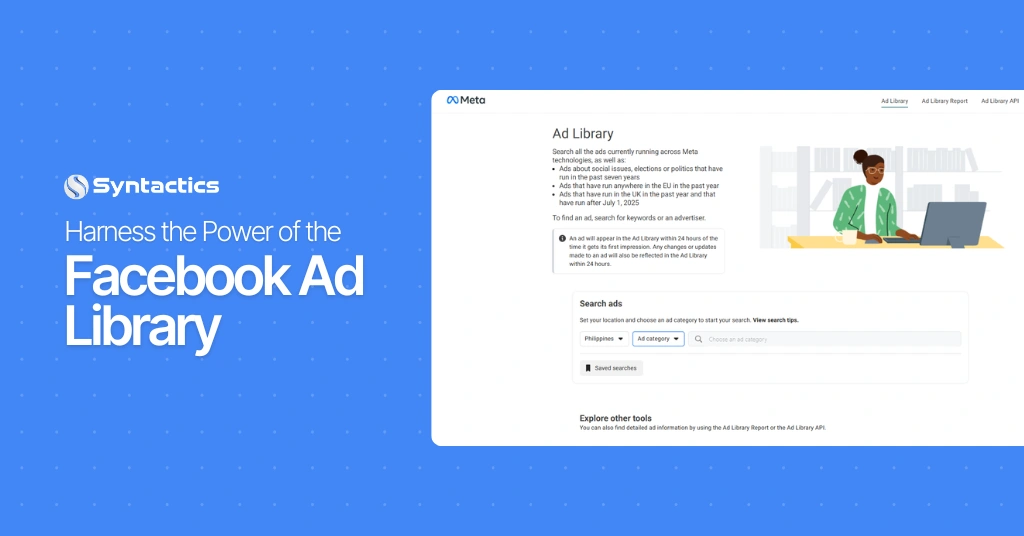
Harness the Power of the Facebook Ad Library
Facebook Ad Library is a free, publicly searchable database of active and past Meta ads. Marketers use it to study competitor strategy, find creative inspiration, and benchmark ad performance without needing their own ad account. As a result, this tool has become instrumental in Facebook marketers’ advertising campaigns.
According to a recent Statista survey, 86% of marketing specialists utilize Facebook to promote their businesses and grow their communities.
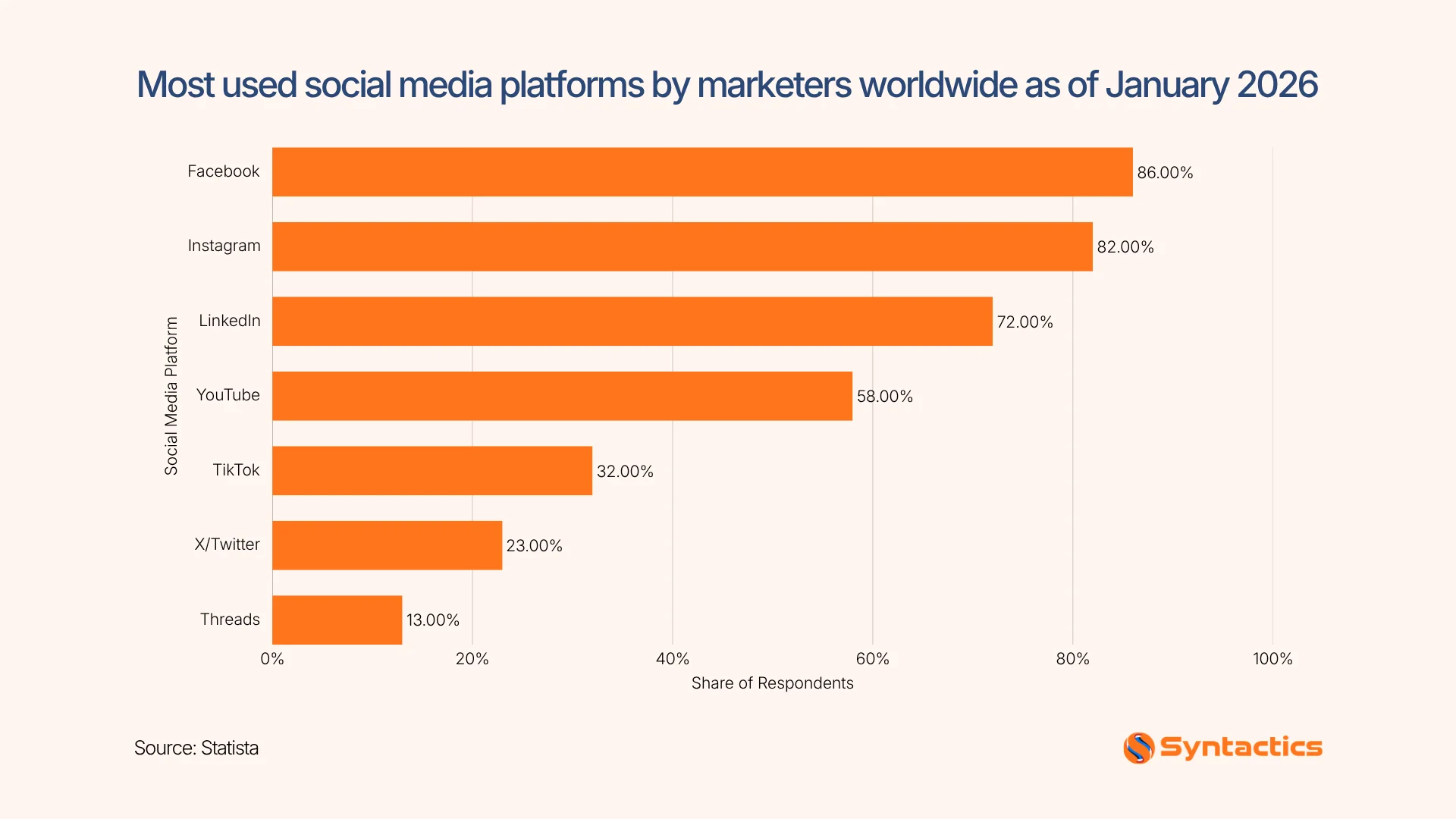
Source: Statista.
What is the Facebook Ad Library?
Meta provides additional information about ads related to politics and social issues, including Their spend, Reach, and Funding entities as far as seven years.
Meta even added a layer of transparency for all advertisements displayed in the European Union due to legal and regulatory requirements. This action gives users more control over their data and how it’s used for advertising.
Benefits of Using the Ad Library
It provides insights into what competitors are doing and why it might be working.
Here are the benefits of using the Ad Library:
Competitive Analysis
As mentioned, the Ad Library allows you to view the following:
- The advertisements your competitors are running;
- The messaging they’re using, and
- What visuals they’ve chosen.
This gives you valuable insights into your competitors’ marketing strategies. By using the Ad Library, you can shape a Unique Selling Proposition (USP) or target a specific market or audience segment you might be neglecting.
Inspiration and Creativity
You can discover innovative approaches or creative ideas for your Facebook ad campaign. You can learn from success stories from other businesses and apply those insights to your Facebook paid marketing strategy.
Transparency and Trust
Having your advertisements stored in the Library also signals to other businesses and marketing professionals that you’re also practicing ethical advertising. If you’d rather limit your audience or keep an ad from being shown in the Library, you can use the Special Ad Category option.
How to Navigate Meta’s Facebook Ad Library
Access the Library
You can access the tool using two methods. First, you can visit the Ad Library home page. (It’s important to note that you can do so via a web or mobile browser, but you can get a better view of it on larger screen sizes.)
Second, to check your competitors’ ads, you can use the following steps:
Step #1:
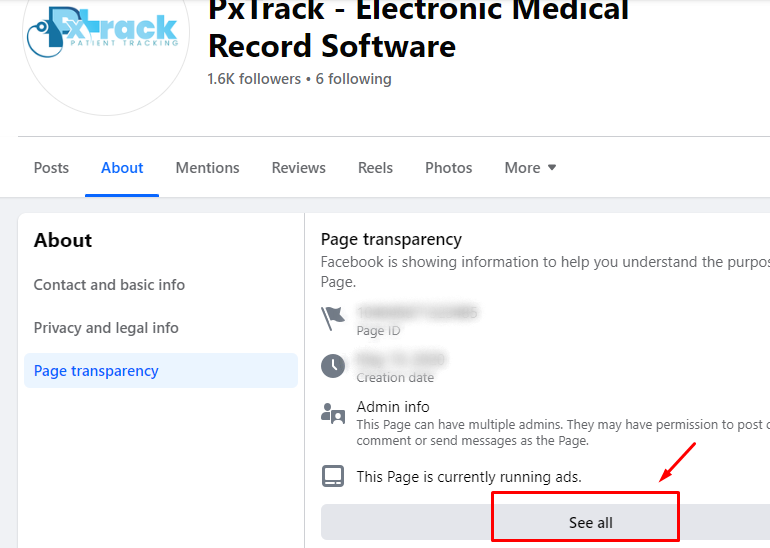
Go to your competitor’s Facebook page, then click the ‘About’ tab. From the menu, click ‘Page transparency.’
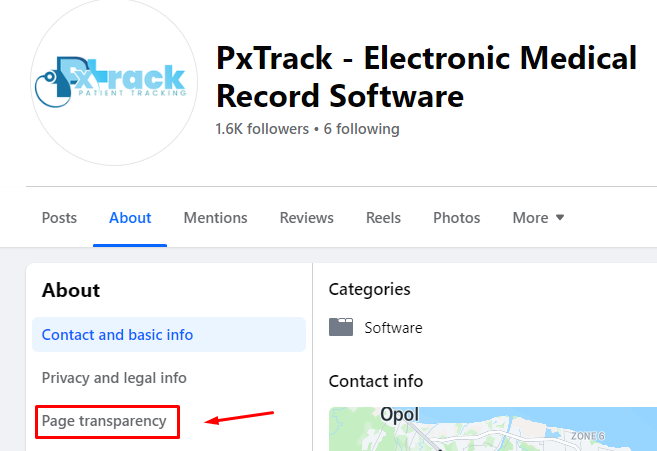
Step #2:
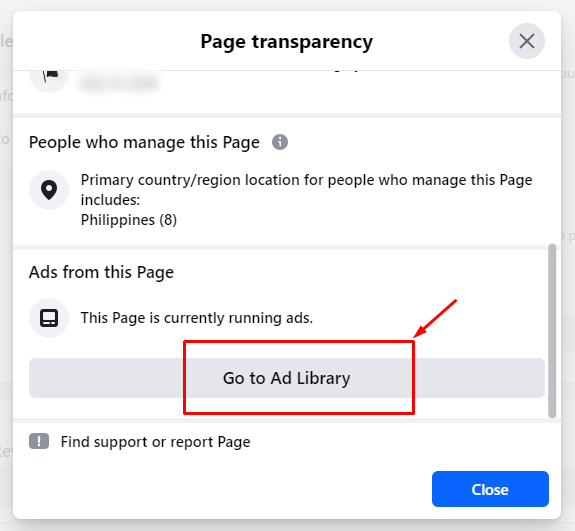
After you click the ‘Page transparency’ option, you’ll see a section that indicates whether or not your competitor is running an ad. Next, click the ‘See all’ button to see a popup containing helpful page information on the competitor.
Step #3:
You can check the details of your competitor’s advertisement by clicking the ‘Go to Ad Library’ button at the bottom of the Page transparency popup.
Refine Your Research
Immediately after clicking ‘Go to Ad Library,’ you’ll be redirected to the tool’s interface. Upon entering the Library, you can narrow down your results by filling in the search bar.
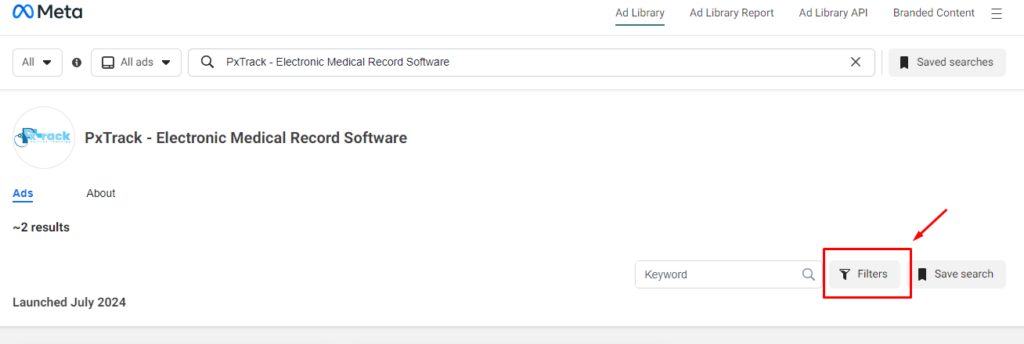
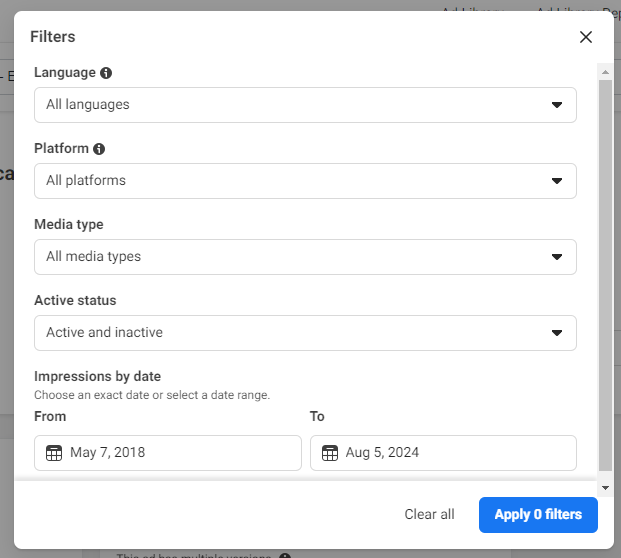
From there, you can narrow down your results using the search bar and filter by:
- Location (name of country);
- Ad Category (housing, employment, politics, etc.);
- Keywords (brand or industry);
- Advertiser (name of advertisers);
- Platform (Facebook, Instagram, etc.);
- Media Type (images, videos, etc.);
- Ad Status (active or inactive) and,
- Impressions by Date (before, during, or after).
Analyze and Apply Insights
After using your preferred filters, you can get a more refined list of advertisements to analyze. Consider focusing on active advertisements published within the past year and evaluate the ad copy.
Then, you can identify whether they’re relevant to today’s market trends and get inspiration for your campaigns.
Best Practices for Using the Meta Ad Library
Facebook paid marketing specialists can leverage the Ad Library tool to sharpen their advertising approach.
Here are three essential best practices for using the Ad Library:
Regular Monitoring and Analysis
The digital marketing landscape is dynamic; you can harness the power of the Ad Library to always stay ahead of the curve. For example, you can check it regularly to see what marketing strategies and content types your competitors are using.
Ethical Considerations
The tool shows ads to all Facebook users, so marketers can use this data to target users while respecting users’ privacy. Other key ethical considerations include:
- Transparency;
- Data privacy;
- User consent, and
- Fairness and inclusivity.
Insights gained from the tool should inform the brand voice that resonates with the audience.

Combining Data Sources
Compile what you’ve gathered from the Library alongside your own ad performance insights to set realistic benchmarks and goals for your campaigns.
This creates a more comprehensive understanding of what social media advertising strategies work best for your business. When you supplement your insights with market research, you can get a complete picture of:
- Your ideal target audience;
- Their preferences, and
- The competitive landscape.
Elevate Your Campaigns for Better Results
Business owners can transform the Meta Ad Library into a strategic asset to fuel the following:
- Continuous learning;
- Ethical marketing strategies, and
- Data-driven decision-making.
With the help of the Ad Library tool, you can refine your advertising campaigns for the best results. Boost your success by partnering with a Facebook paid marketing expert who has in-depth knowledge and expertise in using the Ad Library.

This article was updated on August 26, 2026.
Frequently Asked Questions About Facebook Paid Marketing
How much do Facebook ads pay per 1,000 views?
Facebook ads typically don’t pay for every 1,000 views. Rather, they often operate on a Cost-Per-Click (CPC) or Cost-Per-Conversion (CPA) model.
Does the Meta ad library show all ads?
The Meta Ad Library doesn’t show all ads. Instead, it shows ads that require additional transparency due to their nature, such as political ads.
Are Meta ads the same as Facebook ads?
Meta Ads and Facebook Ads are related but not exactly the same. Meta Ads refers to advertising across Meta’s platforms, including Facebook, Instagram, etc. Meanwhile, Facebook Ads specifically refers to advertising activities on the Facebook platform.
Is there a Google Ads library like Facebook?
Google doesn’t have a public ad library similar to Facebook’s Meta Ad Library. However, the Google Ads Transparency Center can offer some insights into ads displayed on Google services.
Is the Facebook ads library free?
Yes, the Meta Ad Library is free and publicly accessible, so any user can view ads running on Facebook and Instagram without needing an account or paying a fee.

About Jalou Batilong
Related News:

9 Key Next.js Developer Skills You Need in Your Team











Comment 0