

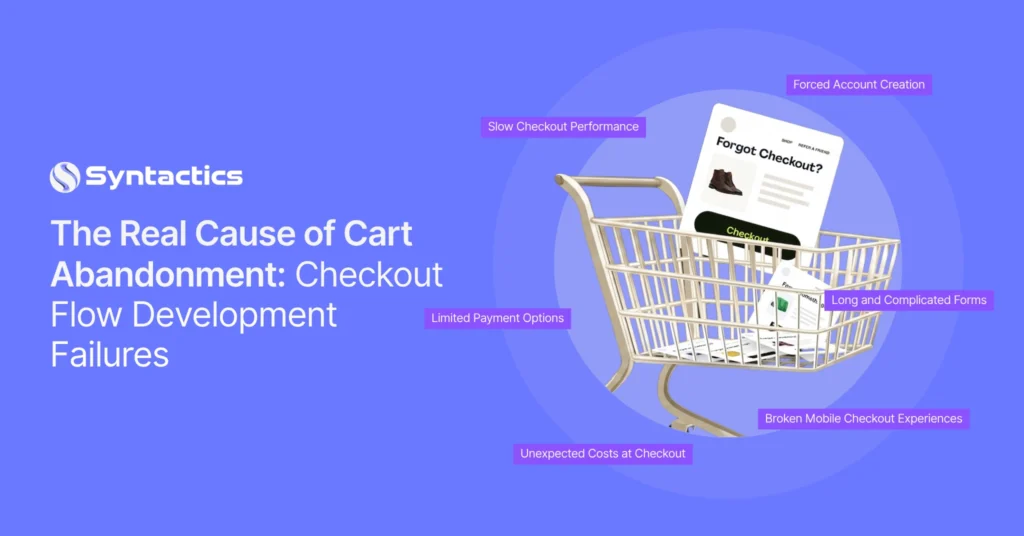
The Real Cause of Cart Abandonment: Checkout Flow Development Failures
Driving visitors to your online store and converting them into customers are two different challenges. While many businesses blame poor targeting or weak promotions for lost sales, the real problem often lies in the checkout experience itself. Shopping cart abandonment is frequently caused by technical issues and user experience failures that discourage buyers just before they complete their purchase.
According to the Baymard Institute, the average online cart abandonment rate across industries is 70.22%, highlighting how common this problem remains for ecommerce businesses.
If your checkout process creates unnecessary friction, even highly qualified visitors may leave without buying. The good news is that most checkout barriers can be identified and fixed through better development practices. By improving your checkout architecture, you can create a smoother buying journey that drives more completed purchases.
Key Takeaways
- 39% of users abandoned their carts because extra costs were too high (Baymard Institute).
- Technical checkout issues often contribute more to lost sales than poor marketing.
- Fast-loading pages, mobile optimization, and simplified forms improve checkout completion.
- Payment flexibility and transparent pricing help build customer confidence.
- Platform-specific development strategies improve long-term ecommerce performance.
7 Technical Issues Quietly Killing Checkout Completion
Before investing more in advertising, examine how your checkout performs. Even small technical problems can cause shopping cart abandonment.
Slow Checkout Performance
Customers expect checkout pages to load almost instantly. Heavy scripts, large images, and inefficient code create delays that increase frustration.
Google’s Core Web Vitals continue to show that page speed directly affects user engagement and conversion rates. As such, faster websites consistently deliver stronger business results.
To implement this, optimize images, minimize unnecessary JavaScript, enable caching, and improve server response times to keep checkout pages responsive.
Forced Account Creation
Many shoppers simply want to complete a purchase without creating an account, and requiring registration introduces unnecessary friction.
To prevent this, offer guest checkout and provide an optional account creation after payment. This approach improves convenience without sacrificing future customer engagement.
Limited Payment Options
Customers have different payment preferences. Restricting available methods increases the likelihood that buyers will abandon their purchase.
Support major credit cards, digital wallets, Buy Now Pay Later solutions, and trusted payment gateways whenever possible.
Unexpected Costs at Checkout
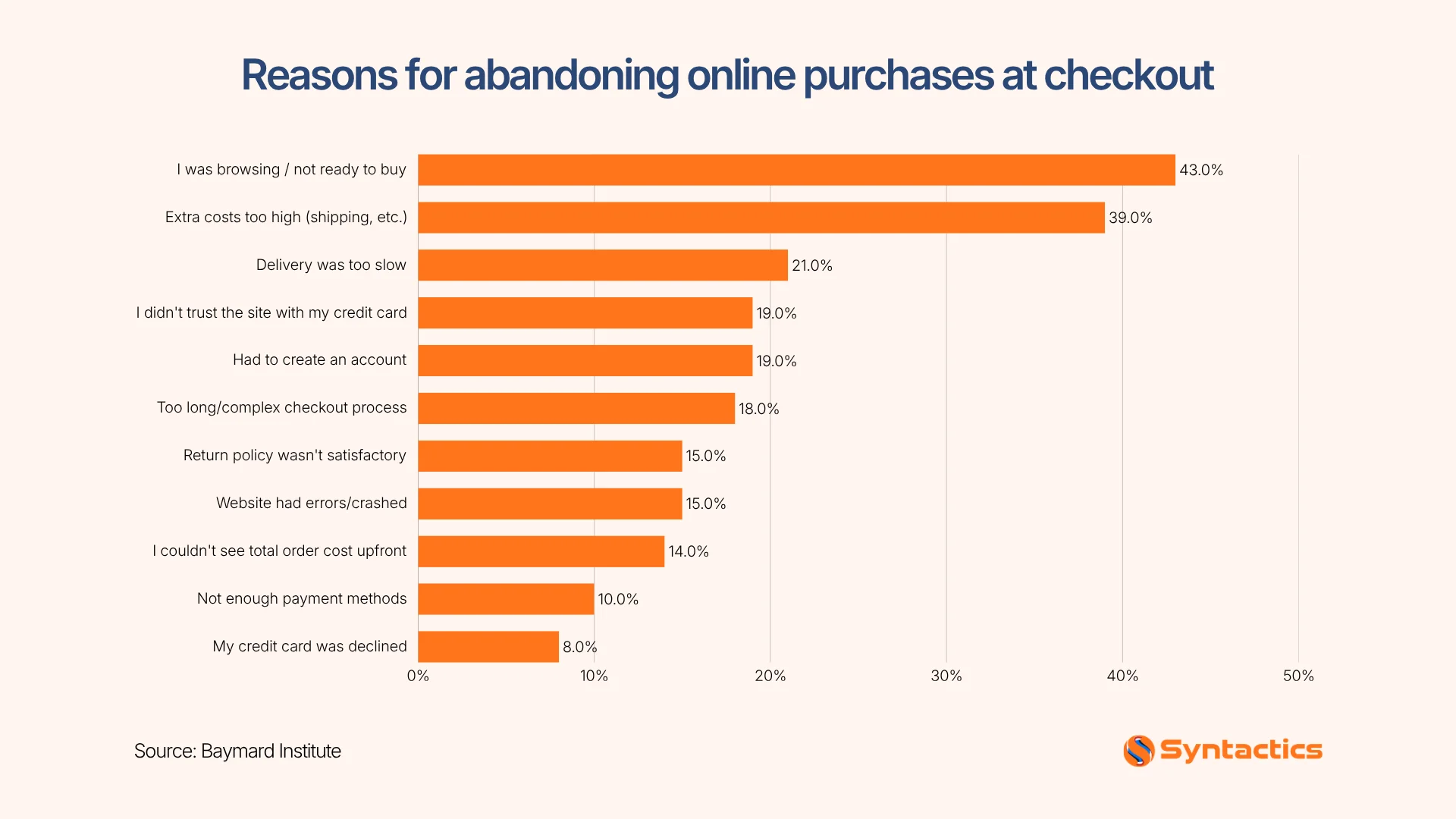
Hidden shipping charges or taxes revealed during the final step quickly erode customer trust. According to a survey by Baymard Institute, 39% of users abandoned their carts because extra costs were too high. Meanwhile, 14% of users left because they didn’t see the total cost of their purchase early on.
So, display estimated shipping costs early in the shopping journey so customers know exactly what to expect.
Source: The Web Almanac
Long and Complicated Forms
Every additional field gives customers another reason to leave. That said, keep forms concise by requesting only essential information. Also, enable autofill features and clear validation messages to reduce friction.
Broken Mobile Checkout Experiences
More customers now shop using their smartphones. According to Market Data Forecast, mobile commerce continues to account for over 40% of total US ecommerce sales, making mobile optimization an important conversion factor.
With this in mind, test every checkout step across multiple devices to ensure buttons, forms, and payment fields remain easy to use.
How to Audit Your Checkout Flow Like a Developer, Not a Marketer
Once you understand the common problems, evaluate your checkout process with a technical mindset instead of relying on assumptions. Use this checklist to identify technical issues before they affect conversions.
1. Measure checkout page speed
Test your checkout using Google PageSpeed Insights or Lighthouse to identify slow-loading scripts, render-blocking resources, and other performance issues. Even a small delay can interrupt the buying journey.
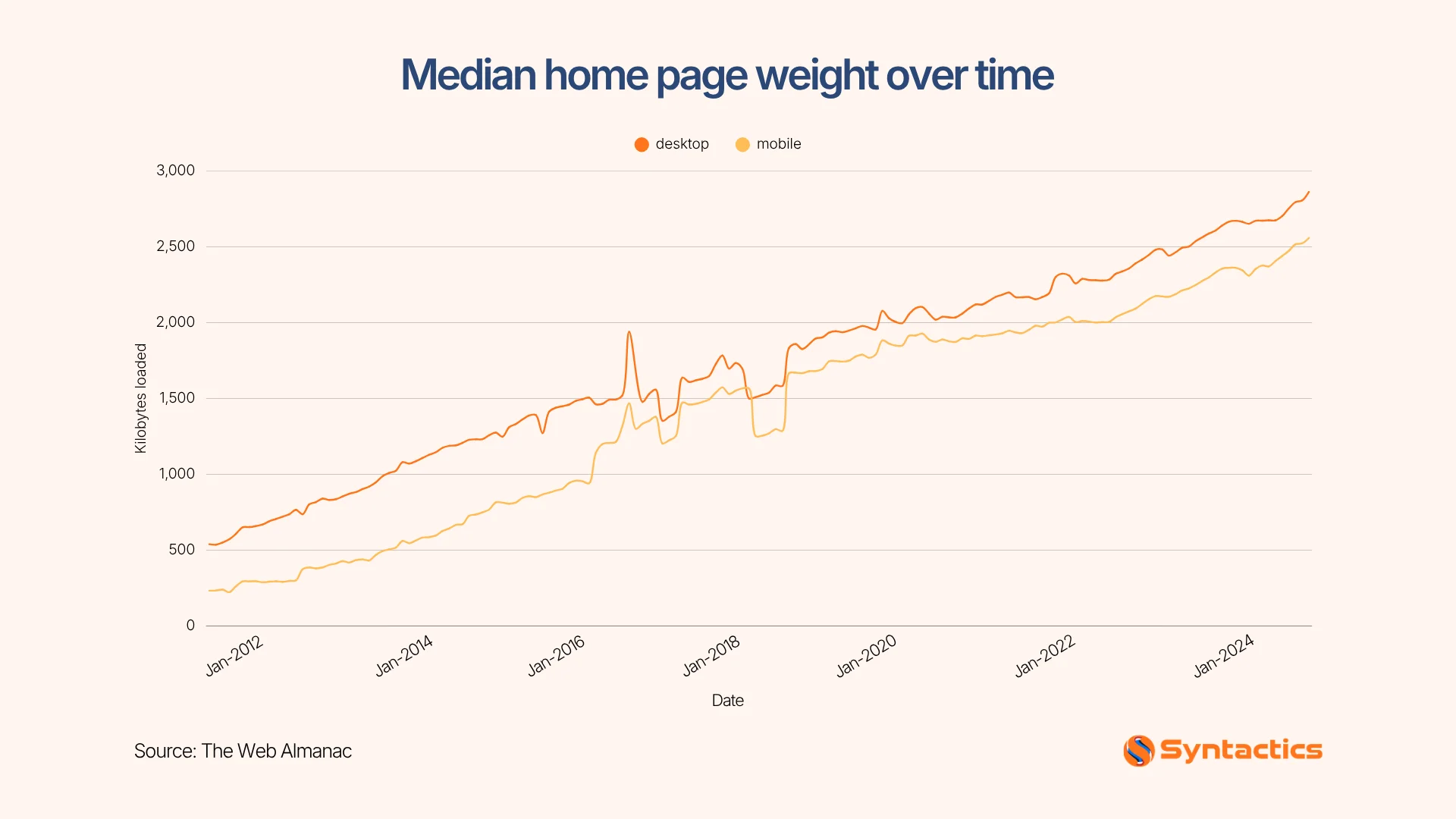
According to the Web Almanac, the median mobile webpage in the United States loads 2,362 KB of resources. This reinforces the need to optimize checkout pages to reduce delays and improve completion rates.
Source: The Web Almanac
2. Review every form field
Count the number of required fields and remove anything that isn’t essential. Shorter forms reduce friction and help customers complete purchases more quickly.
3. Test every payment method
Complete transactions using credit cards, digital wallets, and other supported payment options. Also test failed payments, expired cards, and error messages to ensure the checkout works in every scenario.
4. Evaluate the mobile experience
Navigate your checkout on multiple smartphones and tablets instead of relying only on browser previews. Confirm that buttons, forms, and payment fields remain easy to use on different screen sizes.
5. Analyze checkout analytics
Review where customers abandon the checkout process. Compare drop-off rates across desktop and mobile users to identify technical issues requiring immediate attention.
Overall, regular technical audits and performance improvements, with support from an experienced web design company in the Philippines, can help ensure your checkout experience remains fast, reliable, and user-friendly.
Platform-Specific Fixes for Shopify, WooCommerce, and Custom Builds
Every ecommerce platform requires a different optimization strategy. Applying these platform-specific improvements helps create a smoother checkout experience, reducing friction that often leads to shopping cart abandonment.
Shopify
Use Checkout Extensibility instead of unsupported customizations whenever possible. This approach improves compatibility with future platform updates while allowing you to customize checkout safely.

WooCommerce
Review installed plugins regularly. Multiple checkout, shipping, or payment plugins often cause conflicts that slow performance or lead to unexpected errors. Additionally, keep WooCommerce, themes, and extensions up to date to maintain compatibility and security.
Custom Ecommerce Platforms
Custom-built stores provide flexibility but require careful engineering. Focus on efficient payment gateway integrations, optimized APIs, database performance, and secure coding standards. Continuous testing helps identify problems before customers encounter them.
Whether you use an ecommerce website builder in the Philippines or invest in a fully customized platform, ongoing technical maintenance remains essential for long-term performance.
What a Checkout-Focused Ecommerce Development Engagement Delivers
After identifying technical barriers, the next step is to implement structured improvements. Start with a professional ecommerce development engagement, which typically includes:
- Complete checkout flow evaluation
- Checkout interface redesign
- Payment gateway integration improvements
- Mobile responsiveness optimization
- Performance optimization
- Security enhancements
- Post-launch A/B testing
- Continuous monitoring and maintenance
If you’re planning a new online store or redesign, partnering with experts in ecommerce website design in the Philippines allows you to build conversion-focused experiences from the beginning rather than correcting problems later.
Conclusion
Every improvement you make to your checkout experience removes another obstacle between your customers and a completed purchase. Reducing shopping cart abandonment requires a technically sound checkout flow that performs consistently across every device.
At Syntactics, Inc., our team delivers ecommerce website development services in the Philippines that prioritize performance, usability, and long-term growth. From checkout flow optimization and payment gateway integration to mobile performance improvements and ongoing technical support, we help businesses reduce cart abandonment and create ecommerce experiences that convert more visitors into loyal customers!

FAQs About Shopping Cart Abandonment
What does shopping cart abandonment do to online shopping?
Shopping cart abandonment prevents online shoppers from completing their purchases, resulting in lost sales for businesses. It can also indicate friction in the checkout process that negatively affects the overall shopping experience.
How often should you audit your checkout process?
Review your checkout at least every quarter. Perform additional audits after major platform updates or feature releases.
Should you redesign your checkout or optimize the existing one first?
Start by optimizing your current checkout using data and user testing. Redesign only when technical limitations prevent meaningful improvements. If you need expert guidance, contact us today to build a faster, more user-friendly checkout experience that drives more conversions.

About Ladymieh Naallatan
Related News:



How Does the Website Migration Process Work?


Essential Web Security Plans for Government Websites








Comment 0