

Claude for SEO: How to Improve Technical SEO With AI
Claude makes technical SEO faster by analyzing crawl exports, Search Console data, and structured data at scale. It groups common issues, ranks fixes by impact, and turns findings into a clear action plan. Claude works best as an extra analysis layer for your crawler, developer team, and SEO specialist.
Key Takeaways
- Claude reviews crawl exports, Search Console data, and schema markup, then ranks fixes based on business impact.
- Decide what you want to achieve before uploading data. Clear, specific prompts always work better than vague ones.
- Claude compares sitemap, crawl, and index data to spot pages that search engines miss or can’t rank.
- Claude also helps you track your brand’s visibility in AI-generated answers.
What Can Claude Actually Do for Technical SEO?
Claude can process large crawl and Search Console exports to find patterns that manual reviews might miss. It does the following tasks well:
- Group crawl errors by type and root cause.
- Flag duplicate title tags and meta descriptions.
- Spot internal linking gaps around key pages.
- Compare sitemap URLs against crawl and index data.
- Draft and check JSON-LD structured data.
- Rank fixes by impact and effort.
- Explain technical findings to non-technical stakeholders.
- Test how your brand shows up in AI search answers.
It’s important to note that Google’s SEO starter guide recommends keeping important content crawlable, using clean internal links, maintaining accurate sitemaps, and adding structured data. With the right technical tool, Claude can check whether your site follows these practices before you make changes.
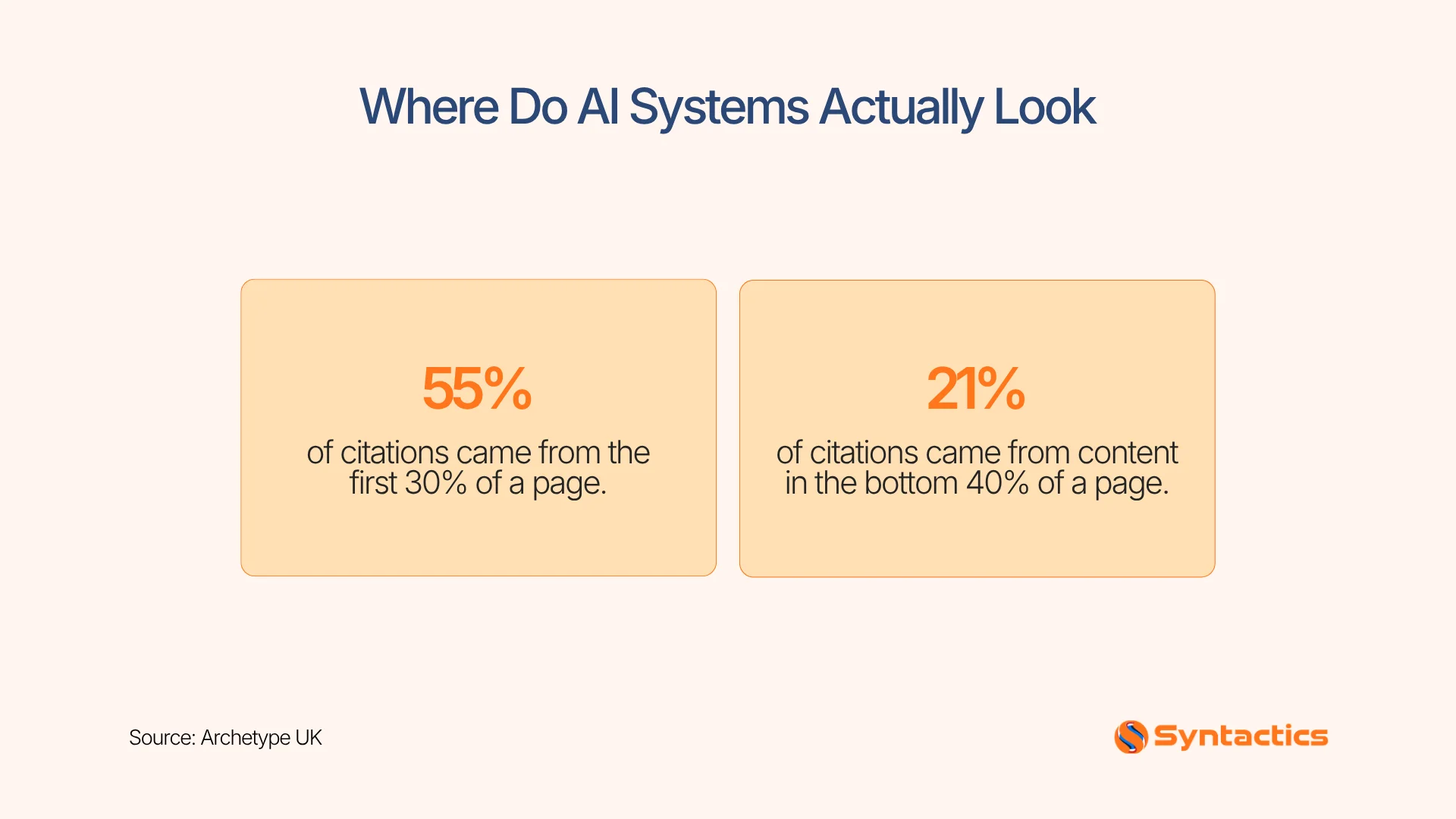
Source: Archetype UK.
Writing Prompts That Get Useful Results
A vague prompt produces a vague audit. So, define your goals and objectives before you upload anything or run a prompt.
Weak prompt: “Analyze this crawl export and tell me what’s wrong.”
Strong prompt: “Review this crawl export for indexability issues on service pages. Group similar problems, list the affected URLs, explain the likely SEO impact, and rank fixes by business impact and effort. Do not infer anything the data doesn’t support.“
A stronger prompt gives Claude a defined page type, a specific concern, a required output format, and limits guessing. Decide which question you’re answering before you start:
- Which issues should developers fix first?
- Which pages need content updates?
- Which URLs should stay indexed?
- Which pages compete for the same search intent?
- Which high-value pages have weak internal links?
Using Claude With Crawl Data
Export crawl data from tools like Screaming Frog, Sitebulb, Ahrefs, or Semrush. Useful fields are URL, status code, indexability, canonical, title tag, meta description, H1, word count, crawl depth, and internal link count.
Ask Claude to find:
- Duplicate title tags
- Missing H1 headings
- 4xx and 5xx status codes
- Redirect chains and loops
- Conflicting or self-referencing canonicals
- Indexable pages with very few internal links
- Orphaned pages
- Unusually thin pages
- Important pages buried deep in the site structure
Request the output as a table:
| Issue | Affected URLs | Likely Cause | Potential Impact | Recommended Action | Priority |
| Duplicate titles | 42 | Templated category pages | Weak snippet differentiation | Rewrite unique titles | High |
| Orphaned pages | 15 | Missing internal links | Low crawl frequency | Add contextual links | Medium |
Don’t base priority only on the number of URLs. Twenty broken service pages can be more important than 2,000 low-value archive pages. For more on fixing overlapping content, check our duplicate content guide.
Checking Crawlability and Indexation
Robots.txt controls crawling. Noindex tags and access restrictions control whether a page can enter the index. Sitemaps help search engines discover and prioritize your URLs, according to Google’s indexing documentation.
Claude can also cross-reference multiple URL sources at once: your XML sitemap, crawlable URLs, indexable URLs, Search Console URLs, canonicals, and redirect targets.
So, ask questions like:
- Which sitemap URLs return errors?
- Which important pages are missing from the sitemap?
- Which pages are blocked by robots.txt?
- Which noindex pages still receive internal links?
- Which pages get impressions but show as non-indexable in the crawl?
Example prompt: “Compare the sitemap URLs with the crawl export. Identify URLs that error, redirect, are blocked, carry a noindex tag, or are missing from the crawl. Separate confirmed findings from anything that needs live validation.”
This step is important. Claude should always separate what the data confirms from what needs a manual check.
Improving Internal Linking With Claude
You can also give Claude your list of URLs and ask it to match pages by topic relevance, search intent, page importance, and current link coverage. Ask for the results in a table:
| Source Page | Destination Page | Suggested Anchor | Reason | Priority |
| Migration guide blog post | Migration service page | site migration service | High-intent readers, no current link | High |
Check every suggestion yourself. A link should guide readers to a helpful next step, not just pass authority. Focus on linking to core service pages, high-converting landing pages, and new pages that need discovery. Google recommends keeping links crawlable, so avoid patterns that hide destinations from crawlers.
Putting Search Console Data to Work
Export Query, Page, Clicks, Impressions, CTR, Position, Date, Country, and Device from Search Console. Then, ask Claude to find:
- Pages with high impressions and low CTR
- Queries ranking between positions 4 and 20
- Pages losing clicks over time
- Queries landing on the wrong page
- Pages that draw traffic but few conversions
Example prompt: “Analyze this 90-day Search Console export. Identify commercially relevant pages with impressions but few clicks. Separate title and snippet fixes from ranking or content fixes. Cite the evidence behind each recommendation.“
Link your findings to business value. Sometimes, a page with 10,000 impressions is less important than a service page with 1,000 impressions but a high conversion rate.
Drafting and Checking Structured Data
Claude can draft JSON-LD for Articles, Products, Services, Organizations, Events, and FAQs. Use this workflow:
- Give Claude the visible page content.
- Ask which schema types fit the page.
- Request a JSON-LD draft.
- Compare every property against the actual page.
- Test the markup in Schema.org’s validator.
- Recheck after major page changes.
Only add a property after you confirm it matches what’s visible on the page. Google requires structured data pages to stay accessible, according to its structured data policies. Don’t block them with robots.txt, noindex, or a login wall.
Measuring Your Visibility in AI Search
Furthermore, Claude creates a new channel worth tracking: your brand’s presence inside AI-generated answers. When web search is active, Claude cites live sources, and you can follow those links to check accuracy.
Test 10 to 20 high-value prompts across platforms:
- “What is [your product category]?”
- “Best [product category] for [use case]”
- “[Your brand] vs [competitor]”
- “[Your product category] pricing”
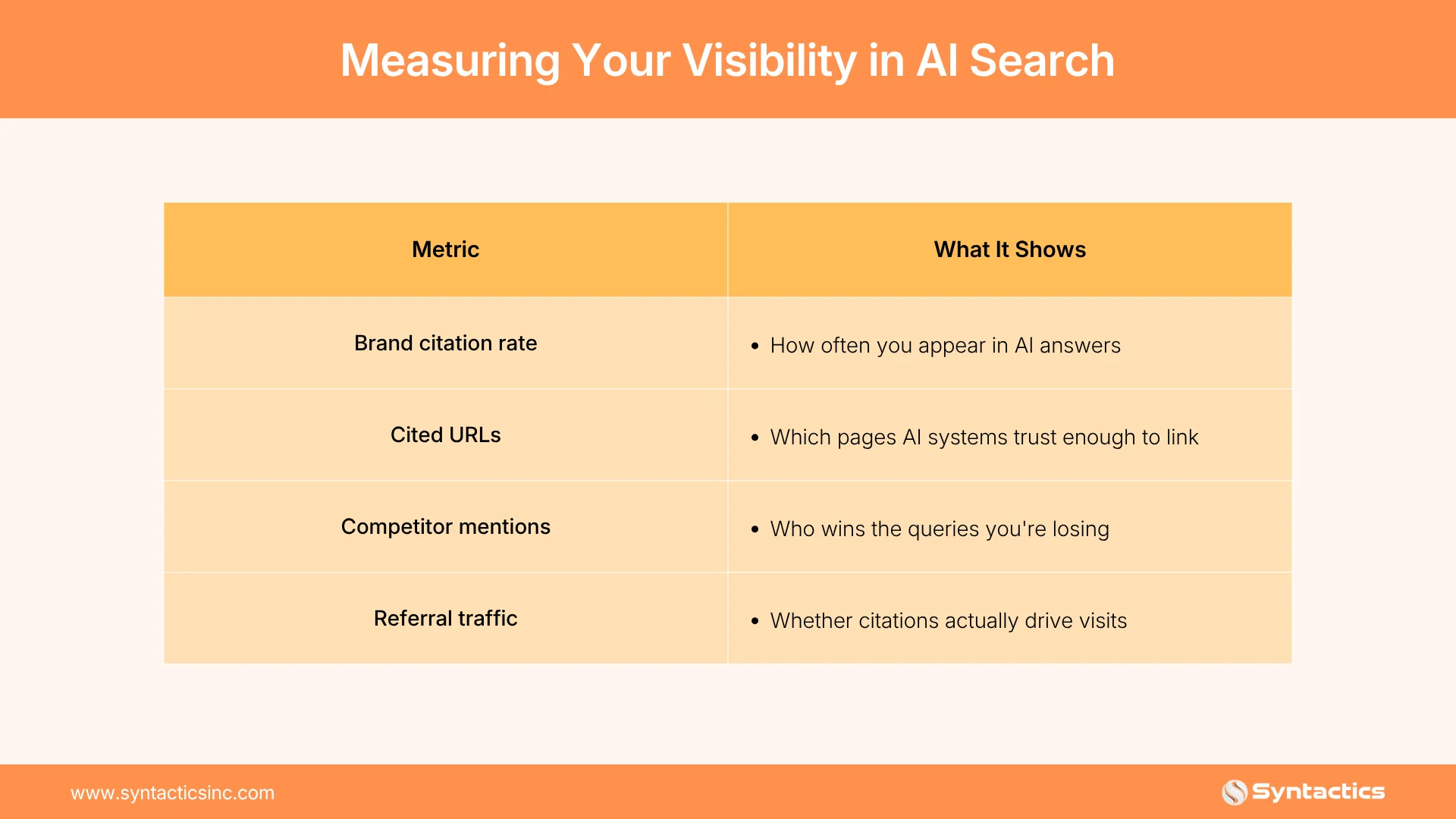
A citation shows visibility, not conversions. Track it along with real traffic and leads. Google now reports AI Overview visibility in Search Console, including impressions by page and device. We explain this feature in our AI performance report breakdown.
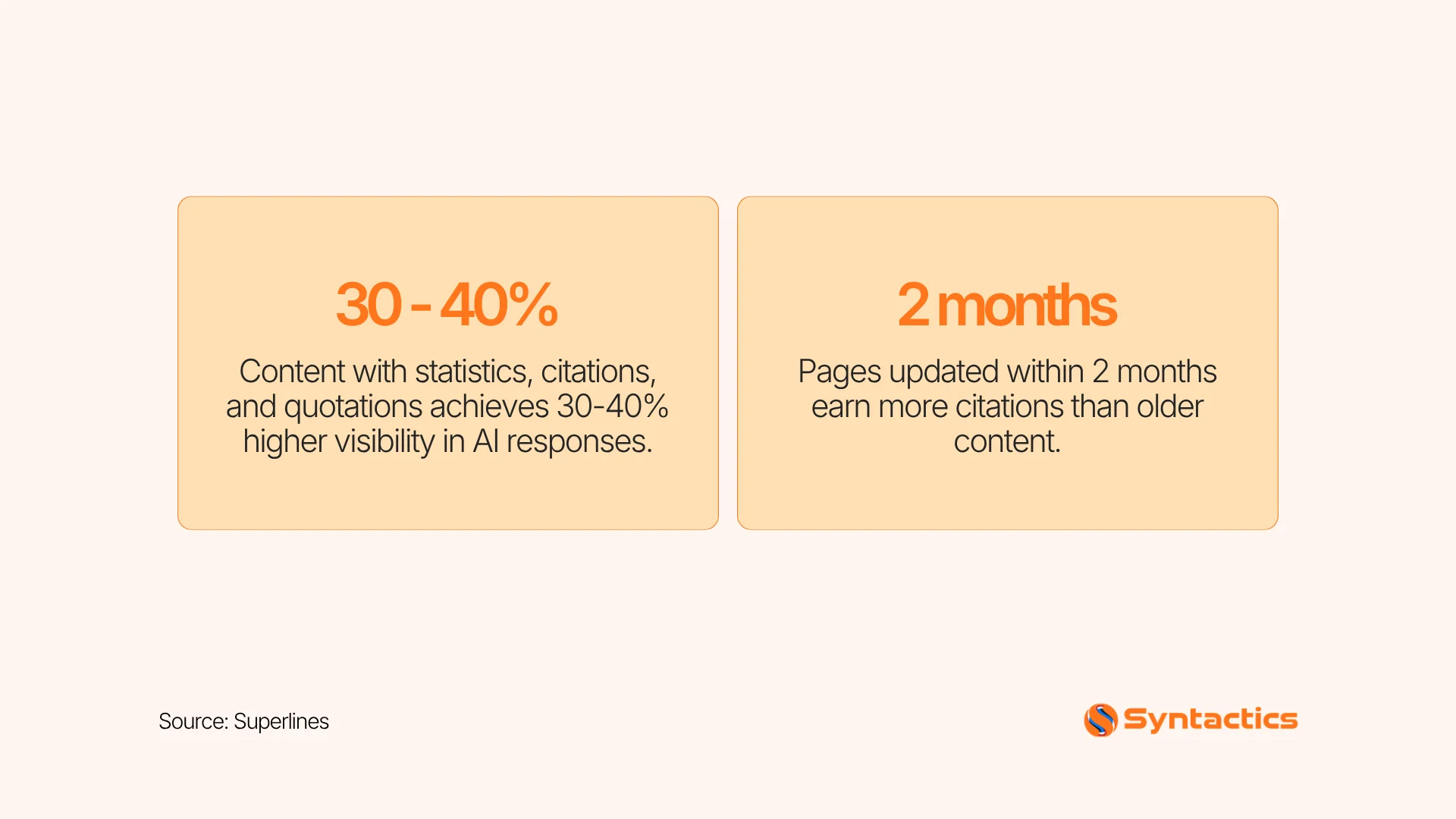
Source: Superlines.
Prioritizing Fixes by Impact
Score each finding for business impact, confidence, and how much effort it takes to implement, using a 1 to 5 scale:
Priority score = (business impact × confidence) ÷ implementation effort
Sort findings into Critical, High, Medium, and Low, and make sure you give a reason for each score. This approach turns a long audit into a clear roadmap for your developers and stakeholders.
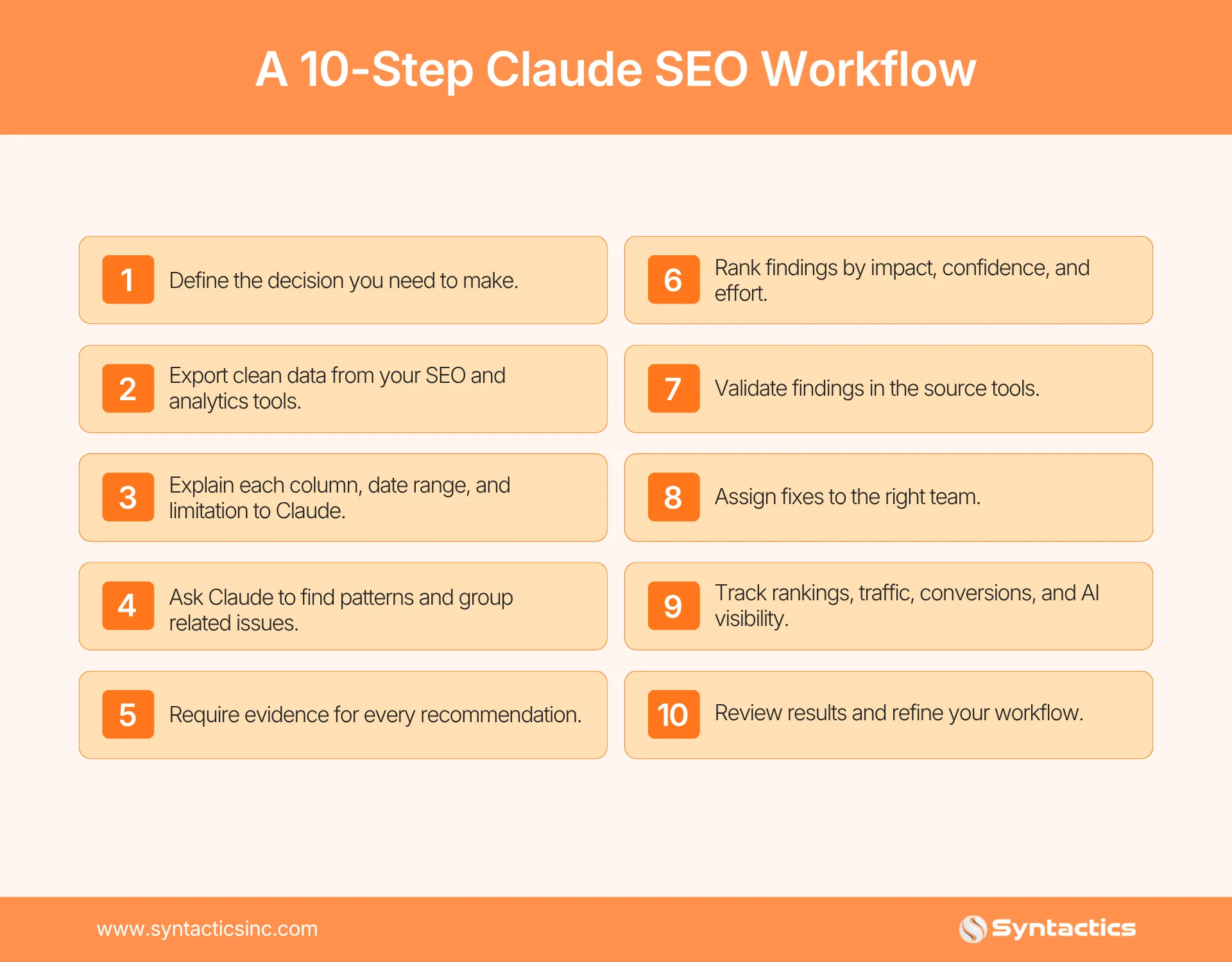
A 10-Step Claude SEO Workflow
Turn AI-Powered Analysis Into Ranking Results
Claude can group crawl errors, flag indexation gaps, and draft structured data in minutes. But turning those findings into ranked, indexed, and converting pages still requires a team that works with Search Console and crawl exports every day.
At Syntactics, Inc., our SEO experts combine AI-assisted analysis with technical audits, content strategy, and implementation for brands that need measurable search results.
We deliver SEO services in the Philippines and worldwide, using this exact workflow. We start by defining the decision, then analyze the data, validate every finding, and implement the fix. Contact our team for a technical audit of your site.

Frequently Asked Questions
What role does Claude play alongside an SEO crawler?
Claude analyzes the crawl exports your crawler produces and turns them into a ranked action plan.
How does Claude fit with Core Web Vitals and page speed tools?
Pair Claude with a tool like PageSpeed Insights to gather the data, then ask Claude to help you interpret the results.
Does Claude help with AI search visibility, not just Google rankings?
Yes. You can test how your brand appears in Claude’s own search-enabled answers, alongside ChatGPT, Perplexity, and Google AI Overviews.
Should I trust every structured data suggestion Claude makes?
No. Compare every property against the actual page content and run it through a validator before you publish it.












Comment 0