

The Complete Guide to Fixing Duplicate Content
Canonicalization signals which version of a webpage you prefer search engines to treat as the primary URL. Websites typically create multiple URLs for similar content through tracking codes, filters, sorting, or link variations. To manage these situations, a technical SEO specialist reviews canonical signals alongside other site elements to keep the preferred URL consistent.
Canonical tags are important indicators, but search engines treat them as hints rather than absolute commands. Search engines can choose a different canonical when other signals suggest treating another URL as the primary version.
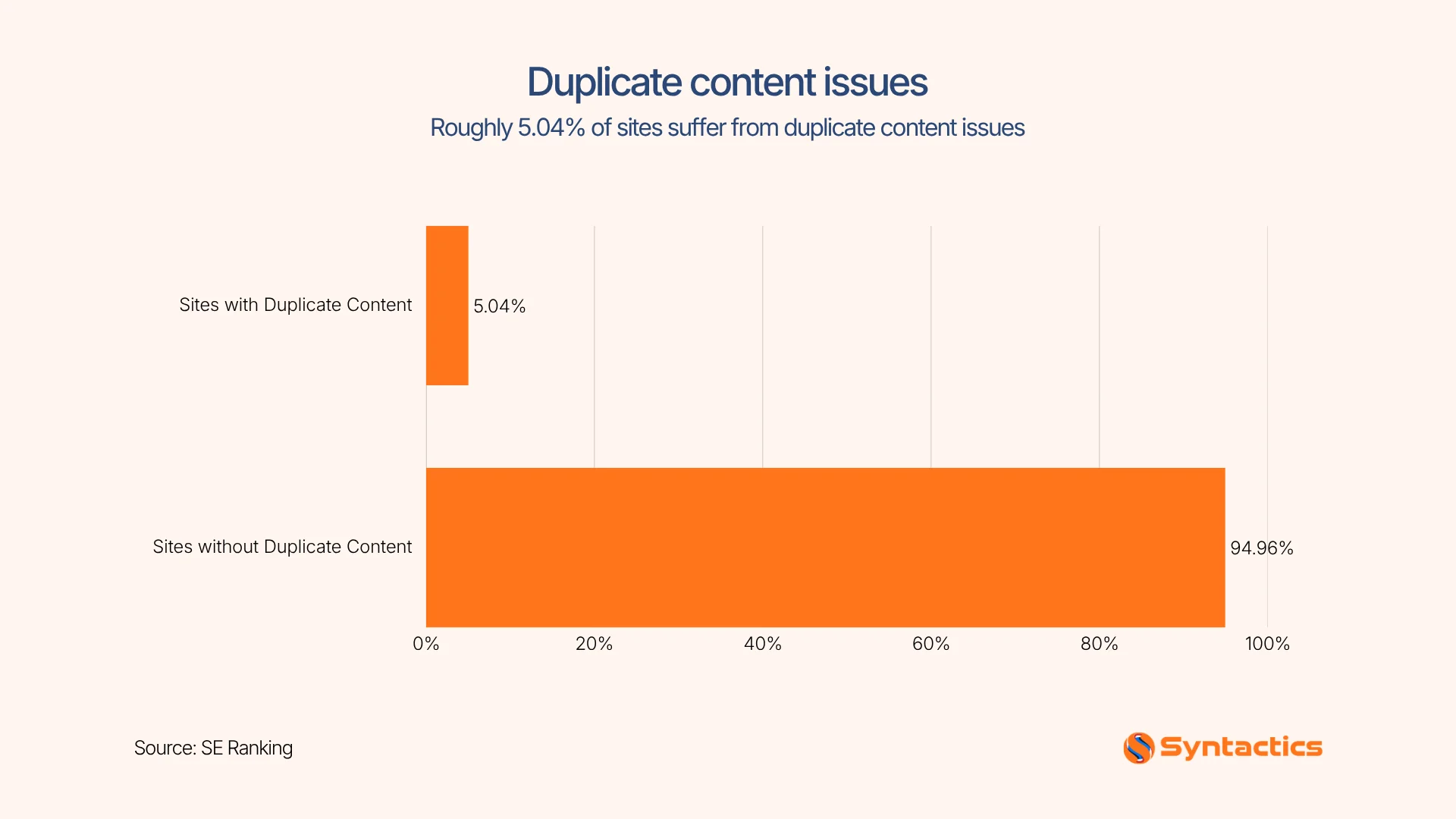
According to SE Ranking, around 5.04% of websites have issues with duplicated content. Fixing duplication issues starts by identifying which URL represents the content and aligning every signal around that choice. The goal is to establish which URLs remain accessible, indexed, or consolidated for search engines.
Source: SE Ranking
Key Takeaways
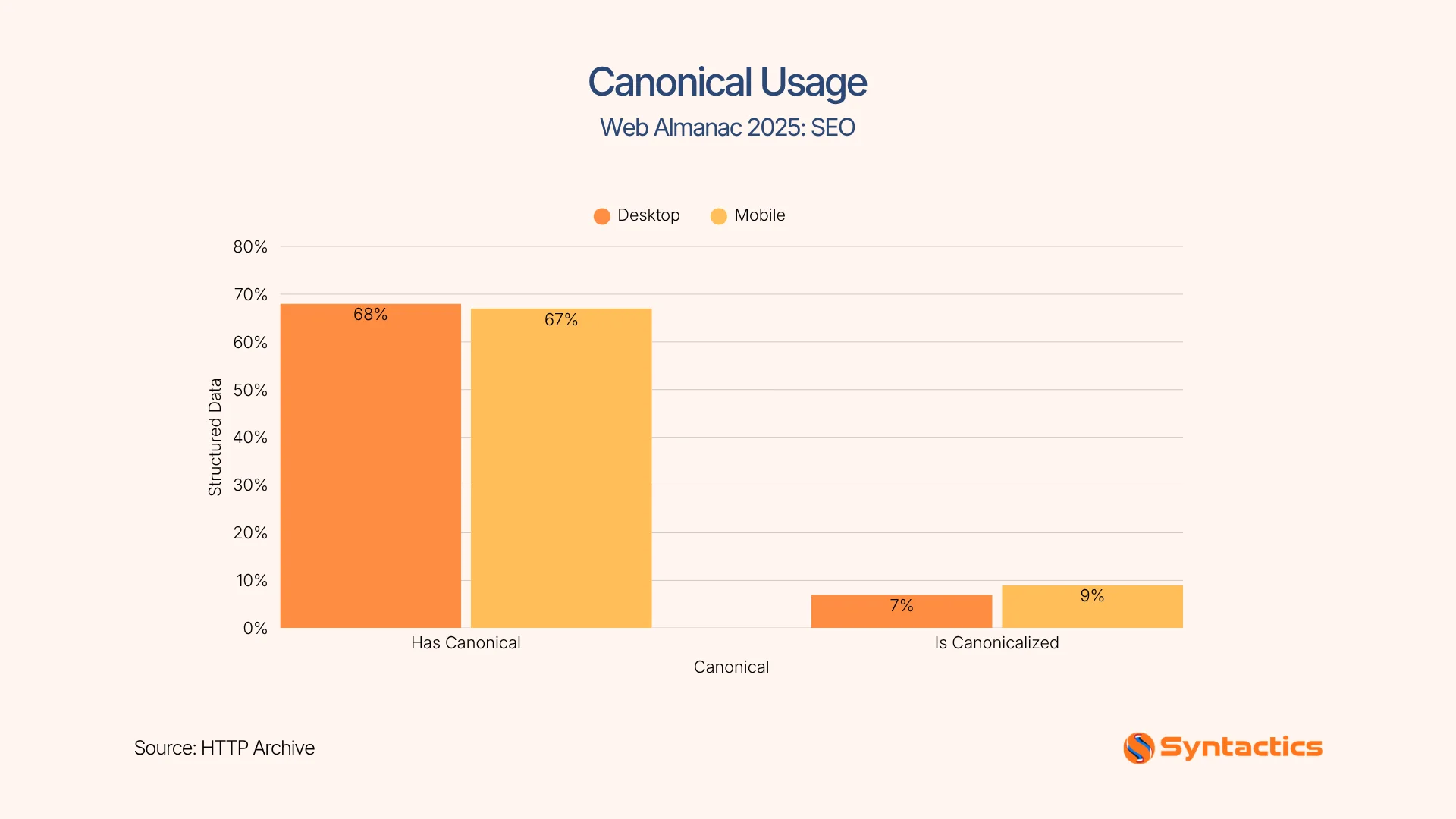
- 68% of desktop pages and 67% of mobile pages are canonical. (HTTP Archive)
- Duplicate content can build up through tracking parameters, filters, sorting, archives, pagination, and alternate URL versions.
- Canonical tags, 301 redirects, and noindex directives solve different duplication problems, making it important to choose the right fix.
- Incorrect pagination can hide deeper products or articles, especially when paginated pages are incorrectly treated as duplicates of the first page.
- Canonical tags function as hints, so technical signals such as internal links, redirects, or XML sitemaps support the preferred URL.
- WordPress, Shopify, and custom websites require different approaches to implementing and validating canonical pages.
- Crawling tools and Search Console URL inspections help detect canonical conflicts and new duplicate URLs before they affect search visibility.
How Duplicate Content Builds Up on Your Site Quietly
Different URLs can create separate versions of substantially similar content, particularly when parameters, filters, or link variations are crawlable. Without clear consolidation signals, search engines may have to decide which version to index or prioritize.
Duplicate content inevitably occurs when sites auto-generate new URLs for tracking, filtering, or sorting. Search engines would then detect relationships between similar URLs and content. As such, website owners provide consistent signals when multiple versions represent the same or substantially similar resource. If unaddressed, it could dilute the authority of your main page.
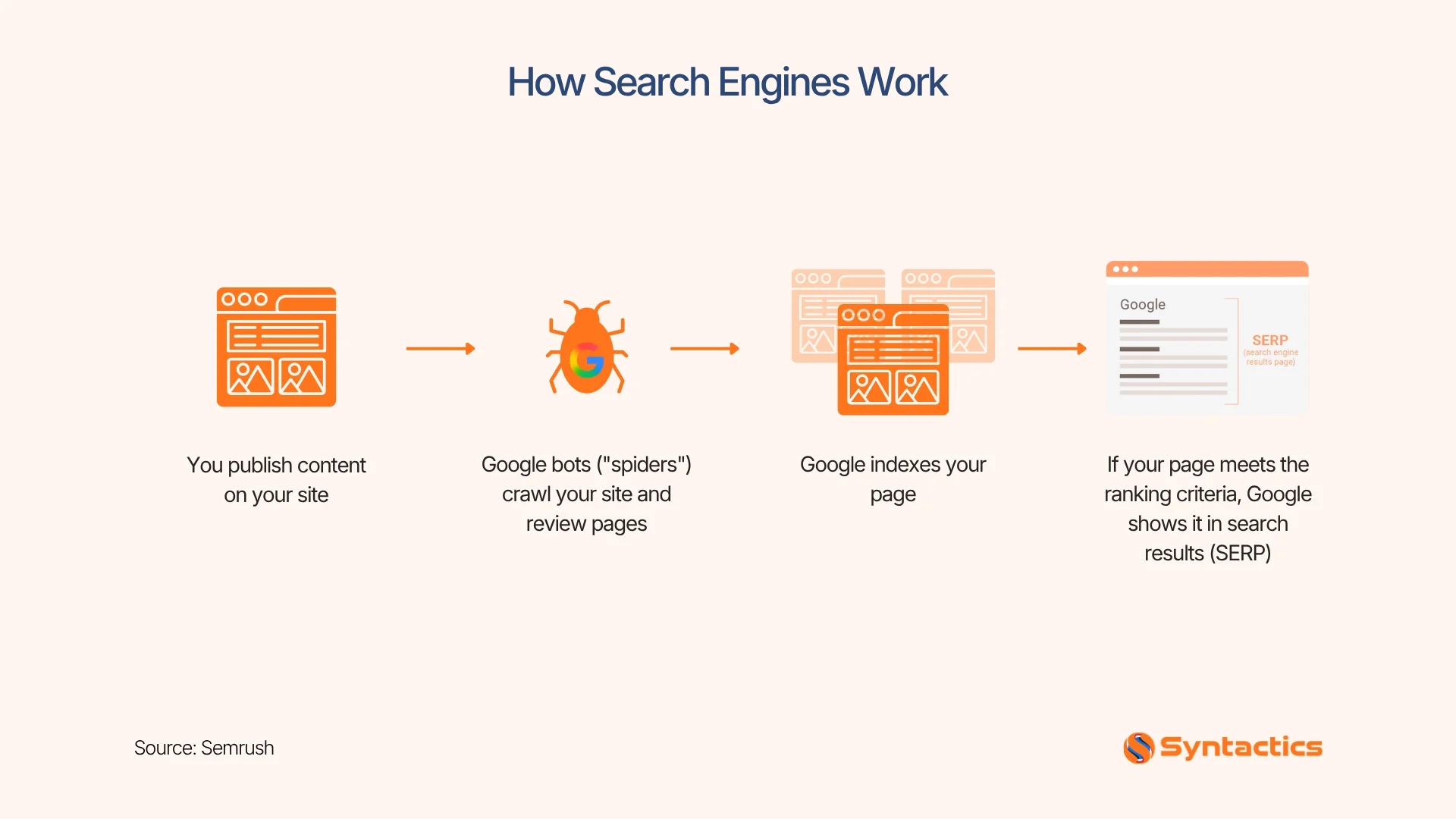
To demonstrate, here’s a simple illustration that shows how search engines generally work:
Source: Semrush
Common Ways Websites Create Duplicate Page Content
A technical SEO specialist conducts regular audits to monitor clone pages. Duplicated content typically creeps into your website in these common ways:
Tracking & Sorting Tags
Adding tracking text to the end of a link (like ?utm_source=facebook) or sorting products by price (?sort=price) helps your site function. However, because the address bar text changed, Google assumes it’s a brand-new page with identical content.
Depending on how they are linked, generated, and configured, Google may discover and crawl parameterized URLs as separate variants. When these variations contain substantially similar content, the website may need appropriate canonicalization or other indexing controls.
Technical Address Variations
Technical URL variations create multiple accessible versions of the same or substantially similar webpage. Some of these common examples include:
- HTTP versus HTTPS
- www versus non-www
- Trailing slash versus non-trailing slash
- Case variations, depending on server configuration
These variations are then reviewed and consolidated where they represent the same resource.
E-Commerce Filters
E-commerce shop filters, such as /shoes/?color=black or /shoes/?size=10, can create many URL combinations. Some filtered pages may show substantially similar products, while others may offer useful, unique product selections.
The appropriate solution depends on whether the filtered URL serves a useful search purpose, should remain crawlable, or should be consolidated. Therefore, evaluate faceted navigation by URL pattern rather than applying the same rule to every parameter.
Archived Pages and Pagination
Multi-page lists (like /blog?page=2) or legacy date archives (/2024/05/) may repeat chunks of the same text snippets and structural elements. Without proper configuration, this structural repetition can potentially lead to keyword cannibalization. On another note, repeated templates do not automatically make paginated pages duplicates. A paginated URL may contain different products, articles, or listings that search engines need to discover.
Separate Mobile Versions
Running a mobile setup (such as m.yoursite.com) alongside a desktop version can create alternate versions of similar content. For this reason, websites using separate mobile URLs should ensure implementation follows search engine guidelines. If you neglect to do so, your ranking power stays split, and one version gets filtered out as duplicate content.
Why Canonicalization Matters with AI Search in the Picture
AI is changing search experiences by extracting content through RAG systems, which makes clear sources more important. For this to work, canonicalization helps reduce ambiguity about which page represents the primary version of a resource. This is why 68% of desktop pages and 67% of mobile pages are canonical (HTTP Archive) and are likely to show in rankings.
Canonicalization gives an SEO specialist in the Philippines and around the world a way to clean up duplication. A clean canonical architecture also makes analytics, internal linking, content maintenance, and future migrations easier to manage.
Source: HTTP Archive
5 Pagination Mistakes That Affect Your Visibility
Pagination can create trusted pages. However, incorrect canonicalization could make those pages difficult to index. To prevent this from happening, here are five mistakes you should avoid:
- Canonicalizing every page to page one. This can suppress useful paginated URLs when they contain different products or articles.
- Blocking paginated URLs in robots.txt file. Search engines may lose an important route to deeper content with this approach.
- Using only JavaScript to reveal later pages. To resolve this, make important links accessible through crawlable HTML.
- Removing internal links to deeper pages. Products that exist only on page 5 can become difficult for crawlers to discover.
- Treating pagination as duplicate without testing. Compare the actual content and purpose of each URL before deciding how to consolidate it.
For large e-commerce websites, it’s better to test pagination with a crawler and review crawl depth. If products disappear from crawl reports after a pagination change, restore the crawlable pathways before applying canonical or noindex rules.
Choosing Between Canonical Tags, Redirects, and Noindex
Each duplication fix solves a different problem for a technical SEO specialist. Choosing the wrong one can create a larger indexing issue.
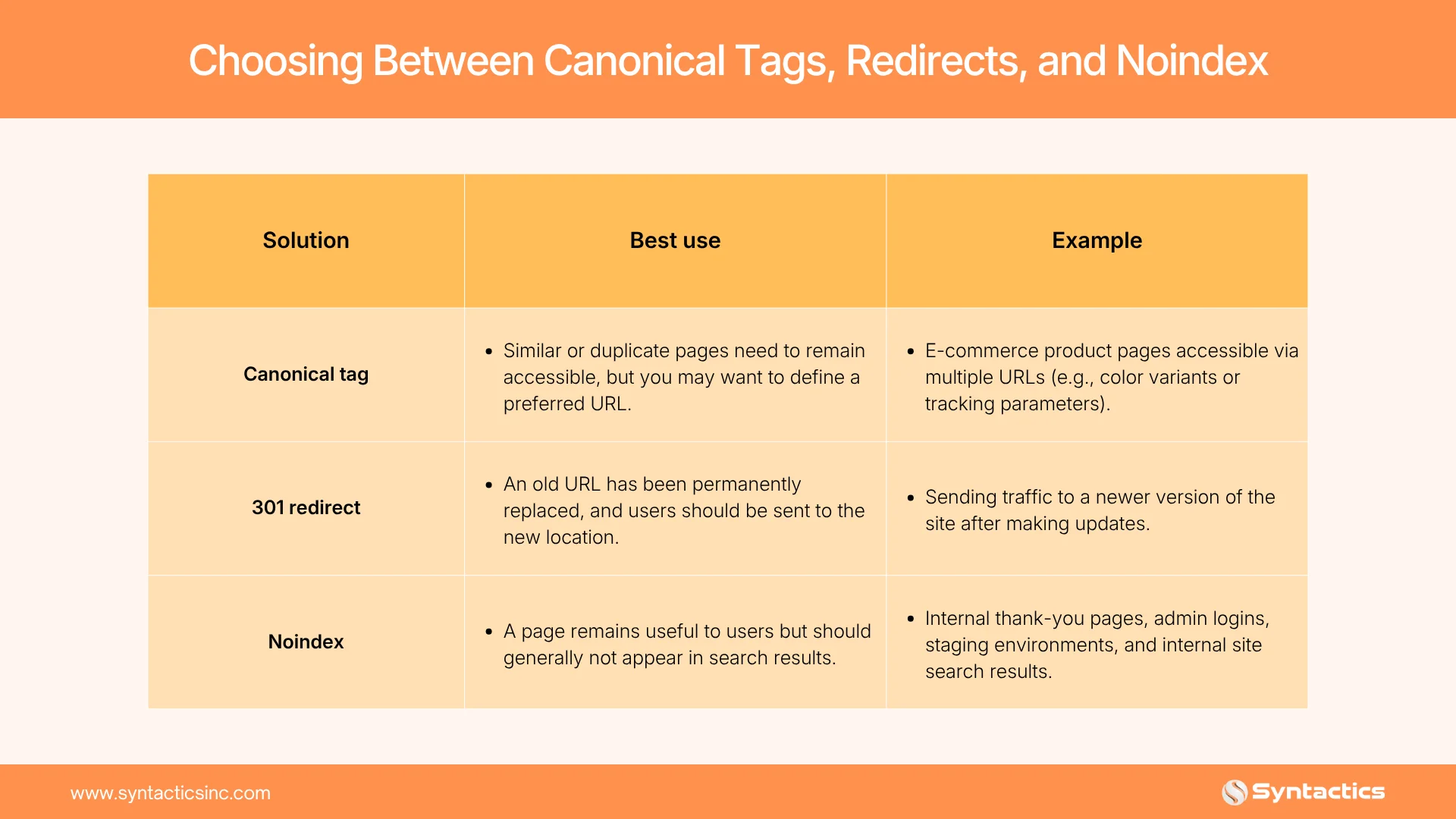
One useful rule to validate the duplication-fix approach is to check the entire signal chain. The preferred URL should return a 200 status and appropriately match your canonical signals and XML sitemap. It should also appear consistently in internal links.
Platform-Specific Canonical Implementation
SEO-friendly Content Management Systems (CMS) handle canonicalization differently, so implementation should match the technology stack. So validate platform defaults before assuming they’re correct. Here’s how common platforms handle them effectively:
WordPress
Plugins such as Yoast SEO and Rank Math automatically generate canonical tags for many standard pages. Yoast allows custom canonical URLs, while Rank Math provides a canonical field under its Advanced settings. That said, our SEO specialist in the Philippines generally does not recommend installing multiple plugins that result in conflicting canonical tags. Instead, inspect the rendered HTML first to confirm that only the intended canonical remains.
Shopify
Shopify automatically generates canonical tags across its pages, reducing the amount of manual configuration required for standard stores. However, a close validation is still needed. For this reason, manual checks are required for custom themes, apps, market-specific URLs, and product configurations.
For more tips on e-commerce SEO, check out our comprehensive guide here:

Custom Builds
Custom websites require developers to generate canonical URLs through templates or server-side rules. Use absolute URLs, standardize protocol and hostname choices, and prevent dynamic parameters from replacing the preferred URL.
Why Canonical Audits Should Be a Routine Practice
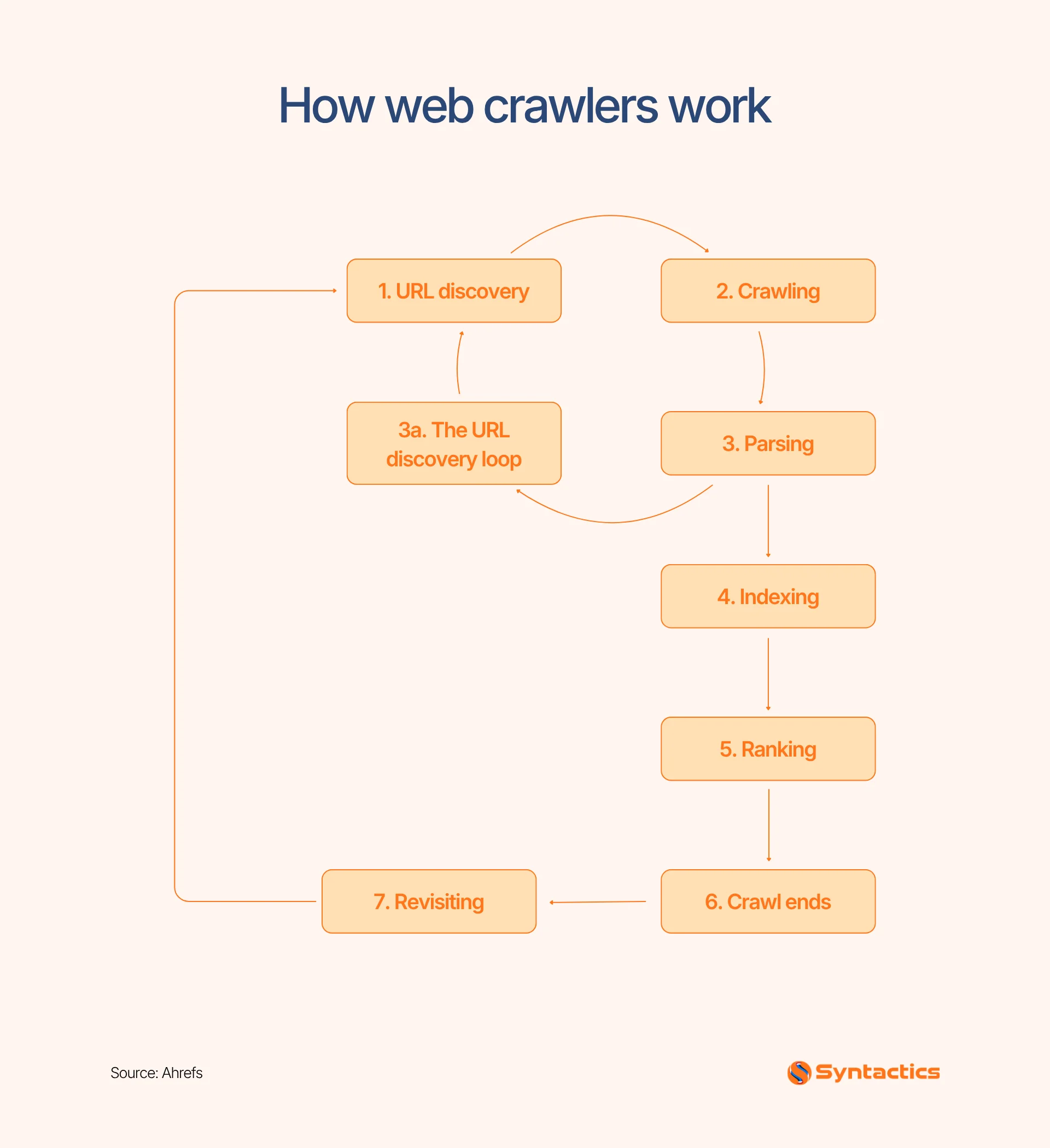
Canonicalization is an important technical SEO process, especially for e-commerce, publishing, and JavaScript-heavy sites. For web crawlers to work, a technical SEO specialist typically takes the following steps:
- Use Google Search Console’s URL Inspection tool to compare the user-declared canonical with the platform-selected canonical.
- Inspect important URLs individually after SEO migrations, template changes, redirects, or major content updates.
- Utilize dedicated crawlers like Screaming Frog, Semrush, and Ahrefs to scale the review.
- Export crawl reports and group their findings according to template or URL pattern instead of fixing links one by one.
This routine helps you catch new duplication created by product filters, CMS updates, URL changes, development releases, and content migrations. It also helps your website crawl efficiently by guiding search engines to the right page.
For better demonstration, here’s a quick flowchart on how web crawlers work:
Source: Ahrefs
Conclusion
Fixing duplicate content requires consistent canonical signals, clean URL structures, and ongoing technical checks. These practices help search engines understand which version of your content should be prioritized. This is also where a technical SEO specialist can help identify duplication issues and align your website’s technical elements with preferred URLs.
So, when evaluating SEO packages for your business in the Philippines or worldwide, consider the technical support needed. Fortunately, Syntactics Inc. can help you manage these details to build a stronger search presence with technically sound strategies. As a trusted SEO agency in the Philippines, we help you address technical SEO concerns through technically sound strategies. To get started, contact our team today.

Frequently Asked Questions (FAQs)
What SEO specialists focus on technical SEO?
SEO specialists focus on crawlability, indexability, site speed, structured data, canonicalization, and website architecture. They also identify technical issues that can limit your search visibility and organic performance.
Can duplicate URLs affect website analytics?
Yes, duplicate URLs can split traffic, conversions, and engagement data across multiple URL records. Consolidating duplicates helps create cleaner and more accurate performance reports.
Should canonical URLs appear in XML sitemaps?
Yes, XML sitemaps should generally contain the canonical URLs you want search engines to index. This reinforces the preferred URL and reduces conflicting signals.

About Jalou Batilong
Related News:


Build Brand Trust With Email Marketing

Project Management Reports for Project Managers

Why Your SEO Agency Isn’t Delivering ROI










Comment 0