

Shopify WebMCP Checkout: What AI Agents Buying From Your Store Means for Merchants
Shopify announced WebMCP support for checkout, including Shop Pay, allowing eligible browser-based AI agents to help shoppers complete purchases with their authorization. The update extends AI-assisted shopping beyond product discovery and cart management to the final checkout steps.
According to NielsenIQ, 51% of U.S. consumers had used at least one AI-powered tool to support shopping in the past month. As shoppers increasingly turn to AI for product research and recommendations, merchants need to understand how these tools interact with their stores.
With Shopify’s announcement, merchants have another reason to check their checkout process, product details, and purchase safeguards. Here’s what the update means and how you can get ready.
Key Takeaways
- 42% of U.S. consumers would not trust AI to make purchases on their behalf (Statista).
- WebMCP lets supported browser-based AI agents interact with a Shopify storefront and checkout through structured tools.
- The get_checkout, update_checkout, and complete_checkout tools support checkout review, updates, and order submission.
- The buyer must authorize the order, and some checkout scenarios still require direct buyer interaction.
- Merchants should verify their checkout setup, product information, payment settings, and policies.
What is WebMCP?
Web Model Context Protocol (WebMCP) is a proposed web standard that lets websites make structured actions available to AI agents operating in a browser. Instead of guessing which buttons to click or interpreting screenshots, an agent can call defined tools to perform supported actions.
Shopify introduced WebMCP support for storefronts and carts before adding checkout capabilities. These tools work in the shopper’s active browser session, allowing a compatible agent to search products, update a cart, and move into checkout. Shopify’s WebMCP documentation explains how these browser-based tools work.
WebMCP differs from Shopify’s hosted Model Context Protocol (MCP) server. WebMCP operates inside the buyer’s browser, while Shopify’s server-side MCP connects to Shopify from its own environment to manage a checkout session.
Both approaches support agentic commerce, but they suit different technical setups. WebMCP is relevant when an agent already operates in the buyer’s browser, while server-side MCP supports agents that manage commerce workflows outside that browser session.

What the New Checkout Tools Do
Shopify’s Checkout WebMCP uses three tools that support checkout actions:
- get_checkout: Reads the current checkout details or retrieves order information after completion.
- update_checkout: Updates supported checkout fields, such as buyer contact details, delivery information, discount codes, and payment details.
- complete_checkout: Submits the order after the buyer confirms the purchase.
These tools use the checkout already open in the buyer’s browser. Shopify’s existing checkout validation still applies, and the agent must hand control back to the buyer when an action requires direct input, such as certain payment authentication steps or checkout extension interactions.
This distinction matters for merchants: an agent can assist with the transaction, but it doesn’t receive unrestricted permission to purchase anything on the shopper’s behalf.

Where UCP Fits
WebMCP offers a way for agents to interact in the browser, while the Universal Commerce Protocol (UCP) sets a shared framework for commerce between businesses and AI agents. UCP also covers checkout and fulfillment, making it easier for different systems to work together.
Shopify’s AI agents use UCP’s checkout features through browser-registered tools. Meanwhile, the server-side Checkout MCP uses the same checkout model but connects differently.
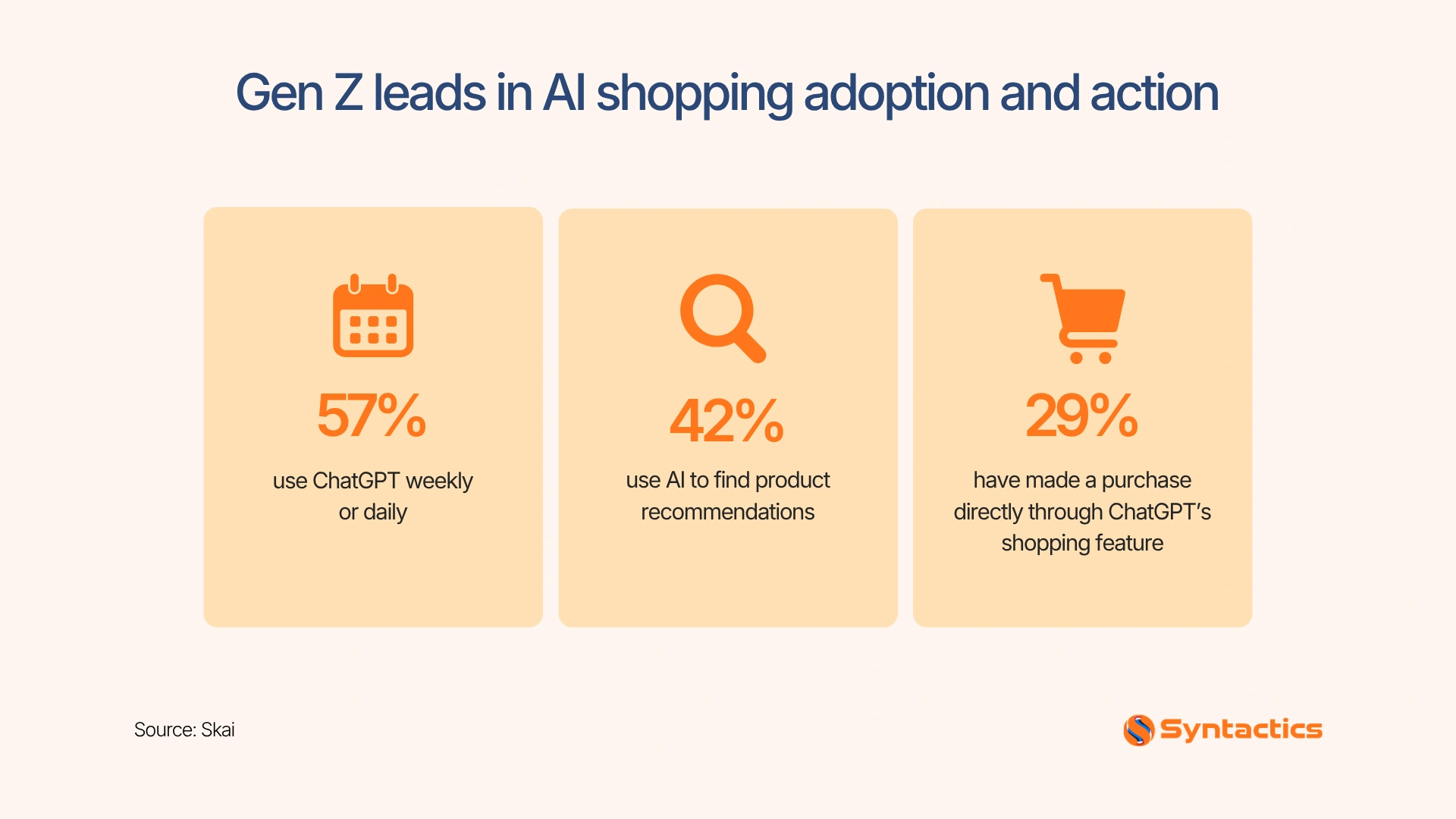
These standards support a shopping journey where AI can help customers discover products, compare options, manage carts, and proceed through checkout. The quality of your product information matters throughout that journey. A Skai survey of 1,000 U.S. consumers found that 42% used AI to find product recommendations.
So, accurate descriptions, prices, and stock information help AI tools compare products and give shoppers useful guidance as they move toward checkout.
Source: Skai
What Merchants Should Check
You don’t have to rebuild your Shopify store just because WebMCP checkout is available. Shopify states that its checkout tools don’t require new merchant configuration, but not every checkout scenario supports the same agent workflow.
Start with these checks:
- Confirm checkout eligibility: Review Shopify’s Checkout WebMCP documentation to understand supported checkout types and limitations. Some B2B, embedded, mobile SDK, and other checkout scenarios require the buyer to finish the process directly.
- Review payment settings: Test Shop Pay and other payment flows used by your customers. Confirm that authentication challenges and any required buyer interactions work as expected.
- Audit product information: Keep titles, descriptions, variants, prices, stock status, shipping details, and return policies accurate. AI tools rely on accessible information to help shoppers choose the right product.
- Test the customer journey: Check product discovery, cart updates, discounts, checkout validation, and order confirmation. Document any steps that require manual input.
- Monitor changes: Revisit Shopify’s developer documentation as browser support and checkout capabilities develop.
Preparing well helps Shopify AI agents work better with your store and keeps buyers informed and in control.
Some Retailers Block Agent Purchases
While Shopify is opening more of its checkout experience to AI agents, other retailers are taking a more restrictive approach. TechCrunch reports that Amazon blocked Meta’s Muse AI agent from making purchases on its platform. It also reports that Adidas appears to be blocking agent purchases.
This contrast presents a business decision for merchants: allow agent access, limit it, or block it. Each approach has trade-offs involving customer convenience, security, data access, and control over the shopping experience.
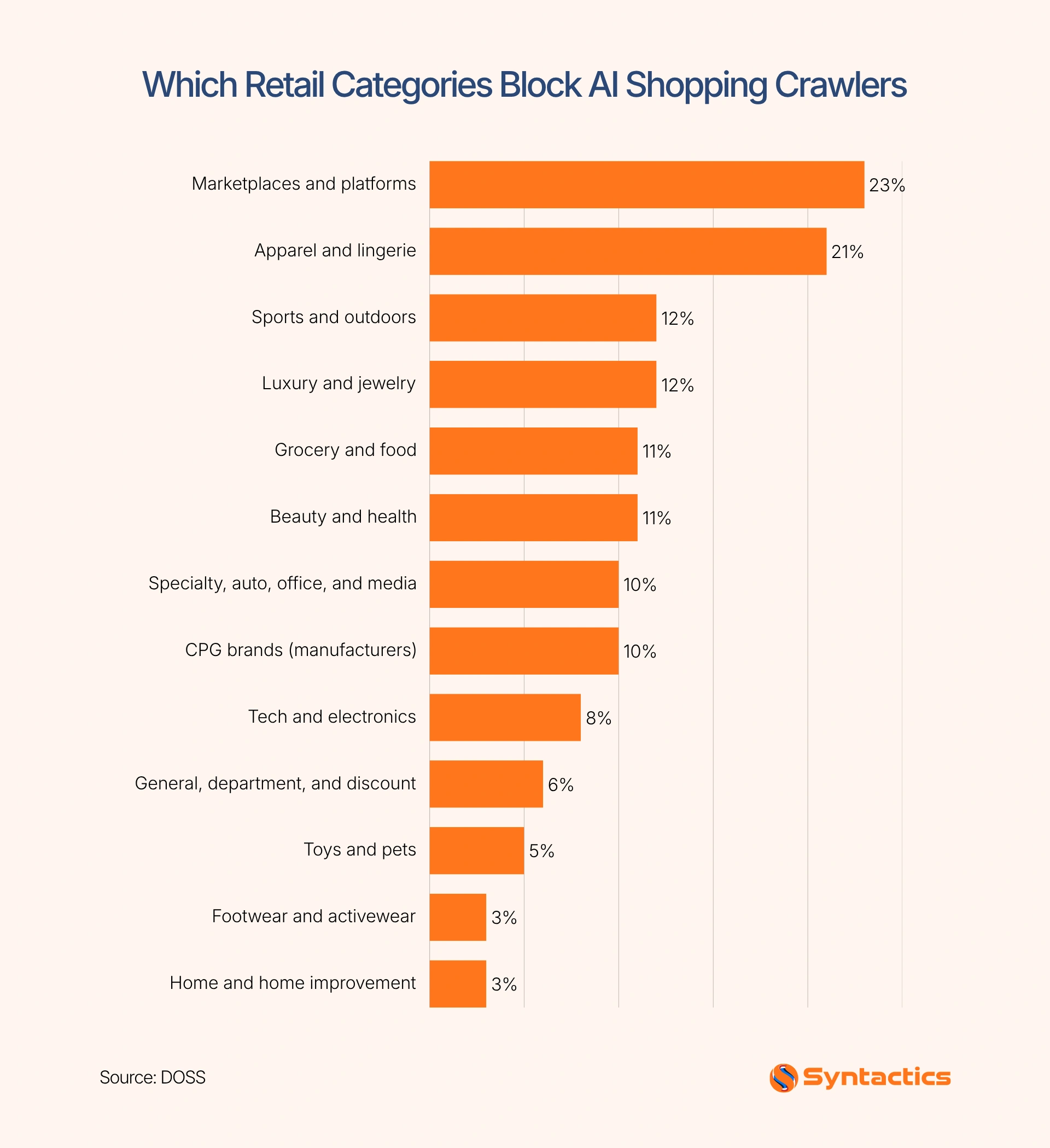
Moreover, a DOSS study of 500 major retailers and eCommerce platforms found that about 10% of Consumer Packaged Goods (CPG) brands blocked AI shopping crawlers. The study shows how access policies vary across retail categories, illustrating why merchants need to consider how AI agents access their product information before deciding whether to allow automated interactions.
Before changing your store’s access policies, consider which customer interactions agents can perform, what information they can access, and when a shopper needs to step in.
Source: DOSS
Open Questions on Risk
Allowing AI agents to assist with checkout raises operational questions that merchants and platforms will need to address as the technology develops.
For example, who handles a mistaken order, a disputed charge, or a refund request when an agent has helped complete a purchase? How should merchants investigate transactions when an agent misinterprets a product variant or delivery instruction?
Shopify’s announcement doesn’t cover every possible liability or dispute, so merchants shouldn’t assume agent-assisted transactions change their current responsibilities.
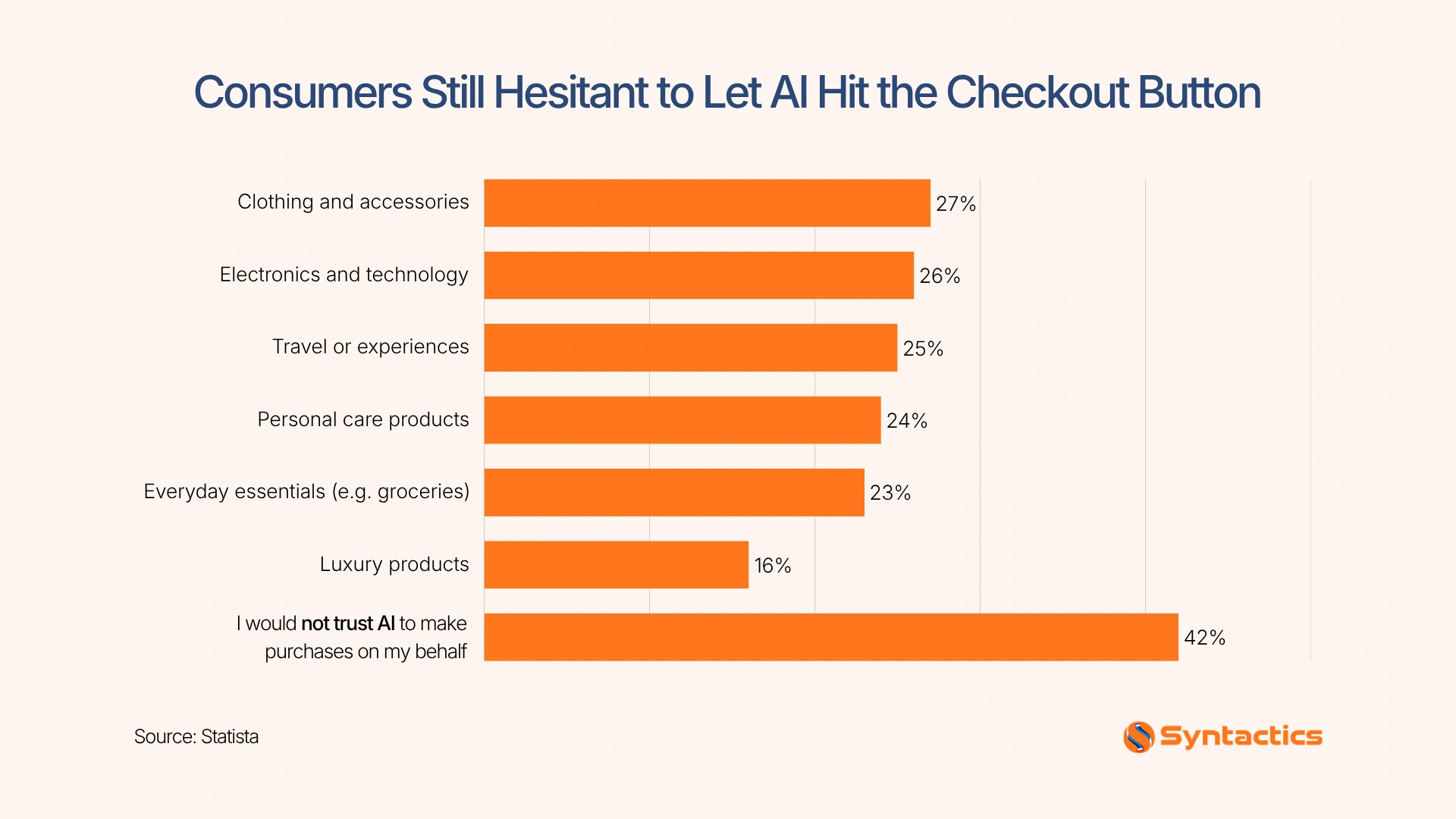
Consumer trust is another consideration. According to Statista, 42% of U.S. consumers would not trust AI to make purchases on their behalf. This hesitation makes it clear that purchasing permissions, reliable transaction records, and accessible customer support are especially important as agent-assisted shopping develops.
If you’re working with an eCommerce website builder in the Philippines, consider how well the platform supports checkout controls, transaction records, and integrations with customer support tools.
Regardless of your platform, set clear return and refund policies, keep order records accessible, and make customer support easy to reach. Lastly, test unusual checkout scenarios and monitor order issues as agent-driven purchases become more common.
Source: Statista
What This Means for Non-Shopify Stores
WooCommerce and custom ecommerce sites can also prepare for AI-assisted shopping, even without Shopify’s specific WebMCP checkout implementation. Start by making product information accurate, organizing variants consistently, and presenting shipping, payment, and return policies in accessible language.
If you’re working with eCommerce website design services in the Philippines, consider how structured product data, accessible page content, and predictable checkout steps could support future AI integrations. Avoid building around one agent or standard alone; interoperability and human oversight remain important as the technology develops.
Conclusion
Shopify AI agents are creating new ways for customers to move from product discovery to checkout. To prepare, review your product information, payment flows, and purchasing safeguards so customers can complete orders with confidence.
Syntactics, Inc. can help you assess your store’s technical setup and prepare for emerging commerce integrations. As a trusted web design agency in the Philippines, we provide Shopify development and eCommerce solutions tailored to your business requirements. Our experienced team can help you build a more reliable, user-friendly store that’s better prepared to support emerging AI shopping experiences and deliver smoother customer journeys.

FAQs About Shopify AI Agents
How to use eCommerce AI agents?
You can ask an AI shopping agent to find products, compare options, or help manage a cart. Depending on its capabilities and the store’s support, it may also assist with checkout after you review and authorize the purchase.
Does an AI agent need buyer approval to place an order?
Yes, the buyer needs to confirm the purchase before the agent submits the order through the supported checkout flow. Certain payment authentication steps and other interactions may also require the buyer to take direct action.
Which merchants are eligible?
Eligibility depends on Shopify’s supported checkout configurations and the specific agent workflow. Merchants should consult Shopify’s Checkout WebMCP documentation for current requirements and limitations.

About Ladymieh Naallatan
Related News:
The Web Developer’s SEO, AEO and GEO Checklist



Analyzing Social Media Post Performance with SEMrush

Functional Testing: Meet Business Requirements!








Comment 0