

WordPress Maintenance Plan Checklist: Updates, Backups, Security, and Performance
A WordPress maintenance plan keeps your core software, plugins, themes, backups, security, and performance checks on a consistent schedule. Without regular upkeep, outdated components can expose your website to security threats, compatibility issues, and avoidable downtime.
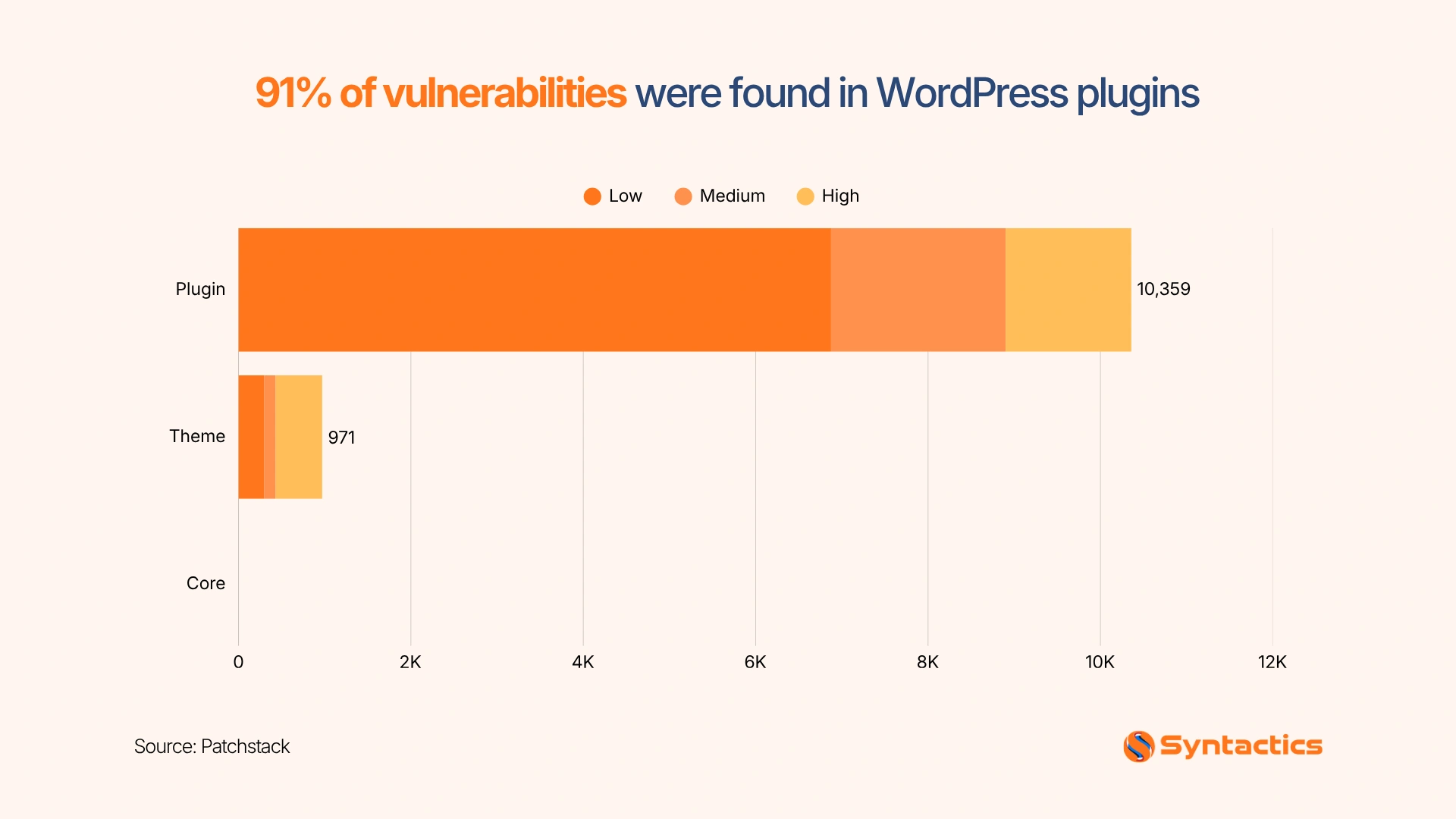
Patchstack’s 2026 State of WordPress Security report found that 91% of vulnerabilities disclosed in the WordPress ecosystem in 2025 affected plugins. This finding reinforces the need to monitor third-party components and apply security updates promptly.
A structured WordPress website maintenance plan helps you identify problems early, protect business data, and keep essential features working. Use this checklist to organize recurring tasks, evaluate service providers, and determine which maintenance activities your business needs.
Source: Patchstack
Key Takeaways
- 31% of analyzed breaches began with vulnerability exploitation (Verizon).
- Schedule core, plugin, and theme updates, then test them before deployment.
- Store backups offsite and verify that you can restore them.
- Monitor security threats, user permissions, website speed, and uptime.
- Keep PHP and database versions compatible with supported WordPress releases.
Updates for Core, Plugins, and Themes
Start by establishing a consistent update schedule. WordPress core, plugins, and themes receive security patches, bug fixes, and compatibility improvements at different times. Review available updates weekly and prioritize urgent security patches based on severity and exposure.
Before changing a live website, create a staging environment that mirrors its essential features. Test updates there, paying particular attention to contact forms, payment gateways, navigation, and other business-critical functions. If an update causes problems, roll back to the previous working version or restore a verified backup.
Additionally, maintain an inventory of installed plugins and themes. Remove components you no longer need, and replace abandoned plugins with actively maintained alternatives. If you work with a WordPress website design company, coordinate major updates with the developers to reduce compatibility issues and protect custom functionality.
Backups You Have Restored
After establishing an update routine, prepare for unexpected issues with a reliable backup and recovery process. As such, include these tasks in your maintenance checklist:
- Back up essential files: Save your WordPress database, media uploads, themes, plugins, and relevant configuration files.
- Set a backup schedule: Back up your website at least daily if it changes regularly. Online stores with frequent orders may need more frequent database backups to minimize data loss.
- Store backups offsite: Keep copies in a separate, secure location with restricted access so a server failure or security incident does not compromise every backup.
- Set a retention period: Decide how long to keep backup copies based on your website’s activity, recovery needs, and storage capacity.
- Test restoration quarterly: Restore a backup in a staging environment and verify that your database, media, user accounts, and essential features work correctly.
Remember: A successful backup doesn’t always guarantee a successful recovery. So, test your backups regularly to ensure you can restore your website when you need to.

Security Monitoring and Cleanup
With recovery procedures in place, focus on preventing and detecting attacks. Your website security practices should include malware scans, login protection, vulnerability alerts, and regular reviews of administrator accounts and user permissions.
Verizon’s 2026 Data Breach Investigations Report found that 31% of analyzed breaches began with vulnerability exploitation. These findings demonstrate why businesses need timely patching and continuous security monitoring.
For businesses working with web design and development services in the Philippines, maintaining strong security practices helps protect customer information and preserve website reliability.
Use strong passwords and multifactor authentication where available, remove unnecessary accounts, restrict administrator privileges, and investigate unfamiliar files or unexpected website changes. Lastly, document security incidents and the steps required to contain them.
Performance and Uptime Checks
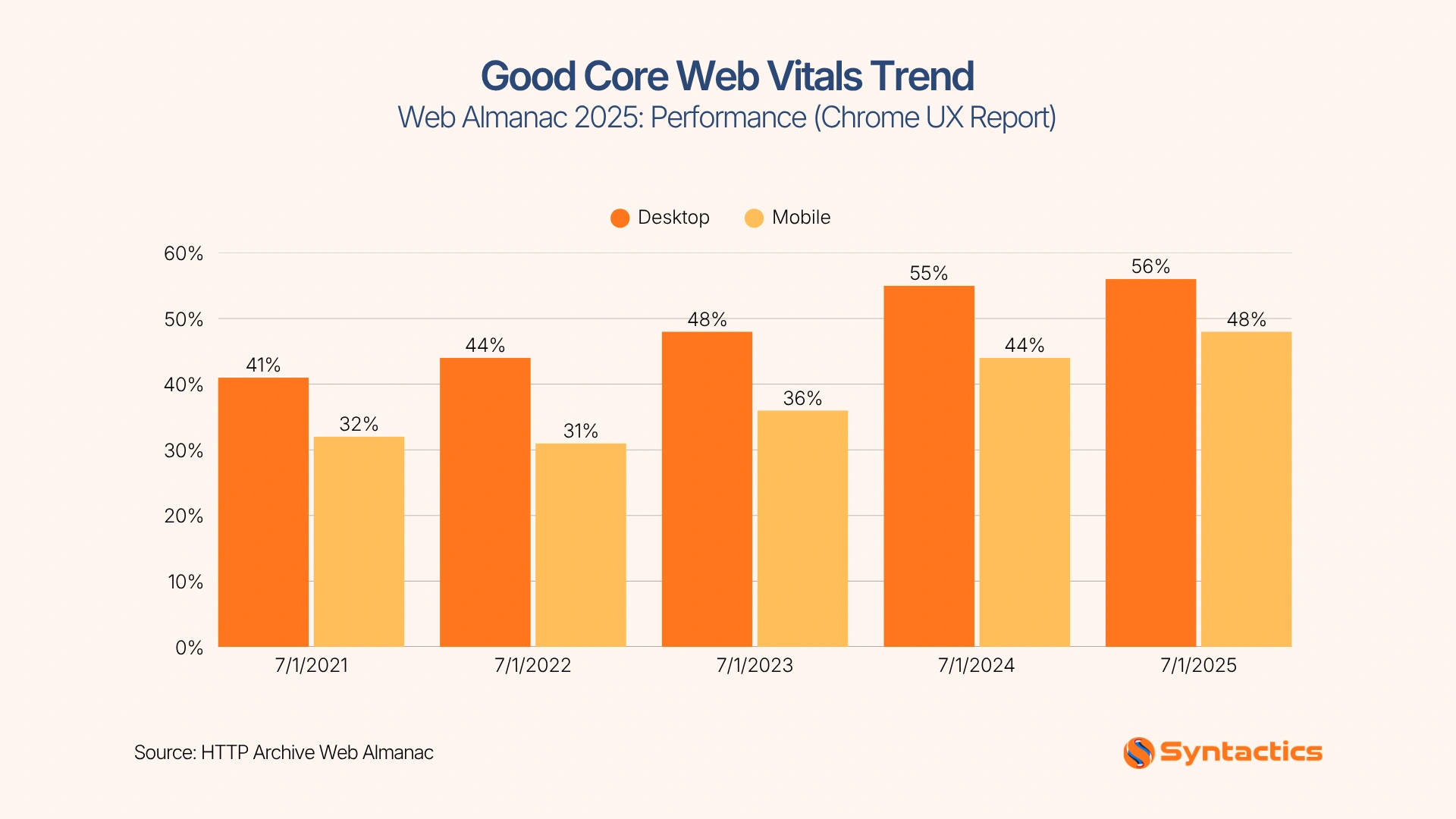
Regularly review your website’s loading speed, interactivity, visual stability, and uptime to catch technical problems before they affect visitors. The HTTP Archive Web Almanac reports that 48% of desktop websites passed all three Core Web Vitals in its 2025 dataset. This benchmark shows why ongoing performance monitoring matters, especially for mobile visitors.
Google’s Core Web Vitals documentation explains how to assess these performance metrics. Include the following tasks in your WordPress website maintenance checklist:
- Monitor Core Web Vitals: Review real-user data when available and identify pages that consistently perform poorly in loading speed, interactivity, or visual stability.
- Optimize images and caching: Compress oversized images, review caching settings, and remove unnecessary database records when safe.
- Check website uptime: Configure monitoring alerts to detect outages and help your team investigate availability issues quickly.
- Test after updates: Check page speed, navigation, contact forms, and other essential features after major plugin, theme, or hosting changes.
- Review performance trends: Compare results over time to identify recurring slowdowns and determine when your website needs further optimization.
Source: HTTP Archive Web Almanac
Hosting Stack: PHP and Database Versions
Your maintenance plan needs to cover the hosting environment as well as the WordPress dashboard. PHP and database versions affect compatibility, security support, and the ability to run current WordPress releases.
Check the official WordPress server requirements to confirm the recommended software versions. Ask your hosting provider which PHP and database versions it supports, when it applies security patches, and how it handles upgrades.
Test major environment changes in staging before applying them to the live website. Keep a rollback option available in case your theme or plugins become incompatible. Your maintenance provider should also monitor software end-of-life dates and plan upgrades before unsupported versions create security or operational problems.

Plan Tiers, Pricing Factors, and Response Times
Once you understand the technical work involved, compare service tiers against your website’s needs. The table below provides a sample framework of a website maintenance package.
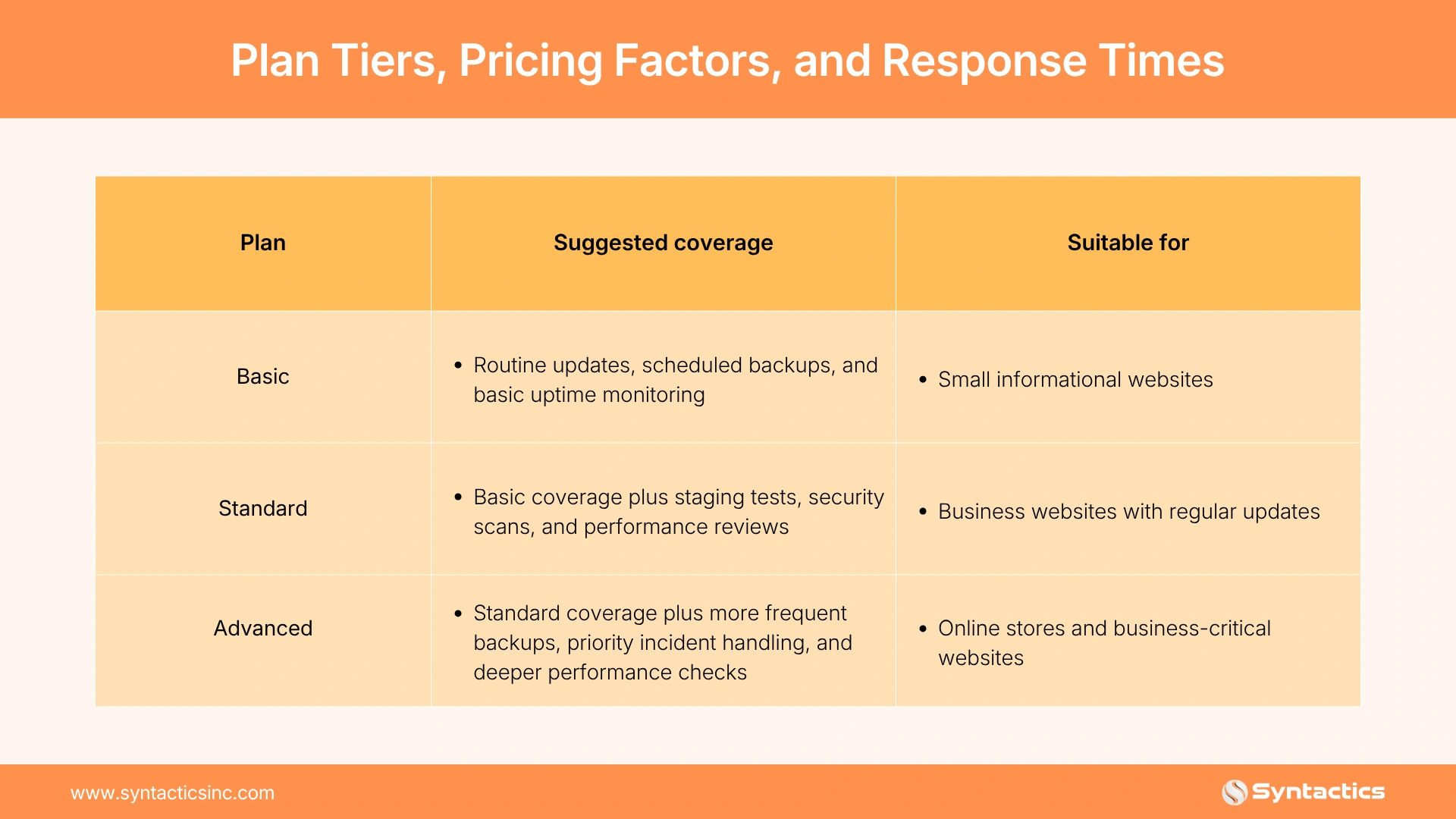
Actual pricing depends on the number of websites, plugin complexity, ecommerce functions, backup frequency, reporting requirements, and support hours. Emergency response commitments and restoration assistance can also affect the cost.
If you’re comparing WordPress website maintenance providers in the Philippines, assess their technical expertise, communication practices, and documented service commitments alongside their prices.
Questions to Ask Any Provider
Before signing a maintenance agreement, ask these five questions:
- How often do you back up our files and database, and do you test restorations?
- Do you test updates in staging before applying them to the live website?
- What reports will we receive, and how often will you deliver them?
- What response time can we expect during an emergency or outage?
- How do you evaluate, update, replace, or remove vulnerable plugins?
Clear answers help you compare providers based on accountability, recovery readiness, and the support your business will receive.
Conclusion
A consistent WordPress website maintenance routine helps you reduce avoidable outages, identify security issues earlier, and resolve technical problems faster. Review your checklist monthly and adjust it as your website adds features, processes more transactions, or changes hosting environments.
Syntactics, Inc. can help businesses evaluate their website requirements and determine the technical support they need. Our WordPress design and development services can complement a maintenance strategy when your site requires technical improvements or new functionality. With the right support, you can keep your website secure, reliable, and performing well while focusing on growing your business.

FAQs About WordPress Website Maintenance
How to create a maintenance plan for WordPress?
List recurring tasks for updates, backups, security checks, performance monitoring, and uptime. Set a schedule for each task and assign responsibility for completing and verifying it.
Is a maintenance plan needed if the host offers backups?
Yes, because backups alone do not cover plugin updates, security monitoring, or performance checks. Confirm how often your host backs up your site and test whether you can restore it successfully.
What happens if a plugin update breaks the site?
Restore a verified backup or roll back the update to return your website to a working state. Test updates in a staging environment first to reduce the risk of disrupting your live site.

About Ladymieh Naallatan
Related News:

Fashion Website Template Designs for eCommerce Sites

Why Outsource a Dedicated Project Manager?

Successfully Hosting Your Own Virtual Event

Complete More Projects With Virtual Project Managers








Comment 0