


Google Ads Retargeting: Turning Window Shoppers Into Buyers
Many shoppers visit a website to compare options and leave without making a purchase. Most of the time, it doesn’t mean they have lost interest in the products you offer. What they need is multiple interactions with your brand until they feel confident enough to make a purchase. This is where Google Ads retargeting takes place to reconnect with these visitors.
According to SQ Magazine, retargeted shoppers spend roughly 47% more on every order than first-time customers. So, apart from spending on ads to acquire new traffic, advertisers also shift their focus to people who have initially interacted with your brand. Doing so helps your business stay top of mind as they are still researching other options.
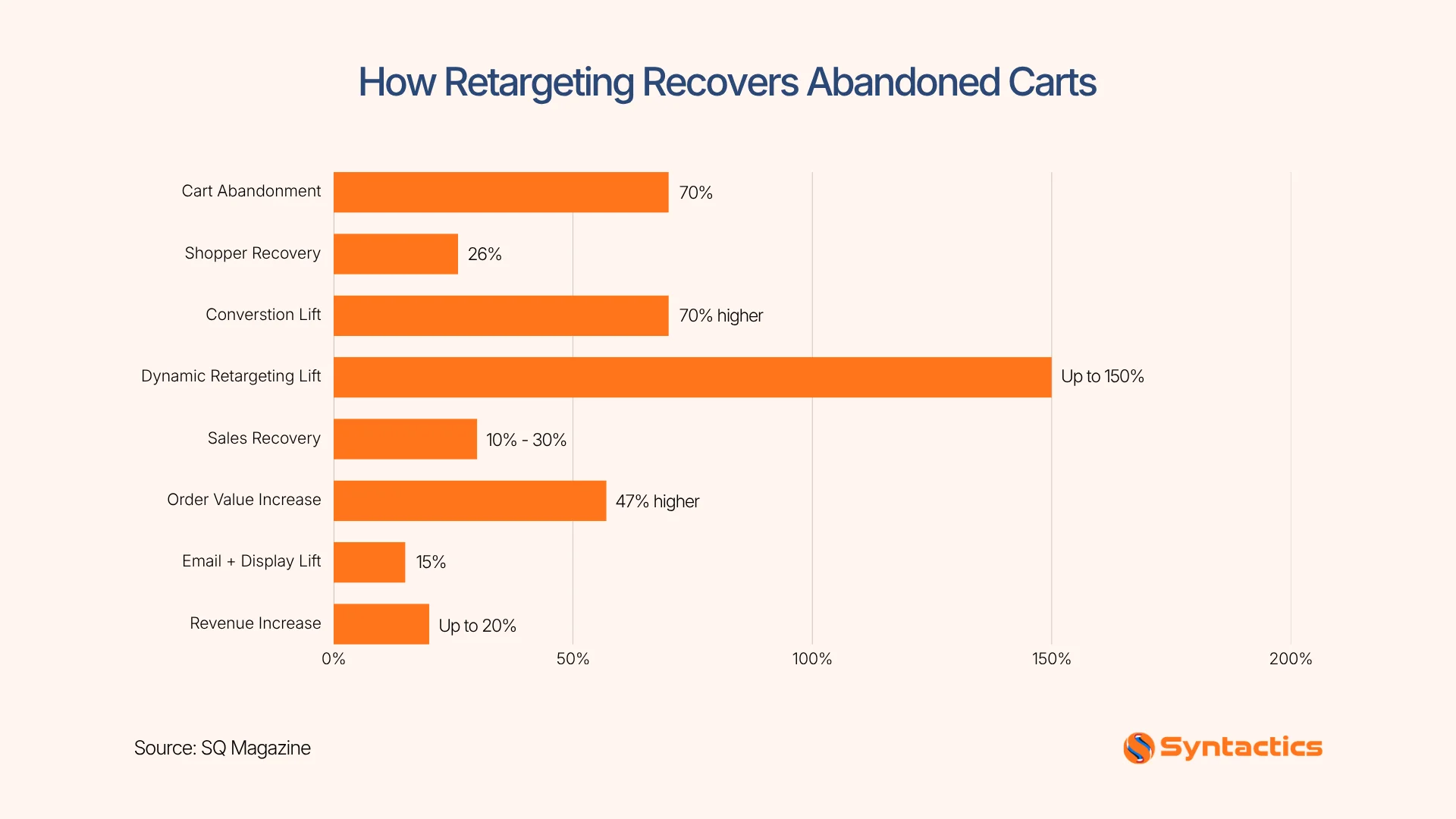
Source: SQ Magazine
Key Takeaways
- 80% of businesses using market segmentation reported increased sales, making it a valuable approach in remarketing campaigns. (American Marketing Association)
- Google Ads uses data segments to help advertisers target users based on first-party interactions across multiple campaign types.
- Audience segmentation allows you to deliver personalized ads that match each customer’s stage in the buying journey.
- Accurate conversion tracking, enhanced conversions, and proper tag setup help improve campaign optimization and bidding decisions.
- Avoid common retargeting mistakes by excluding converted customers, refreshing ad creatives, and tailoring messages to user intent.
- Managing ad frequency, audience duration, and campaign timing keeps your ads relevant and turns visitors into customers.
What Retargeting Actually Does for Your Campaigns
Google has renamed “remarketing lists” to “data segments” since 2021. It allows advertisers to organize first-party audiences based on interactions with their business across campaign types. Instead of showing generic ads, advertisers can reach audiences based on previous interactions with Google properties.
Its data can come from several sources, so it isn’t limited to interactions with Google properties. Depending on the setup and campaign type, advertisers can utilize information from their own website, app, or customer records. In addition, they can leverage data from YouTube activity and Analytics audiences.
This shift is especially important as privacy regulations aim to reduce third-party tracking. In fact, 52% of companies are making first-party data collection from digital experiences a top priority (Merkle, via CDP). Despite changes in privacy standards, PPC management experts continue to configure these audience signals correctly in their campaigns.
How Your Audience Segments Should Be Structured
A successful retargeting campaign starts with organized audience segmentation. To do this effectively, first sort your audiences by their journey. Hence, the Audience Manager functions by allowing advertisers to build data segments for Google Ads retargeting:
- Website visitors: People who visited specific pages or sections of your site.
- Mobile app users: People who interacted with your app.
- YouTube viewers: Users who engaged with eligible YouTube content.
- Customer lists: Existing customer information uploaded to Google’s requirements.
- Google Analytics audiences: Audiences created from relevant Analytics activity.
Once these segments are in place, it helps to understand how they function at different levels of buying intent. For example, someone who viewed your pricing page is much closer to making a decision than someone who only visited your homepage. Meanwhile, a user who abandoned a shopping cart may need a final push to complete the transaction.
One benefit of market segmentation is that it increases sales for 80% of businesses (American Marketing Association). That’s why you tailor your approach based on behavior and intent. Some of these examples include:
- Homepage visitors who may need educational content that reintroduces your brand.
- Product viewers who benefit from testimonials, reviews, and product comparisons.
- Cart abandoners who often respond best to limited-time offers or reminders.
- Previous customers who may be more receptive to complementary products.
Google generally requires at least 100 active users within the last 30 days for data segments to serve across Search, Display, and YouTube. Hence, smaller websites may need to combine related audiences or wait until a segment reaches the required size before it can be utilized.
When structured this way, retargeting becomes a guided journey to achieve higher conversions in Google Ads. Businesses working with a digital marketing company in the Philippines and around the world can also further refine these segments in campaigns.
Matching Your Message to Someone in the Funnel
Audience segmentation only works when messaging matches user intent. Someone who just discovered your brand should not receive the same advertisement as your paying customer. To simplify, consider this flow in the customer journey:
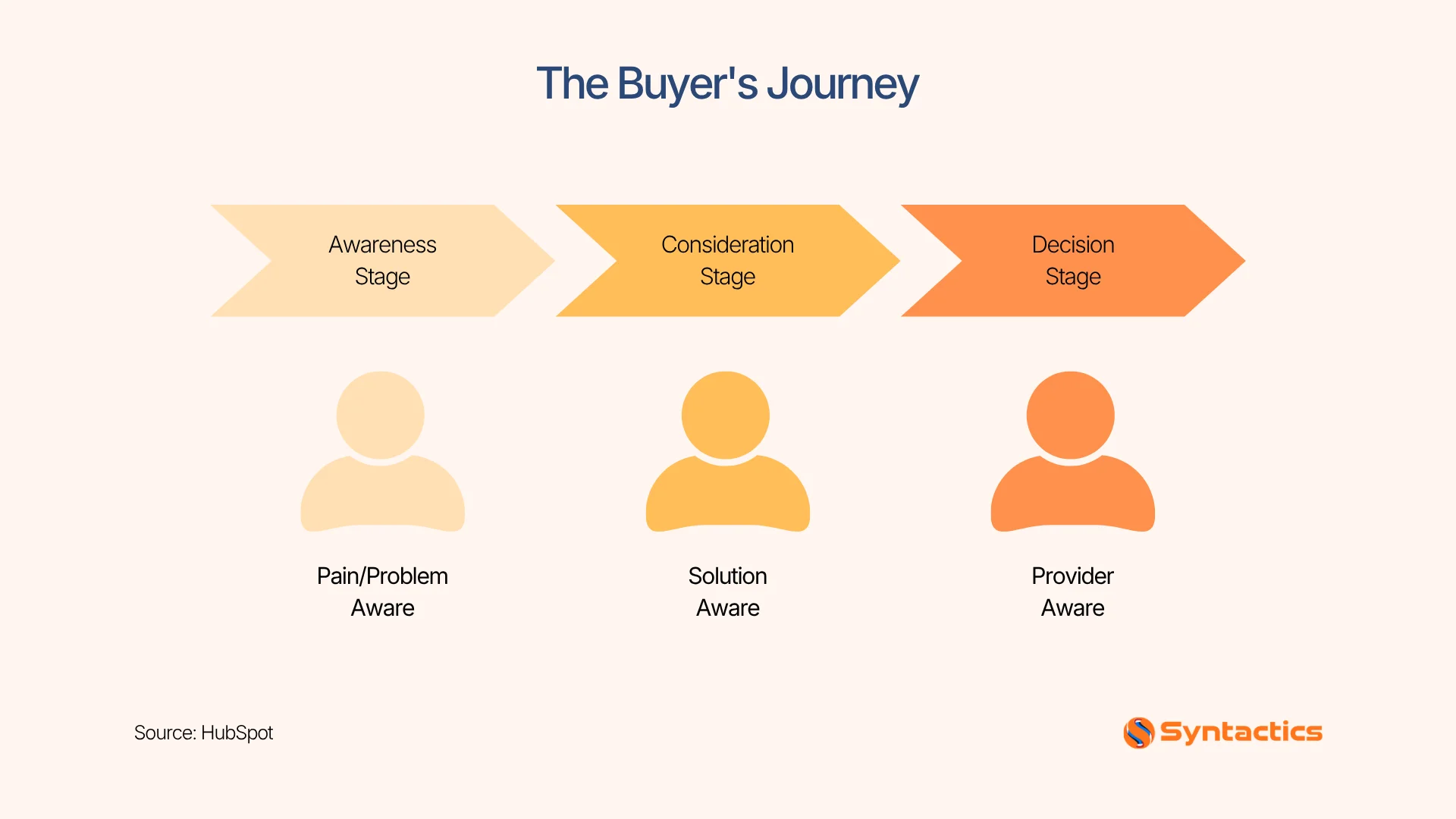
Source: HubSpot
Showing the right retargeting content in Google Ads helps you evaluate ad performance to improve relevance and click quality. As such, marketers create multiple ad variations tailored to different buyer journeys.
Your Quick Measurement-Readiness Checklist
Before launching your retargeting ad campaigns, verify the infrastructure and integrated tools for tracking performance metrics. To guide you, here’s a quick checklist used by PPC advertising teams in the Philippines and around the world:
- CRM integration
- Conversion events
- Enhanced Conversions
- Google Tag implementation
- Consent Mode configuration
- Offline conversion imports (if applicable)
Accurate measurement lets you automate bidding toward meaningful business outcomes. Conducting a regular audit of conversion tracking is the key to effective PPC campaigns, because it minimizes inaccurate data.
Mistakes to Avoid That Break Retargeting Campaigns
Here are common mistakes that Google Ads experts avoid to achieve a successful retargeting ad campaign for your business:
Showing the same message to all visitors
Receiving an aggressive sales message after reading one piece of informative content can create a poor customer experience. Not every visitor is ready to buy, and pushing hard sales too early can further discourage engagement. Instead, refine your ad copy to gradually guide users based on their level of interest.
Failing to exclude converted customers
Showing the same display ads to an already existing customer creates friction in their experience. For this reason, existing customers are placed in different categories, such as:
- Upselling
- Cross-selling
- Renewals
- Repeat purchases
- Loyalty campaigns
If you neglect proper exclusion, you risk paying to target people who have already completed your desired action. Hence, proper audience management is needed to ensure ads are shown only to users who still need to convert.
Not refreshing ad creatives regularly
According to EMarketer, seeing the same ad too often makes 60% of adults less likely to buy a product or service. To address this problem, refreshing ad visuals and refining your messaging help maintain attention and improve click-through rates. Regular creative updates also allow you to test new angles and improve performance over time.
Ignoring audience duration and intent
A customer researching a specific product may respond better to educational case studies before being asked to purchase. If this timing is ignored, ads can quickly feel irrelevant or intrusive, leading to disengagement with your brand. To avoid this, it is best to align audience duration with buying intent by regularly reviewing user behavior data and remarketing windows. That way, each user receives messaging that matches their stage in the decision-making.
Get Your Ad Frequency and Timing Right
Here’s a quick guide on balancing ad relevance, frequency, and timing so your ad feels helpful and less intrusive:
Step 1: Define Your Audience Type
Start by identifying your retargeted user groups that require different timing strategies, such as:
- Cart abandoners: Test shorter windows immediately after abandonment. Then, adjust strategies based on conversion data.
- High-value purchase prospects: Consider longer periods when the product or service requires more research.
- Existing customers: Use occasional reminders, upsell messages, renewal notices, or loyalty offers based on purchase behavior.
Step 2: Set Appropriate Audience Duration
Adjust how long users stay in your retargeting list based on their buying cycle. Shorter durations work for fast decisions, while longer durations are better for complex or expensive products.
Step 3: Manage Frequency Caps When Available
Limit how often your ads are shown to the same user within a specific time period. This is one of the ways to prevent ad fatigue and ensure your brand remains helpful rather than intrusive. Manual frequency caps are primarily available for eligible Display and Video campaigns. Hence, it is not represented as a universal control across all Google Ads campaign types.
Step 4: Align Campaign Timing With Intent
Schedule your ads based on user behavior patterns. For example, show reminders shortly after cart abandonment, or space out ads for users still in the research phase.
Step 5: Monitor and Adjust Performance
Continuously review campaign data to see how users respond to different timing and frequency settings. Adjust your strategy if engagement drops or if users begin ignoring your ads.
Step 6: Test Before Scaling
Run controlled tests with different frequency levels and audience durations. This helps you identify the most effective balance before increasing your budget or reach.
By following these steps, advertisers can fine-tune their retargeting strategy to improve engagement and avoid overwhelming potential customers.
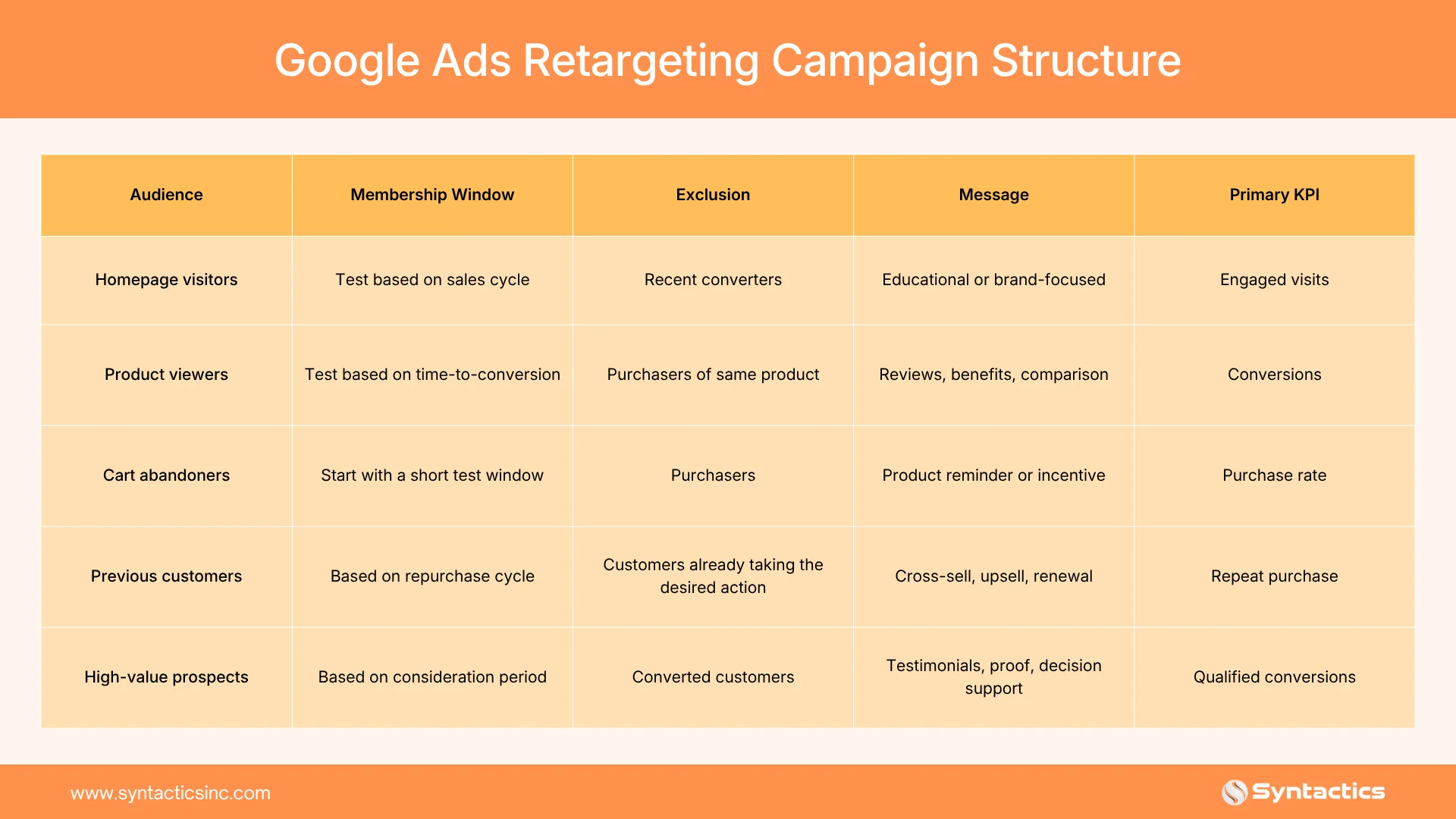
Google Ads Retargeting Campaign Structure
A simple campaign structure can help advertisers connect audiences with appropriate messages and KPIs. Here’s a quick table to keep you guided:
Conclusion
Retargeting campaigns in Google Ads are one of the ways to reconnect with customers who initially showed interest in your business. It works best when paired with audience segmentation, relevant messaging, accurate conversion tracking, and well-timed ad delivery. Together, these elements transform missed opportunities into valuable conversions.
For maximum results, choose an experienced ad services partner that specializes in PPC campaign management. At Syntactics Inc., we help businesses develop data-driven advertising strategies that continuously improve performance and ROI. See how our team can help you build high-performing campaigns that achieve better results.

Frequently Asked Questions (FAQs)
Does retargeting only work on the Google Display Network?
No, data segments in Google Ads can be used across Search, Display, YouTube, Demand Gen, Shopping, and Performance Max campaigns.
How to effectively utilize remarketing ads?
To effectively utilize your remarketing campaign, segment your audience based on user behavior to match their buying journey. For maximum results, monitor conversions, refresh your creatives regularly, and adjust audience duration and frequency.
How long should a Google Ads retargeting audience last?
The ideal audience duration depends on your sales cycle. Short purchase cycles typically perform well with 7 to 30 days, while longer buying decisions often benefit from 30 to 90 days.

About Jalou Batilong
Related News:


The Complete Guide to Fixing Duplicate Content











Comment 0