


Google Ads Launches New “Text Guidelines” to Refine AI Ad Copy
Google Ads introduces Text Guidelines, helping advertisers refine AI-driven ad copy for stronger branding and compliance.
Google is now rolling out a new “Text Guidelines” feature in Google Ads, a tool introduced at the Think Retail event in September 2025. This campaign-level tool allows advertisers more control over how Google’s AI generates text-based ad assets, specifically in Performance Max and AI Max for Search campaigns.
Designed to strengthen brand alignment and compliance, the feature enables marketers to define tone, messaging, and style preferences before AI produces ad copy. This helps businesses maintain brand consistency while taking advantage of Google’s AI capabilities for faster campaign execution.
Currently in Beta for English campaigns, Text Guidelines apply specifically to text customization within responsive ad formats. This update reflects Google’s ongoing effort to balance automation with advertiser control, particularly for businesses prioritizing brand integrity and measurable outcomes.

TABLE OF CONTENTS
How the Text Guidelines Feature Works
This feature is found within campaign settings, where text customization is enabled. Advertisers can input clear parameters or “rules” that guide how AI-generated ad copy should be created.
For example, you can:
- Specify preferred tone of voice, such as professional, conversational, or promotional.
- Identify keywords, brand terms, or disclaimers that must appear in every ad.
- Exclude words or phrases that don’t align with brand identity or compliance standards.
- Ensure ad text adheres to industry-specific regulations, such as those in healthcare or finance.
Once set, Google’s AI uses these guidelines to generate copy that matches your campaign goals while respecting brand and legal boundaries. It helps advertisers maintain creative consistency across ads while still leveraging automation for speed and scalability.

What Do Google Ads Text Guidelines Mean for Businesses
As AI continues to shape digital advertising, many businesses face a common challenge: maintaining brand consistency while automating ad creation. The Text Guidelines feature addresses this by giving advertisers more authority over the messaging that represents their brand.
With this update, companies can ensure that every AI-generated ad aligns with their voice, compliance requirements, and customer expectations. This is especially valuable for industries where precision in communication is critical. This includes the finance, healthcare, and legal sectors, where a single word choice can influence credibility or compliance.
Beyond control, this new feature also enhances campaign performance. Ads that stay true to brand tone to build stronger audience trust and engagement, leading to better Click-Through Rates (CTRs) and conversions. In short, Text Guidelines bridges automation and authenticity, allowing businesses to scale efficiently without sacrificing quality.
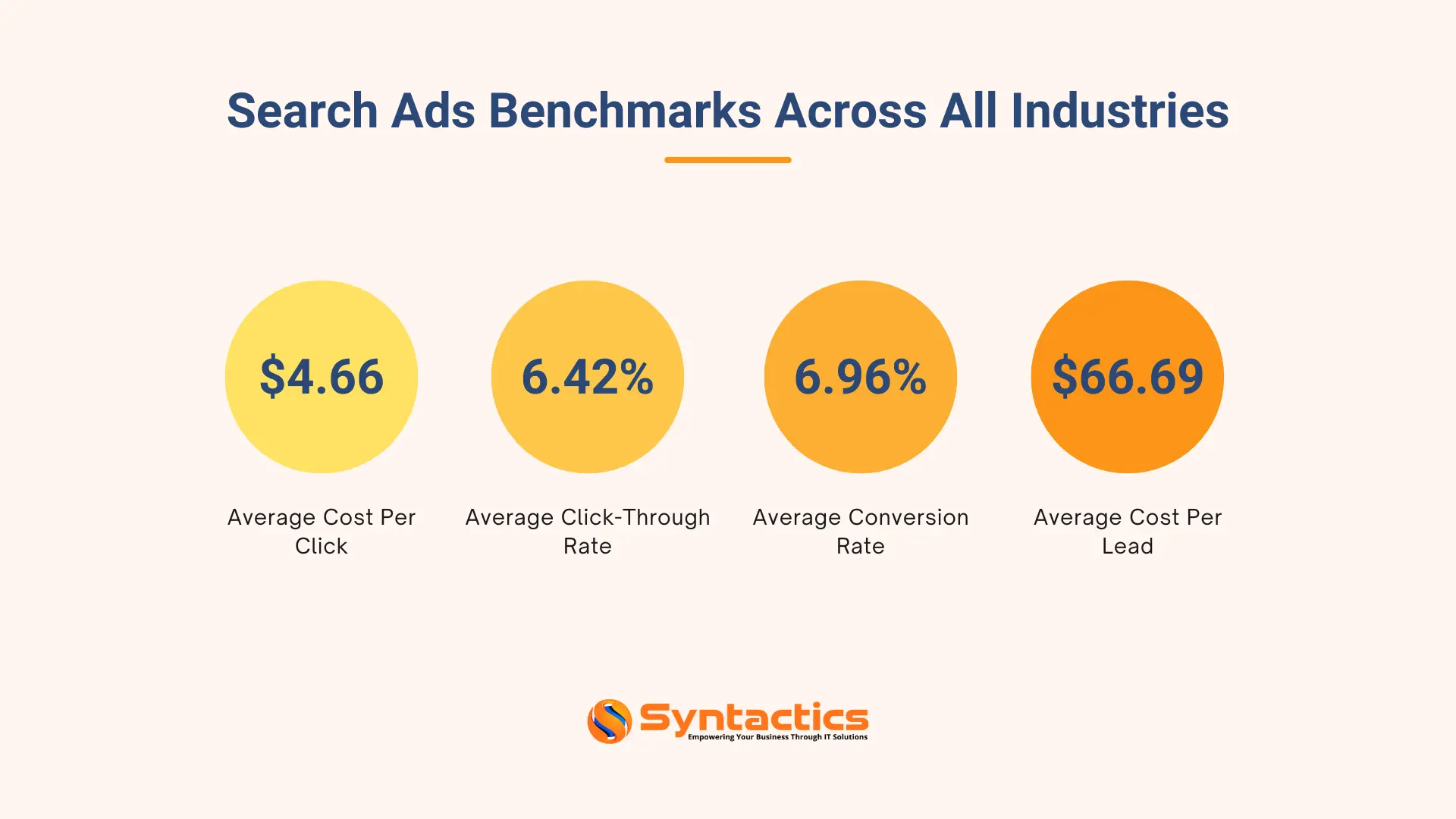
Source: WordStream
The Bottom Line
Text Guidelines highlights Google’s move toward smarter, brand-safe automation. By blending AI efficiency with advertiser control, businesses can preserve authenticity and compliance even in automated campaigns. This feature empowers marketing teams to refine AI-generated assets while maintaining creative and regulatory standards.
Optimize your campaigns for better performance and control as Google continues improving automation. Syntactics, Inc. can help you harness these updates to achieve smarter, more strategic advertising results through our expert PPC management services.

FAQs About Google Ads Text Guidelines
What is Google Ads’ Text Guidelines feature?
It’s a campaign-level tool that lets advertisers set specific rules or preferences for how Google’s AI generates text-based ad assets.
Where can I find the Text Guidelines option?
The feature appears in campaigns with text customization enabled, particularly in Performance Max and AI Max for Search campaigns.
Is the Text Guidelines feature available to all advertisers?
Currently, it’s in Beta, so access may be limited to select advertisers or regions as Google continues testing.

About Jalou Batilong
Related News:







Comment 0