

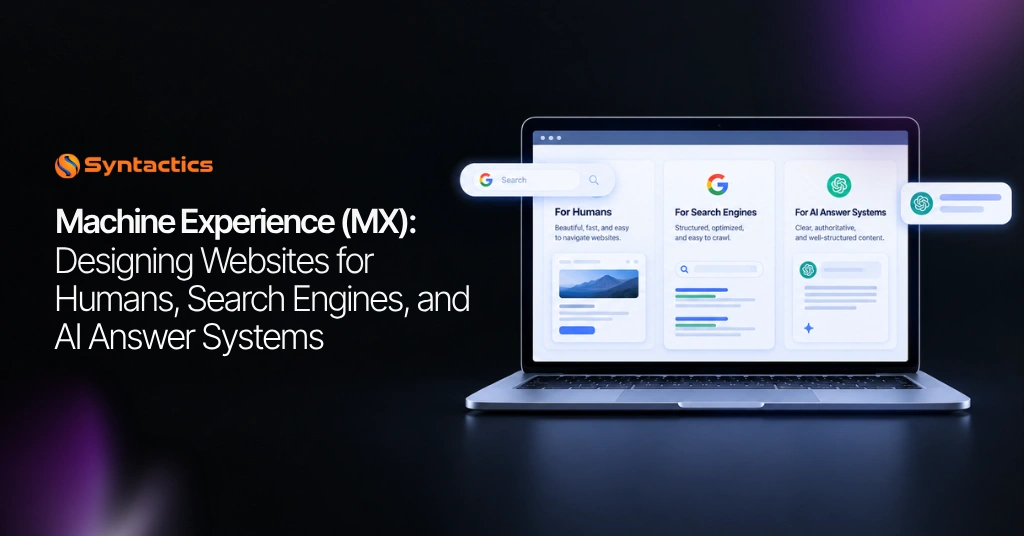
Machine Experience (MX): Designing Websites for Humans, Search Engines, and AI Answer Systems
Business websites function to communicate with the person looking at the screen. Search crawlers, accessibility technologies, browser tools, and AI answer systems rely on their content and structure to relay accurate information. So, if the website’s structure isn’t cohesive, it gives visitors a reason to leave.
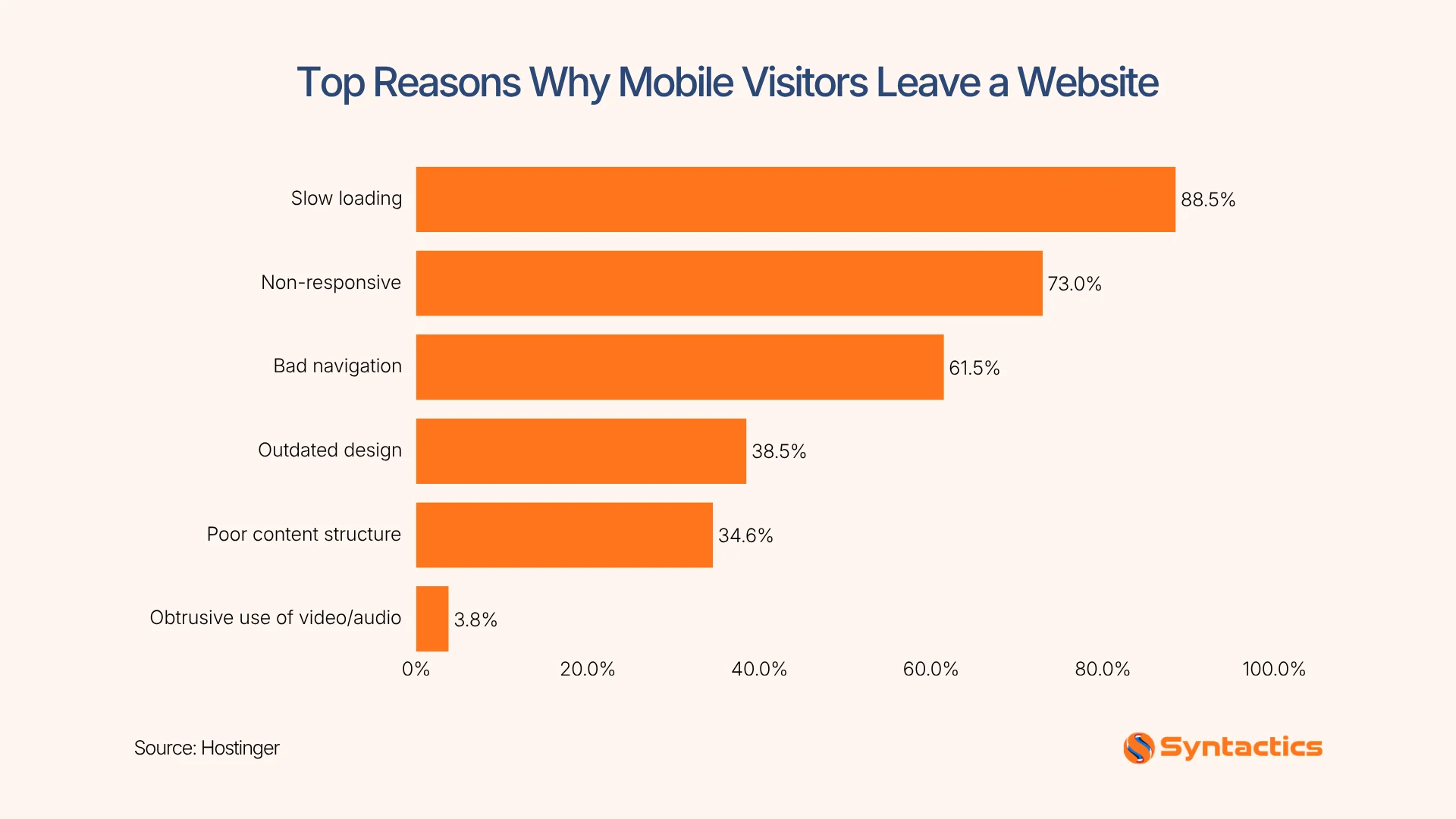
According to Hostinger’s Web Design Statistics, poor content structure is one reason visitors leave your website. This means a polished interface does not compensate for an unclear machine experience that even machines struggle to retrieve and interpret. Hence, businesses need professional web design that makes sense to people and systems.
Source: Hostinger
Key Takeaways
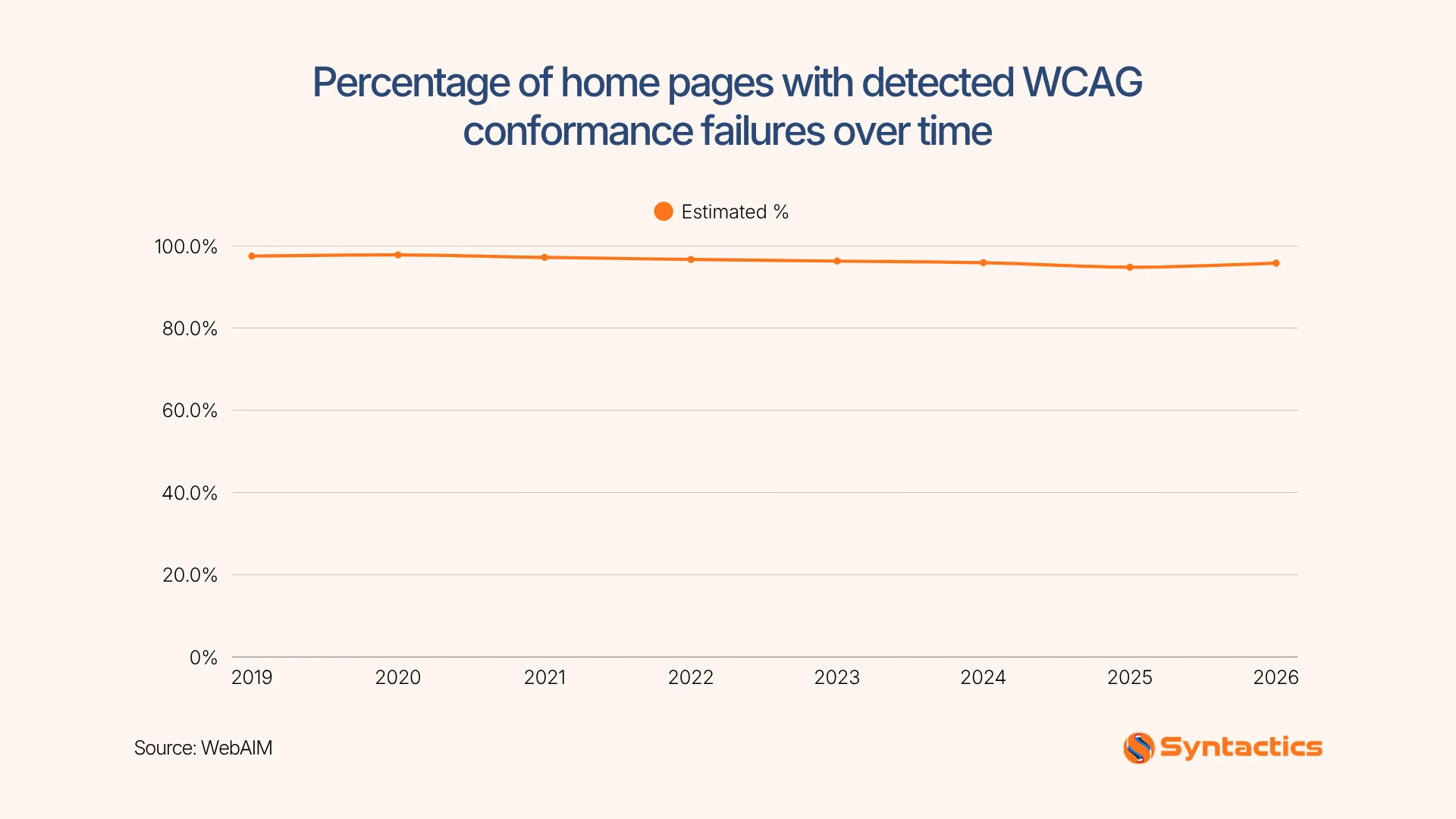
- 95.9% of home pages had WCAG failures, highlighting the need for an accessible website design. (WebAIM)
- Machine Experience (MX) optimizes website content and technical structure for clear interpretation by users, search engines, accessibility tools, and AI.
- Semantic HTML, logical headings, descriptive links, accurate metadata, and structured data improve website clarity and support usability.
- Clear definitions and consistent terminology help machines understand your business information.
- Regular MX audits help keep a website aligned with user needs and business goals.
What is Machine Experience in Web Design
Machine Experience (MX) is an approach to organizing website structure and technical signals for machines to accurately interpret information. It does not replace UX, SEO, or accessibility in web development. Instead, it recognizes that modern websites serve multiple interpreters.
The concept becomes more relevant as AI becomes part of digital experience. It does not mean every AI system reads websites the same way. However, it reinforces the broader movement toward machine-assisted information discovery and interpretation.
Why MX Matters for Your Business Website
Customers may discover a company through traditional search, while others through means that extract information from online sources. Websites with vague service descriptions create problems at this stage. For instance, if the site does not clearly distinguish its services, the system has less reliable information to work with.
Accessibility also provides a useful benchmark. According to WebAIM, 95.9% of home pages have WCAG failures. While this does not automatically translate into visibility problems, structural barriers still affect interaction with web content.
So, if you’re thinking about investing in website design in the Philippines, include machine readability in the planning process.
Source: WebAIM
The Technical Foundations of an MX-Ready Website
The W3C’s Web Content Accessibility Guidelines establish accessibility by being perceivable, operable, understandable, and robust. This technical structure provides the foundation for machine clarity. A strong implementation relies on key practices across structure, accessibility, SEO, and user experience, such as:
- Crawlable URLs: Ensure search engines can access and index your pages easily.
- Reliable Rendering: Guarantee content loads across devices and browsers.
- Semantic HTML: Use native elements (<header>, <nav>, <main>) to convey page meaning.
- Logical Heading Levels: Organize content with proper hierarchy from <h1> to <h6>.
- Enhanced User Navigation: Enable seamless site traversal for screen readers and keyboard users.
- Useful Alt Text: Describe visual context clearly for non-text content.
- Descriptive Links: Write link text that clearly explains its destination.
- Accurate Metadata: Supply clear titles and descriptions for search and discovery.
- Appropriate Structured Data: Implement schema markup to help search engines understand page context.
Structured data provides additional information about entities such as organizations, products, articles, events, and services. According to The Web Almanac, 94% of mobile and 92% of desktop pages passed its Lighthouse viewport-tag check. Proper data structure improves machine understanding, but it does not guarantee enhanced search features or AI citations.
How to Create Content and Entity Design for Machine Clarity
With the technical foundation in place, website content needs the same level of precision. In this phase, businesses identify their organization, services, products, locations, professionals, and relationships between them.
Here’s how you can create content and design focused on machine clarity:
Establish Clear Definitions for Every Business Entity
Give each key entity a clear purpose and description. A company’s About page can explain its overall identity. Meanwhile, individual service pages define what each service includes, who benefits, and where it is available.
Use Consistent Terminology and Descriptive Internal Links
Consistent terminology reduces ambiguity on your website. For this reason, business websites use consistent official names for your business, products, services, locations, and roles. This approach aligns web developer teams and content writers around a shared structure for your international or Philippine-based business.
Support Claims With Evidence and Updated Information
Clear definitions are more useful when businesses support their claims with credible evidence. Potential customers evaluate technical specs, case studies, certifications, and proven results.
How MX, UX, SEO, and Accessibility Work Together
MX is built to complement other practices for designing accessible websites such as UX, accessibility, and SEO. It makes websites easier for people and machines to interpret through descriptive links, heading hierarchy, clear page titles, and structured content.
Combining human-centered design and machine-readable structures boosts visibility without compromise. Here’s how they complement each other in developing a professional web design:
Use Overlapping Practices to Improve Website Clarity
Many technical and content practices benefit multiple audiences. For instance, semantic HTML helps assistive technologies identify page structure that provides meaningful signals. Meanwhile, logical headings make pages easier to scan for visitors and navigate for screen reader users. Lastly, descriptive internal links clarify destinations, and accurate metadata helps visitors understand a page’s purpose.
Prioritize Human Understanding and Conversion
A machine-friendly design simplifies the web experience to support your business goals. A page should clearly show its value, guide user actions, and offer easy paths to convert. Teams do regression testing, navigation, and core tasks with users before changing markup or layout to preserve an engaging human experience.
Common Website Structures That Confuse Machines
Some professional web design choices can make valuable business information harder to discover. Some common examples of such cases include:
- Text embedded exclusively in images
- Generic anchor links
- Unreliable JavaScript rendering
- Unoptimized web vitals
- Inconsistent business details
- Misleading structured data
- Excessive markup
- Disconnected page architecture
These problems do not always produce an obvious visual error. However, the underlying structure makes important information difficult for other systems to retrieve.
How to Audit a Website for MX Readiness
Here’s a simple guide on how you can audit your website for MX readiness:
- Crawlability: Check robots.txt, sitemaps, status codes, canonical URLs, and optimized hyperlinks.
- Rendering: Verify that essential content appears without depending unnecessarily on client-side JavaScript.
- Structure: Review headings, semantic HTML, page titles, metadata, navigation, and descriptive links.
- Accessibility: Test keyboard navigation, image alternatives, color contrast, form labels, landmarks, and heading order.
- Entity clarity: Confirm consistent names, locations, services, products, people, and organizational relationships.
- Structured data: Validate schema markup to accurately represent visible page content.
- Content coverage: Identify the questions customers ask and determine whether the site answers them directly.
- Performance: Review loading behavior and technical performance because usability still influences the human experience.
- Business alignment: Prioritize changes according to visibility, usability, conversions, and business objectives.
The goal is to remove ambiguity and create a website whose meaning remains clear across different interfaces and technologies.
Build a Website That Works for People and Machines
A website designed for people, search engines, and AI answer systems needs more than an attractive interface. You need an expert development partner that integrates your business goals with content structure and user experience.
Fortunately, Syntactics, Inc. brings 26 years of experience and a global client portfolio to projects involving web design and development in the Philippines. Our experienced team can help you build professional web design that organizes information supported by search and machine interpretation. Your website can continue evolving alongside your business needs.
If you’re looking for web development that works for your business, get in touch with our dedicated team today!
Get Design and Functionality
Specific to your Brand!

Frequently Asked Questions (FAQs)
What makes a good web design for people, tools, and search engines?
A good web design combines clear navigation, accessible content, responsive layouts, and machine-readable structures. These elements help users and digital systems understand and interact with a website.
Does MX mean a website needs to use AI technology?
No, MX does not require a website to use AI technology. It focuses on organizing content and technical structures so machines can interpret information accurately.
Can MX improve a website’s accessibility?
Yes, MX supports accessibility through semantic HTML, logical headings, descriptive links, and clear navigation. These practices help systems interpret website content more effectively.

About Ladymieh Naallatan
Related News:


Leveraging A/B Testing for Higher Conversions


Coronavirus Phishing Scams and How to Avoid Them







Comment 0