

SEO Migration Checklist: The Complete Guide for Web Redesign
An SEO migration checklist is a step-by-step plan that helps protect your search rankings and organic traffic as you redesign, replatform, or rebuild a website. It includes pre-launch audits, URL mapping, redirects, technical SEO checks, and post-launch monitoring. Use this checklist before, during, and after any redesign project.
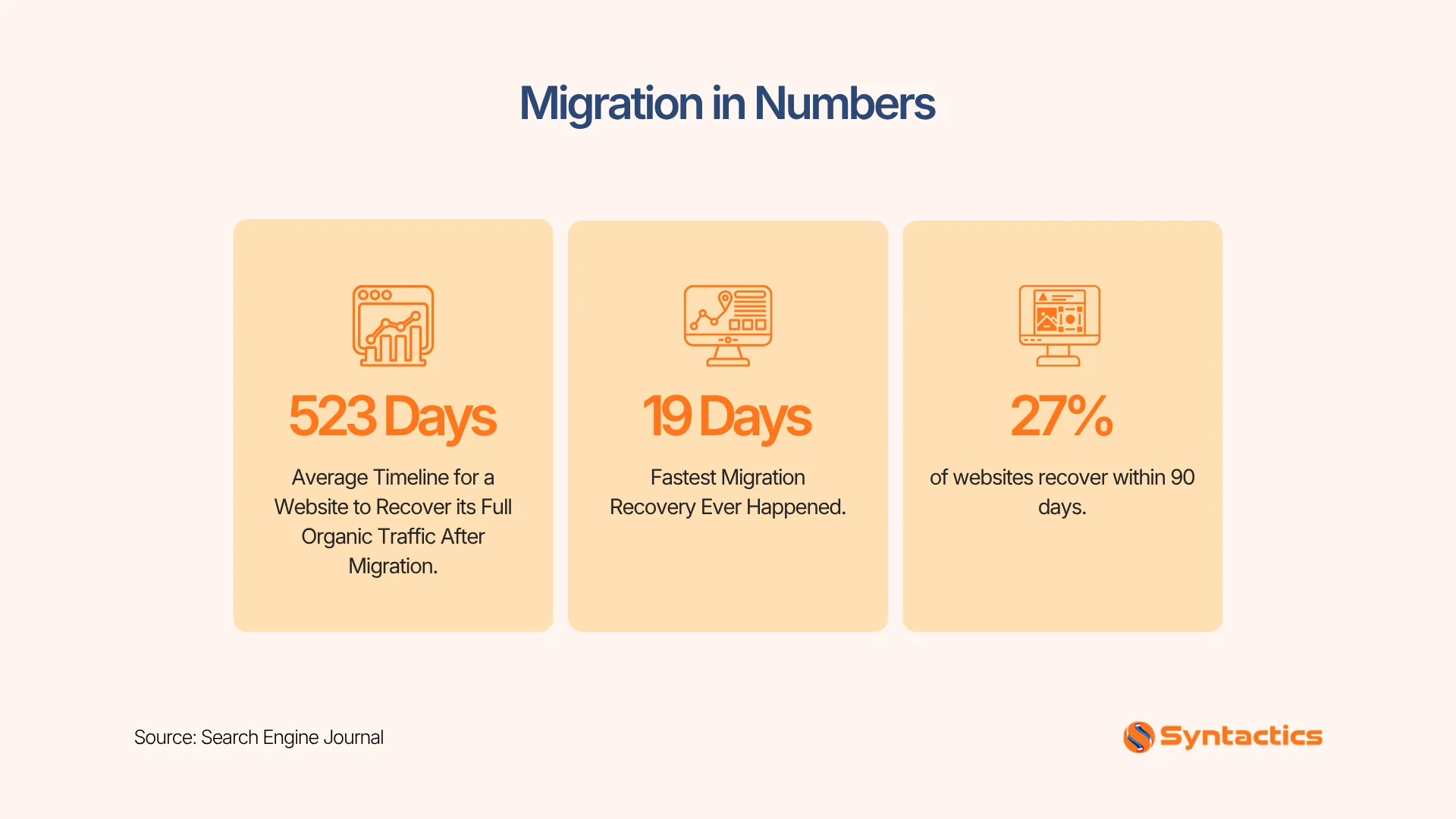
Source: Search Engine Journal.
Key Takeaways
- Redesigns without SEO planning can cause organic traffic losses between 30% and 70%.
- Most lasting damage comes from unredirected URLs, blocked indexing, or broken internal links, not from the new design itself.
- A full site audit and URL mapping document should happen before development starts, not after launch.
- Recovery typically takes two to four weeks when redirects and content are handled correctly, but can stretch to several months if not.
- Staging environment checks, especially the removal of the noindex tag, prevent the most common launch-day failures.
Why SEO Migrations Fail
Most SEO losses during a redesign are preventable. They happen when technical signals get disconnected from the new site version.
Common failure points include:
- Unredirected URLs. Old pages return 404 errors instead of pointing to their new equivalent.
- Noindex tags left active. Staging directives that block indexing accidentally carry over to the live site.
- Broken internal linking. Pages become orphaned when navigation and link structures change.
- Lost backlink equity. Pages that earn external links are poorly removed or redirected, wasting accumulated authority.
- Blocked indexation. Inconsistent canonicals, incorrect sitemaps, or JavaScript rendering issues hide content from crawlers.
Traffic loss ranges vary depending on how much of the site changes and how well the migration is planned. According to Shopify’s SEO guidance, a short-term change of 0-20% is normal in the first month after launch. Anything beyond that range usually signals a deeper technical issue.

Pre-Migration Phase (Before Development Starts)
Start your SEO work during the planning stage, not after the new site is finished.
Run a Full Site Audit
Crawl your whole site and export every indexed URL before making any changes. This gives you a backup in case anything gets lost.
Your audit should capture:
- Every current URL and its page type
- Title tags, meta descriptions, and heading structure
- Internal linking relationships between pages
- Current keyword rankings and organic traffic by page
Benchmark Performance Data
Get your performance data from Google Search Console and Google Analytics before you launch. This way, you’ll have a baseline to compare your recovery after launch.
Flag pages by:
- Organic traffic and click volume
- Conversion rate and revenue contribution
- Backlink count and referring domain quality
- Rankings for strategic target keywords
Build a Content and Keyword Inventory
Match each existing page to its main keyword and search intent. This helps you avoid keyword cannibalization and spot pages you can combine.
Decide on each page using this logic:
- Keep if it drives traffic, converts, or ranks for a strategic query.
- Merge if multiple pages target the same intent (redirect the weaker pages to the strongest one).
- Redirect if the content is moving to a new location.
- Remove only if the page has no traffic, no rankings, and no backlinks.
Create a URL Mapping Document
Build a table that links each old URL to its new destination before you start development.
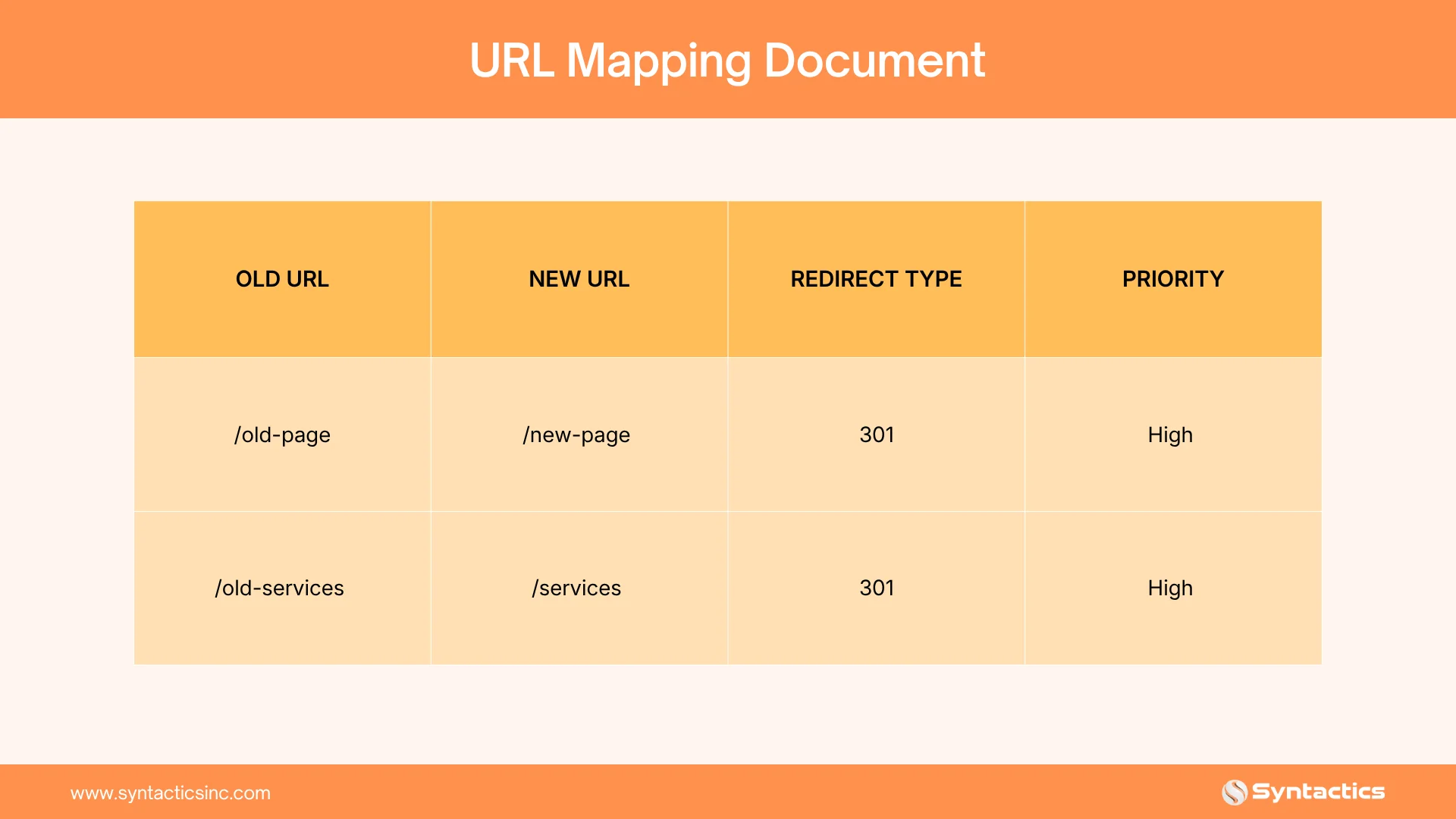
Keep URLs unchanged wherever possible. Unchanged URLs remove the need for redirects and eliminate a major source of migration risk.
Technical SEO Requirements Checklist
Technical elements determine whether search engines can crawl, index, and understand your redesigned site.
- Configure robots.txt correctly for staging and confirm it changes before production launch.
- Regenerate and submit an updated XML sitemap.
- Carry over canonical tags accurately on every page.
- Migrate structured data and schema markup (Article, FAQ, Organization, Product).
- Benchmark Core Web Vitals before development and test again before launch.
- Confirm mobile responsiveness and rendering across devices.
- Verify AI crawlers are not blocked, including GPTBot, ClaudeBot, PerplexityBot, and Google-Extended.
Core Web Vitals are a known ranking factor. Using new frameworks, large images, or too much JavaScript can slow down your redesigned site and lower your rankings.

Redirect Strategy Checklist
Redirects are the most important part of keeping your SEO value during a migration.
- Map every retired URL to a 301 redirect, not a temporary 302.
- Redirect each URL to its closest content and intent match, not just the homepage.
- Avoid redirect chains; always point A directly to its final destination, not through an intermediate page.
- Set up 404 monitoring to catch any URLs that were missed during the mapping process.
- Audit internal links so they point to new URLs, not old redirected ones.
- Verify high-value backlinks still resolve correctly after redirect implementation.
Even low-traffic pages deserve a redirect. They can carry backlinks or indexing signals that quietly support overall site authority.
Content Migration Checklist
Preserve the content elements that already earned rankings; don’t just move the words over.
- Transfer and update the meta titles and descriptions for every migrated page.
- Preserve or improve the existing H1-H3 heading hierarchy.
- Carry over image alt text and descriptive file names.
- Migrate FAQ content and any schema-eligible sections intact.
- Keep the length and depth of your main content the same unless you’re making improvements.
Staging Environment Checks (Pre-Launch Blockers)
These checks help you catch the mistakes that can cause the most damage if overlooked.
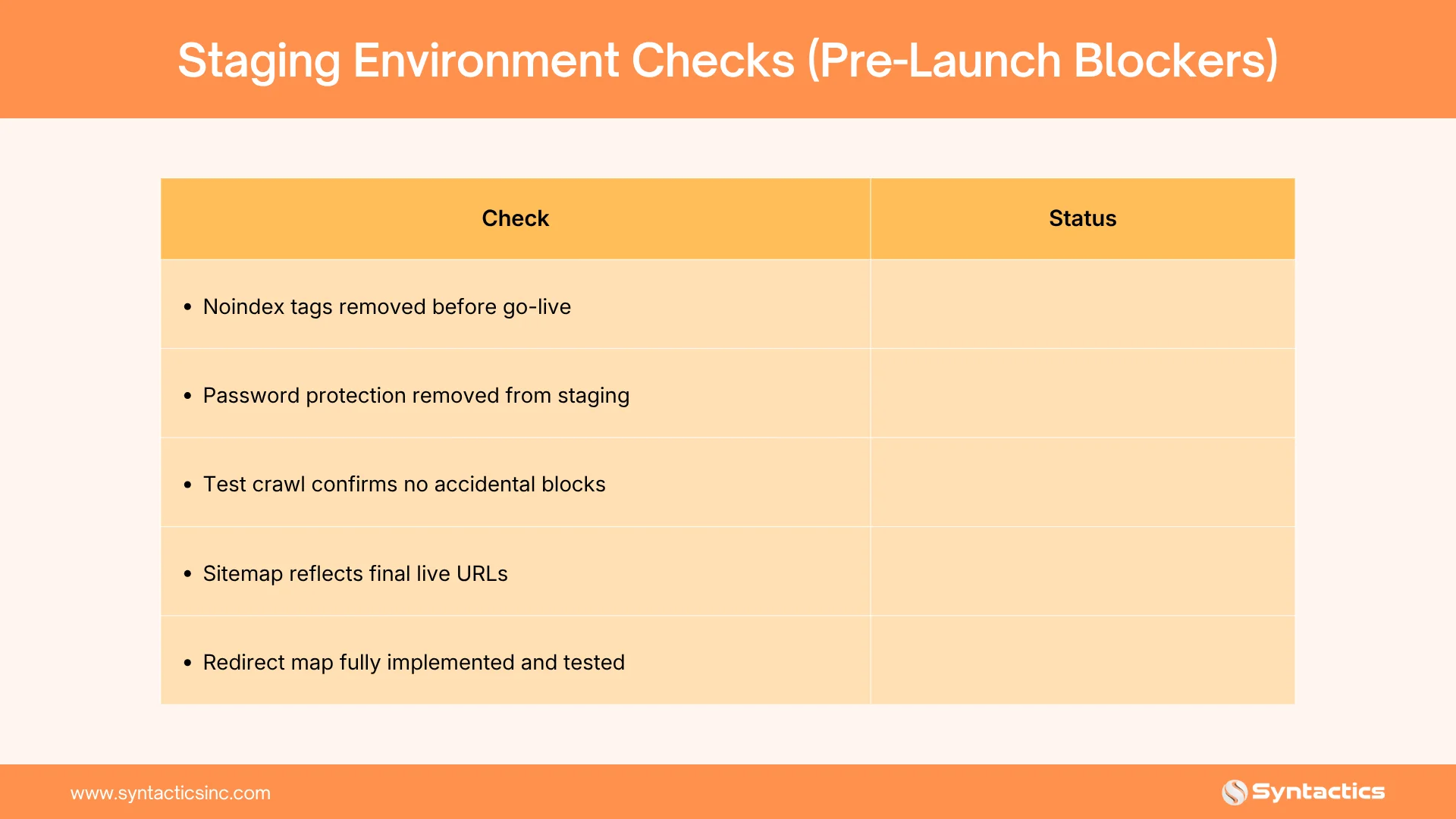
Leaving noindex tags active after launch is one of the most common and damaging redesign mistakes. Teams often add them during staging but forget to remove them before the site goes live.
Launch Day Checklist
- Re-submit your updated sitemap to Google Search Console and Bing Webmaster Tools.
- Request indexing for your highest-priority pages.
- Monitor server logs for crawl errors in real time.
- Confirm analytics and conversion tracking fire correctly on the new site.
- Spot-check redirects on your top 20 traffic-driving pages.
Post-Migration Monitoring (First 30 to 90 Days)
Recovery speed depends on how well the migration was executed, not on time alone.
- Check rankings and traffic daily for the first two weeks after launch.
- Review crawl errors in Search Console weekly.
- Monitor your backlink profile for lost or broken referring domains.
- Compare pre- and post-migration KPIs in a single summary table.
- Watch for soft 404s, pages that load but return no real content.
If you set up redirects and keep your content, most sites recover in two to four weeks as search engines recrawl. If the redesign isn’t handled well, it can take months to stabilize.
Conclusion
A website redesign should improve your rankings, not reset them. A smooth migration comes from careful planning: audit before you build, map every URL before launch, and keep a close eye on things afterward.
Work through this checklist step by step and make SEO part of your redesign plan from the start. Most ranking losses can be avoided if you handle redirects, technical SEO, and content with as much care as the new design.
Build your website with SEO woven into every stage of development. Syntactics offers SEO services in the Philippines, including migration planning and technical audits with every engagement. With SEO integrated throughout the project, your website is better prepared to maintain its search presence and attract qualified traffic from day one.
Track Your Migration Progress
Reading a checklist is one thing; working through it is another. Use the interactive tracker below to check off each task as you complete it. Your progress saves automatically in your browser.
Your progress is saved automatically in this browser. Clearing your browser data will reset it.
Frequently Asked Questions
How long does it take to recover SEO rankings after a redesign?
Well-executed migrations with proper redirects typically recover within two to four weeks. Poorly handled migrations can take several months.
Do I need to redirect every old URL?
Yes. Even low-traffic pages can carry backlinks or indexing signals that support your site’s overall authority.
Can I migrate a site without losing rankings?
Yes, if SEO is involved from the planning stage. Most losses come from missed redirects and blocked indexing, not the redesign itself.
Should I noindex my staging site?
Yes, during development, but confirm the noindex tag is removed before the site goes live. This is one of the most common launch-day failures.
Is some traffic fluctuation normal after a redesign?
Yes. A short-term change of roughly 0% to 20% in the first month is common. Larger or persistent drops usually signal a technical issue.

About Jalou Batilong
Related News:


The Importance of Content Updates in Website SEO

Professional Virtual Assistant Services: A Guide

6 Easy Ways to Set Up Ads on LinkedIn

Hiring a Software Developer: Dos and Don’ts









Comment 0