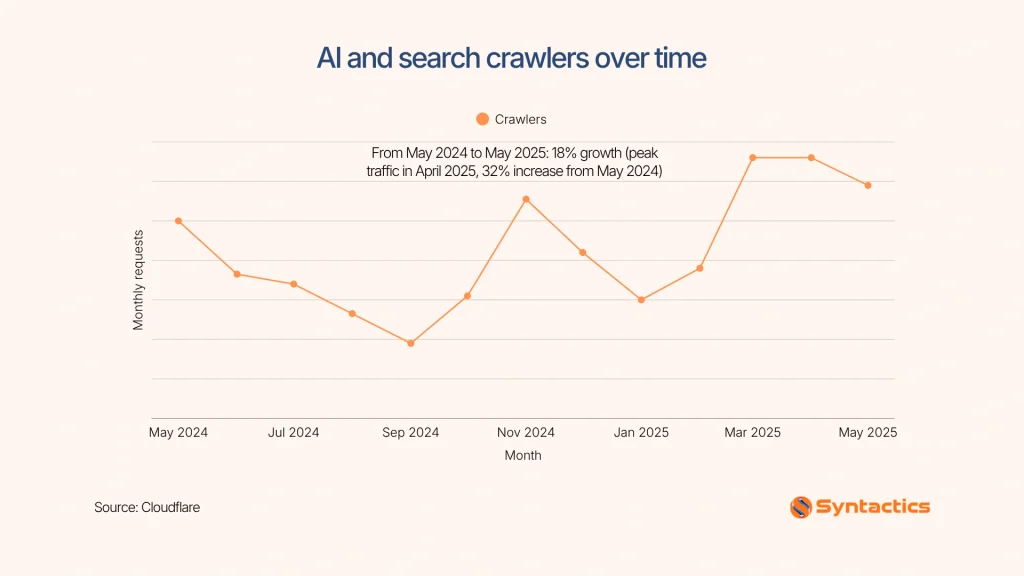
AI crawlers influence how websites supply information to search engines and generative AI platforms. In fact, Cloudflare reports these AI and search bots grew by 18% from May 2024 to May 2025. For this reason, websites are encouraged to allow these bots for AI-driven discovery.
A well-configured strategy from a technical SEO specialist separates these decisions instead of blocking every AI crawler by default. The goal is to manage access without unnecessarily sacrificing visibility, exposing restricted content, or treating a crawl directive as a security barrier.
Source: Cloudflare
Key Takeaways
- Cloudflare reports that automated traffic accounts for 54.7% of requests across its hosted websites. (NBC News)
- Distinguish AI training crawlers, search crawlers, and user-triggered fetchers to make informed decisions about which bots to allow or block.
- Allow search crawlers for AI-driven discovery and evaluate training crawlers based on content licensing, protection, and commercial priorities.
- Configure and test robots.txt carefully, then verify crawler identities, IP addresses, response codes, and activity over 14-day and 30-day periods.
- Review AI crawler policies quarterly and use authentication and server-side access controls to protect sensitive information.
3 Types of AI Bots and Their Purpose
Before editing robots.txt, identify AI crawlers’ impact on SEO. These AI platforms operate separate bots for training, search, and user-triggered requests. However, their policies and naming conventions can change.
Here are common types of AI bots that a technical SEO specialist deals with and their purpose:
Training Crawlers
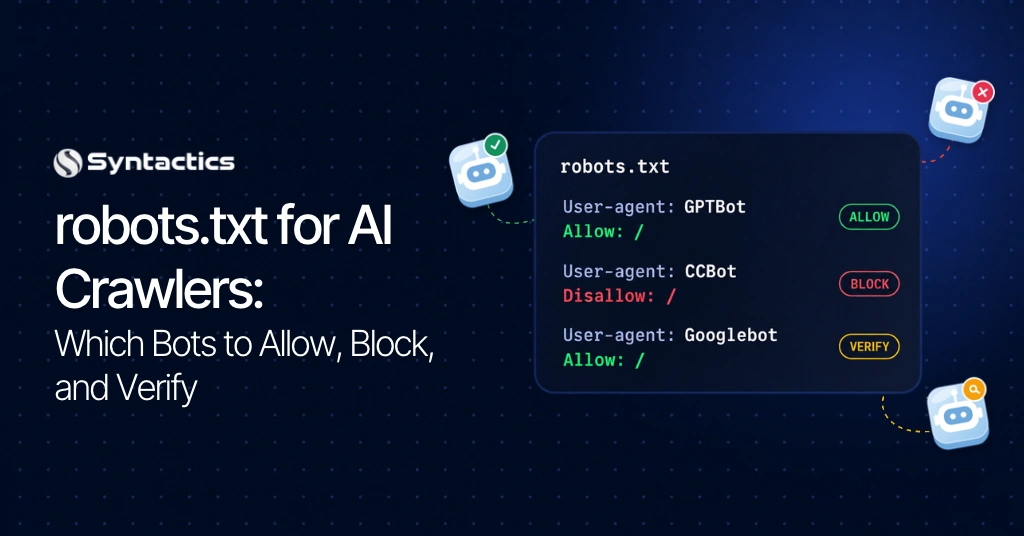
Training crawlers collect publicly accessible web content to improve your visibility in AI search. Examples of training crawlers include OpenAI’s GPTBot, Anthropic’s ClaudeBot, and Common Crawl’s CCBot. Blocking these crawlers can express a preference against future collection. However, it does not remove content previously collected or guarantee that a provider will delete existing training data.
Search Crawlers
Search crawlers help AI platforms discover and retrieve information for search experiences. According to OpenAI, their search bot functions by allowing website owners to permit ChatGPT search discovery while disallowing training-related crawling. Other examples of search crawlers include Claude-SearchBot and PerplexityBot.
User-Triggered Fetchers
Fetchers retrieve web pages in response to user requests instead of conducting routine indexing. Their access behavior and robots.txt policies differ by provider. So, always verify the current documentation before applying restrictions.
Some examples of fetchers include ChatGPT-User, Claude-User, and Perplexity-User. Two additional control tokens that deserve attention:
- Google-Extended: Controls certain uses of content for Google’s generative AI systems, but does not affect Google Search inclusion or ranking.
- Applebot-Extended: Controls certain uses of content by Apple’s generative AI features.
Note: Confirm every bot name and its stated purpose against the operator’s documentation immediately before publishing changes.
AI Crawlers to Allow or Block According to Goals
Once you know the different types of crawlers, you can then decide which access supports your objectives. Search and user-triggered crawling serve different purposes, reinforcing the value of separate rules. Here’s a quick overview of AI crawlers to keep you guided:
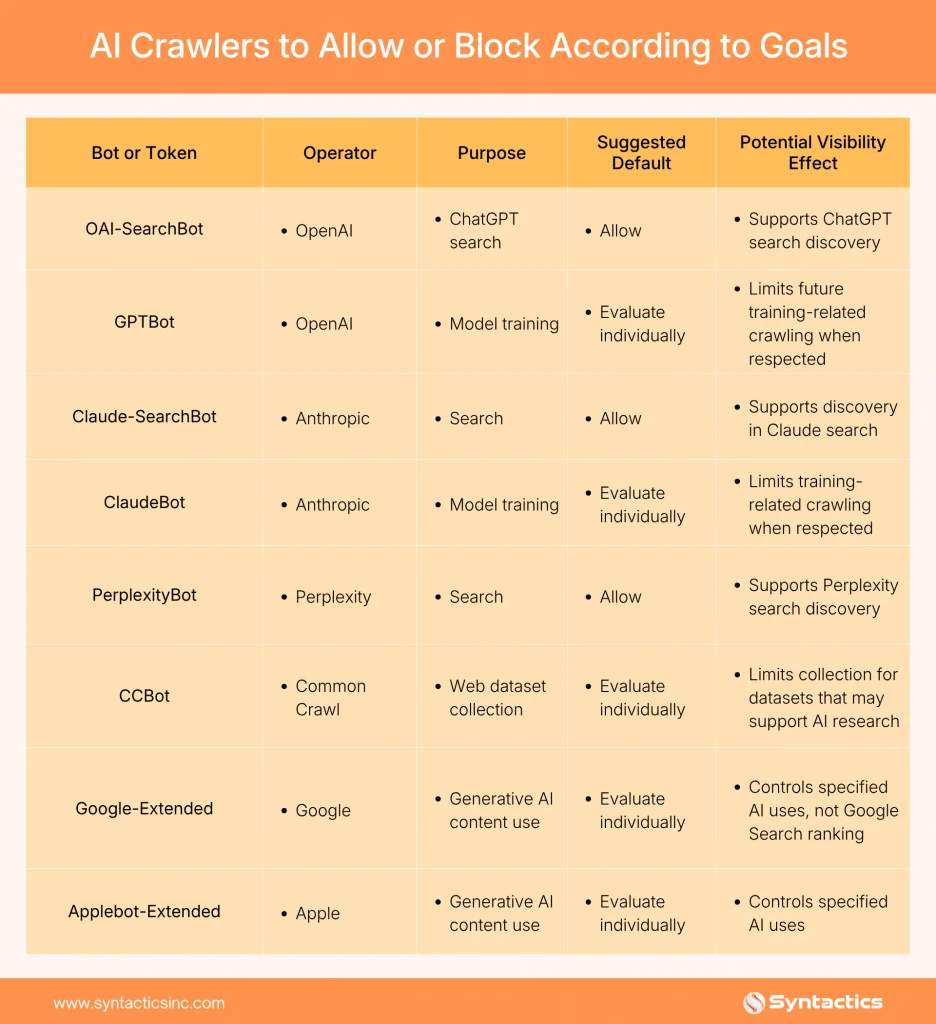
For service businesses and lead-generation websites, enabling search crawlers allows AI RAG systems to extract content from your page. Excluding them prevents a site from appearing in AI search answers, although navigational links may still appear.
Meanwhile, licensed publications, premium research, and gated resources can consider blocking relevant training crawlers. For instance, an SEO specialist in the Philippines can translate these requirements into a documented crawl policy. They help keep access decisions aligned with content licensing, contractual obligations, and business priorities.
Understanding the Limits of User-Triggered Fetchers
User-triggered fetchers retrieve web pages in response to user requests. However, AI providers also describe how these fetchers handle robots.txt differently. Hence, a technical SEO specialist reviews each vendor’s stated policy before deciding how to manage access.
- OpenAI (ChatGPT-User): OpenAI states that robots.txt rules might not apply to ChatGPT-User requests initiated by users.
- Anthropic (Claude-User): Anthropic states that its bots honor robots.txt directives.
- Perplexity (Perplexity-User): Reference Perplexity’s official crawler documentation for its current policy on user-triggered fetching.
These positions reflect each vendor’s stated policy and should not be treated as universal guarantees. Verify crawler identities, monitor server logs, and use authentication and server-side access controls to protect sensitive content and data independently of robots.txt.
Copy-Ready robots.txt Configurations
With the policy established, implement the smallest set of rules that meets your needs. The following examples illustrate two common configurations.
Example 1: Allow search crawlers and block selected training crawlers.
User-agent: OAI-SearchBot
Allow: /
User-agent: Claude-SearchBot
Allow: /
User-agent: PerplexityBot
Allow: /
User-agent: GPTBot
Disallow: /
User-agent: ClaudeBot
Disallow: /
User-agent: CCBot
Disallow: /
Sitemap: https://example.com/sitemap_index.xml
TIPS: For your practical use, replace example.com and the sitemap path with your actual website details. Add other rules only after verifying the relevant bot’s identity and purpose.
Example 2: Allow all crawlers by default.
User-agent: *
Allow: /
Sitemap: https://example.com/sitemap_index.xml
This configuration expresses a general crawl preference. It does not override more specific access restrictions, authentication requirements, or server-side controls.
Where to Edit and Validate the File
If you want to optimize performance in platforms like WordPress, use a supported SEO plugin’s robots.txt editor when available. You can also edit the file in the website’s server root through an authorized hosting or file-management interface. However, file editor availability may depend on the installation and configuration.
After making changes and updates, ensure you do any of the following:
- Save the file and fetch https://example.com/robots.txt directly.
- Confirm the live response contains the intended directives and returns successfully.
- Test representative URLs against the rules.
- Check for conflicting rules, unexpected redirects, and CDN or firewall overrides.
Google’s robots.txt introduction provides additional implementation guidance.
Verify AI Crawler Activity in Server Logs
According to Cloudflare reports, 54.7% of requests to a selection of websites it hosts are automated (H/T NBC News). Saved configuration does not always verify that crawlers have stopped or started visiting. It’s the server logs that provide the evidence.
To ensure AI crawlers are in place, take advantage of this verification workflow:
- Filter by user agent. Search access logs for tokens such as GPTBot, OAI-SearchBot, ClaudeBot, and PerplexityBot.
- Validate the source. Compare requesting IP addresses with each operator’s published ranges or verification guidance.
- Review status codes. Check whether requests return 200, 301, 403, 404, or 429. These responses record access, redirects, missing pages, blocking, or rate limiting.
- Compare 14-day and 30-day windows. Review request counts, requested paths, response codes, and verified bot identities before and after the change.
- Investigate discrepancies. A crawler continuing to appear may be using a different token, ignoring directives, or reaching the site through another route.
For deeper analysis, consider a dedicated log-file analysis to distinguish genuine crawling from impersonation or unwanted automated traffic.
Know What robots.txt Cannot Control
robots.txt manages crawling preferences. The noindex directive controls whether a crawler that accesses a page should include it in search results, subject to the relevant platform’s indexing rules. A blocked page cannot communicate its noindex meta tag to a crawler that cannot access it. So, if you need to prevent unauthorized access to confidential content, use authentication, authorization, and server-side access controls instead.
Firewalls and content delivery networks (CDNs) can block traffic independently of robots.txt. However, indiscriminate IP blocking may interfere with legitimate crawlers or prevent them from reading your directives. For cases like these, it is recommended that robots.txt be opted out as a crawl-management mechanism.
Establish a Quarterly AI Crawler Review Routine
Crawler names, policies, and infrastructure can change. For this reason, establish a recurring review. Here’s a quick guide you can follow:
- After Every Update: Fetch the live robots.txt file and test its rules.
- At 14 and 30 days: Compare crawler activity against the baseline.
- Monthly: Review access logs, response codes, and changes in crawler frequency.
- Quarterly: Recheck official documentation, bot names, and published IP verification methods. Test relevant AI search prompts to assess whether your important pages appear in results.
If you availed technical SEO services for your business in the Philippines or outside the country, clarify who owns the review, implementation, and monitoring tasks. This helps you document decisions for members to follow the same policy.
Get Expert Help Managing AI Crawler Access From Us!
Choosing which AI crawlers to allow or block does not imply restricting every bot or maximizing access to all of them. The key here is finding the right balance for your website’s content, search visibility, licensing requirements, and business goals.
A qualified technical SEO specialist can evaluate your website’s crawl rules and align them with your goals. They are also experts in identifying your site’s configuration issue with an established monitoring process.
Fortunately, Syntactics, Inc. offers comprehensive SEO packages for businesses in the Philippines and around the globe. Our SEO specialists in the Philippines develop practical and expert solutions without compromising your website’s access-control requirements. We assess your technical SEO requirements, validate crawler directives, and analyze server logs. See how our team can assist you by getting in touch with us today.
Elevate Your Brand In the Digital Landscape!

Frequently Asked Questions (FAQs)
What do SEO specialists focus on in technical SEO?
Technical SEO specialists tend to focus on identifying issues that prevent search engines from accessing, understanding, or indexing important pages.
Can a CDN override robots.txt rules?
Yes, content delivery networks can independently allow, block, or rate-limit crawler requests regardless of robots.txt directives. For guaranteed results, review both CDN settings and the live robots.txt file when crawler behavior differs from expectations.
Can I use different crawler rules for subdomains?
Yes, each subdomain can have its own robots.txt file with rules tailored to its content and business needs. Rules on one subdomain do not automatically apply to other subdomains.