

Reviewing AI-Written Code Before Launch: A QA and Security Checklist
AI-generated code can run correctly and may still contain security weaknesses, so you need a review step before every release. Veracode’s 2026 GenAI Code Security Report found that roughly 44% of AI code generation tasks introduced a known vulnerability in testing when no security guidance was provided.
That distinction is at the heart of AI code security. When you use AI coding tools to build an application, modify an existing website, or speed up development, your review needs to check more than whether the code works.
You also need to verify dependencies, access controls, input handling, secrets, configuration, and test coverage before users interact with the release. By applying these checks, you can catch vulnerabilities earlier, reduce security risks, and deploy more reliable applications with greater confidence.
Key Takeaways
- Out of 576,000 tested code samples, there were 5.2% hallucinated package rates for commercial models and 21.7% for open-source models (USENIX).
- Review AI-written code before every release, even when the application works as expected.
- Verify every dependency, package source, maintainer, version, and lockfile entry to reduce supply chain risks.
- Test authentication and access controls to prevent unauthorized users from reaching accounts, routes, or data.
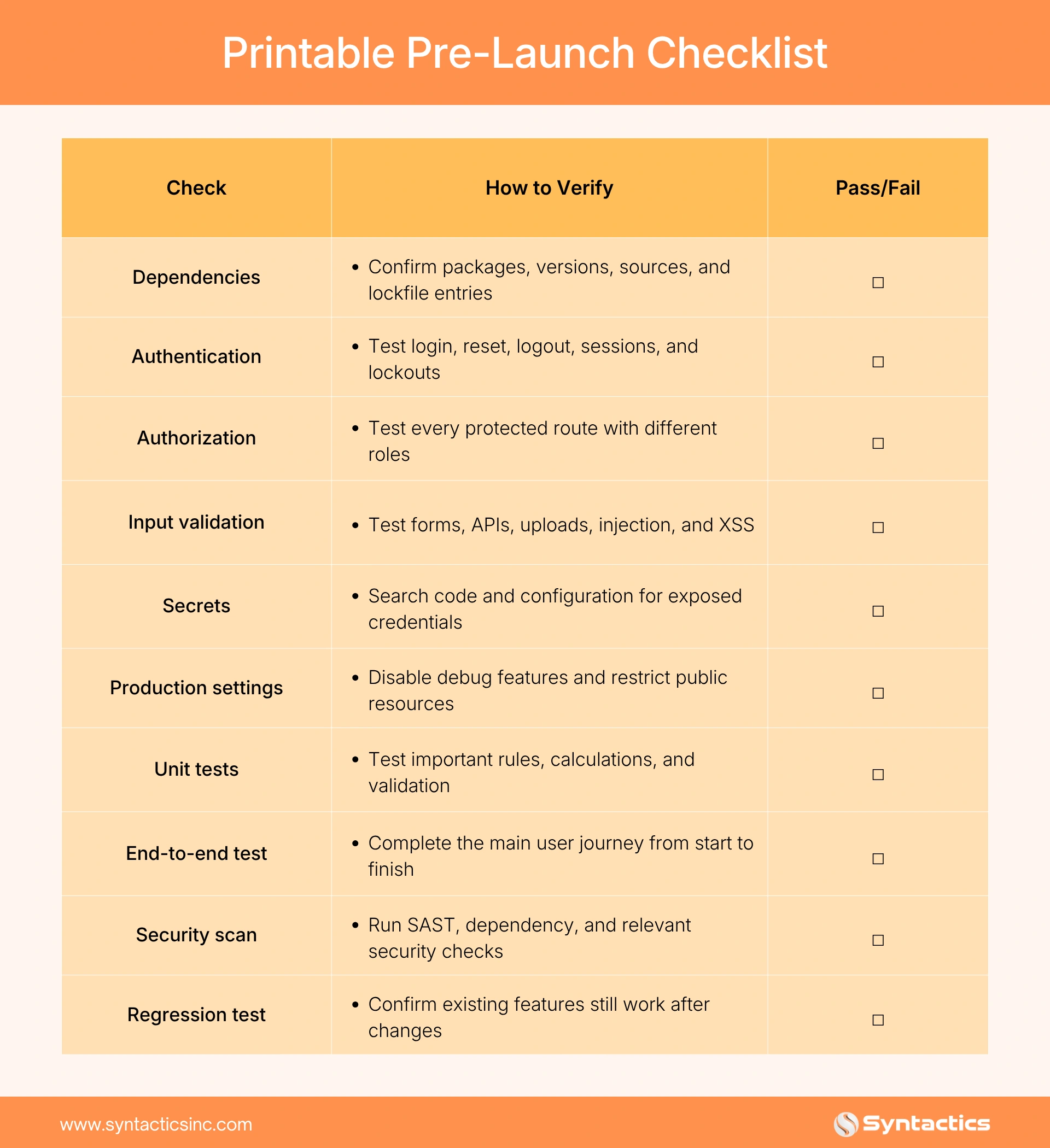
- Use a documented pre-launch checklist to record each security and QA check and its pass or fail result.
Who This Checklist Is For
This checklist works for business owners who built an application with AI or vibe coding tools, teams receiving AI-assisted code from developers, and organizations preparing a new website or application for launch. It also applies when you outsource website design and development in the Philippines or elsewhere.
A polished project can still contain backend security issues that users cannot see from the interface. That said, the goal is simple: verify what the code does, how it handles data, and how it behaves under unexpected conditions before you put it in front of customers.

Check Dependencies First
Start by reviewing every package or library the AI-generated code uses. For each one, check that the package actually exists in a trusted repository, comes from a legitimate developer or organization, and is the version your application is supposed to use.
This dependency review is an important part of AI code security. This is because AI tools can recommend packages that sound legitimate but do not actually exist.
In fact, a USENIX Security study tested 576,000 code samples and found hallucinated package rates of at least 5.2% for commercial models and 21.7% for open-source models. Overall, the researchers identified 205,474 unique non-existent package names across their testing.
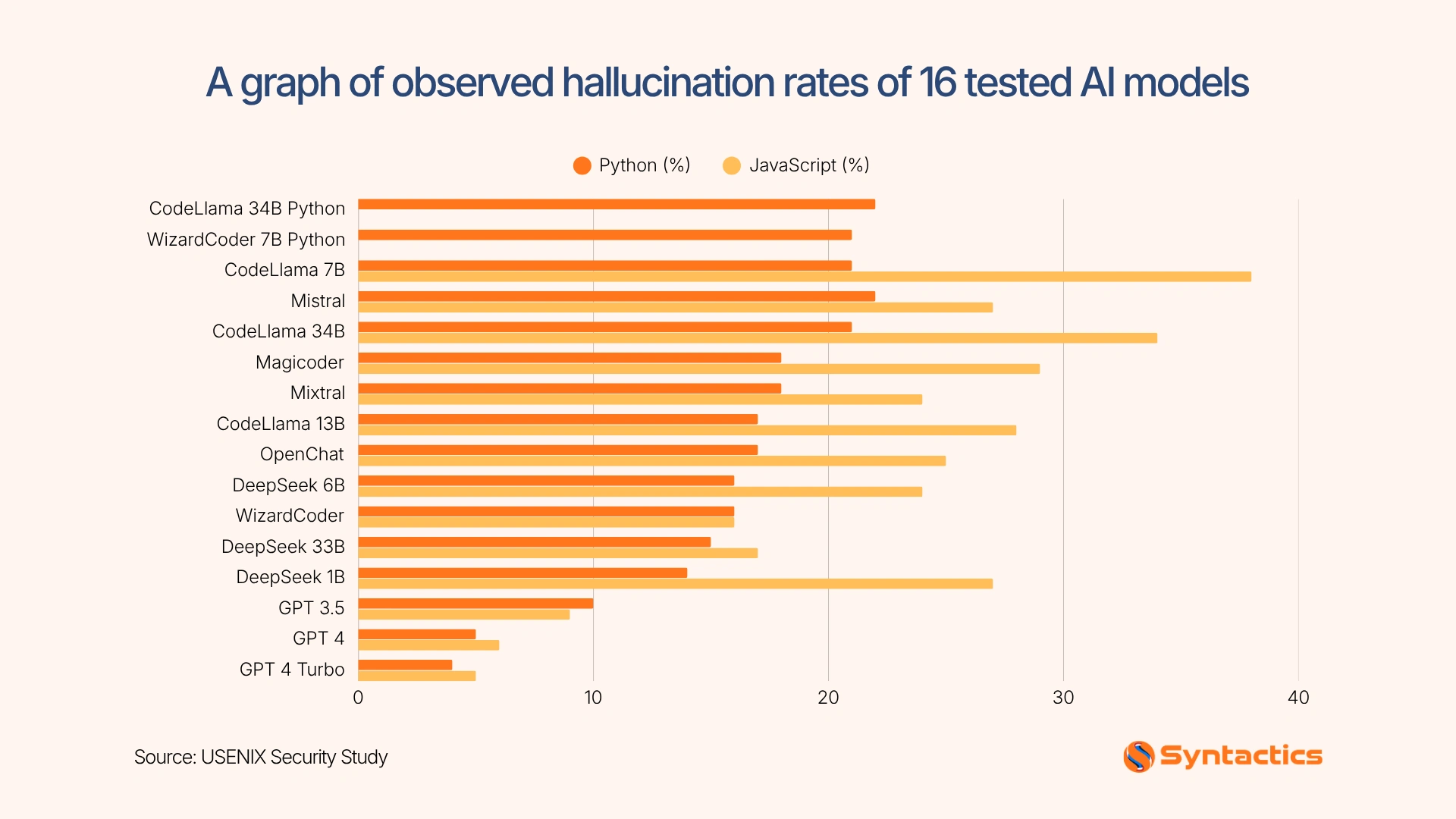
Source: USENIX Security study
This creates a risk known as slopsquatting, where someone can register an invented package name and attempt to place malicious code behind it. To prevent it, verify every AI-suggested dependency against the official package registry instead of installing it automatically.
Also check whether dependencies have known vulnerabilities and whether the application actually needs each package. Removing unnecessary dependencies reduces the amount of third-party code you have to monitor.
Check Authentication and Access Control
Next, verify that users can access only the accounts, data, and functions permitted by their assigned roles. A login page can work perfectly while authorization logic remains weak, allowing users to reach accounts, records, or functions they should not control.
This matters because the 2026 Verizon Data Breach Investigations Report found that vulnerability exploitation accounted for 31% of breaches, making software weaknesses the leading initial breach vector in the report.
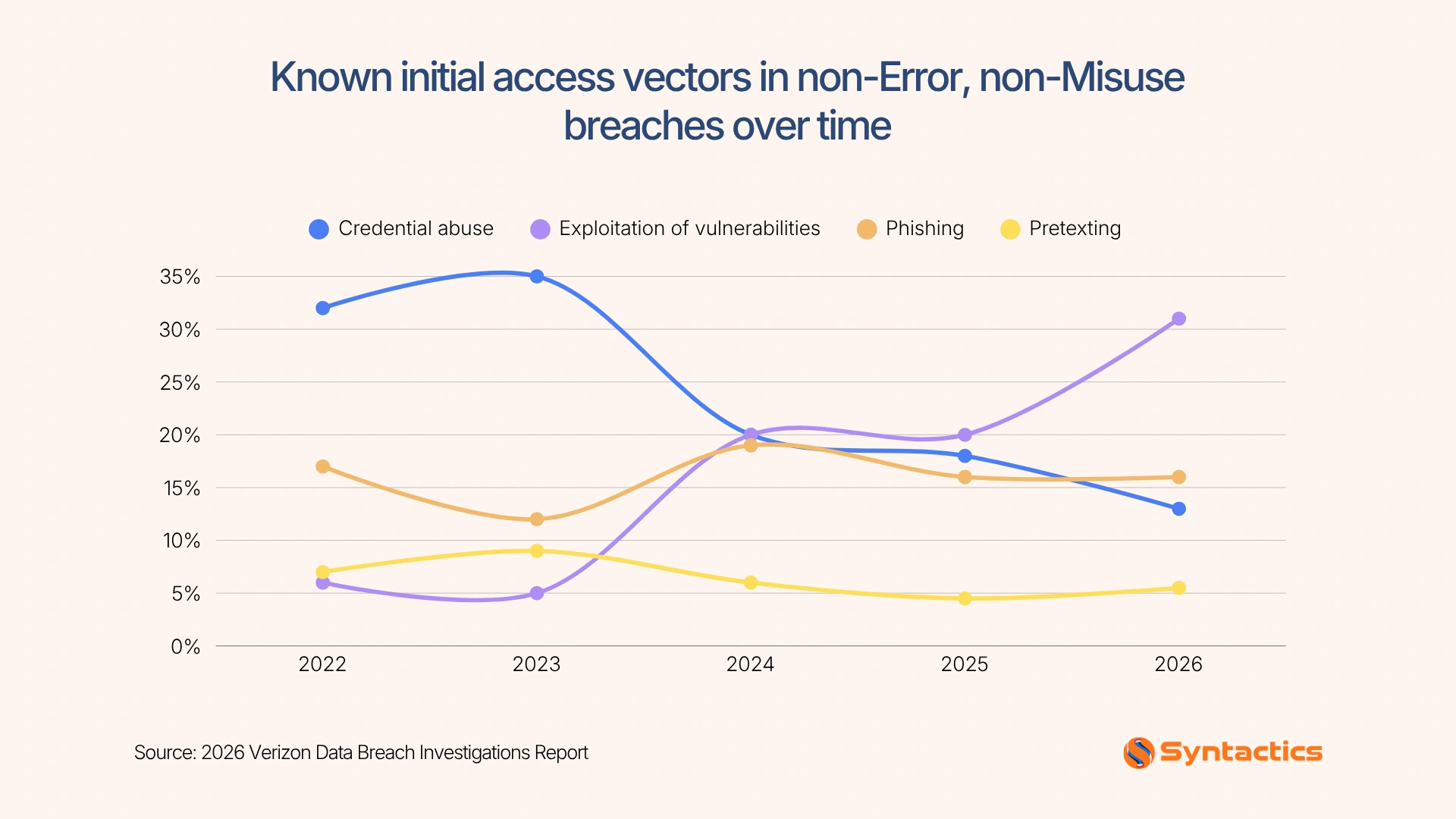
Source: 2026 Verizon Data Breach Investigations Report
Start by testing password creation, login, password resets, session expiration, logout behavior, and account lockout rules. Then test every protected route using different user roles to make sure the application enforces permissions on the server.
For example, a regular customer should not be able to view an administrator’s account simply by changing a URL or API request. Try accessing another user’s records directly, changing resource IDs, and submitting requests without the required role. These tests can expose authorization problems that a normal login test will miss.
If you work with a web developer team in the Philippines, ask for evidence that authorization checks happen on the server, not only in the interface. Hiding a button does not prevent a user from sending the underlying request manually.
Check Input Handling
AI-generated code can accept user input without adequately validating or sanitizing it. Test every form, query parameter, API endpoint, search field, and file upload.
Look specifically for:
- SQL injection
- Cross-site scripting (XSS)
- Command injection
- Unsafe file uploads
- Path traversal
- Missing server-side validation
- Improper handling of unexpected data types
Map your findings against the OWASP Top 10 to organize the review. For example, if a search form inserts user input directly into a database query, test whether specially crafted input can alter that query instead of being treated as ordinary text.
Do not rely on client-side validation alone. Users can bypass browser-based checks, so your server must validate incoming data before processing or storing it.
Check Secrets and Configuration
Before deployment, review how the application stores and exposes sensitive information. AI-generated code may place API keys, database credentials, authentication tokens, or private keys directly in source files or configuration, where attackers could access them if the code reaches a public repository or frontend.
According to GitGuardian State of Secrets Sprawl 2026, 29 million new secrets were detected in public GitHub commits in 2025. Meanwhile, AI-assisted commits leaked secrets at roughly twice the baseline rate.
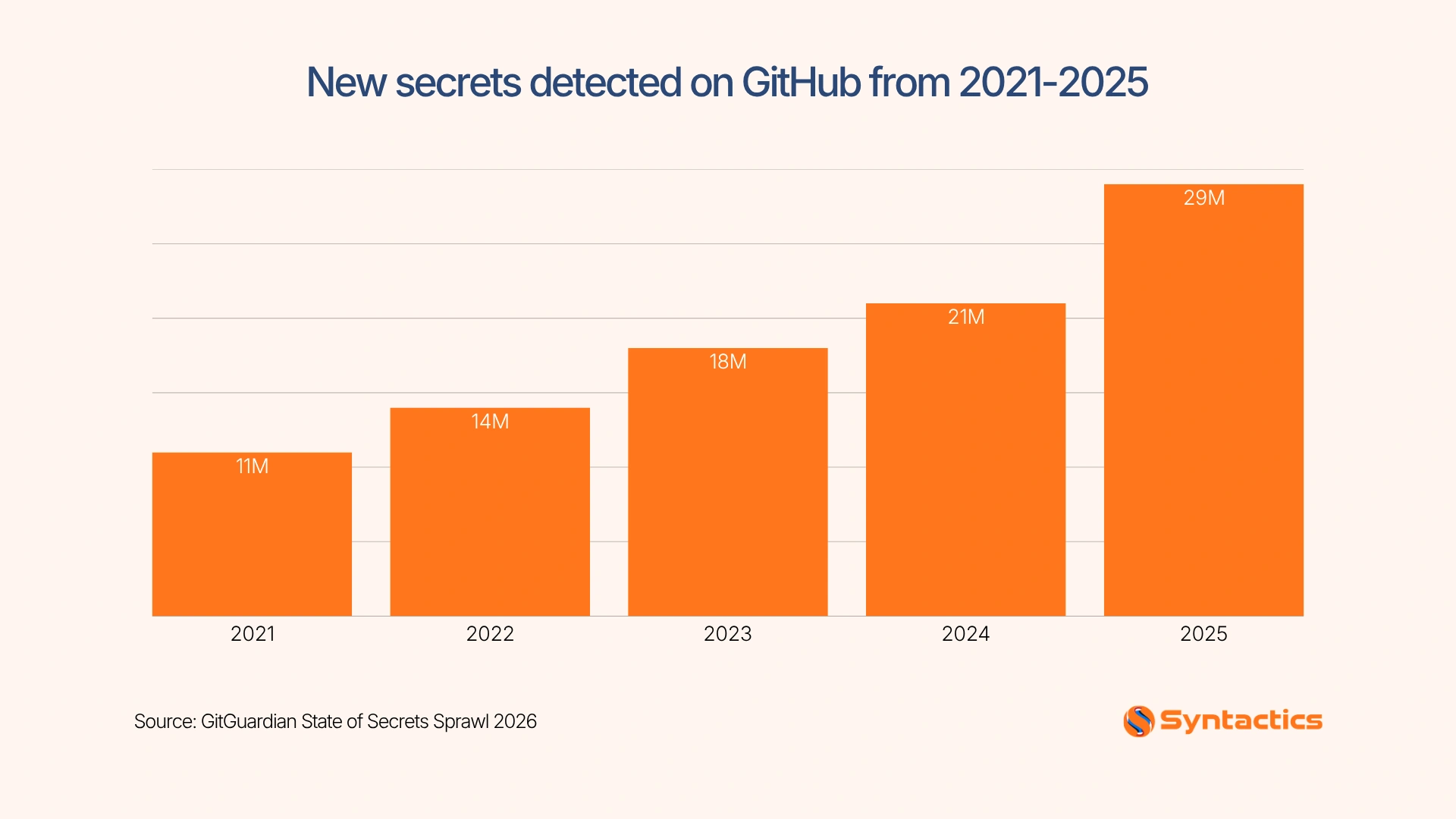
Source: GitGuardian State of Secrets Sprawl 2026
To prevent leaked secrets, search the codebase, environment files, build scripts, logs, and deployment settings for exposed credentials, then remove and rotate anything that has already been committed.
Also, disable debug mode, limit error details, and restrict public access to cloud storage and administrative tools. These checks help prevent a configuration mistake from becoming a security incident after launch.
Check Test Coverage
AI-written code needs tests that verify business behavior, not just whether the application builds successfully. Start with unit tests for important business rules, validation logic, and functions that handle sensitive data.
Testing also supports AI code security because automated tests can reveal unexpected behavior that a quick code review may miss. Run at least one end-to-end test through the main customer journey, such as account creation, login, checkout, booking, or form submission.
Tools such as Cypress can help you automate browser-based tests and repeat them during future releases. Add security scanning to the process and rerun existing tests after AI-generated changes to check that new code has not introduced security or functionality issues.
A web design company in the Philippines may deliver an attractive and functional interface, but launch readiness also depends on what happens behind that interface. Your QA process needs to cover both the visible experience and the underlying application logic.
Pre-Launch Checklist
Conclusion
AI-generated code can speed up development, but you still need to verify what reaches production. Reviewing dependencies, access controls, input handling, secrets, configuration, and test coverage gives you a practical way to catch problems before they affect users. A consistent AI code security review also helps you document what you tested and address issues before they become costly post-launch fixes.
If you want another layer of review before release, Syntactics, Inc. can support your team with QA and development services. A trusted web QA tester can check application behavior, user flows, and potential defects, while experienced developers can examine implementation details that automated tools or basic testing may miss. This way, you get documented findings, actionable fixes, and a clearer picture of your application’s readiness before launch.

FAQs About AI Code Security
Can AI write secure code?
AI can write code with secure practices, but it can also introduce vulnerabilities or unsafe patterns. Balancing it with human review and security testing helps verify that the code is safe before launch.
Does a vibe-coded app need a developer review?
Yes, especially when the application handles accounts, payments, personal information, or external APIs. A developer can inspect backend logic and security controls that may not be obvious from the finished interface.
Which free scans check for common vulnerabilities?
You can start with reputable static analysis, dependency scanning, and browser testing tools. Choose tools that match your programming language and deployment environment, then combine automated results with human review.

About Ladymieh Naallatan
Related News:

Social Media Shops across Facebook Apps












Comment 0