

What Can You Actually Put in a URL? Emojis, Encoding, and SEO Rules
URLs can include letters, numbers, hyphens, non-English characters, and emojis. Browsers change unusual characters into percent-encoded or Punycode formats. For better SEO, stick to lowercase words, hyphens, short paths, and only use necessary parameters.
“You can” doesn’t always mean “you should.” URLs have technical limits, encoding rules, and usability issues, and they only play a small role in SEO. This guide explains what makes up a URL, how unusual characters are handled, and how to create URLs that work well for both users and search engines by following Google’s URL structure guidelines.
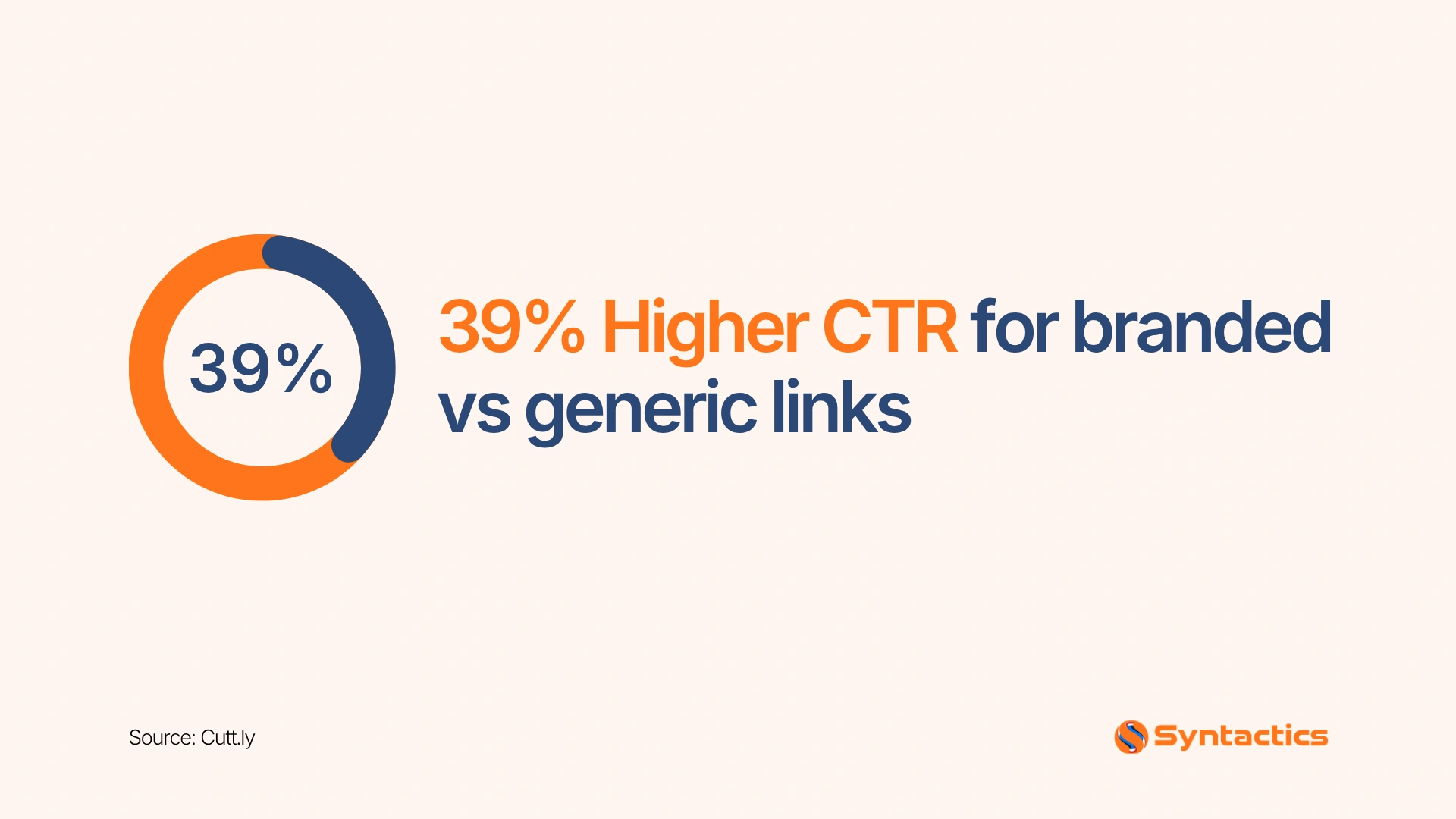
Source: Cutt.ly.
Key Takeaways
- Domains accept letters, numbers, and hyphens. Other scripts convert to Punycode (xn--).
- Emojis work technically but display inconsistently and look suspicious on important pages.
- Google recommends percent encoding for non-ASCII characters in links, emojis included.
- Keywords in URLs are a minor ranking signal. Clarity matters more.
- Use hyphens, not underscores, and keep URLs lowercase.
- Keep parameters few. Never place passwords, API keys, or personal data in a URL.
What Are the Parts of a URL?
A URL has several parts. Here is an example:
https://example.com/products/red-shoes?color=red#reviews
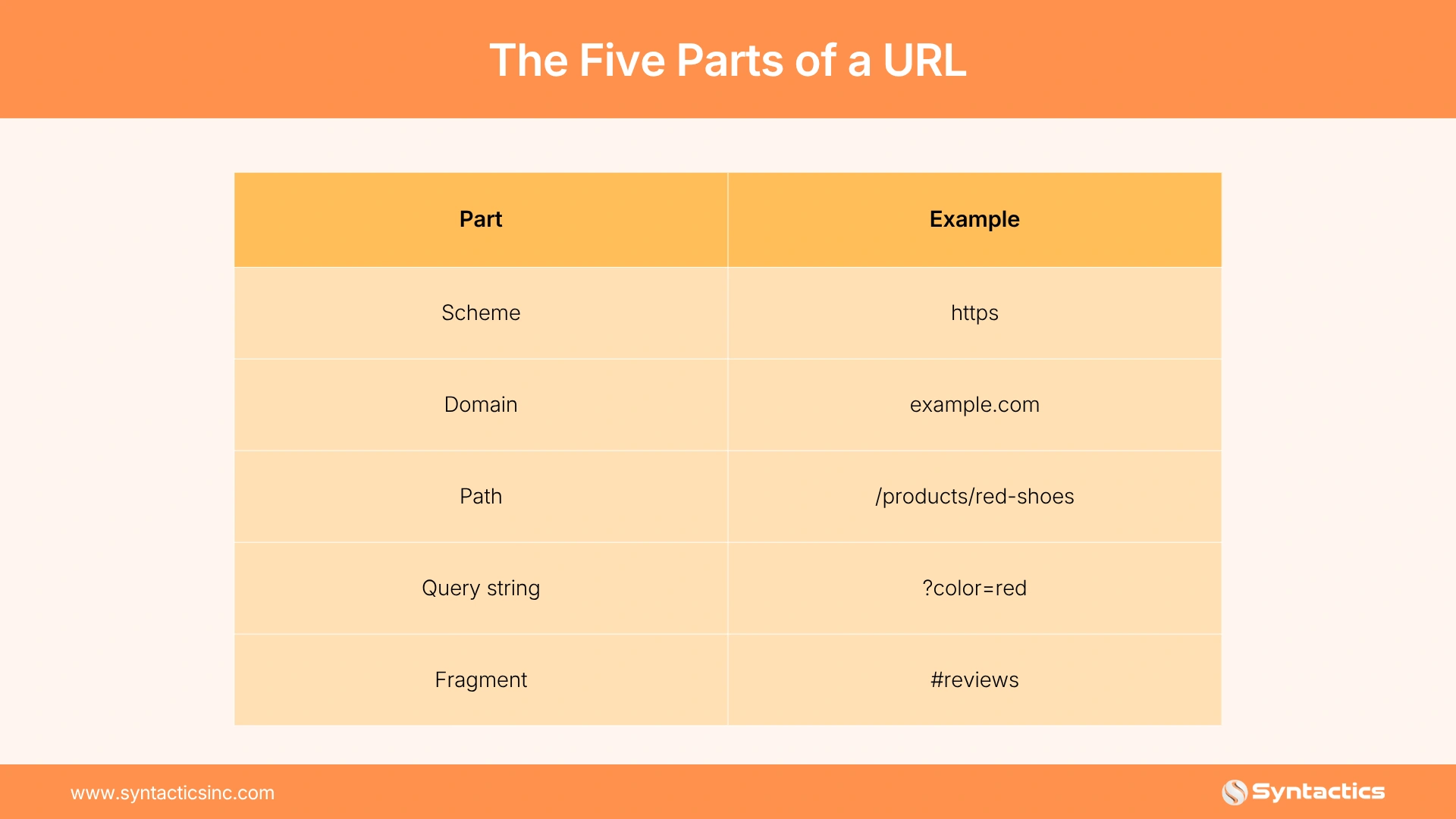
The scheme tells the browser how to access the resource. The domain identifies the site. The path points to a specific page, file, or API endpoint. Query strings pass extra information, such as filters, search terms, or tracking data. Fragments point to a section within a page.
What Characters Are Allowed in a Domain Name?
A traditional domain name contains letters A-Z, numbers 0-9, and hyphens. A hyphen cannot start or end the name. A domain name cannot contain spaces or most symbols.
The namespace is crowded. Verisign’s DNIB.com report counted 401.6 million domain name registrations across all top-level domains at the end of Q2 2026, up 9.1 million from Q1. The .com base alone totaled 166.6 million.
How Do Internationalized Domain Names Work?
Internationalized domain names (IDNs) let people register domains in scripts such as Chinese, Japanese, Korean, Arabic, and Cyrillic.
Browsers convert those characters into Punycode. Punycode starts with xn-- and uses only ASCII characters. A domain with non-ASCII characters looks readable in the address bar, but its technical form looks like xn--….
Can You Put an Emoji in a URL?
Yes. A domain or URL path accepts an emoji if the system supports the character. Google’s example asks whether you can put a chicken emoji in a domain or path. Technically, the answer is yes.
What Problems Do Emoji URLs Create?
- Some browsers, apps, and platforms display the emoji inconsistently.
- Copying and sharing the link can break or change the emoji.
- The URL becomes long and hard to read.
- Some systems convert the emoji into percent-encoded characters.
- The link looks suspicious in email, social posts, and search results.
The length problem is easy to see. Google’s documentation shows a llama and sparkles emoji path in its recommended form: /%F0%9F%A6%99%E2%9C%A8. Two emojis turn into 24 characters.
When Does an Emoji URL Make Sense?
An emoji works for a campaign, novelty page, or brand experiment. Rarely is an emoji the best choice for an important page you want people to trust, share, and remember.
How Do URLs Handle Non-English Characters?
URLs accept non-English characters, and browsers handle them through encoding. A URL path containing café displays as:
/café/
The encoded form looks like this:
/caf%C3%A9/
Google recommends using words from your audience’s language in URLs, including transliterated words. For German searchers, that means German words. For links, Google recommends percent encoding for non-ASCII characters. The documentation lists gemüse as /gem%C3%BCse.
What Is Percent Encoding?
Percent encoding converts unsafe, reserved, or non-basic characters into a % followed by hexadecimal values. Google Search supports URLs as defined by IETF STD 66, and reserved characters must be percent-encoded.
Percent encoding is necessary. Without it, spaces, ampersands, question marks, and hash symbols get mistaken for URL structure.
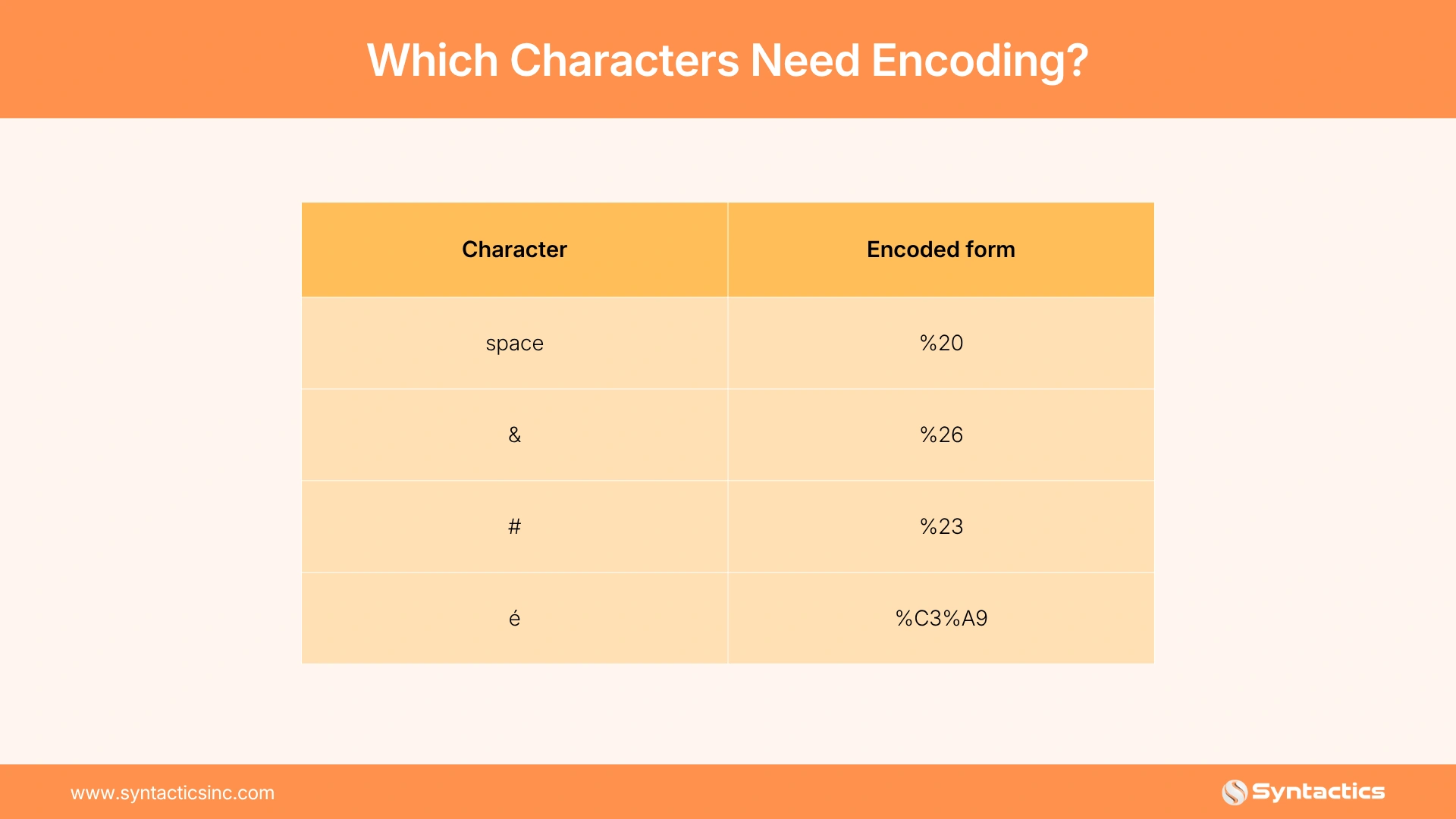
So this URL:
/search?q=red shoes & laces
Should be encoded as:
/search?q=red%20shoes%20%26%20laces
Do Keywords in a URL Help SEO?
Yes, and you often should use them. A descriptive URL helps users understand the page before they click. Google recommends readable words over long ID numbers. Its own pair of examples contrasts /wiki/Aviation with /index.php?topic=42&area=3a5ebc944f41daa6f849f730f1. It also suggests /europe/ over a shortened or unclear alternative.
Keywords in URLs are a minor ranking signal. Google says URL keywords help when Google has little other information about a page. Once the page has substantial content, URL keywords become largely irrelevant.
So do not sacrifice clarity or force keywords into awkward URLs.
Avoid:
/best-seo-services-agency-cheap-affordable-seo-company/
Prefer:
/services/seo/
Should You Use Hyphens or Underscores in URLs?
Use hyphens. Google recommends hyphens over underscores because hyphens help users and search systems recognize separate words. Programming languages often use underscores to keep words together, as in format_date. Google sometimes reads a phrase such as red_shoes as one term rather than two separate concepts.
Use:
/seo-audit-checklist/
Avoid:
/seo_audit_checklist/
Hyphens also read better when a URL appears as plain text in an email, document, or social post.

How Should You Use Query Parameters?
Query parameters support searches, filters, sorting, pagination, and tracking.
/search?q=seo+audit
/products?category=shoes&size=10
/blog?page=2
/landing-page?utm_source=newsletter
Too many parameters create messy URLs and duplicate versions of the same content. Google recommends using as few parameters as possible and removing parameters that do not change the page content.
What Is the Right Parameter Format?
Use = to separate keys from values and & to separate multiple parameters:
?color=red&size=10
For several values under one key, Google allows a character such as a comma, as in color=purple,pink,salmon. Avoid stacking unnecessary tracking values onto every internal link. Keep tracking parameters for campaigns where you need attribution.
How Do Parameters Create Duplicate URLs?
Filters multiply URLs fast. Google’s example is a hotel search. Filtering for value rates creates one URL. Adding “on the beach” creates a second. Adding “with a fitness center” creates a third. Each combination shows a slightly different list of the same hotels.
Googlebot needs only a small number of those lists to reach each hotel page. Excess URLs lead Googlebot to use more bandwidth than needed, and Google sometimes fails to index all your content. Google also advises avoiding session IDs in URLs and using cookies instead. A robots.txt file blocks Googlebot from problem URLs.
What Are URL Fragments Used For?
A fragment starts with #. Example:
/pricing/#faq
Fragments send users to a specific section of a page. Single-page applications also use fragments for client-side routing.
Google advises against using fragments to change page content, because Google Search generally does not support URL fragments. Google’s example of the wrong pattern is https://example.com/#/potatoes. If JavaScript changes content, use the History API instead. A separate URL path or query parameter also works. Both make content easier to crawl, link to, and understand.
Things to Avoid in URLs
- Keyword stuffing
- Long strings of numbers or random IDs
- Session IDs in URLs
- Unnecessary uppercase letters
- Spaces and unencoded special characters
- Too many query parameters
- Duplicate URLs for the same content
- Sensitive data in query strings
- Emojis on important commercial pages
Why Does URL Casing Matter?
Google’s URL handling is case-sensitive. Google treats /APPLE and /apple as distinct URLs with their own content. If your server treats both the same, convert all text to one case. This makes duplicates easier for Google to identify. Keep casing consistent across your site.
Why Keep Sensitive Data Out of URLs?
Never put passwords, API keys, personal information, or unencrypted tokens in a URL. Query strings appear in browser history, analytics platforms, server logs, and links shared by users.
What Does a Good URL Structure Look Like?
A strong URL is short, descriptive, lowercase, easy to read, hyphenated, free of unnecessary parameters, and consistent with your site structure.
Good Examples
https://example.com/services/seo
https://example.com/blog/url-structure-best-practices
https://example.com/products/running-shoes
Weak Examples
https://example.com/index.php?id=8271
https://example.com/p/8271?ref=x&utm_source=twitter&utm_medium=social
https://example.com/Best-SEO-Services-Cheap-Affordable-SEO
The good examples tell users what to expect. The weak examples create confusion and add little value.
Best Practices for SEO-Friendly URLs
- Use lowercase letters.
- Separate words with hyphens.
- Keep paths short and specific.
- Use words people understand.
- Include one primary topic or keyword naturally.
- Avoid stop words unless they improve clarity.
- Encode spaces and special characters.
- Limit query parameters to those that serve a purpose.
- Use canonical URLs to consolidate duplicate versions.
- Avoid emojis for core site pages.
Use unusual characters only when they serve a clear purpose. A readable URL helps users trust the link, understand the page, and share the link without confusion.
Final Thoughts
It only takes a few minutes to write a good URL, but it will stay with your page for its whole life. Once a page is live, changing its address means you’ll need to set up redirects. Decide on your URL pattern early. Use lowercase letters, hyphens, clear words, and only the parameters you need. Test unusual characters before using them, and save emojis for special campaigns.
URL choices rarely stand alone. They affect your site’s structure, canonical tags, crawl management, and on-page content. Duplicate pages and hidden content waste crawl budget. Syntactics’ SEO services in the Philippines start with a technical audit and a clear list of fixes. Get a free quote to see how your site performs in technical SEO, content, and links.

Frequently Asked Questions
Can you put an emoji in a URL?
Yes. A domain or URL path accepts an emoji if the system supports the character. Emojis display inconsistently, break when copied, and look suspicious in email and search results. Avoid emojis on important commercial pages.
What characters are allowed in a domain name?
A traditional domain name allows letters A-Z, numbers 0-9, and hyphens. Hyphens cannot start or end the name. Non-English scripts work through internationalized domain names, which browsers convert to Punycode starting with xn--.
Should you use hyphens or underscores in a URL?
Use hyphens. Google recommends hyphens because they help users and search systems recognize separate words. Google sometimes reads red_shoes as a single term, while red-shoes reads as two words.
Do keywords in a URL help SEO?
Slightly. Keywords in URLs are a minor ranking signal. Google says URL keywords help when Google has little other information about a page. Write clear, descriptive URLs and skip keyword stuffing.
What is percent encoding in a URL?
Percent encoding converts unsafe or reserved characters into a % followed by hexadecimal values. A space becomes %20, & becomes %26, and é becomes %C3%A9. This keeps special characters from being mistaken for URL structure.
Are URLs case sensitive?
Google treats uppercase and lowercase URLs as separate pages, so /APPLE and /apple count as two URLs. Use lowercase throughout. If your server treats both versions the same, convert all text to one case.

About Jalou Batilong
Related News:


Digitally Marketing Mobile Apps: A How-To Guide

Facebook Marketers and Marketing Advertisers


How to Set Up Your Kajabi Website









Comment 0