

Controlling AI Costs in Business Web Apps: Caching, Model Routing, and Token Budgets
AI expenses can rise quickly when your business web app repeats prompts, uses oversized models, or accepts unlimited requests. For example, a customer support chatbot may repeatedly process the same product information and conversation history, increasing costs without improving its answers.
As such, effective AI cost optimization helps you control these expenses through usage monitoring, caching, model selection, and spending limits. According to the Stanford Institute for Human-Centered Artificial Intelligence’s 2026 AI Index Report, the cost of querying a model at GPT-3.5-level performance fell more than 280-fold between November 2022 and October 2024.
This measurable decline demonstrates how quickly AI economics can change, making model selection and ongoing cost monitoring important when planning your business web app’s operating budget.
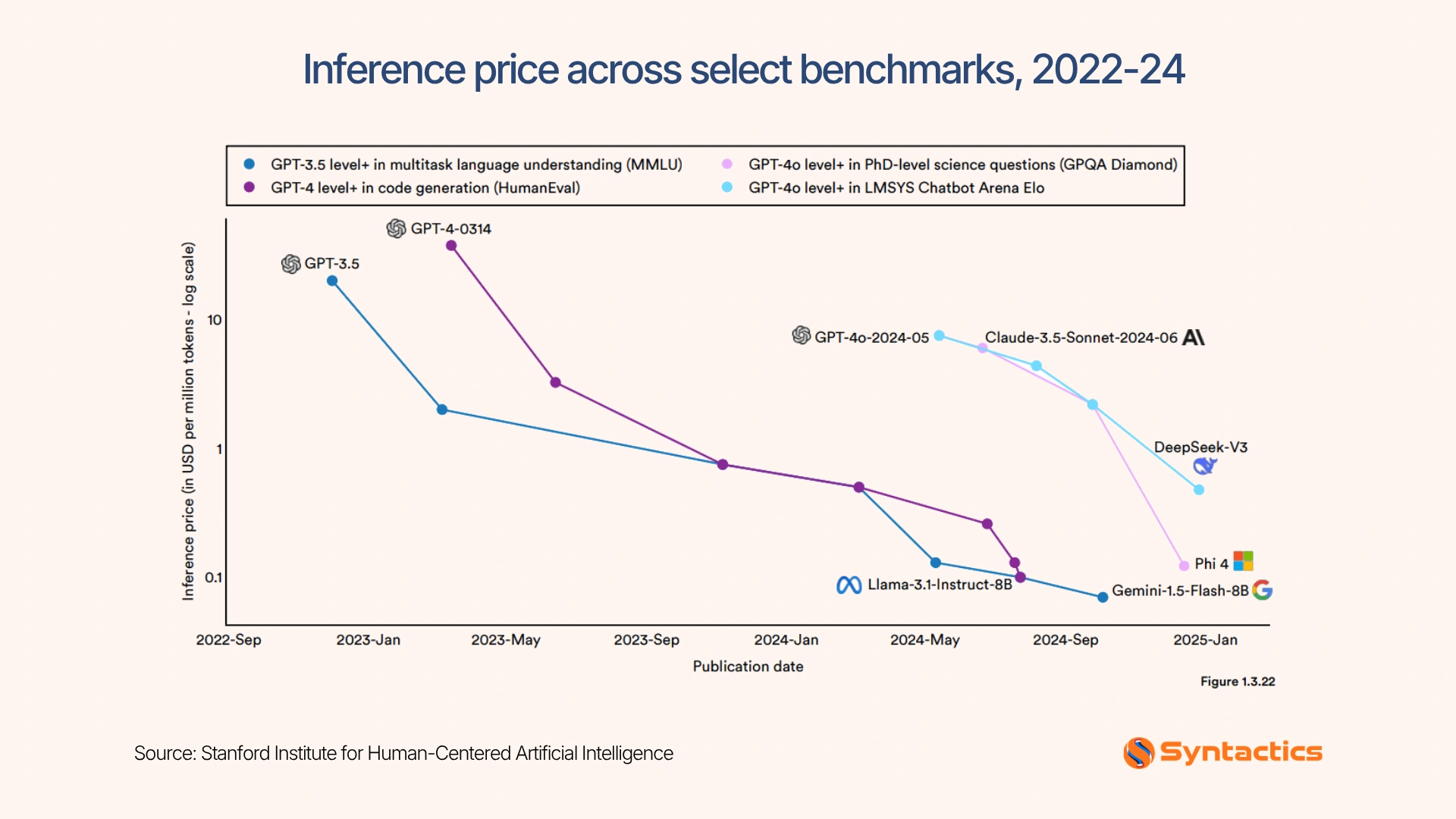
Source: Stanford Institute for Human-Centered Artificial Intelligence
Key Takeaways
- Only 26% of organizations have full, real-time visibility into the cost of running AI at scale (KPMG).
- Track token usage and costs for every AI-powered feature.
- Cache repeated work to reduce unnecessary model calls.
- Match model capabilities to each task’s complexity.
- Set token budgets and spending caps before launch.
Measure Before You Cut
Before changing your AI setup, identify which features consume the most resources. Without reliable usage data, you may cut spending in the wrong places or reduce answer quality unnecessarily.
Record these details for every AI request:
- Input tokens and output tokens
- Total request cost
- Feature name and model used
- Request volume and response status
- User or account identifier, subject to your privacy requirements
Use these metrics to compare spending across features, identify unusual usage patterns, and establish a baseline before making changes. Depending on your provider, you may need to calculate request costs from token counts and current pricing.
This tracking also helps during product planning. If you’re investing in website design services in the Philippines, include expected inference costs alongside development, hosting, maintenance, and other operating expenses. Your initial budget becomes more useful when it accounts for the ongoing cost of serving real users.
Developers can use Laravel AI SDK to integrate AI capabilities into applications. Check the documentation for your installed version and provider to confirm which usage metrics are available, then use those details to build a consistent cost-monitoring process.

Cache Repeated Work
Once you understand your spending patterns, look for requests that repeat the same work. Caching can prevent your application from paying for identical or largely unchanged information repeatedly.
You can use two approaches:
Application-level response caching
Store approved answers to common questions, such as shipping policies, business hours, and return procedures. When a matching request arrives, return the saved answer instead of calling the model again.
Apply this method only when the question, user permissions, and relevant context make the stored response appropriate. Also, set expiration periods and invalidate entries when the underlying information changes.
Provider prompt caching
Some AI providers can reuse stable portions of a prompt, such as lengthy instructions or reference material. This can reduce processing costs when your application repeatedly sends the same context.
That said, review the official Anthropic prompt caching documentation and OpenAI prompt caching documentation before implementation. Eligibility, cache duration, minimum prompt sizes, and pricing vary by provider and model. Verify the applicable rates on your publication date and check them again before deploying changes.
Overall, caching works best when you measure cache hits, missed requests, and invalidated entries. These figures show whether your implementation reduces spending without serving outdated or inappropriate answers.
Route Each Task to the Right Model
Caching reduces repeated work, but your application still needs a suitable model for new requests. Sending every task to the most capable model can waste money on work that a smaller model can handle.
Start with a less expensive model and escalate when it fails a defined quality check.
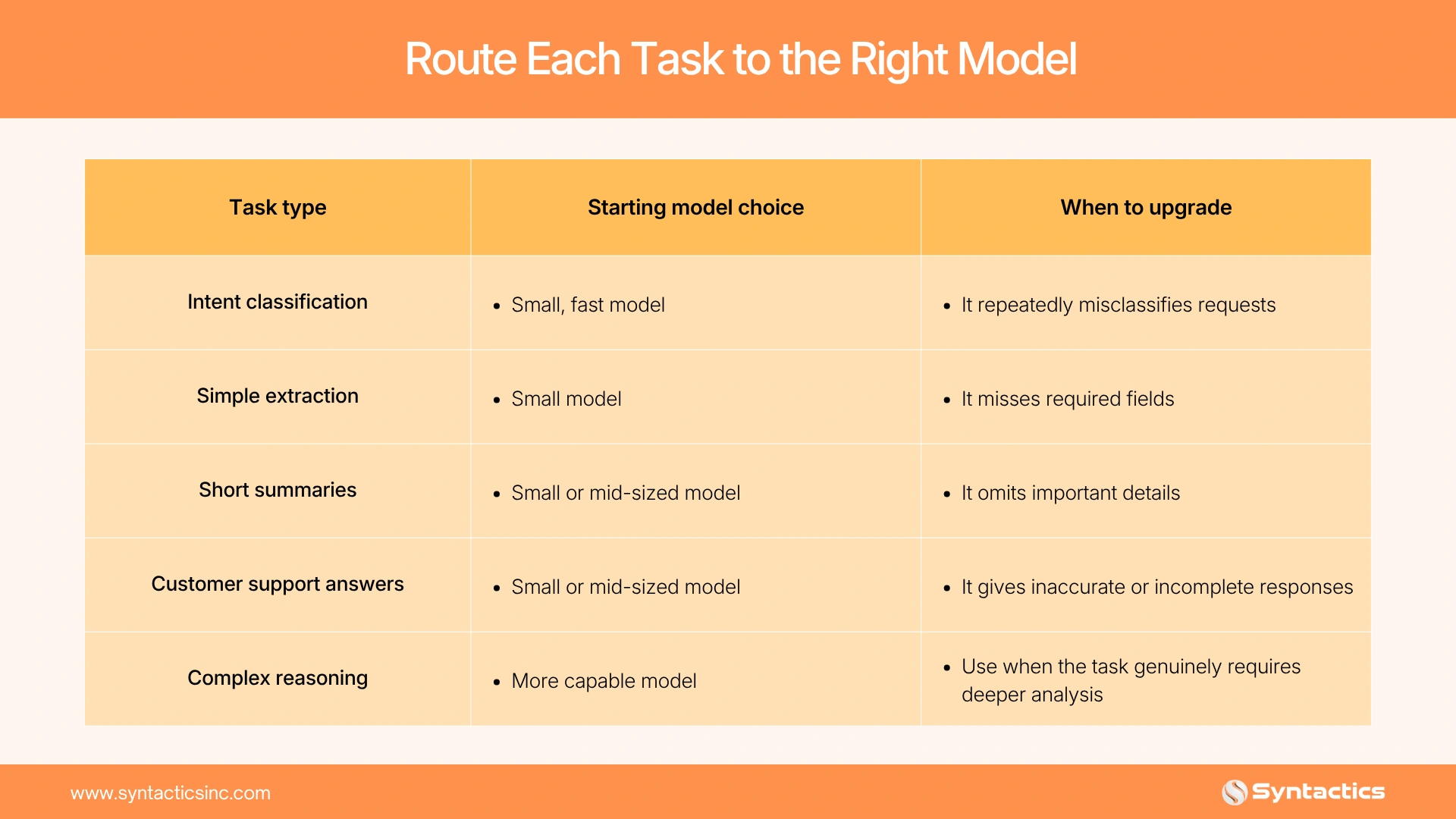
Treat these recommendations as starting points, not universal rules. Model performance depends on your data, instructions, evaluation criteria, and provider options.
Test candidate models against representative requests before selecting a default. Measure accuracy, response time, and cost together. A cheaper model that produces unusable answers may create additional support work, while a capable model used for every minor task can inflate your bill.
An experienced web developer in the Philippines can implement routing rules that start with a lower-cost model and escalate requests when confidence is low or a task requires deeper reasoning. The exact approach depends on your application architecture and the capabilities exposed by each provider.
Set Token Budgets and Caps
Model routing controls which model handles a request, while token budgets control how much work each request can consume. Together, these controls support AI cost optimization by limiting unnecessary processing and keeping usage within your budget.
Set limits at three levels:
- Per request: Cap input and output tokens to prevent unexpectedly long prompts or responses.
- Per user or account: Restrict repeated requests and establish usage allowances that fit each plan.
- Per month: Set a spending threshold for each feature or the entire application.
Define what happens when a limit is reached. Your app might ask the user to shorten a request, display a usage notice, queue nonurgent work, or offer an upgrade where appropriate. For a hard budget cap, stop or restrict additional paid requests rather than merely sending an alert.
Also account for concurrent requests. A system that checks its monthly budget only after completing each request may overspend when multiple users trigger expensive operations simultaneously.
Send Fewer Tokens
Even with caching and model routing, unnecessary context increases the cost of each AI request. Reducing the amount of information your app sends can lower token usage while keeping responses relevant.
This matters as businesses adopt AI more widely. The U.S. Census Bureau reports that AI use among businesses generally ranged from 17% to 20% during the six months covered by its survey, showing the growing relevance of managing AI resources efficiently.
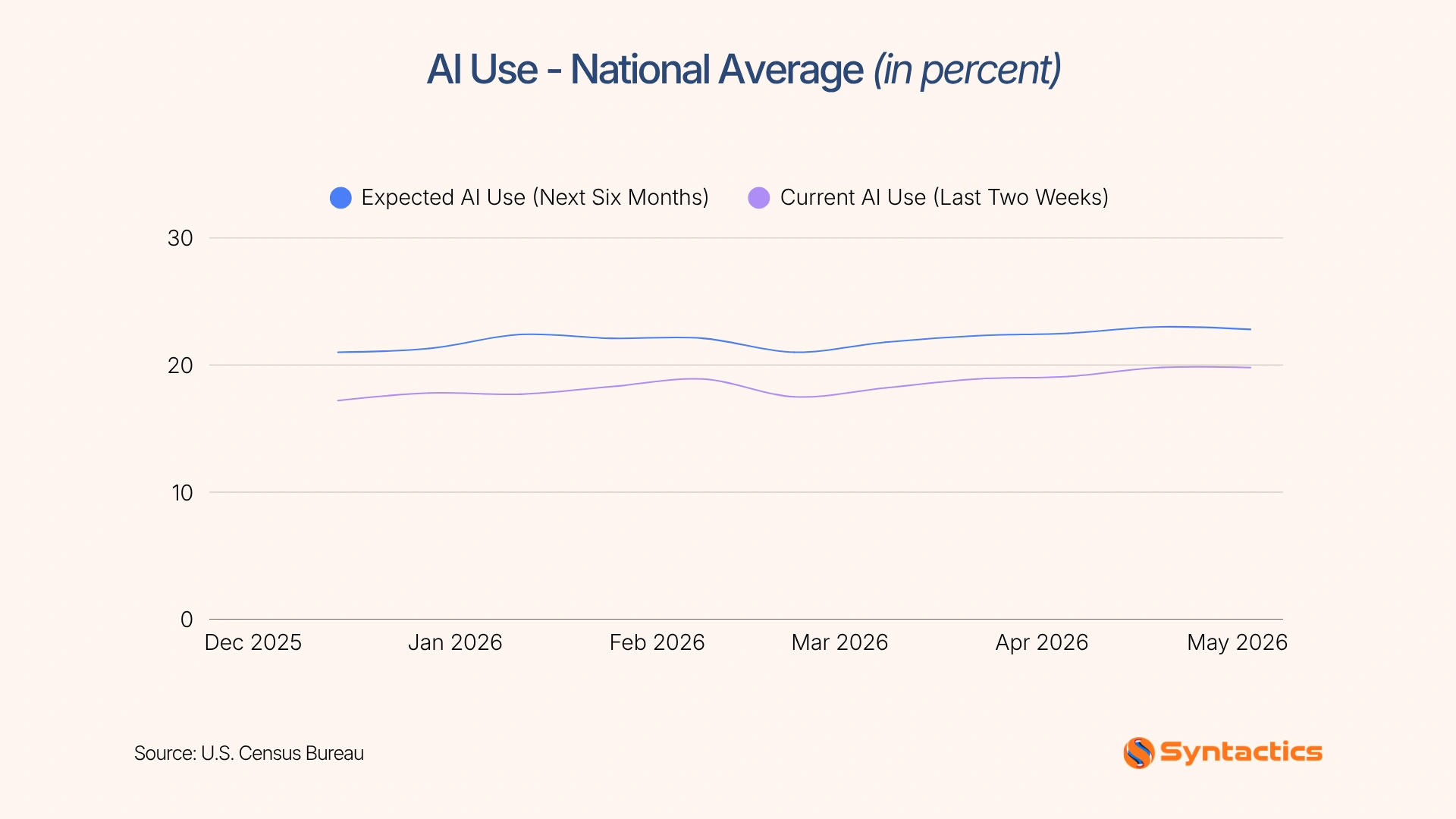
Source: U.S. Census Bureau
Apply these changes to reduce unnecessary token consumption:
- Shorten system instructions. Remove repeated directions and replace vague guidance with concise, specific rules.
- Summarize long conversations. Retain decisions, unresolved questions, and relevant user preferences instead of resending the entire chat history.
- Load only relevant tools. Avoid including descriptions of every available function in every prompt.
- Limit retrieved content. Use targeted database queries to retrieve only the documents or passages needed for each request.
Laravel’s AI SDK documentation covers tool integration and tool search, which can help your application discover relevant tools without placing every tool definition in the initial context. Check the capabilities available in your installed version before implementing this approach.
By combining shorter prompts with targeted retrieval and selective tool loading, you can reduce unnecessary processing across repeated requests. Lastly, track token usage before and after each change to confirm the savings without compromising response quality.
Alerts and a Monthly Review
Automated alerts help you identify unusual spending before it becomes a larger problem. Configure notifications when usage approaches a defined threshold, such as 75% or 90% of your monthly budget.
Assign one person to own the monthly review. That person should examine:
- Cost per feature: Which AI functions account for the largest share of spending?
- Cost per user: Are certain accounts generating unusually high usage?
- Cache hit rate: How often does the application reuse stored results?
- Token usage: Are input or output tokens increasing unexpectedly?
- Request volume: Did traffic, retries, or automated tasks increase?
Investigate sudden changes instead of automatically reducing every budget. A rise in spending may reflect increased customer demand, a software bug, repeated failed requests, or a recent model change.
The KPMG Q2 2026 AI Quarterly Pulse Survey found that only 26% of surveyed organizations had full, real-time visibility into the cost of running AI at scale. For businesses investing in web design and development services in the Philippines, cost monitoring helps teams spot unusual AI usage. This is because regular reviews allow them to adjust budgets before expenses grow.
Worked Example: A Support Chatbot Before and After
Consider a hypothetical support chatbot that answers questions about orders, returns, and shipping. This example shows how AI cost optimization techniques can reduce monthly expenses. The following figures are illustrative, not measured results or provider quotes.
Suppose the chatbot handles 10,000 requests monthly at an average cost of $0.02 per request. Its monthly AI cost is $200.
Your team introduces four controls:
- Cache common answers. Assume 30% of requests can use approved stored responses without calling the model.
- Route simple requests to a smaller model. For the remaining requests, assume the average model cost falls by 25%.
- Trim prompt context. Reduce unnecessary instructions and conversation history, lowering the remaining model cost by another illustrative 15%.
- Apply usage limits. Set per-request and monthly caps, and alert the owner when spending approaches the budget.
Under these assumptions, the application makes 7,000 model requests after caching. At $0.02 per request, that costs $140. Model routing reduces the amount to $105, and context trimming reduces it to $89.25.
Illustrative monthly comparison:
Before controls: $200.00
After caching, routing, and trimming: $89.25
Illustrative monthly savings: $110.75
Estimated reduction: 55.4%, assuming the stated costs and savings percentages hold.
Actual results depend on provider pricing, token counts, cache eligibility, model performance, and request complexity. Before applying these controls across your application, test them against representative customer questions and verify that answer quality remains acceptable.
Conclusion
Managing AI expenses works best when you make cost tracking part of your regular application maintenance. Monitor usage, cache reusable results, route tasks to suitable models, limit token consumption, and review spending trends consistently. These practices make AI cost optimization a measurable process rather than a last-minute response to rising bills.
Syntactics, Inc. brings 26 years of experience and a global client portfolio to web development projects. If you’re planning an AI-enabled application or improving an existing one, explore our business applications development services.
Our experienced team can help you assess your application’s architecture, identify opportunities to reduce unnecessary processing, and build a maintainable solution that supports your business goals.

FAQs About AI Cost Optimization
How to cut costs with AI in operations?
Identify repetitive tasks, automate suitable workflows, and monitor usage by feature. Review the results to confirm that automation reduces expenses without creating additional work.
Does prompt caching change answer quality?
Prompt caching generally reuses eligible prompt content rather than changing the model’s intended behavior. Your application still needs to handle changing information and user-specific context correctly.
Should I set a hard spending cap?
A spending cap can help prevent runaway usage, but plan how your application will respond when it reaches the limit. Combine spending controls with alerts and clear user-facing messages to avoid unexpected service interruptions.

About Ladymieh Naallatan
Related News:

How to Build a Responsive Website

Maximizing Google Search Ads for Local Businesses



Best SEO-Friendly CMS for Your Website: Top Picks







Comment 0