


Laravel Security Made Simple: 10 Steps to Safeguard Your App
Laravel is a powerful PHP framework with robust security features, but misconfigurations can leave your app vulnerable. Following proper Laravel security best practices is essential to protect data, users, and your reputation.
In fact, over 600 Laravel apps were compromised because their APP_KEY was accidentally exposed on GitHub, a completely preventable mistake. Real applications with real users are hacked every day, and breaches can result in data loss, legal liability, and damaged brand trust.
Fortunately, Laravel provides tools to stop these attacks, including SQL injection protection, CSRF tokens, XSS prevention, and more. The framework does the heavy lifting, but they must be used correctly. A single overlooked setting, like leaving debug mode on in production or skipping input validation, can turn a secure app into an easy target.
So, think of Laravel as a state-of-the-art security system; you still need to lock the doors. Understanding common pitfalls and implementing best practices today prevents costly consequences tomorrow.
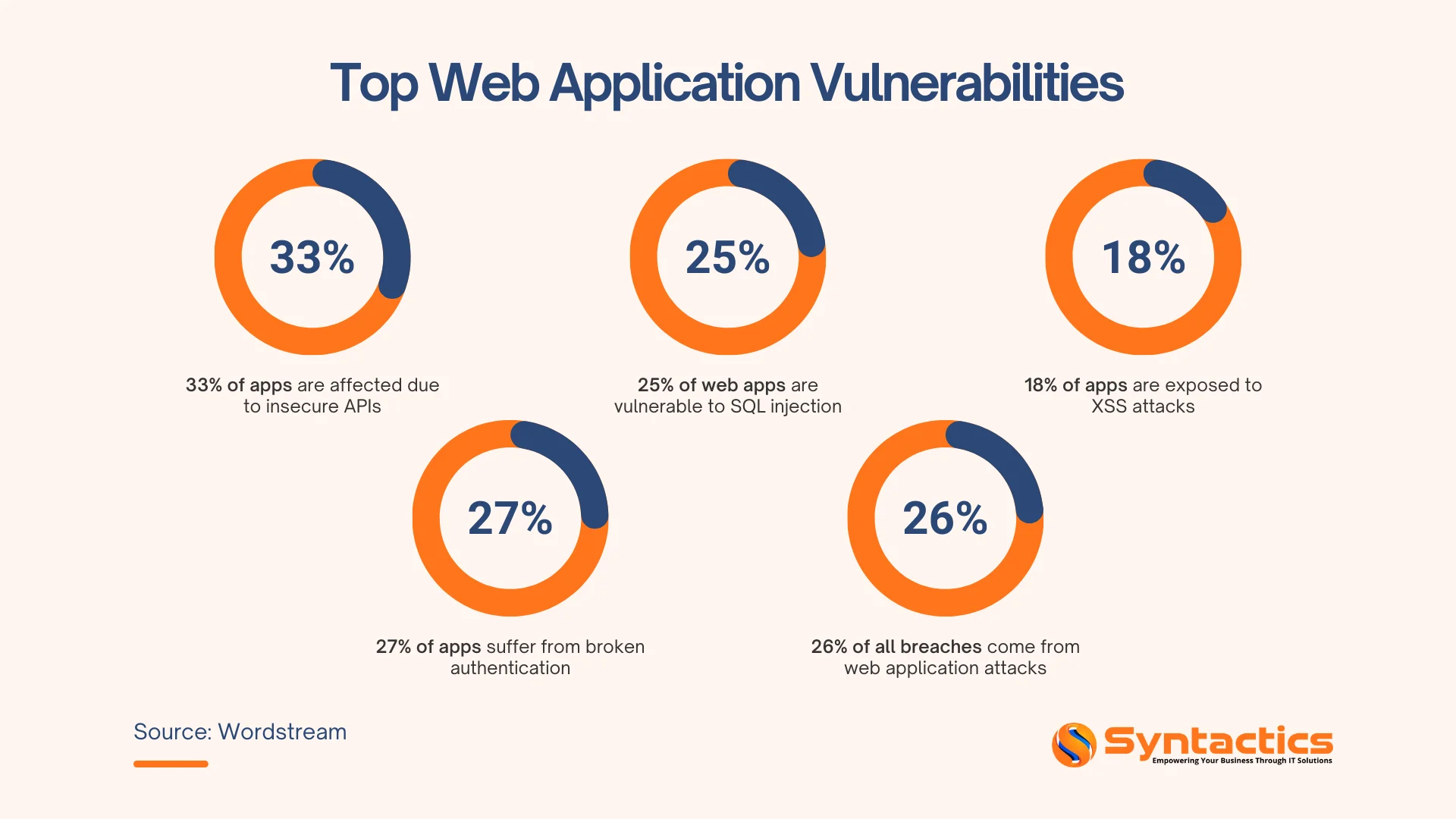
Source: NordLayer.
TABLE OF CONTENTS
Why Laravel Security Fails in Real Projects
Most security issues aren’t caused by Laravel itself; they arise from misused or misconfigured features during development and deployment.
Common problems include:
- Exposed environment files
- Weak access controls
- Disabled protections due to rushed releases or assumptions that defaults are “good enough”
Security risks also evolve over time. Practices that worked in development or staging may become liabilities in production if not regularly reviewed. Understanding these gaps helps close vulnerabilities before they turn into real threats.
Therefore, security isn’t just a technical concern. Each misconfiguration can have direct consequences for customer trust, operational continuity, and compliance.

10 Laravel Security Best Practices to Protect Your App
Securing a Laravel application is about consistently applying proven best practices. Many attacks succeed because of simple oversights, such as exposed credentials, weak validation, or misconfigured environments.
These steps reduce vulnerabilities, protect sensitive data, and strengthen your application.
1. Protect Environment Variables and Secrets
Environment files often contain API keys, database credentials, and encryption secrets. If exposed, attackers can gain full access to your application, steal data, or impersonate users. Securing secrets ensures the foundation of your app’s security remains intact and prevents costly breaches.
Pro Tips:
- Add .env to .gitignore immediately and confirm it has never been committed. If it has, assume all secrets are compromised and rotate them.
- Regenerate APP_KEY using ‘php artisan key:generate’ after a leak.
- Use separate environment variables for development, staging, and production.
- Consider using secret management tools such as AWS Secrets Manager, HashiCorp Vault, or Laravel Forge for production.
- Scan repositories with tools like git-secrets or truffleHog to detect exposed credentials.
2. Use Strong Authentication and Authorization
Weak passwords and poorly implemented access controls are common targets for attackers. Compromised accounts can lead to unauthorized data access or administrative control over your app. Strong authentication and role-based authorization minimize these risks and protect sensitive information.
Pro Tips:
- Implement strong password policies and enable Multi-Factor Authentication (MFA) for sensitive accounts.
- Apply rate limiting to login routes and lock accounts after repeated failed attempts.
- Monitor for compromised credentials and require password resets when breaches are detected.
- Implement role-based access control using Laravel’s authorization features.
- Always enforce authorization server-side; never rely on UI restrictions alone.
3. Enforce HTTPS Across the Application
Without HTTPS, data transmitted between users and your server can be intercepted or modified. Attackers can steal login credentials, payment details, or other sensitive information. Enforcing HTTPS ensures data integrity, privacy, and trust in your application.
Pro Tips:
- Obtain an SSL/TLS certificate from Let’s Encrypt or your hosting provider and serve traffic over port 443.
- Force HTTPS by adding URL::forceScheme(‘https’) and setting SESSION_SECURE_COOKIE=true.
- Enable HSTS headers to prevent protocol downgrade attacks.
- Ensure all internal links, assets, and CDN resources use HTTPS and redirect HTTP traffic automatically.
- Test your SSL setup using SSL Labs’ SSL Server Test to identify weak configurations.
4. Validate and Sanitize All User Input
Malicious input can exploit vulnerabilities like SQL injection or XSS to manipulate or steal data. Proper validation and sanitization prevent attackers from executing unauthorized commands or injecting harmful scripts. This safeguards both your users and the integrity of your database.
Pro Tips:
- Validate every request that accepts user input and use Form Request classes for complex validation logic.
- Apply strict, whitelist-based validation rules for data types, formats, and limits.
- Sanitize input using helpers like strip_tags() and escape output in views when needed.
- Use Eloquent or Query Builder with parameter binding instead of raw SQL queries.
- Add input length limits and custom validation rules to prevent abuse and denial-of-service attempts.
5. Enable and Maintain CSRF Protection
Cross-Site Request Forgery (CSRF) allows attackers to perform unauthorized actions on behalf of authenticated users. Disabling CSRF protection can lead to account compromise, data loss, or unauthorized transactions. Keeping this protection active ensures that sensitive actions are verified and secure.
Pro Tips:
- Ensure VerifyCsrfToken middleware is enabled and include @csrf in all state-changing forms.
- Include CSRF tokens in AJAX requests via headers or meta tags.
- Configure Axios or Fetch to automatically send CSRF tokens with requests.
- Never disable CSRF protection globally; exclude routes only when necessary and use alternative verification methods.
- Avoid state-changing operations using GET requests.

6. Secure File Uploads
Uploaded files can be a hidden entry point for malware or unauthorized access if not handled correctly. Attackers can execute scripts, replace critical files, or access sensitive data. Properly validating, storing, and sanitizing uploads prevents these attacks.
Pro Tips:
- Validate file uploads using both extension and MIME type checks.
- Store uploaded files outside the public directory and serve them through authenticated controllers.
- Generate random filenames to prevent attackers from guessing file paths.
- Re-encode images to remove embedded malicious content and enforce strict size limits.
- Use cloud storage with signed URLs and disable script execution in upload directories.
7. Apply Rate Limiting to Critical Endpoints
Brute-force attacks and automated abuse can overwhelm your login pages or APIs. Without rate limiting, attackers can repeatedly try passwords or trigger resource exhaustion. Applying limits mitigates these attacks, protecting both security and application performance.
Pro Tips:
- Apply throttle middleware to login, password reset, and sensitive API routes.
- Create custom rate limiters for granular control based on IP, user ID, or route.
- Implement progressive delays and temporary lockouts after repeated failures.
- Use different limits for different actions and return proper HTTP 429 responses.
- Monitor rate-limit violations and introduce CAPTCHA when abuse is detected.
8. Disable Debug Mode in Production
Debug mode exposes stack traces, environment variables, and other sensitive information. Attackers can use these details to plan more sophisticated attacks. Disabling debug mode ensures your application only reveals necessary information to users while logging details securely.
Pro Tips:
- Set APP_DEBUG=false and APP_ENV=production before deploying.
- Log exceptions internally and use error-tracking tools such as Sentry or Bugsnag.
- Customize error pages to display user-friendly messages without technical details.
- Log errors with relevant context for troubleshooting.
- Regularly verify that debug mode is never enabled in production.
9. Keep Dependencies and Framework Versions Updated
Outdated libraries and frameworks often contain known vulnerabilities that attackers exploit. Regular updates patch these issues, reducing the risk of breaches. Staying current also ensures compatibility and overall stability for your application.
Pro Tips:
- Run composer update and composer outdated regularly to track updates.
- Enable automated dependency scanning with tools like Dependabot, Snyk, or Sonar.
- Keep PHP, the web server, databases, and system packages up to date.
- Use semantic versioning constraints to receive security patches without breaking changes.
- Test updates in staging before deploying to production.
10. Monitor Logs, Backups, and Security Activity
Early detection of unusual activity allows you to respond before minor incidents escalate. Monitoring logs and maintaining backups ensures you can recover quickly from attacks or failures. These practices protect business continuity, reduce downtime, and support compliance requirements.
Pro Tips:
- Centralize logs using tools such as ELK, Papertrail, or Loggly, and configure security alerts.
- Use structured logging with contextual data for easier investigation.
- Automate daily backups and follow the 3-2-1 backup rule.
- Encrypt backups and test restoration regularly.
- Retain logs for at least 90 days and document recovery procedures.

Conclusion
Security isn’t a one-time checklist; it’s an ongoing commitment that requires vigilance, regular maintenance, and continuous learning. Laravel provides powerful tools for building secure applications, but they are only effective when used correctly and consistently.
Remember: attackers only need to find one vulnerability, but you need to secure everything. Investing time in Laravel security best practices today prevents data loss, compromised user accounts, damaged reputation, and legal liability tomorrow. With our expert web design and development services, you can build secure Laravel apps and avoid the impact of breaches.
Get Design and Functionality
Specific to your Brand!

FAQs About Laravel Security
What’s the most common security mistake Laravel developers make?
The most common mistakes are committing .env files to version control (exposing secrets), leaving debug mode enabled in production, and failing to properly validate user input. These three issues account for the majority of Laravel security breaches. Always add .env to .gitignore, set APP_DEBUG=false in production, and validate every piece of user input.
Is Laravel secure by default, or do I need to configure additional security measures?
Laravel is secure by default and includes built-in protections against common attacks like SQL injection, XSS, and CSRF. However, security also depends on how you use these features. It’s critical to validate user input, configure HTTPS, protect your environment variables, keep dependencies up to date, and follow security best practices.
How much does it cost to implement proper security for a Laravel application?
Most security measures are free. Tools include Let’s Encrypt SSL, Laravel’s built-in security features, GitHub Dependabot, and open-source packages. Paid services such as error tracking, automated backups, and cloud storage incur minimal monthly costs. Also, professional security audits depend on application complexity.
Contact our web experts for a tailored quotation.

About Xenia Labis
Related News:

PipelinePRO Funnel Setup: A Step-by-Step Guide

Posting from Instagram Desktop: A How-to Guide
Coronavirus Phishing Scams and How to Avoid Them









Comment 0