


Why a Sudden Drop in Website Traffic Happens (and How to Fix It)
Few things are more alarming for a business owner or digital marketer than opening Google Analytics and seeing a sharp, unexplained sudden drop in website traffic. One day, leads are flowing, conversions are soaring high, and brand visibility feels solid. The next, your numbers have plummeted, taking revenue and search rankings with them.
A sudden traffic drop is more than a vanity concern; it directly threatens your bottom line. Visitor loss means fewer conversions, less brand visibility, and potential SEO harm. Technical errors, penalties, design missteps, or market shifts can all turn lost traffic into lost business.
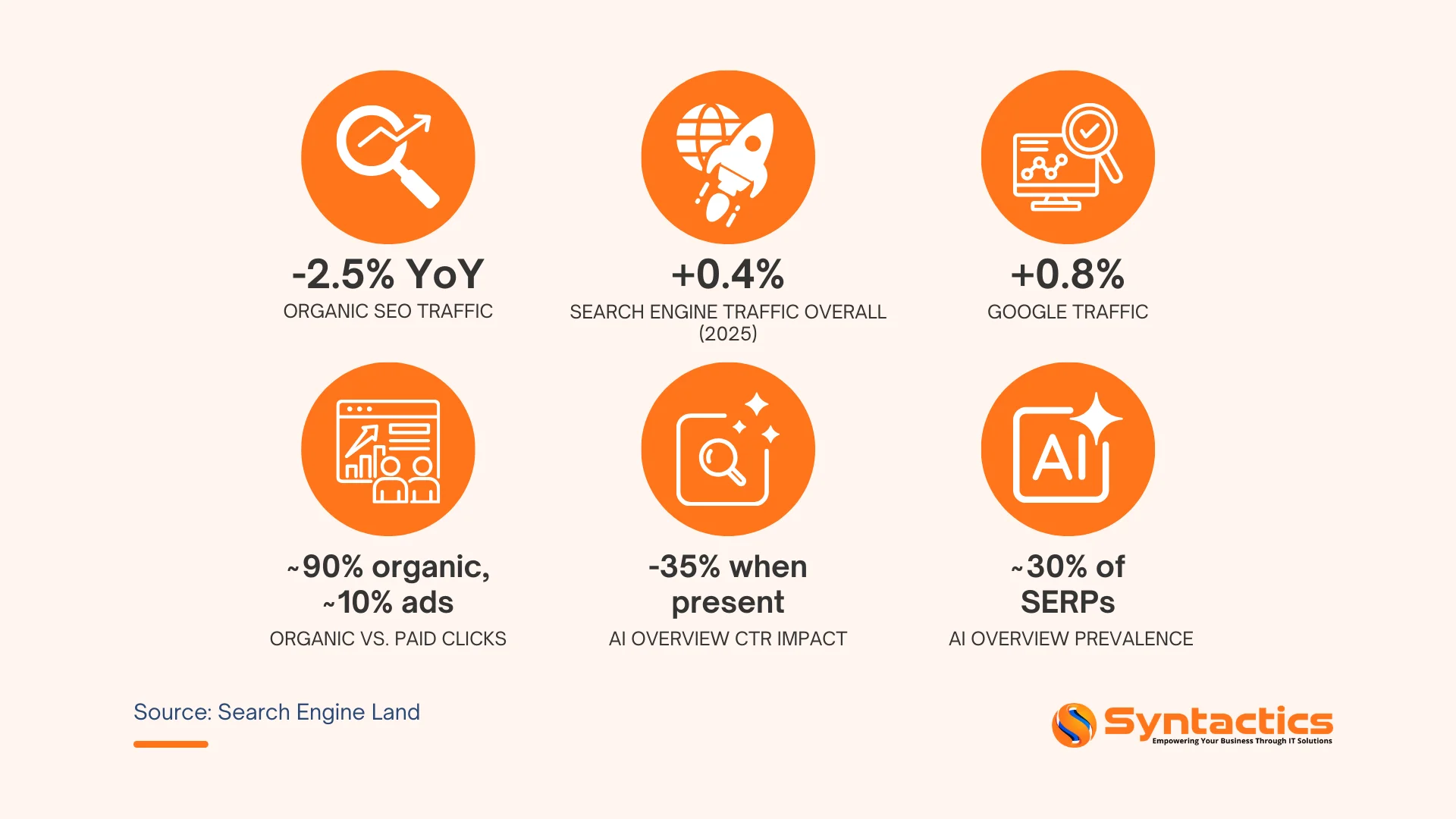
Source: Search Engine Land.
TABLE OF CONTENTS
Core Causes and Diagnostic Framework of Sudden Drop in Website Traffic
Understanding why traffic drops happen is the first step to fixing them. While each website is unique, most sudden declines fall into four major categories. Below is the breakdown of the factors that might be affecting your site.
Technical and Tracking Issues
Sometimes, traffic loss isn’t real; it’s a measurement error. Broken or misconfigured analytics tags after updates, CMS migrations, or changes to tag systems can show drops even as visitors keep arriving.
Genuine technical issues can also hit traffic hard. Server downtime, slow page speeds, broken scripts, or misconfigured hosting can frustrate users and trigger search engine penalties.
Common technical culprits include:
- Broken or missing analytics tracking codes
- Server downtime or hosting issues
- Slow page speed due to unoptimized images, scripts, or poor hosting
- Robots.txt misconfigurations blocking search engines
- SSL certificate errors or HTTP/HTTPS redirect loops
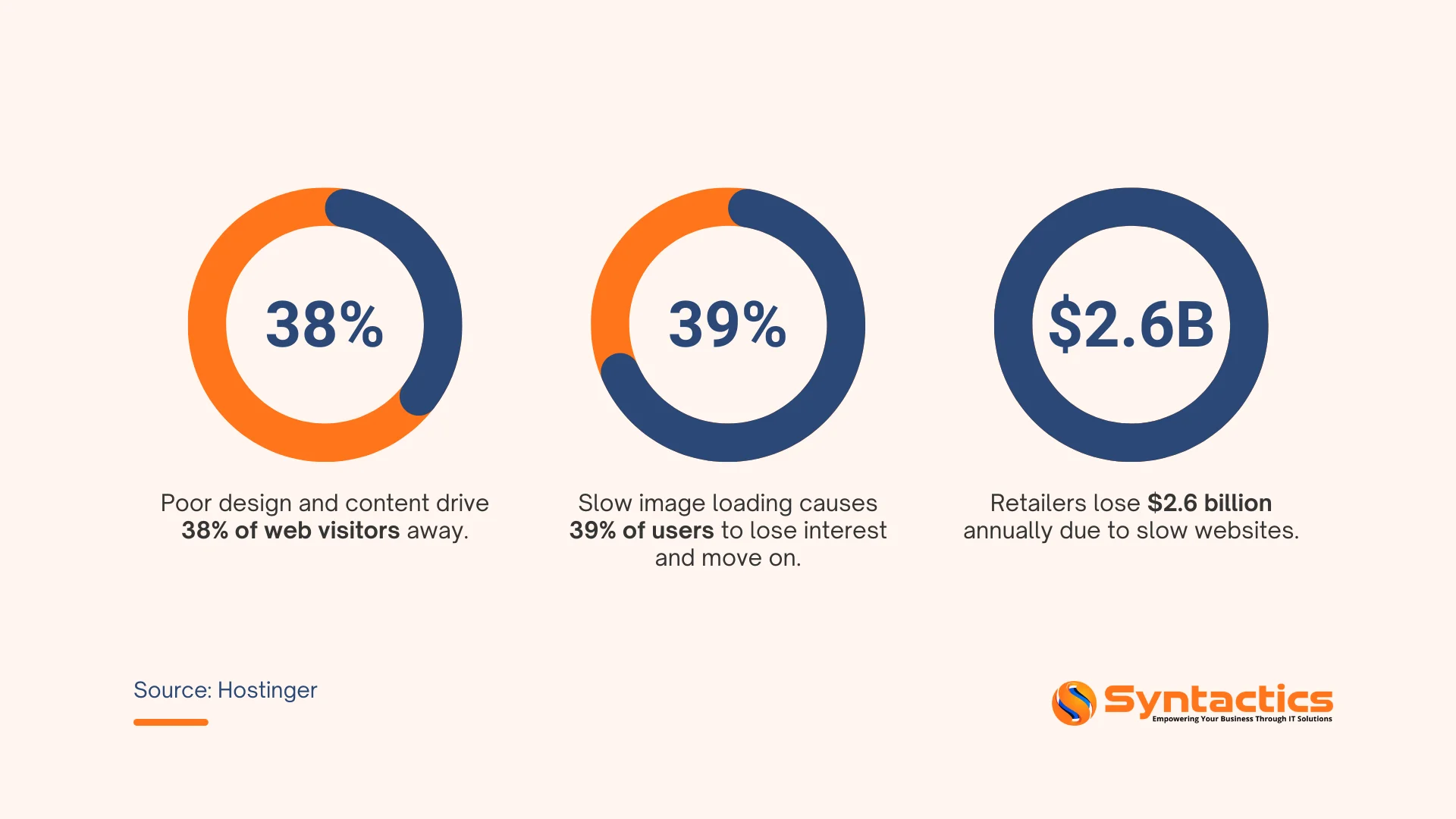
Source: Hostinger.
SEO and Content Factors
Search engine optimization is dynamic, and even well-optimized sites can lose traffic due to algorithm changes or competitive shifts. Remember, Google regularly updates its ranking algorithms. If your site relies heavily on tactics that Google later devalues (like keyword stuffing or low-quality backlinks), a single algorithm update can bomb your rankings.
Lost rankings for key terms are another major driver. Perhaps a competitor launched a better-optimized page, or your once-authoritative content has become outdated. Stale content loses relevance and engagement, which Google interprets as a quality signal. Thin, duplicate, or poorly written pages can also trigger penalties or simply fail to compete in search results.
SEO-related causes include:
- Google algorithm updates penalizing your site;
- Loss of rankings for high-value keywords;
- Outdated or thin content losing search visibility;
- Manual penalties or security warnings in Google Search Console, and
- Loss of authoritative backlinks or a toxic link profile

Design and UX Problems
Poor user experience impacts bounce rates and conversions and can quickly drive visitors away. A redesign can break navigation, hide content, or create confusing layouts. When users can’t find what they need, they leave—and rising bounce rates signal search engines.
Mobile experience is especially critical, as the majority of traffic now comes from smartphones and tablets. If your site isn’t fully responsive, loads slowly on mobile networks, or requires excessive zooming and scrolling, mobile users will abandon it. As a result, Google ranks your site lower in mobile search results.
Design and UX issues to watch for:
- Confusing navigation or broken internal linking;
- Poor mobile responsiveness or mobile page speed;
- Intrusive pop-ups or interstitials that frustrate users;
- Overly aggressive calls-to-action that interrupt the user journey, and
- Layout changes that bury important content or CTAs.
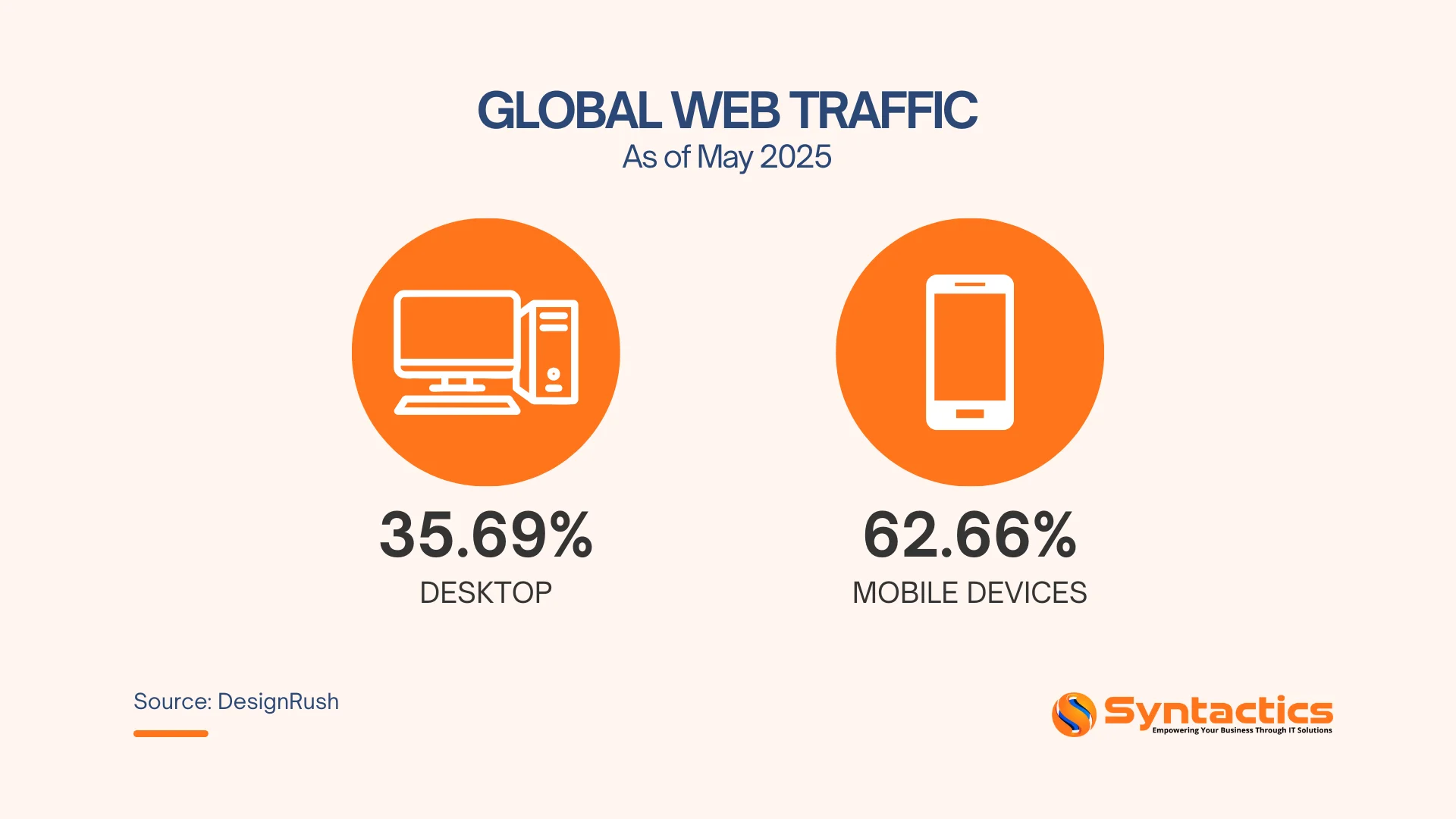
Source: DesignRush.
External Influences
Not all traffic drops are within your direct control. Seasonal fluctuations are normal for many industries. Think tax preparation services in January versus July, or holiday retail spikes. If your business is seasonal, a traffic dip might simply reflect market behavior rather than a problem with your site.
Changes in referral sources can also impact numbers. If a major publication linked to your content and then removed the link, or if a partner site went offline, you’ll lose that referral traffic. Similarly, shifts in social media algorithms or reduced ad spend can decrease traffic from those channels.
Finally, competitor activity matters. A rival’s aggressive SEO, stronger content, or better user experience can draw traffic away. Market changes, like new entrants, industry consolidation, or shifting consumer preferences, can also affect demand.
External factors to consider:
- Seasonal trends and cyclical demand patterns;
- Loss of high-value referral links or partnerships;
- Changes in social media reach or algorithm adjustments;
- Increased competitor activity or superior content from rivals, and
- Broader market shifts or economic changes affecting your niche.
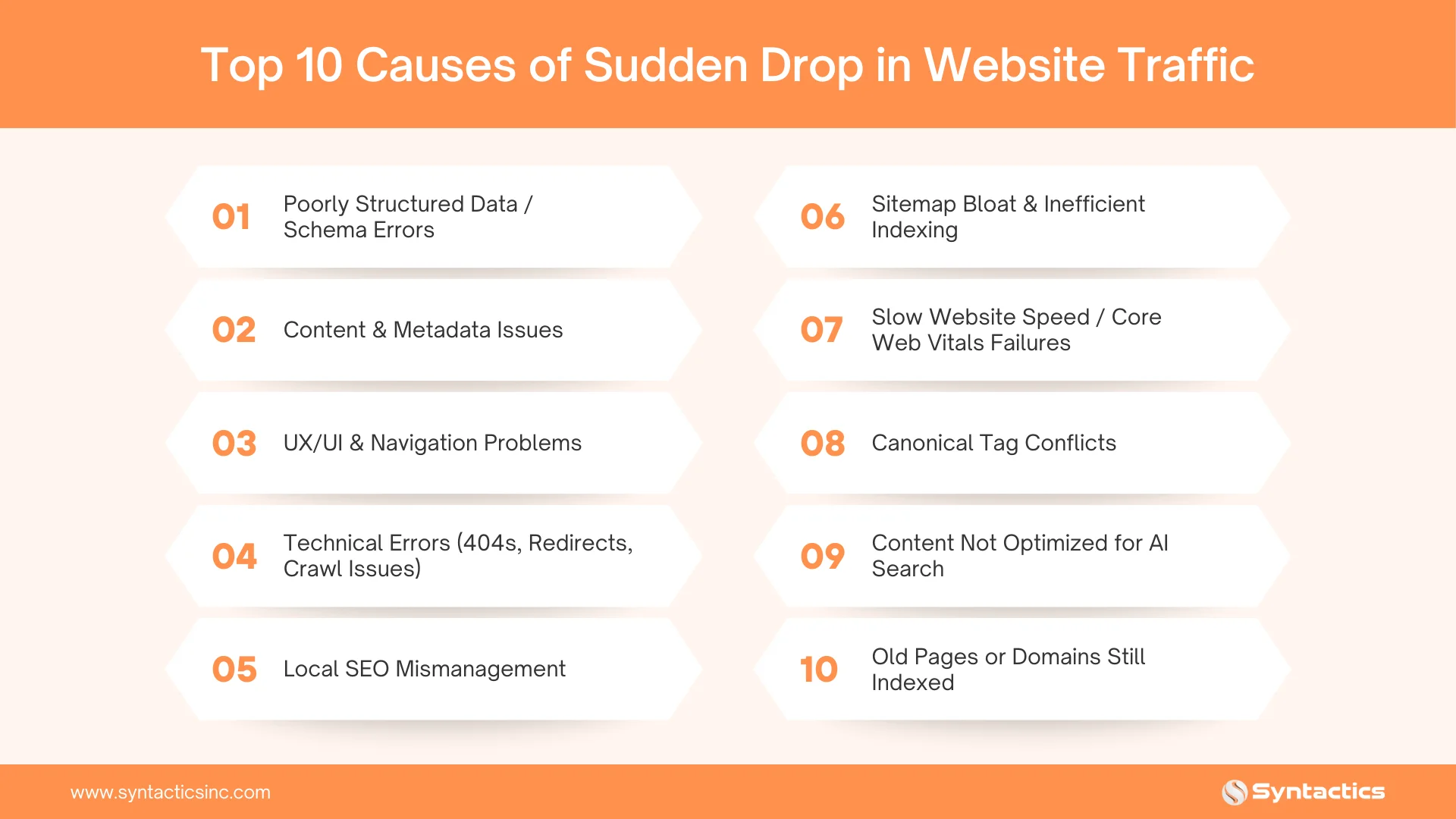
How to Diagnose a Sudden Traffic Drop
Once you’ve identified that a traffic drop is real (not just a tracking error), a methodical approach is essential to pinpoint the exact cause. Here’s a proven diagnostic framework:
Step 1: Verify Your Data Across Multiple Sources
Don’t rely on a single analytics platform. Cross-reference your traffic data in Google Analytics 4, Google Search Console, and any third-party tools you use (like SEMrush, Ahrefs, or Moz). If all platforms show the same decline, it’s a genuine traffic loss. If only one platform shows the drop, investigate that tool’s tracking setup, such as tags that may be broken or misconfigured.
In Google Search Console, review the Performance report for the affected date range. Look at total clicks, impressions, average CTR, and average position. A drop in impressions usually indicates lost rankings or indexing issues, while a drop in clicks with stable impressions suggests lower CTR, possibly due to less compelling titles/meta descriptions or increased competition.
Pro Tips:
- Compare traffic trends in GA4 and Search Console.
- Check for tracking code errors or tag implementation issues.
- Review server logs to confirm actual visitor activity.
Step 2: Segment the Data to Isolate Affected Areas
Traffic drops rarely affect an entire website uniformly. Use segmentation to identify exactly where the problem lies. Break down your data by landing pages, traffic channels (organic, direct, referral, social, paid), device types (mobile vs. desktop), and geographic locations.
If only a handful of pages lost traffic, focus your investigation on those pages. Those pages may have technical errors, lost rankings, or outdated content. If mobile traffic dropped but desktop stayed stable, you likely have a mobile UX or performance issue. If organic search plummeted but other channels remained steady, it’s an SEO problem.
Pro Tips:
- Identify top pages with the largest traffic declines.
- Separate organic, direct, referral, and paid traffic trends.
- Compare mobile vs. desktop performance.
- Review geographic data for regional anomalies.
Step 3: Correlate the Drop with Recent Site Changes
Timing is everything. Pull up your website’s change log. Identify if you deployed a redesign, migrated to a new CMS, updated plugins, changed hosting providers, or modified SEO elements around the time traffic dropped. Even seemingly minor changes (like altering URL structures, removing pages, or tweaking title tags) can have major consequences.
Check Google Search Console for crawl errors, manual actions, or security issues. Review the Coverage report to see if pages were deindexed. Also, check for algorithm update announcements from Google. Major updates often correlate with ranking volatility across many sites.
Questions to ask:
- Did we launch a redesign or site migration recently?
- Were there any technical updates, plugin changes, or server moves?
- Did we modify robots.txt, sitemaps, or canonical tags?
- Are there manual penalties or security warnings in Search Console?
- Did Google announce a core algorithm update around this time?

Key Strategies to Prevent Website Traffic Loss
Preventing traffic loss starts with a stable technical foundation. Many sudden drops are not caused by content or keywords, but by infrastructure, configuration, and deployment issues. The strategies below focus on keeping your website accessible, measurable, and resilient.
Build a Stable Technical Foundation
Search engines and users depend on consistent access to your site. Even brief technical failures can cause traffic disruption.
- Use a clear URL structure that avoids unnecessary redirects.
- Keep your XML sitemap up to date and submit it to Search Console.
- Ensure robots.txt allows critical pages to be crawled.
- Implement proper canonical tags to avoid duplication.
- Use HTTPS consistently and avoid mixed-content issues.
A stable architecture reduces crawl errors, indexing delays, and visibility loss.
Optimize Performance and Availability
Performance issues often precede traffic declines. Slow or unreliable sites drive users away and affect discoverability.
- Monitor server uptime and response times continuously.
- Optimize page speed by compressing images and minimizing scripts.
- Use a reliable hosting environment and CDN where appropriate.
- Test performance regularly on mobile networks.
- Consistent speed and uptime protect both traffic and user trust.
Ensure Accurate Tracking and Monitoring
Traffic drops can go unnoticed until damage is done. Proper monitoring provides early warnings.
- Verify analytics tags after every site update or deployment.
- Configure GA4 and Search Console correctly across all properties.
- Set alerts for sudden traffic drops, crawl errors, and security issues.
- Track Core Web Vitals to catch performance regressions early.
- Reliable data ensures problems are detected before they escalate.
Apply Rigorous Pre- and Post-Launch QA
Many traffic losses occur after deployments. Quality assurance reduces risk.
- Test pages across browsers and devices before launch.
- Check redirects, broken links, and JavaScript errors.
- Validate tracking, forms, and key conversion paths.
- Re-crawl the site after major updates to confirm indexability.
- Structured QA prevents small changes from causing large traffic losses.

Plan for Ongoing Technical Maintenance
Websites are not static assets. Ongoing maintenance is essential.
- Audit technical health regularly.
- Keep plugins, frameworks, and dependencies updated.
- Review logs for crawl, server, or security anomalies.
- Document site changes to simplify future diagnostics.
- Proactive maintenance keeps traffic stable over time.
Recovering Lost Website Traffic: A Practical Action Plan
Speed matters in recovery. Address critical issues first, then work through indexing, performance, and tracking validation. This framework prioritizes actions by urgency and impact.
Stabilize the Site (Hours)
Eliminate active threats that prevent access. Every minute of downtime compounds losses.
Fix server issues. Resolve downtime with your host, implement a CDN if needed, and set up monitoring (Pingdom, UptimeRobot).
- Roll back bad deployments. If the drop followed an update, revert immediately. Test fixes in staging, not production.
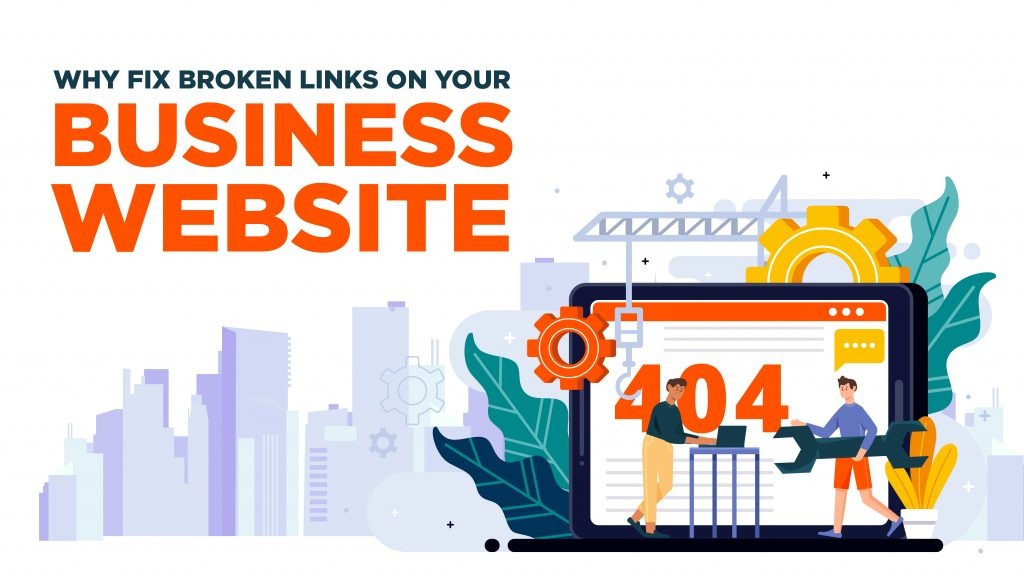
- Repair broken links and tracking. Crawl with Screaming Frog to find 404s. Restore lost 301 redirects. Verify GA4 and conversion tags load correctly.
- Check robots.txt. Remove accidental blocks. A single bad directive can de-index everything. Submit affected URLs for re-indexing.
Restore Indexing (Days-Weeks)
Ensure search engines discover and index your pages. Recovery stalls if content remains deindexed.
- Check Index Coverage. Identify excluded or deindexed pages in Search Console. Prioritize high-traffic URLs and fix thin content, duplicates, or canonical issues.
- Fix crawl errors. Address 5xx errors, redirect chains, and robots.txt blocks. Request indexing via Search Console or update your sitemap.
- Audit canonicals and redirects. Ensure canonical tags point correctly and redirects go directly to final destinations—no chains.
- Resolve penalties. Fix violations completely before submitting reconsideration requests. Partial fixes fail.
Fix Performance Issues (1-2 Weeks)
Core Web Vitals are ranking factors. Slow sites lose to faster competitors.
- Audit Core Web Vitals. Use PageSpeed Insights and Search Console to identify failing LCP, INP, and CLS scores.
- Optimize assets. Compress images (WebP/AVIF), lazy-load media, minify CSS/JS, defer non-critical scripts. Remove heavy third-party plugins.
- Test mobile performance. Use Chrome DevTools to throttle to 3G/4G. Target under 3-second load times.

Validate Tracking (Ongoing)
Reliable data drives smart decisions. Verify you’re tracking real recovery, not false signals.
- Test analytics tags. Verify GA4, conversion pixels, and events fire on all templates. Use Tag Assistant or browser dev tools.
- Cross-reference data. Compare GA4, Search Console, and server logs. Discrepancies indicate tracking issues, not traffic problems.
Monitor and Adjust (Continuous)
Recovery takes time. Watch trends daily, isolate changes, and adjust strategy if progress stalls.
- Track affected segments. Build dashboards for impacted pages, channels, and devices. Look for consistent upward momentum.
- Monitor Search Console. Review crawl stats and index coverage weekly. Watch for new errors that could derail recovery.
- Isolate changes. Wait 1-2 weeks between major fixes. Document each change to identify what works.
Conclusion
A sudden drop in website traffic can directly impact leads, revenue, and brand visibility. The good news is that most traffic declines are diagnosable and fixable with a methodical approach. With solid technical foundations, responsive design, robust monitoring, and proactive maintenance, prevention becomes the pathway to long-term stability.
Take control of your website’s performance with a proven technical strategy. Syntactics, Inc., a leading web design and development agency in the Philippines, builds high-performance, resilient websites that prevent traffic drops and deliver measurable results. Secure your traffic and turn your website into a consistent growth engine today!
Get Design and Functionality
Specific to your Brand!

Frequently Asked Questions (FAQs)
How long does it take to recover lost traffic?
Recovery depends on the root cause, site size, and complexity. Minor technical fixes can restore traffic in days, while larger issues, like server migrations or redesigns, may take a few weeks.
What does it cost to implement these technical solutions?
Costs vary based on the website’s size, complexity, and required optimizations. Our team provides a tailored proposal after assessing your site’s technical needs to ensure effective, scalable solutions. Contact our web experts for a tailored quotation.
Can traffic drops happen even on well-designed websites?
Yes. Even high-performing sites can experience drops due to external factors like algorithm updates, lost backlinks, or sudden server issues. Continuous monitoring and proactive technical maintenance minimize risk.

About Ladymieh Naallatan
Related News:

Why Black Hat SEO Isn’t Right for Your Website


Cloud Based Software vs Desktop Software

Web Design Trends and Inspiration in 2021








Comment 0