

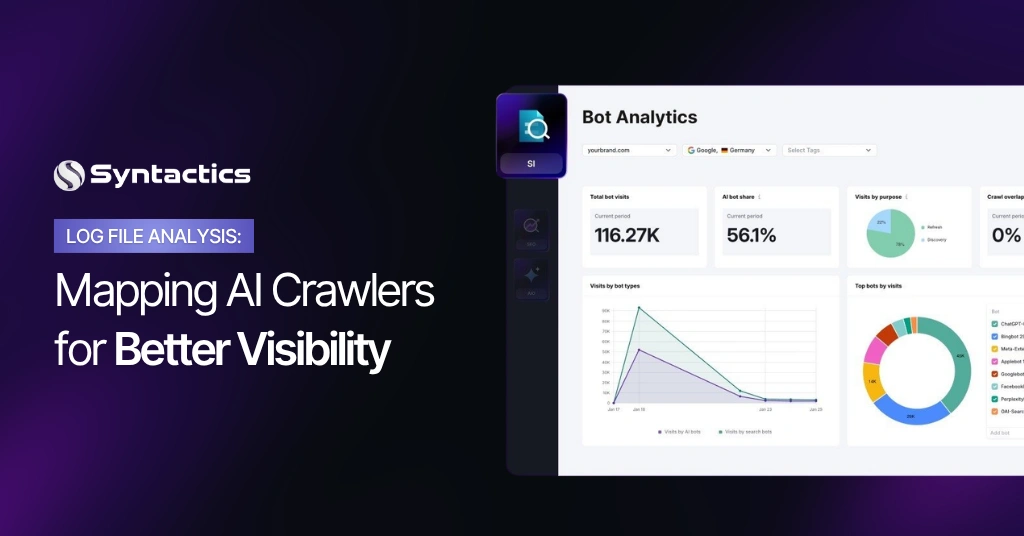
Log File Analysis: Mapping AI Crawlers for Better Visibility
AI bots are already visiting your website. They crawl your pages, use up your bandwidth, and sometimes even scrape your content for model training without your permission. The only way to spot this is through log file analysis, but most teams rarely check these logs.
Google Analytics doesn’t track these bots, and Search Console doesn’t report them either. Only your server log records every request, whether it’s from a person or a bot. A log file analyzer helps you turn this raw data into useful information.
This guide will show you what’s really happening with your website’s performance and visibility. You don’t need a technical background. By the end, you’ll understand what AI crawlers are doing on your sites, what risks to look out for, and how to respond.
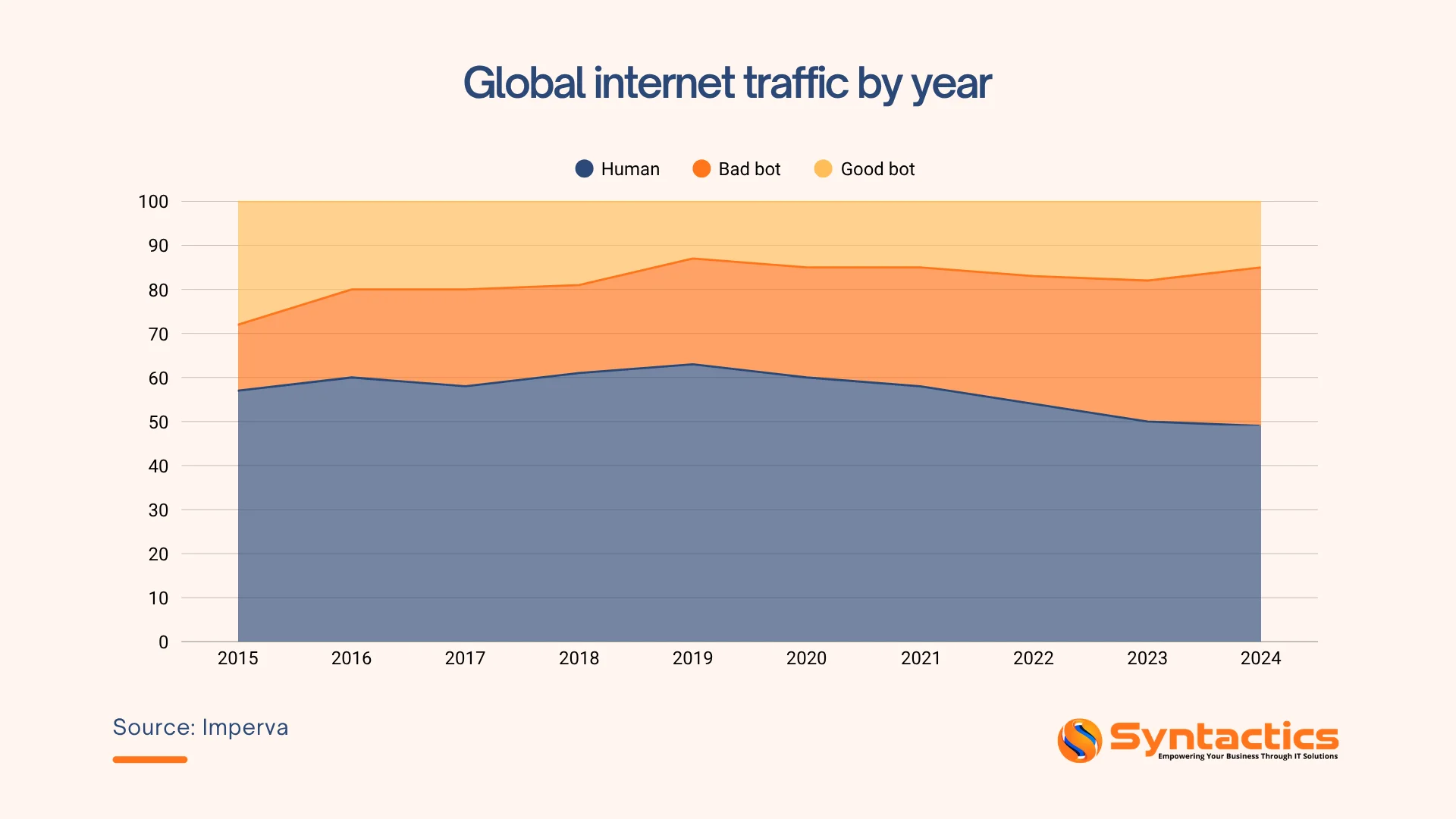
Source: Imperva.
TABLE OF CONTENTS
What Log Files Reveal About AI Crawlers
Your web server keeps a record of every single request it receives. Every page visit, image load, and bot crawl, it writes each one as a line of text in a log file. The problem is that a busy website generates millions of these lines. Without the right tool, there’s no practical way to make sense of them.
A log file analyzer takes this raw data and turns it into useful dashboards, reports, and alerts that help answer important business questions.
What it tells you at a glance:
- Which bots and crawlers are hitting your site, and how often;
- How much bandwidth they’re consuming;
- Which pages they’re targeting;
- Whether they’re hitting pages they shouldn’t be, and
- Where your server is throwing errors.
Having this visibility can help you catch problems early, instead of having to explain to a client why their hosting bill suddenly increased.
Why Google Analytics Isn’t Enough
Here’s the issue: Google Analytics only works when a real browser runs JavaScript on your page. AI crawlers skip this step. They just request the raw HTML and move on, so their visits and other automated requests aren’t recorded in GA4 at all.
According to the Independent, bots now make up about 51% of all global web traffic, passing the halfway mark for the first time in 2024. AI bot traffic alone grew by 187% from January to December 2025, while human traffic only increased by 3.1%.
That means:
- You can’t see which AI platforms are indexing your content or if they’re blocked from doing so.
- You can’t quantify bot-driven bandwidth costs; they’re invisible in client-side tools.
- You can’t catch crawlers accessing pages they shouldn’t be on login pages, admin areas, or content marked private.
Server logs capture every request, which is their main advantage.
What to Look for in a Log File Analyzer
Not all tools are the same. If your business deals with AI crawler activity, these features are the most important:
Bot classification. The tool should identify known AI crawlers by name, like GPTBot, ClaudeBot, and PerplexityBot, and separate them from search engine bots and human visitors. Grouping all bots together isn’t helpful for decision-making.
Real-time alerts. Weekly reports aren’t enough during a sudden surge of bot activity. Choose tools that notify you right away when traffic spikes or when certain crawlers act aggressively.
Bandwidth reporting per bot. This data helps you make your case to clients. For example, you can show, “GPTBot used 12 GB of bandwidth this month with no benefit to your rankings.”
URL grouping. Sites with many navigation options or large product catalogs can create thousands of different URLs. A good analyzer groups these URLs in a smart way, so you see useful patterns instead of random data.

What AI Crawlers Are Actually Doing on Your Website
AI companies send crawlers to collect data for two main reasons:
- To power their AI search results (so your content can be cited in ChatGPT, Perplexity, etc.), and
- To collect training data for building new AI models.
These two purposes are different, and it’s important to know the difference when managing them. Some crawlers can help your business by getting your content cited in AI answers, which boosts your visibility. Others just take your content for training, offering you no benefit.
Log file analysis shows you exactly which crawlers are active on your site and what actions they’re taking.
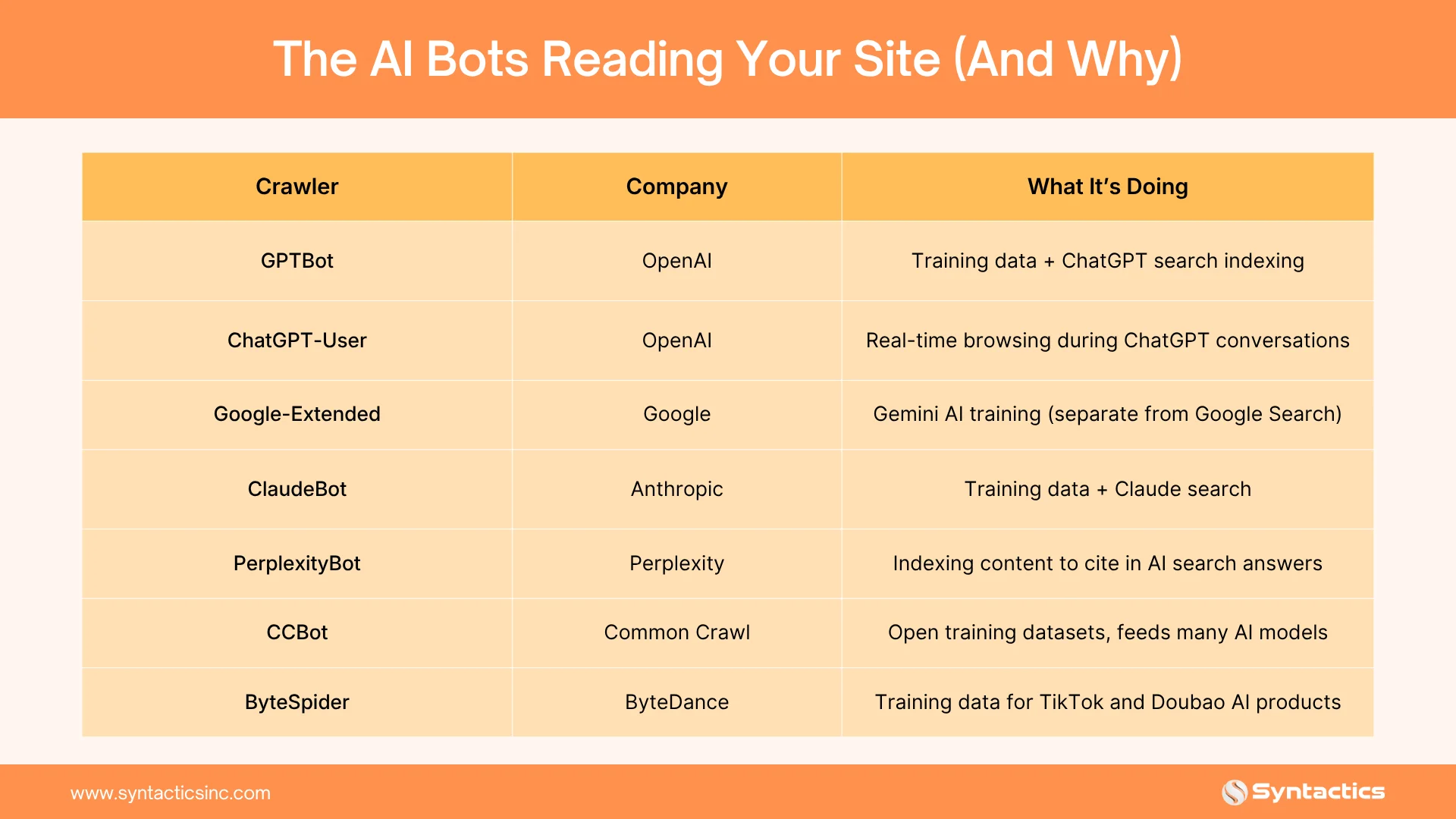
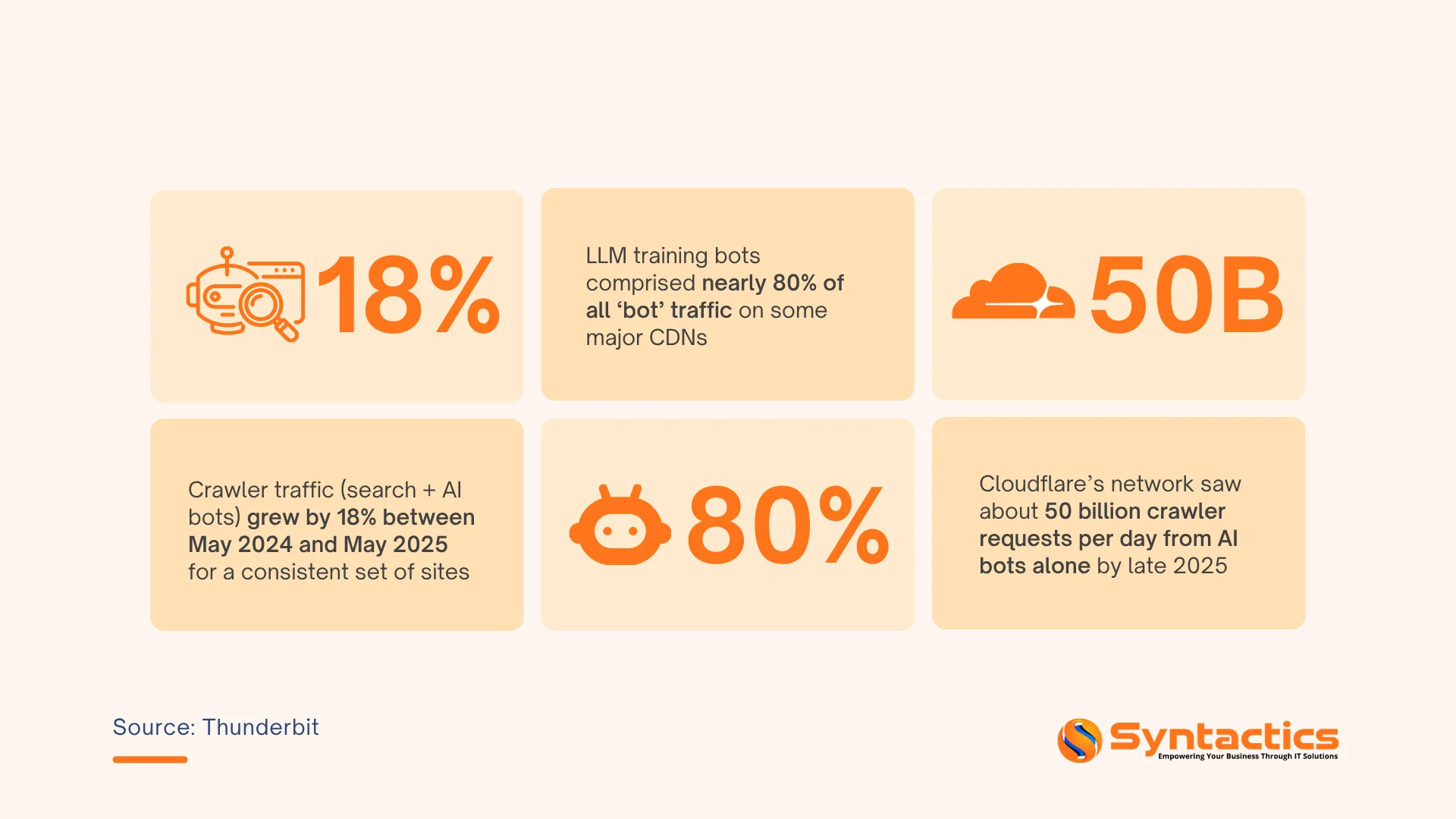
The growth of these crawlers is not gradual. GPTBot alone grew 305% between May 2024 and May 2025, jumping from ninth to third place among all crawlers tracked by Cloudflare. ChatGPT-User, which browses the web in real time on behalf of ChatGPT users, saw requests surge 2,825% over the same period.
How AI Crawlers Behave and Why They Differ from Google
Understanding the behavior helps you interpret what you see in your logs and make smarter decisions.
They crawl in bursts.
Googlebot usually crawls at a steady pace, but AI crawlers often do not. They might visit 200 to 400 pages in just a few minutes, then stop for hours before starting again. If you notice a sudden spike in traffic from one IP address that disappears quickly, it’s probably an AI crawler.
They go deep.
Search engine bots focus on your most-linked and most important pages, but AI crawlers are after quantity. They’ll crawl deep into your blog archives, filtered product URLs, and even old content that hasn’t been linked to in years. Their goal is to build training datasets, not to rank your content.
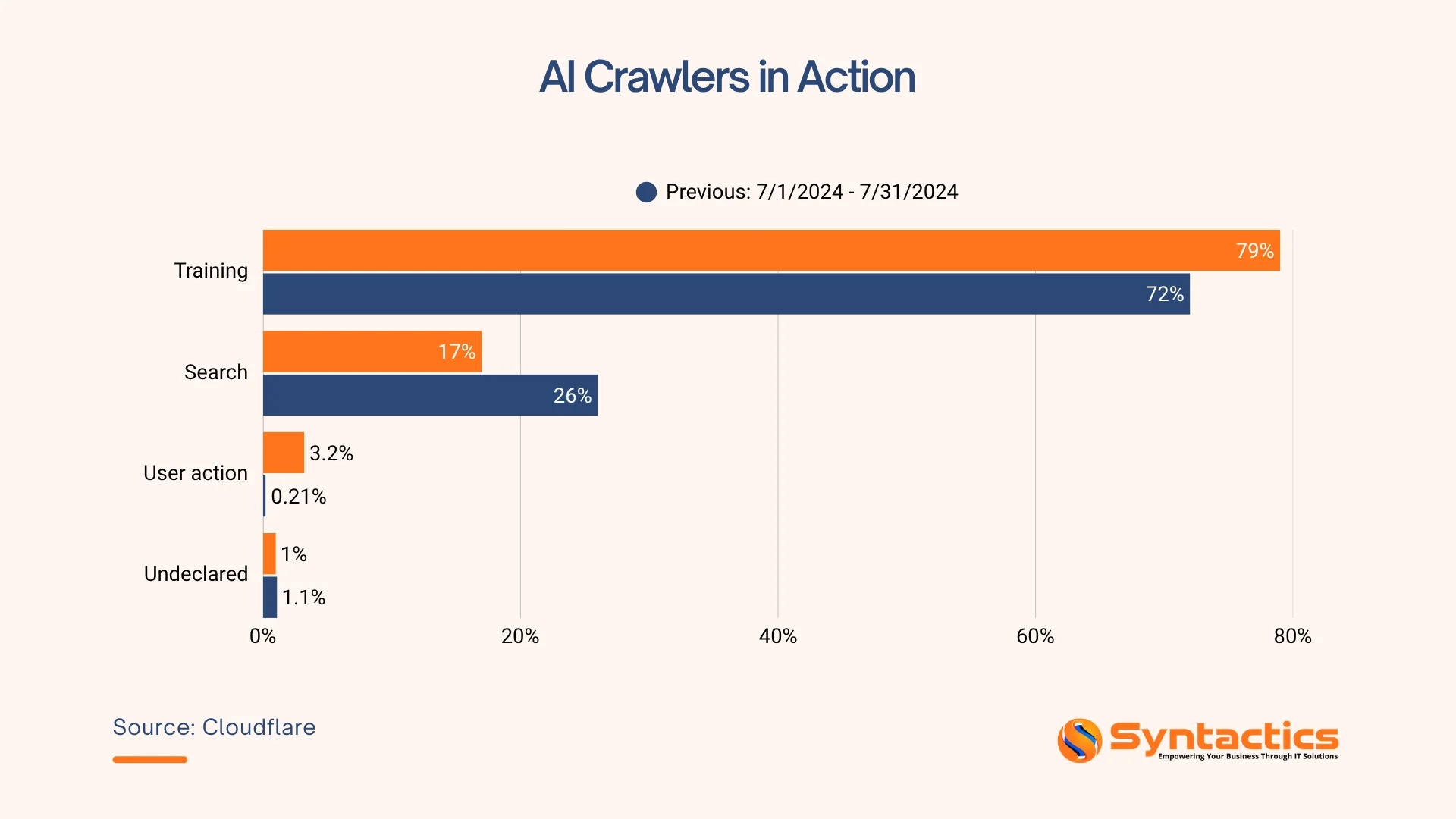
Source: Cloudflare
They don’t always follow the rules.
While reputable AI crawlers from OpenAI, Anthropic, and Perplexity respect your robots.txt instructions, others, CCBot in particular, have an inconsistent compliance record. Log files give you the evidence to see exactly which crawlers are ignoring your directives.
Data from The Register found that 13.26% of AI bot requests ignored robots.txt directives in Q2 2025, up sharply from 3.3% in Q4 2024. Log files give you the evidence to see exactly which crawlers are ignoring your directives.
They access pages you didn’t expect to be crawled.
API endpoints, JSON feeds, old URL structures, and internal search result pages. These paths were never designed for public crawling and often aren’t covered by standard bot-blocking configurations.
Business Risks You Need to Know About
Most site owners only discover these issues after something has already gone wrong. Log file analysis lets you catch them proactively.
Unexpected Bandwidth Costs
A single aggressive crawler can consume bandwidth equivalent to thousands of human visitors in a day. If your client is on a metered hosting plan, that shows up on the next invoice with no explanation. Log analysis puts a number on it and tells you which bot is responsible.
Source: Thunderbit.
Sensitive Content Exposure
Bots don’t always stay in the areas you intend. Logs will show you if a crawler has accessed pages marked noindex, admin-area paths, or content you’ve tried to protect. JavaScript-based protections are invisible to crawlers, server-side logs are not.
Content is Used for AI Training without Consent
If you haven’t specifically blocked training crawlers like CCBot or Google-Extended, they have probably already collected your content. Logs can show you when this happened.
New, Unannounced Crawlers
AI companies often release new products and crawlers without warning. Logs can reveal new user agent strings as soon as they show up. Without log monitoring, you might not notice a new crawler until it causes issues.
Step-by-Step Guide on How to Map AI Crawlers Behavior
Here is the five-step process to map AI crawler activity on your website.
1. Collect Raw Server Access Logs
Locate your server logs first. Apache stores them at /var/log/apache2/access.log. Nginx uses /var/log/nginx/access.log. Cloud hosting providers offer log exports through their consoles. CDNs like Cloudflare provide log streaming or export options.
Managed WordPress hosts such as Kinsta or WP Engine can provide raw access logs on request.
2. Filter for Known AI Bot User Agents
Use grep to extract AI crawler lines from your logs.
# Extract GPTBot visits
grep “GPTBot” /var/log/nginx/access.log
# Extract multiple AI bots at once
grep -E “GPTBot|Google-Extended|ClaudeBot|CCBot” access.log
Then, redirect the output to a CSV file for easier analysis.
3. Group by URL, Time, and Crawl Depth
Once you have filtered logs, organize them. Answer three questions for each crawler.
- Which URLs did it visit?
- How frequently did it request pages?
- Did it crawl beyond the first or second navigation level?
A spreadsheet works for smaller sites. Use a log analyzer for larger volumes.
4. Visualize the Crawl Path
Map the chronological sequence of URLs for a single crawler session. The pattern often looks like this.
Homepage → Category Page → Blog Post 1 → Blog Post 2 → Pagination Page 2 → Return to Homepage
As mentioned above, AI crawlers behave differently from human visitors. They ignore images and scripts. They follow every internal link systematically. Some request pages in alphabetical or numerical order rather than natural navigation order.
5. Identify Gaps, Overlaps, and Anomalies
Review your completed map for three things. Gaps are important pages that the crawler never visited. Overlaps occur when multiple crawlers hit the same low-value page. Anomalies include crawlers accessing staging subdomains, admin paths, or old backup files.
Each discovery points to a clear step you can take to improve your site’s visibility.

Improving Visibility Through Mapping
Mapping has a real benefit: it helps boost your visibility in AI products like ChatGPT, Perplexity, Google SGE, and Bing Chat.
See which content AI bots value most. Your log map becomes a heatmap of AI interest. Pages with the most crawler visits are the ones most likely to appear in AI-generated answers. Prioritize those pages.
Optimize high-interest pages for AI understanding. Once you know which pages AI crawlers favor, improve them. Add clear factual headings. Use bullet points and tables. Include relevant Schema.org markup for articles, FAQs, or how-to guides. Remove fluff and contradictory statements.
Identify hidden or undercrawled valuable pages. Some excellent content may never receive an AI crawler visit. Logs reveal these zero-visit URLs. Promote them by adding internal links from high-traffic pages.
Ensure AI bots access your best content. If logs show crawlers hitting old or staging URLs, take action. Block staging subdomains via robots.txt. Set up 301 redirects from old URLs to current ones. Remove internal links pointing to deprecated content.
Best Practices for AI Visibility
Apply these best practices based on your log insights.
- Update robots.txt to allow beneficial AI bots. Do not block all AI crawlers indiscriminately. Some improve your visibility.
- Implement an llms.txt file. The llms.txt standard gives AI agents a machine-readable site summary. Create one at yoursite.com/llms.txt. Include links to your most important AI-readable content.
- Fix broken crawl paths. Your log map shows 404 errors that AI crawlers encounter. Each 404 is a missed visibility opportunity. Fix those broken links.
- Rate limit aggressive crawlers. Some AI crawlers ignore your directives or overload your server. Implement rate limiting.
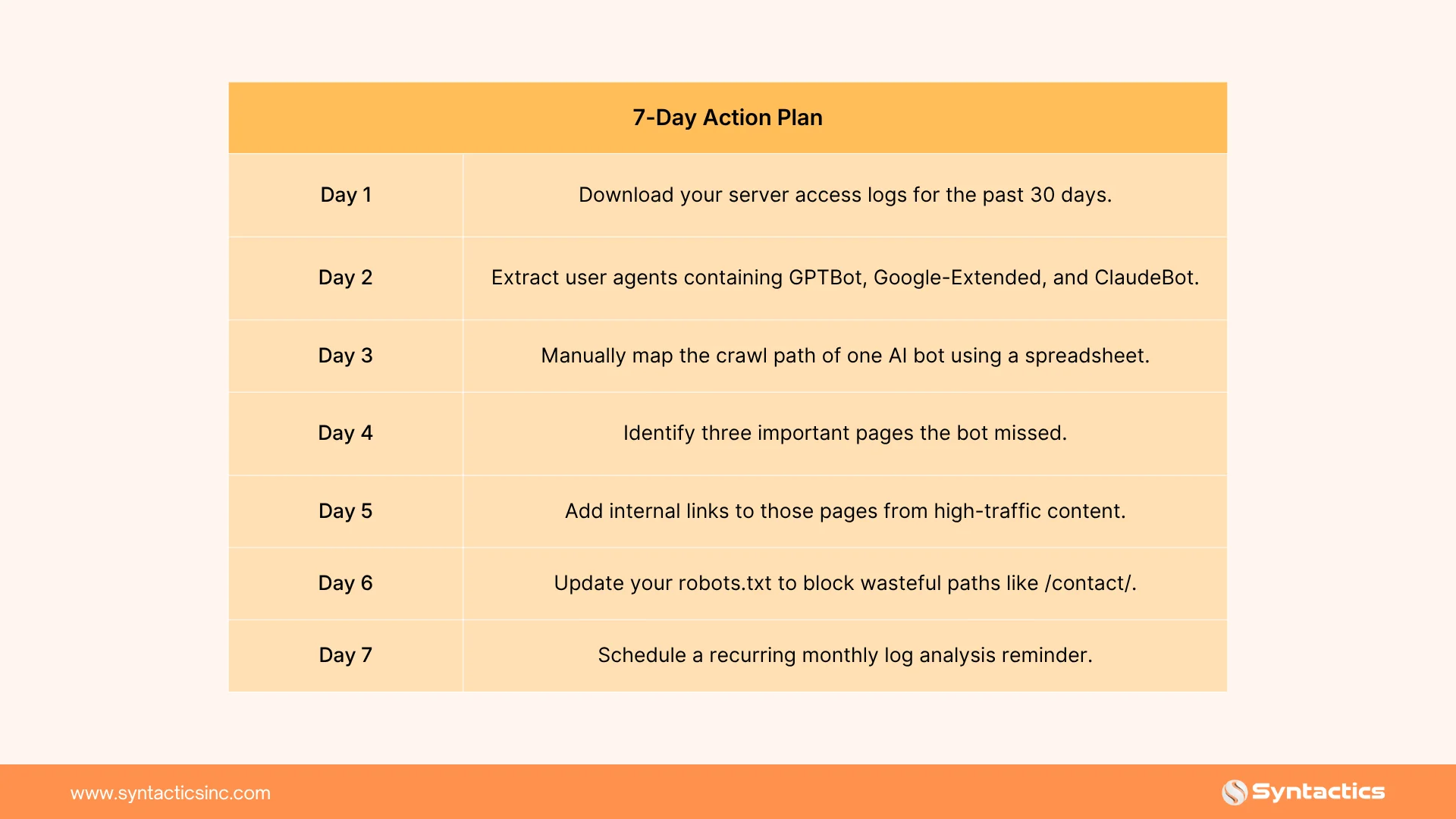
Here’s your 7-day action plan:
Conclusion
AI crawlers are permanent; more models will emerge, and more bots will hit your server daily. The difference between invisibility and citation in AI answers comes down to one skill: mapping AI crawler behavior through log file analysis. Large sites and content-heavy platforms require a structured approach to this challenge.
Fortunately, Syntactics, Inc. provides SEO services in the Philippines and globally, with expertise in AI crawler mapping and auditing to show how AI agents interact with your content. We refine content for LLM readiness, improving clarity, structure, and citation potential. Turn server logs into a measurable advantage in AI-driven search.

Frequently Asked Questions About Log File Analysis
How is AI crawler mapping different from traditional SEO log analysis?
Traditional SEO analysis focuses on search engine bots, such as Googlebot. Metrics include crawl budget, indexation, and response codes. AI crawler mapping focuses on training data collection, LLM output visibility, and content control.
How often should I analyze logs for AI crawler activity?
Start with a monthly review. AI models and crawlers evolve rapidly. Some sites benefit from weekly checks after major content updates.
Can a log file analyzer automatically block bad AI crawlers?
Some advanced analyzers integrate with firewalls or CDNs to automatically block or rate-limit traffic. Manual review is recommended first to avoid blocking beneficial crawlers. Contact our SEO experts for tailored solutions.











Comment 0