

Canva vs CapCut: Which Content Creation Tool is Right for Your Business?
Choosing the right creative platforms can determine how quickly and effectively you scale your brand. As visual content dominates consumer attention, businesses face a direct choice among platforms for designing, editing, and publishing their media. Currently, two heavyweights lead the charge in user-friendly content creation: Canva and CapCut. While modern creators widely use both, they approach corporate communication from completely different angles.
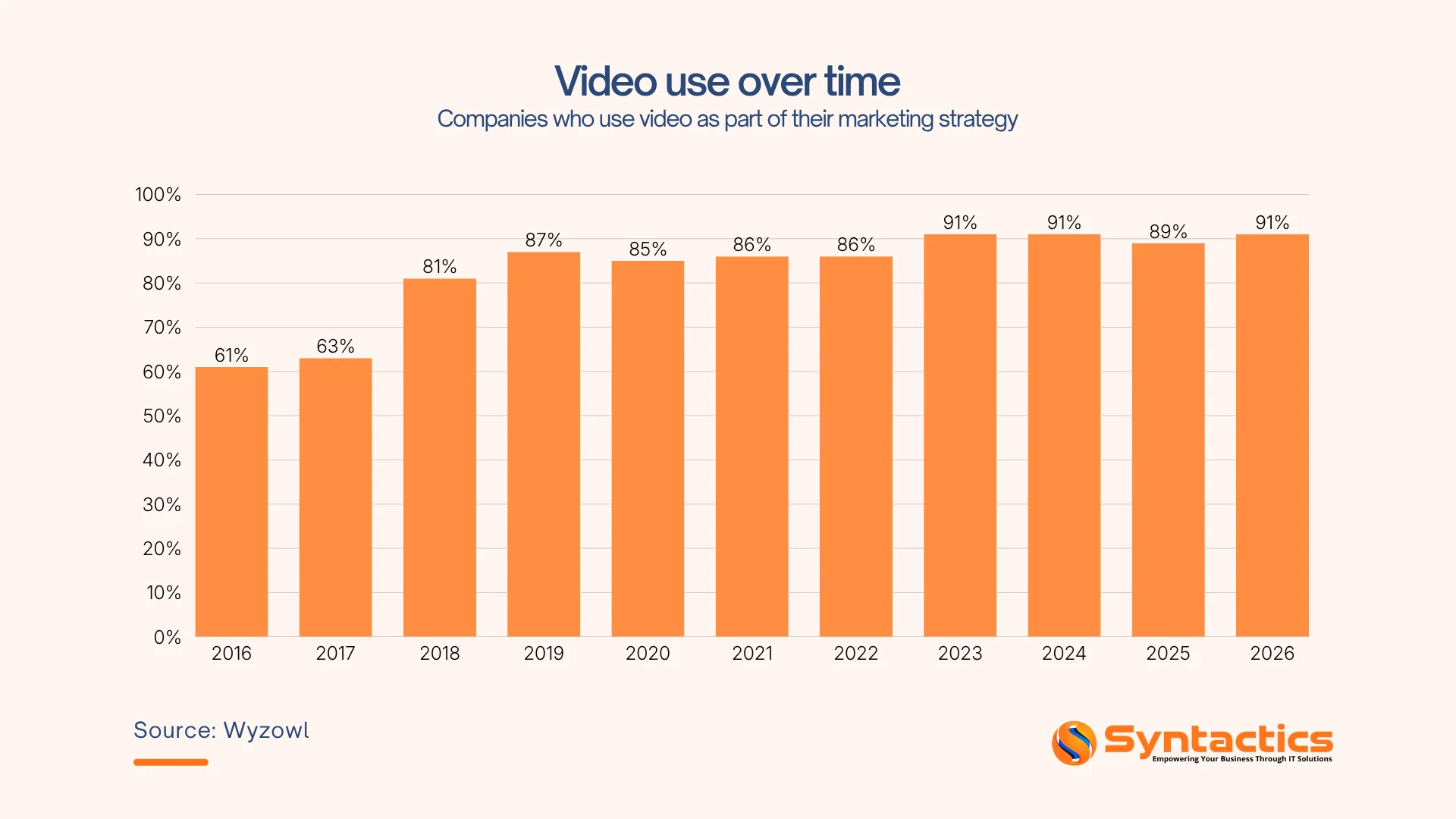
To thrive in today’s marketplace, you need to navigate an environment where visual representation directly dictates customer acquisition. According to Wyzowl, 91% of businesses use video as a marketing tool, underscoring that dynamic content is essential for your commercial growth.
So, it’s important to pick tools that fit your team’s skills, your work speed, and your marketing channels. That said, understanding the distinct design philosophies behind Canva vs CapCut will help you improve your marketing assets, control your production budget, and maximize your audience engagement.
Source: Wyzowl
Key Takeaways
- 43% of businesses struggle to implement video marketing because they lack in-house filming and editing skills (SQ Magazine).
- Canva acts as a template-driven branding hub built for static graphic design, brand kits, and marketing collateral.
- CapCut serves as a video-first editor optimized for fast-paced, short-form mobile video production and AI features.
- Workflow integration reveals that businesses achieve the highest ROI by utilizing both tools symmetrically within their content funnels.
- Professional scaling requires recognizing when templates hit a ceiling and knowing when to hand off complex projects to experts.
Canva Overview: Design Simplicity at Scale
When you need to establish a cohesive brand identity across presentations, social feeds, and print media, Canva is a great central tool. It was created as an easy-to-use alternative to complicated design software, making graphic design much simpler.
The ecosystem revolves around brand consistency, allowing you to lock in company colors, fonts, and logos across thousands of pre-made frameworks. Canva stands out because it makes design tools easy for everyone to use. Your marketing team doesn’t need special design skills to create great-looking visuals ready for publication.
Recent market insights from Business Research Insights reveal that social media content design contributes 67% of demand in the graphic design sector. Canva addresses this massive need by offering real-time collaboration dashboards, quick drag-and-drop tools, and instantly resizable formats for every major marketing platform.
Experienced brands often combine these quick layouts with professional graphic design services in the Philippines to maintain an absolute edge in visual production.
CapCut Overview: Video-First Creative Engine
If your business aims to capture consumer attention on fast-moving, vertical-video feeds, CapCut provides the processing power required for rapid video editing. Owned by ByteDance, this platform was engineered from the ground up to support the mobile-first, short-form video movement.
CapCut is much easier to use than traditional desktop editors. It gives you quick access to advanced motion effects, audio syncing, and popular filters.
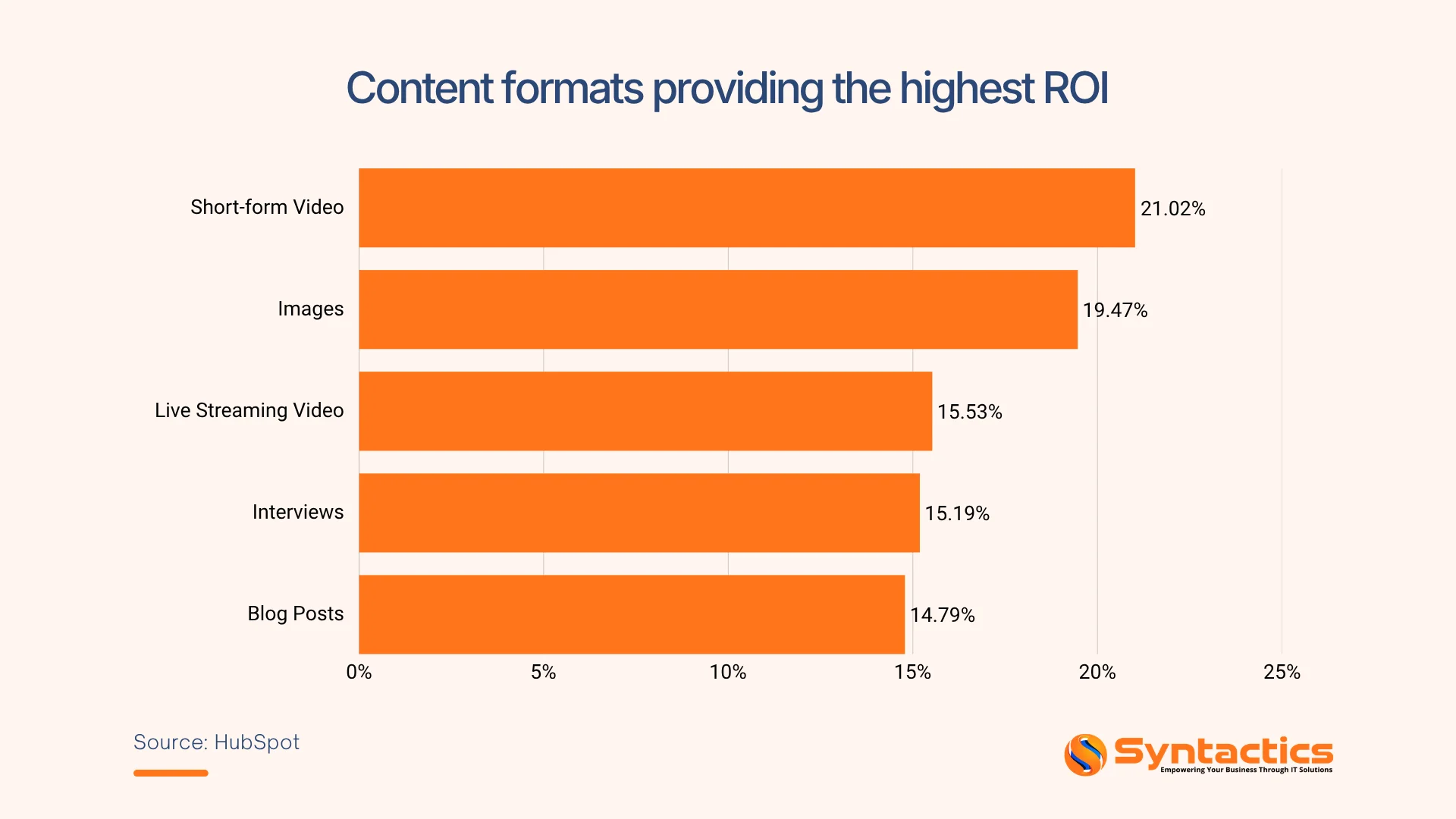
Also, CapCut functions as an agile production ecosystem that thrives on speed, auditory impact, and automated visual flair. According to HubSpot’s Video Statistics for 2025, 21.02% of marketers state that short-form videos deliver the highest ROI among all video content formats.
To balance this fast video production with highly distinct static branding, many growing enterprises coordinate their internal workflows with an external graphic design company in the Philippines.
Moreover, CapCut captures this value by offering advanced artificial intelligence capabilities, such as auto-captions, background removal, and smart tracking. These specialized tools allow you to take raw smartphone footage and transform it into high-impact, trend-aligned commercial clips within minutes.
Source: HubSpot
Canva vs CapCut: Core Feature Comparison
Choosing the correct software requires a direct assessment of where your team spends its creative hours. While both platforms have introduced crossover features, they retain distinct operational advantages and structural boundaries.

The Structural Boundaries of Each Platform
The operational limitations of both platforms stem directly from their original product architecture and core engineering focus. Failing to recognize these boundaries can slow down your production pipelines.
For instance, data from SQ Magazine shows that 43% of businesses struggle to implement video marketing because they lack in-house filming and editing skills. Trying to force an application to perform a creative task it wasn’t originally built to handle is a leading cause of this lost operational time.
Why Canva Struggles with Complex Video
Canva was built as a static graphic layout editor. Because its core framework handles design assets as flat canvas layers, its video timeline operates on a linear slide-by-slide system rather than a frame-by-frame multi-track engine. This makes precise visual pacing, microsecond trims, and advanced audio mixing incredibly difficult to execute within the platform.
Why CapCut Struggles with Desktop Graphic Design
CapCut was engineered exclusively as a chronological video processor. Its interface handles media along a horizontal time vector, which means it completely lacks the spatial layout architecture needed to build multi-page print files, brochures, or corporate PDF slide decks.
Furthermore, its text and shape tools are designed as video overlays rather than scalable vector graphics, preventing users from creating high-resolution logos or complex static brand assets.
Use Case Breakdown: When to Use Each Tool
Your tool selection has to match the specific media format required for your immediate marketing campaigns. Reviewing distinct business scenarios helps determine where Canva vs. CapCut delivers the highest value.
For example, Statista notes that 43% of creative ad buyers actively run ad campaigns on YouTube Shorts, highlighting how rapidly short-form channels are securing business capital. So, aligning your production software with these intended channels ensures you build highly optimized assets from the very start.
Choose Canva For Branding and Static Layouts
- Corporate Presentations and Pitch Decks: You can construct clean, professional slide decks and client proposals that keep your audience engaged.
- Cohesive Visual Branding: The platform locks in your brand guidelines, allowing any employee to safely update assets without breaking design consistency.
- Print and Multi-Page Distribution: It provides the exact structure needed to lay out physical marketing materials, corporate reports, and company newsletters.
- Evergreen Social Graphics: Non-designers gain the autonomy to generate standalone banners and graphics using established master templates.
Choose CapCut For Short-Form and Dynamic Video Content
- High-Volume Video Deployment: The localized asset engine outperforms traditional platforms when your growth strategies require rapid video turnaround times.
- Trend-Driven Marketing: You can react instantly to industry shifts and social media trends with fast, intuitive editing tools.
- Product Demonstrations and Testimonials: The interface helps you craft engaging video walk-throughs and customer reviews that build buyer trust.
- Automated Mobile Optimization: Built-in tools automatically handle mobile aspect ratios, sync visual cuts to audio beats, and generate accurate localized subtitles for better audience retention.

Conclusion
While template platforms like Canva vs CapCut allow your internal team to execute daily content updates, scaling businesses eventually outgrow the boundaries of stock layouts. To build a unique brand identity that commands market authority, you need custom design strategies that software templates simply cannot replicate. Relying solely on standard pre-made assets risks blending your company into a sea of identical corporate competitors.
Syntactics, Inc. fills this creative gap by providing professional graphic design services tailored precisely to your operational objectives. If you need custom visual branding that sets your enterprise apart, we provide the specialized talent you need without the overhead of expanding an in-house studio. Our experienced creative professionals build unique brand assets, optimize multi-channel media layouts, and craft tailored promotional materials designed specifically to convert your target audience!

FAQs About Canva vs CapCut
What is the main difference between how Canva and CapCut handle content?
Canva is built as a design-first platform where video files are treated as flat graphic objects on a static layout grid. Meanwhile, CapCut operates as a timeline-first video processor, in which the flow of time, precise cuts, and audio synchronization dictate the entire project structure.
Is CapCut free to use?
Yes, CapCut is free to download and use, offering access to an extensive selection of basic video editing tools, transitions, and effects. However, the platform also offers a paid “CapCut Pro” subscription that unlocks advanced AI features, premium templates, and additional cloud storage.
Can a business completely replace external design agencies by using Canva or CapCut?
No, because these template systems lack the capacity for advanced custom illustration, complex layout formatting, and deep brand strategy development. Some businesses still rely on professional graphic designers from the Philippines to craft original corporate identities and major campaign assets that stand out from competitors.

About Jalou Batilong
Related News:


The Secret to Inclusive Website Design











Comment 0