

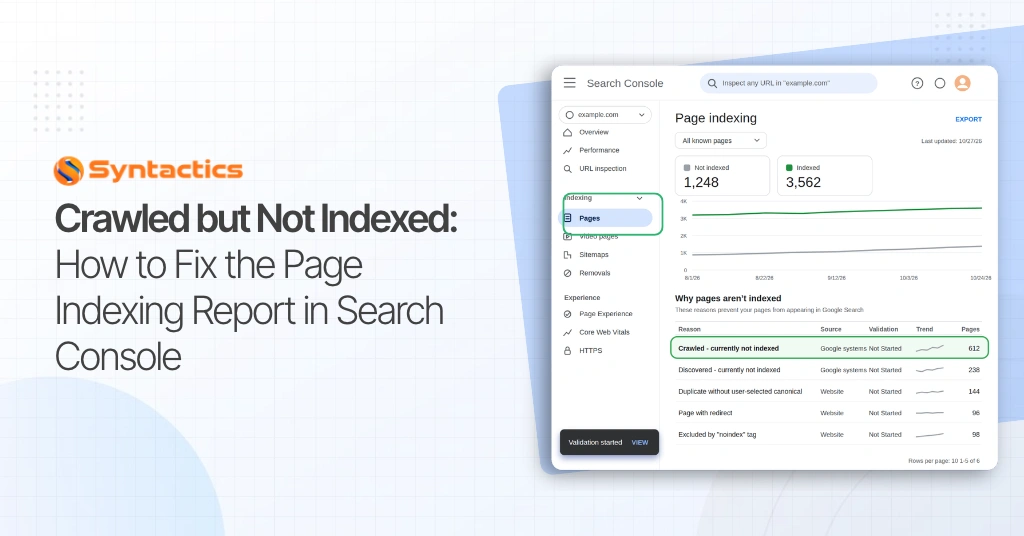
Crawled but Not Indexed: How to Fix the Page Indexing Report in Search Console
Google can crawl your page without adding it to search results, limiting your chances of attracting customers. According to a Shopify case study, Mac Duggal achieved a 115% increase in organic search traffic within four months through technical SEO improvements.
The fixes included resolving indexing issues, correcting canonical signals, and optimizing performance. The results covered its U.S. store and international sites, illustrating how web page indexing fits into a broader strategy for traffic growth.
That said, “crawled, currently not indexed” means Google fetched your page but has not indexed it. Start by improving duplicate or weakly linked content, confirm your changes through URL Inspection, then request validation where available. The status alone doesn’t identify a specific quality problem or require repeated resubmission.
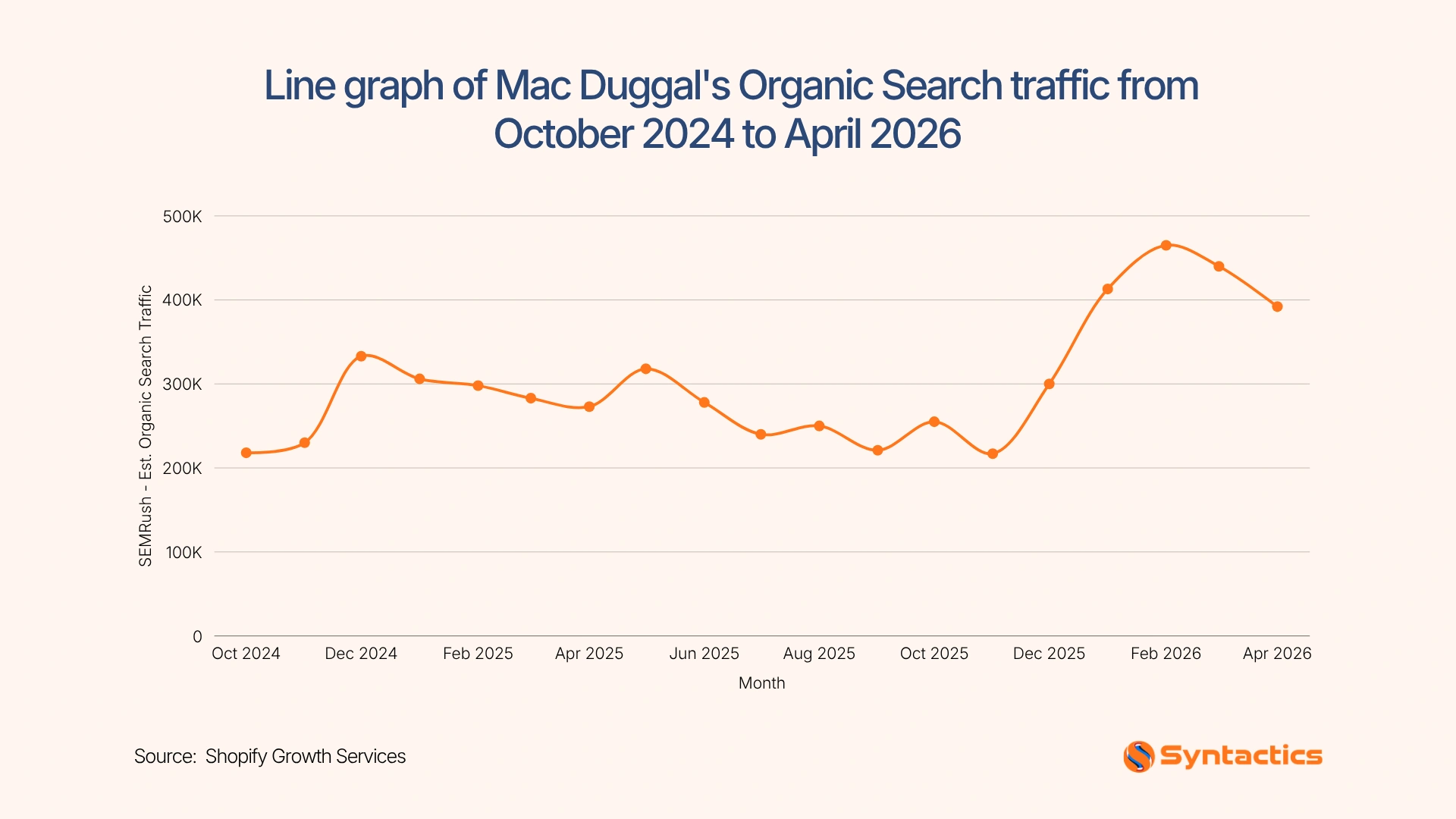
Source: Shopify Growth Services
Key Takeaways
- 70.4% of U.S. consumers had abandoned a purchase because a website was slow or malfunctioned (Kinsta).
- Prioritize important pages that should attract search traffic.
- Diagnose the exclusion before changing content or settings.
- Confirm individual URLs through URL Inspection.
- Track recovery without expecting guaranteed inclusion.
How to Read the Page Indexing Report
Start by reviewing the overall indexing data in Google Search Console, then investigate the exclusion reasons affecting your most important pages. The report helps you distinguish between pages that need attention and URLs that Google has correctly left out of its index.
Compare indexing totals over time
Review the number of indexed and non-indexed URLs and look for sudden changes or ongoing patterns. A sharp increase in non-indexed pages may indicate a recent website update, a crawl issue, or changes to canonical tags, so compare the timing with recent deployments and content changes before deciding what to fix.
Examine the reasons table
Search Console groups non-indexed URLs by status, helping you understand why Google has excluded them. Prioritize issues affecting important service pages, product pages, and useful articles, since these pages may attract relevant search traffic. Check each reason before taking action because some exclusions are expected, while others may point to technical or content problems.
Filter by submitted sitemap
Use the sitemap filter to focus on URLs you’ve explicitly submitted for indexing. These pages generally deserve closer attention if they remain unindexed, particularly when they provide unique value and target relevant searches. However, alternate pages with correctly configured canonical tags may be excluded as intended, so confirm their purpose before making changes.
Confirm individual URLs
The Page Indexing report doesn’t always reflect changes immediately, so a recently updated page may still show its previous status. Use URL Inspection to review Google’s recorded information and test the live page. This helps you determine whether a fix has addressed an accessibility or technical issue, although it cannot guarantee that Google will index the URL.
According to Backlinko, 83% of consumers use Google to find local business reviews. That said, pages that are not indexed generally cannot appear as regular results in Google Search, so monitoring indexing issues can help you identify barriers to organic visibility.
When comparing SEO services in the Philippines, ask how the provider reviews indexing trends, investigates exclusions, and prioritizes fixes based on business value. A sound approach addresses pages that deserve to appear in search results while leaving appropriate exclusions unchanged.
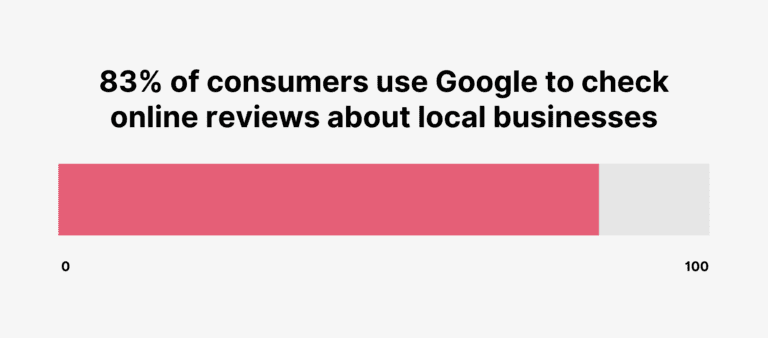
Source: Backlinko
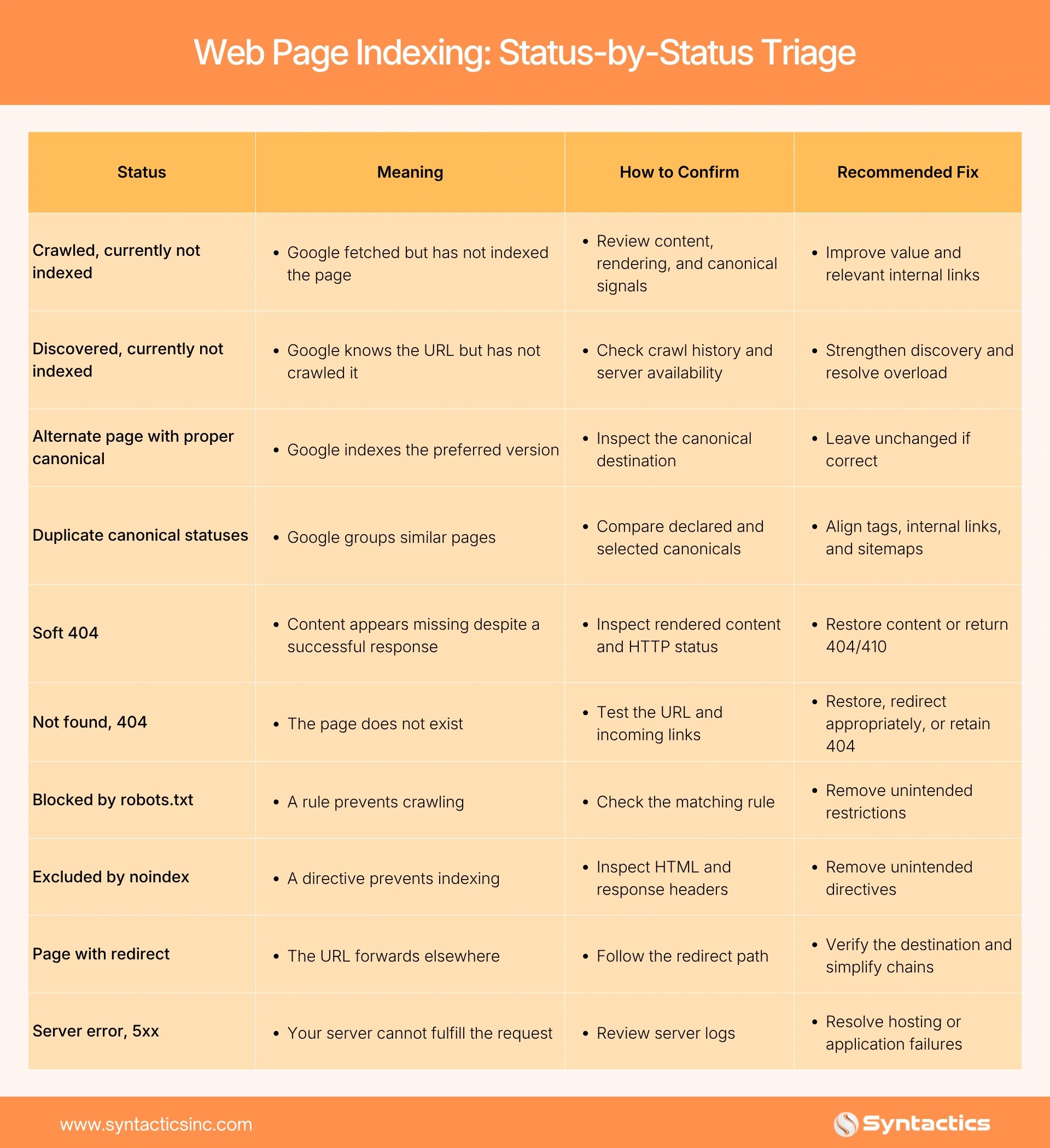
Status-by-Status Triage
Next, translate your web page indexing findings into specific checks.
Diagnosing One URL with URL Inspection
Once you identify a priority URL in the Page Indexing report, use Google Search Console’s URL Inspection tool to investigate why Google has not indexed it.
The tool shows information about Google’s last crawl, the page’s indexing status, and the canonical URL Google selected, when available. Comparing these details with the page’s current setup can help you identify technical problems or signals that may explain its status.
- Enter the complete URL. Open Google Search Console, paste the page’s full URL into the inspection bar, and review the indexing information Google has recorded.
- Check the indexing status and last crawl date. Confirm whether Google has crawled the page and when it last accessed it. If the page has changed since that crawl, Google may not have evaluated the latest version yet.
- Compare the canonical URLs. Review the user-declared canonical, which indicates the preferred URL specified on your page, against Google’s selected canonical, if available. If they differ, check for duplicate content, inconsistent internal links, or conflicting canonical tags that could influence Google’s choice.
- Test the live URL. Select Test Live URL to check whether Google can access the page as it exists now. Review any reported errors involving crawling, indexing directives, or page availability before making changes.
- Review the rendered page. Select View tested page to inspect the tested page’s HTML and other available details. Confirm that important content appears as expected and that the page does not accidentally block search engines through a noindex directive or other technical settings.
Use URL Inspection as your primary diagnostic reference for an individual page, then compare its findings with the broader Page Indexing report. A successful live test confirms that Google can access the page at the time of testing, but it does not guarantee indexing or predict which canonical URL Google will ultimately choose.
If you’re evaluating an SEO specialist in the Philippines, look for someone who can explain these findings, connect them to the likely cause, and recommend specific fixes before proposing broader changes.
Deciding Whether to Improve, Merge, or Remove a Page
Once you complete your technical checks, evaluate whether each page gives visitors a clear reason to read it. Consider whether it answers a specific question, matches search intent, and provides information that your other pages do not already cover.
According to SQ Magazine, 66% of consumers conduct further research after reading positive reviews. This is why your content needs to help visitors compare options, understand your services, or make informed decisions.
- Improve pages with a clear purpose but incomplete information. Add original examples, practical comparisons, or detailed answers that help visitors move forward. Focus on filling meaningful gaps rather than increasing word count.
- Merge pages that serve the same search intent. Combine their strongest information into one comprehensive resource, then use 301 redirects to send visitors from the older URLs to the relevant replacement.
- Remove pages that no longer serve a useful purpose. If outdated or unnecessary content has no suitable replacement, return a 404 or 410 status instead of redirecting visitors to an unrelated page.
After making these changes, update internal links so relevant pages point directly to the content you retain. This supports web page indexing by helping Google discover useful pages and understand how they connect across your website.
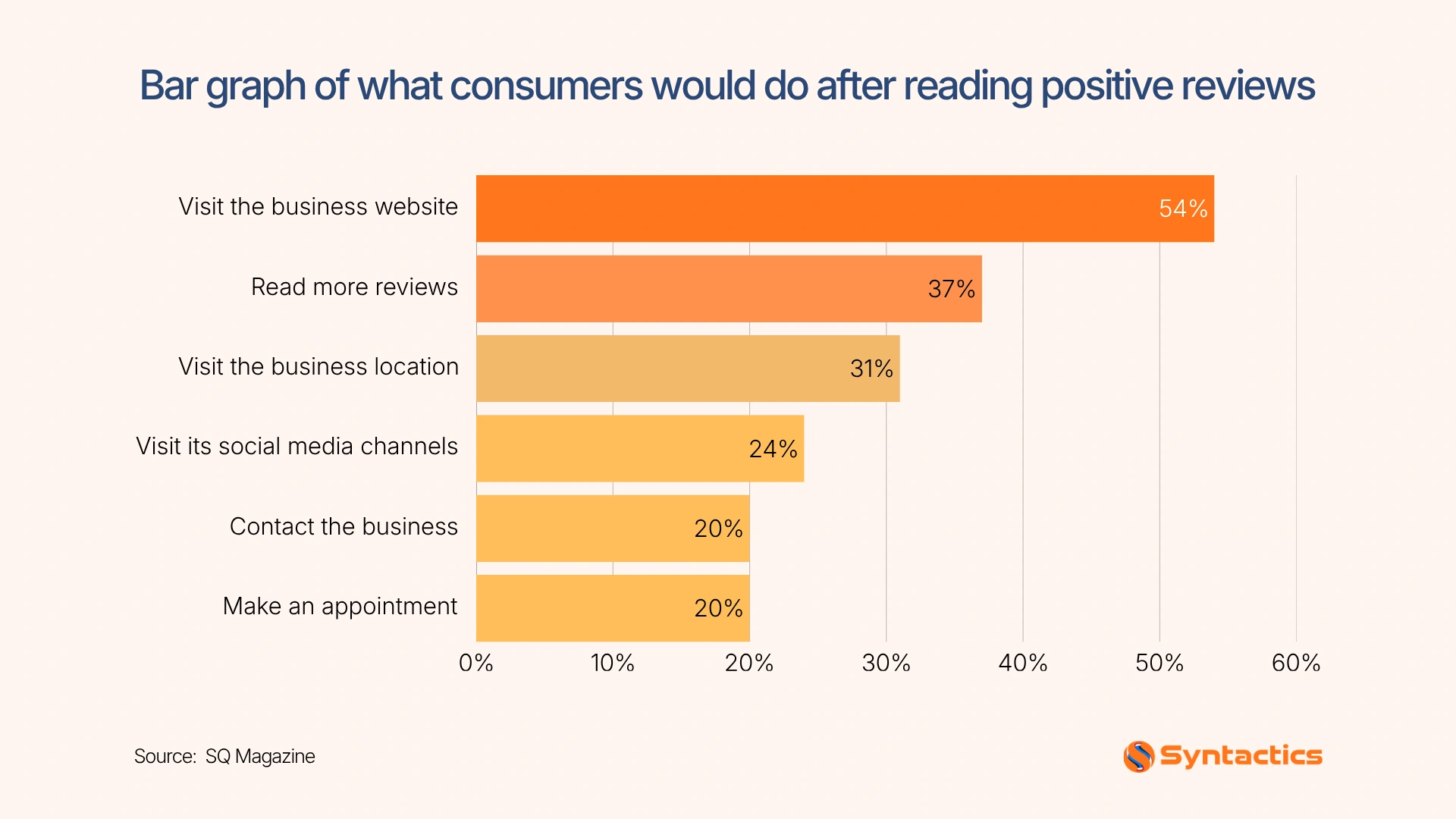
Source: SQ Magazine
WordPress Fixes
After improving your content, check whether WordPress settings or server problems prevent Google from accessing your important pages.
- Review Yoast settings. Check tag, author, and date archives, applying noindex selectively when they lack independent search value.
- Clean your sitemap. Include indexable, preferred URLs so your sitemap consistently points to pages you want appearing in search.
- Check Redirection. Replace redirect chains with direct redirects and eliminate loops that prevent visitors and crawlers from reaching their destination.
- Improve internal links. Connect orphaned or deeply buried pages from relevant content to make them easier to discover.
- Investigate server failures. Check LiteSpeed Cache output, PHP error logs, and hosting memory or process limits to identify recurring failures.
These checks also support a better visitor experience. A Kinsta survey found that 70.4% of U.S. consumers had abandoned a purchase because a website was slow or malfunctioned. Resolving performance problems helps customers access and use your pages once they arrive.
Validating Fixes and Monitoring
After confirming that your changes address the identified issue, select Validate Fix in Search Console where available. This starts Google’s review of affected URLs to determine whether the problem persists, although successful validation does not guarantee indexing.
Then, allow days to weeks for recrawling and processing, then track whether important pages return to the index. Review indexing totals, new exclusions, and priority URLs monthly, following Google’s recommendation to check monthly or after major site changes.
To keep this process focused, the best SEO company in the Philippines can evaluate documented diagnoses, establish clear priorities, and provide progress reports that connect completed fixes with observed results. This helps you identify unresolved problems and decide where further work is needed.

Conclusion
When important pages remain unindexed, start by understanding what prevents them from appearing in search. By addressing technical barriers, strengthening content, and improving internal links, you give Google clearer reasons to discover and consider your pages for inclusion.
As a trusted SEO agency in the Philippines, Syntactics, Inc. can support your web page indexing efforts. Our experienced SEO team can help you diagnose gaps, prioritize fixes, and monitor recovery while recognizing that Google makes the final indexing decision. With a clear action plan and expert guidance, you can improve your website’s search visibility and help more potential customers discover your business.

FAQs About Web Page Indexing
How do I index my site on Google?
Make important pages accessible through internal links and submit your sitemap. Request indexing for priority URLs through Search Console.
Does Request Indexing speed up the process?
It requests crawling but doesn’t guarantee faster inclusion. However, repeated submissions don’t accelerate crawling.
Does a high count of Crawled, currently not indexed pages hurt rankings?
The count alone does not establish a ranking penalty. Investigate which pages Google excludes and why.

About Jalou Batilong
Related News:


Web Development Methods: Agile VS Waterfall









Comment 0