


JavaScript Coding Standards for WordPress: A Guide
According to W3Techs, JavaScript is a programming language used by a whopping 98% of all websites. So here are the WordPress Coding Standards and Best Practices for JavaScript!
WordPress is an open-source CMS or Content Management System. So, its contributors need to follow a uniform standard, as with the PHP, CSS, and HTML Coding Standards. Thus, it can eliminate inconsistencies, making code easier to read.
Overview of Modern JavaScript Standards in WordPress
WordPress continues to align its JavaScript Coding Standards with modern ES2015+ syntax. Contributors are encouraged to use const and let over var, prioritize readability through multiline statements and chained method calls, and structure code for long-term maintainability as the platform evolves.
JavaScript Coding Standards for WordPress
Among the various coding or programming languages in use, JavaScript is the most widely used by nearly 65% of Software Developers, according to Statista.
JavaScript is responsible for creating complex front-end elements on WordPress. So, for instance, you can rely on the coding language for Fashion Website Templates and Designs.
Code Refactoring
Some WordPress JavaScript code structures have style inconsistencies. Although refactoring older JavaScript code isn’t an immediate issue. But because of these inconsistencies, WordPress is working to make the code more uniform for better readability.
Follow WordPress JavaScript Coding Standards and best practices for consistency. WordPress Contributors can use JSHint to detect errors in JavaScript code. However, devs must avoid using “Whitespace-only” patches, especially for older files that don’t conform to the standards.
Spacing
WordPress encourages liberal spacing in JavaScript files to improve readability and long-term maintainability. While minification optimizes files for browsers, clear spacing helps developers understand and manage code more efficiently.
Core spacing standards include:
- Indent lines using tabs (one tab equals four spaces).
- Avoid trailing whitespace on lines and blank lines.
- Keep lines between 80–100 characters for readability.
- Always use braces for control blocks (if, else, for, while, try).
- Do not add spaces around unary operators (++, –)
- Do not place spaces before commas or semicolons.
- Place statement-terminating semicolons at the end of lines.
- Add spaces around ternary operators (?, :).
- Avoid filler spaces in empty constructs: fn(), {}, [].
- Include a newline at the end of every JavaScript file.
Bonus: Deviations for Better Consistency
Although WordPress JavaScript Coding Standards are based on the jQuery style guide, they allow several deviations to improve consistency across .js and .php files.
- All ‘!’ negation operators must be followed by a space.
- Function bodies must be indented with one tab, whether or not a closure wraps the file.
- Tabs must be used at the start of lines, while spaces may be used for alignment within lines or documentation blocks.
- Trailing whitespace is flagged as an error by JSHint, so enabling visible whitespace in your editor is recommended.
Object Declarations
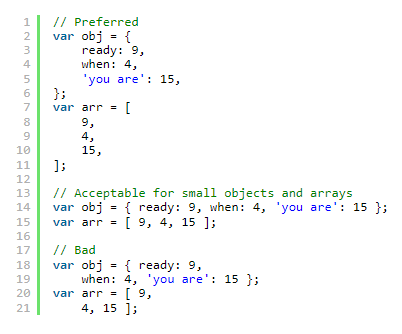
Source: WordPress.
When handling object declarations, keeping optimal line length in mind is vital.
- Thus, if short enough, you can make a declaration in just one line.
- But, if your array or object declaration is too long for one line, you can split it up. Thus, WordPress Contributors must ensure that each line has one property. Also, make sure each line ends with a ‘,.’
- Additionally, you should only quote property names if they have special characters or are reserved words.
Arrays and Function Calls
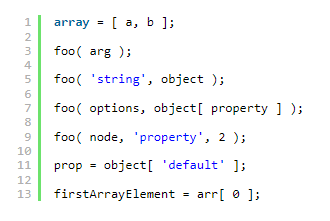
Source: WordPress.
One of the Best Practices for JavaScript Coding Standards is to constantly include additional spaces around elements and arguments in your file.
Examples of Good Spacing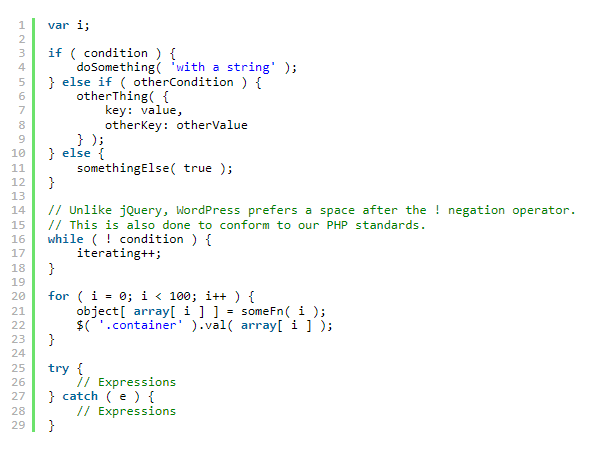
Source: WordPress.
Semicolons and Indentation
WordPress JavaScript Coding Standards recommend using explicit semicolons instead of relying on Automatic Semicolon Insertion (ASI) to avoid parsing errors.
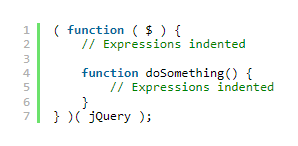
Source: WordPress.
Indentation and line breaks:
- Use tabs for indentation (one tab = 4 spaces).
- Keep lines between 80–100 characters.
- Split multi-line statements after operators for readability.
- Curly braces for control blocks (if, else, for, while, try) should span multiple lines.
Blocks and Curly Braces
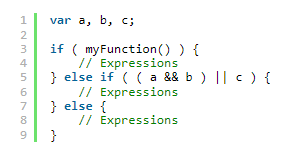
Source: WordPress.
Blocks containing if, for, while, else, and try statements must use curly braces and be split across multiple lines. Opening braces should appear on the same line as the related statement, while closing braces should be placed immediately after the final statement within the block.
Multi-line Statements
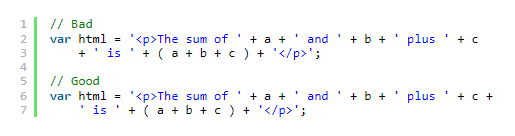
Source: WordPress.
- If your statements exceed the optimal length, add line breaks after an operator.
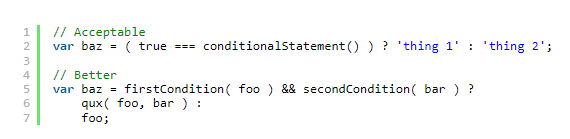
Source: WordPress.
- Additionally, you can break lines into logical groups to increase readability, like with CSS Coding Standards! So even if two expressions of a ternary operator can fit on a single line, it’s better to split them up and give them their own lines.
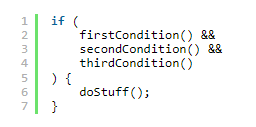
Source: WordPress.
- But, naturally, if lines are too long, WordPress Developers must break them up. For instance, a dev must ensure a logical operator’s operands have their own lines. Also, they must have an additional indent from the ‘(’ and ‘).’
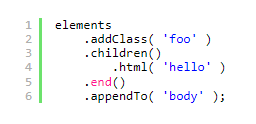
Chained Method Calls
Source: WordPress.
- If a chain of method calls gets too long for a single line, developers must split it up.
- Upon splitting the chain, it’s recommended that WordPress Contributors should have one call to a line.
- In addition, the first call shouldn’t be on the same line as the object you called the methods on.
- However, if the method will change the line’s context, apply an extra indent to keep things understandable.
Declaring Variables with const and let
- If you’re writing code using ES2015 or more recent ones, use const and let instead of var.
- So, WordPress Contributors must use const for declarations. But upon reassigning the value, you can then use let.
- Lastly, you can declare variables whenever they’re first used. As a result, it’s unnecessary to declare your variables at the beginning of a function.
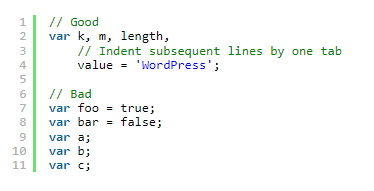
Declaring Variables With var
Source: WordPress.
At the start of every function, there must be one var statement that’s been comma-delimited. The statement must declare any necessary local variables. But if one function doesn’t declare a particular variable with var, it can leak to an outer scope, usually the global scope. Thus, devs must avoid such a situation at all costs.
- Assignments in a var statement will be listed on lines of their own. On the other hand, declarations can share a line as long as they’re within the desired line length.
- Also, if there are any additional lines in the file, give them an extra indent.
- Finally, if you have objects and functions with several lines, they shouldn’t be assigned within the var statement. This keeps contributors from having to over-indent lines.
Globals
WordPress core heavily used global variables in the past, and even now, they’re still in use.
- Sometimes, plugins use core .js files, so WordPress Contributors must take great care not to remove existing globals.
- Also, at the top of your JavaScript file, you must document the globals you use throughout the file before separating them with commas.

Source: WordPress.
- Upon adding your allowable globals, as with the example, you must add ‘true’ right after. Of course, the ‘true’ means that the global is defined in the file.
- However, if you’re accessing a global variable not defined in the file, you should avoid adding ‘true.’ This results in the global being designated as read-only.
Common Libraries
The root .jshintrc file has registered these allowed globals: jQuery, Backbone, Underscore, and the global wp object.
- WordPress Devs can directly access the Backbone and Underscore globals anytime.
Source: WordPress.
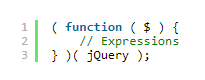
- Naturally, WordPress Developers will access jQuery, so they must pass the jQuery object into an anonymous function! Devs can accomplish this by using $, rather than .noConflict() or setting $ with a different variable.

Source: WordPress.
- Finally, files that add to or modify the wp object should access the global carefully. Otherwise, it might overwrite properties you’d set earlier.
Naming Conventions
JavaScript’s best practices differ from PHP Coding Standards when naming variables and functions.
- Firstly, variable and function names must be named using full words, not abbreviations or shortened words.
- Also, WordPress Contributors must apply camelcase, keeping the first letter lowercase.
- In addition, the names should be straightforward, but this doesn’t extend to iterators.
Abbreviations and Acronyms
Source: WordPress.
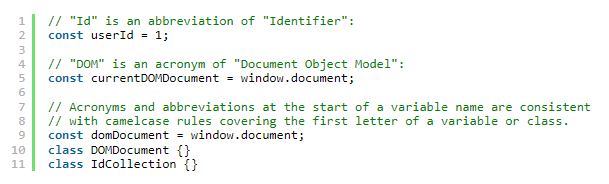
This Coding Standard for JavaScript states that acronyms should be written in uppercase. As a result, contributors can see that every letter stands for a proper word.
- But, developers should remember that other abbreviations should be in camelcase. So the initial letter should be capitalized, with the rest being lowercase.
- Still, if an acronym or abbreviation starts a variable name, it should follow camelcase naming.
- Variable assignments require the abbreviation to be in lowercase.
- Class definitions have the initial letter capitalized.
Class Definitions
- If you wish to use constructors with new, ensure that you use UpperCamelCase, meaning the first letter is capitalized.
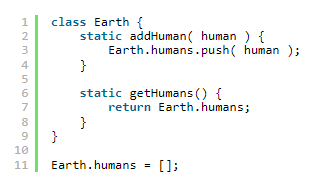
Source: WordPress.
- Of course, you should use UpperCamelCase for class definition. Even if you’re utilizing new construction, it’s critical to use the UpperCamelCase convention.
- WordPress Devs must name all their @wordpress/element Components according to Class Definition naming rules. This Coding Standard extends even to stateless function components. Naturally, this practice helps keep things consistent. Also, it indicates that a specific component might have to transition from a function into a class seamlessly.
Constants
- Constant values aren’t intended for reassignment or mutation. In addition, they’re one exception for camelcase. Thus, they should utilize the SCREAMING_SNAKE_CASE convention.
- Most of the time, constants are defined in a file’s topmost scope.
- However, WordPress Contributors must remember that const assignment in JavaScript is somewhat limited.
Comments
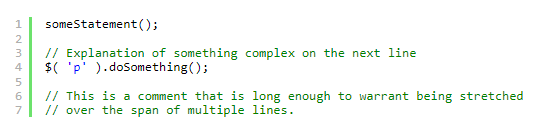
Source: WordPress.
Naturally, comments precede the code they’re referring to.
- Thus, they must be preceded by a single blank line.
- Also, it’s vital to properly capitalize the comment’s first letter.
- If writing a complete sentence as a comment, WordPress Developers must end it with a period.
- Lastly, WordPress Developers must add one space between ‘//’ and the comment.
- Of course, when it comes to JSDoc comments, WordPress Contributors must remember to use the ‘/**’ or multi-line comment opening.

Source: WordPress.
- Finally, inline comments can annotate arguments in your formal lists of parameters.
Equality
WordPress Developers using JavaScript must remember to apply strict equality checks (===) over abstract equality checks (==).
Type Checks
There are several preferred Type Checks for objects that WordPress Contributors can utilize:
- String
- Number
- Boolean
- Object
- Plain Object
- Function
- Array
- Element
- null
- null or undefined
- undefined
- Global Variables
- Local Variables
- Properties
- Any of the above
If you use Backbone or Underscore, it’s best to use Type Checking methods for Underscore.js rather than jQuery.
Strings

Source: WordPress.
- According to JavaScript Coding Standards, when it comes to string literals, WordPress Devs must utilize single quotes or “’.’

Source: WordPress.
- Additionally, you must escape a string containing ‘‘’’ with a ‘\.’
Switch Statements
Switch statements aren’t recommended for use. However, they’re helpful if you have a significant number of cases. So, for instance, one block can handle multiple cases, or you can leverage fall-through logic.
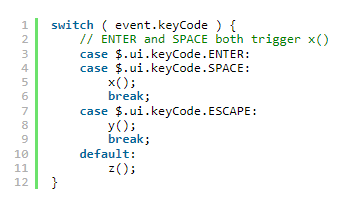
Source: WordPress.
- If you must use switch statements, use breaks for cases that aren’t default. Also, contributors must make notes on statements that were allowed to “fall through.”
- Of course, within the switch, indenting case statements with a single tab is critical.
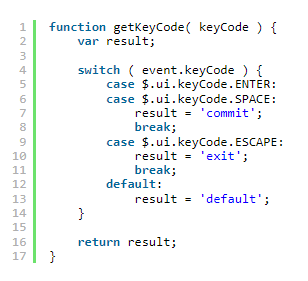
Source: WordPress.
- Lastly, WordPress Developers shouldn’t return values from switch statements. It’s better to set values with case blocks, then return them at the end.
Arrays
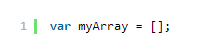
Source: WordPress.
- To create arrays, apply the shorthand [] constructor instead of new array ().

Source: WordPress.
- Construction is the perfect time for initializing arrays. Of course, you must always define associative arrays in JavaScript as objects.
Objects
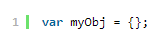
Source: WordPress.
One of the easiest ways to create objects is by applying object literal notation, {}.

Source: WordPress.
- Also, WordPress encourages devs to use object literal notation. However, one notable exception is if the object needs a particular prototype. In this case, you can use new to call a constructor function to create the object.
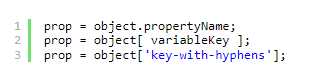
Source: WordPress.
- Also, you can access object properties with dot notation. But one exception to this is if the key is a string or variable that won’t be a valid identifier:
Iteration
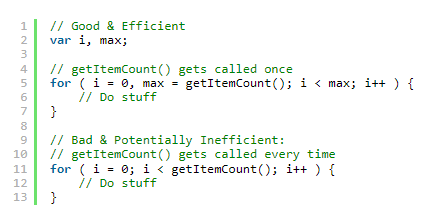
Source: WordPress.
If you use a for loop to iterate over an extensive collection, store that loop’s max value as a variable.
Underscore.js Collection Functions
Of course, WordPress Contributors should learn the many collection and array methods of Underscore, including the _.map, _.each, and _.reduce. Naturally, such methods help transform massive data sets into more ones that are more legible.
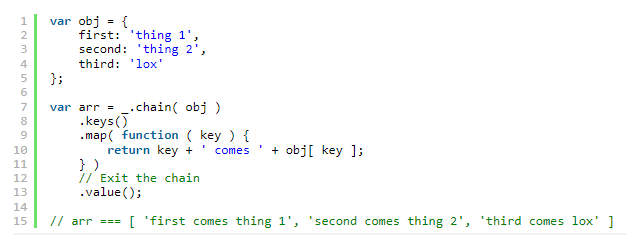
Source: WordPress.
Additionally, Underscore lets you do jQuery-style chaining.
Iterating Over jQuery Collections
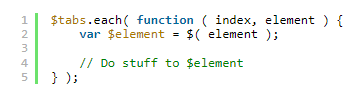
Source: WordPress.
- If you’re iterating over jQuery objects, WordPress Developers should only use jQuery. Of course, this instance should be the only time you utilize it for iteration.
- Also, avoid iterating over raw data or vanilla objects with jQuery.
JSHint
As mentioned earlier, JSHint is a tool that checks your JavaScript code quality. As a result, it can catch logic or syntax errors, allowing WordPress Devs to see how well the patch works in the front-end.
While JSHint remains part of the WordPress development workflow, many modern teams also use ESLint alongside it. ESLint can be configured to enforce WordPress JavaScript Coding Standards and integrates well with modern editors and CI pipelines, helping developers catch issues earlier in the development process.
Installing and Running JSHint
For this WordPress JavaScript Coding Standard, you need a tool called Grunt, which JSHint requires. Coincidentally, both programs are written in Node.js. Fortunately, WordPress’ development code has a configuration file (package.json) that lets you install and configure JSHint and Grunt.
Upon installation of Node.js, you can download the Node packages for WordPress and install them. Once done, Grunt can check your WordPress JavaScript files for any errors.
JSHint Settings
Within the WordPress SVN repository, there’s a file called .jshintrc title=” WordPress JSHint file in svn trunk” that contains the configuration options for JSHint. In addition, it indicates the errors that JSHint must flag if found in WordPress’ source code.
Type npm run grunt jshint:core to have it analyze your core code. But, contributors must type npm run grunt jshint:tests to check unit test JavaScript files.
Target A Single File

Source: WordPress.
You may target specific files if you wish to get results on one or two files rather than the entire thing. After all, having JSHint process all your files will take some time. To direct JSHint to a specific file, include –file=filename.js at the end of your command.
JSHint Overrides: Ignore Blocks
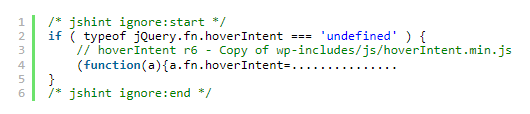
Source: WordPress.
There may be some instances where developers want JSHint to ignore parts of a .js file. So, you want to keep JSHint from processing a particular file region. JavaScript Coding Standards and Best Practices will tell you to use directive comments.
Declaring Variables with const and let
If you’re writing JavaScript using ES2015 or newer syntax, WordPress encourages the use of const and let instead of var. Use const for variables that are not reassigned, as it makes intent clearer and reduces the risk of unintended changes. When reassignment is necessary, let is the preferred option.
Variables should be declared as close as possible to where they are first used. This improves readability, limits scope, and makes code easier to maintain, especially in larger WordPress projects.
This approach reflects current WordPress best practices, which favor predictable scoping and clearer intent in modern JavaScript development.
Build Scalable WordPress with JavaScript Standards
Following WordPress JavaScript Coding Standards goes beyond consistency—it supports cleaner code, faster collaboration, and easier long-term maintenance. As WordPress continues to evolve alongside modern JavaScript practices, adhering to these standards helps future-proof your themes, plugins, and front-end features.
Furthermore, the WordPress JavaScript Coding Standards are based on the jQuery JavaScript Style Guide and provide a consistent framework for writing maintainable code. Whether you’re a WordPress Developer from the Philippines or part of an international team, disciplined JavaScript practices improve readability, reduce errors, and streamline development across teams.
Consistent standards aren’t just best practices; they’re a strategic advantage in delivering reliable, scalable WordPress solutions.

This article was updated on February 16, 2026.
Frequently Asked Questions
Do I need to follow these standards for plugin or theme development?
While not mandatory for third-party plugins and themes, following WordPress JavaScript coding standards improves code readability, makes collaboration easier, and aligns with WordPress community best practices. Many developers adopt these standards for consistency and professionalism.
How do I check my JavaScript code against WordPress standards?
Use JSHint with WordPress’s .jshintrc configuration file. Run npm run grunt jshint:core for core code or npm run grunt jshint:tests for test files. You can target specific files using –file=filename.js to save processing time.
Does following WordPress coding standards increase development costs?
Initially, learning these standards may slow development slightly. However, adherence reduces debugging time, improves code maintainability, and facilitates team collaboration. Long-term, following standards typically decreases overall development and maintenance costs through fewer errors and faster updates.
Contact our web development experts for a free consultation.

About Xenia Labis
Related News:













Comment 0