

Enhanced Conversions and Meta Conversions API: Fix Your Ad Tracking Before Holiday Spend
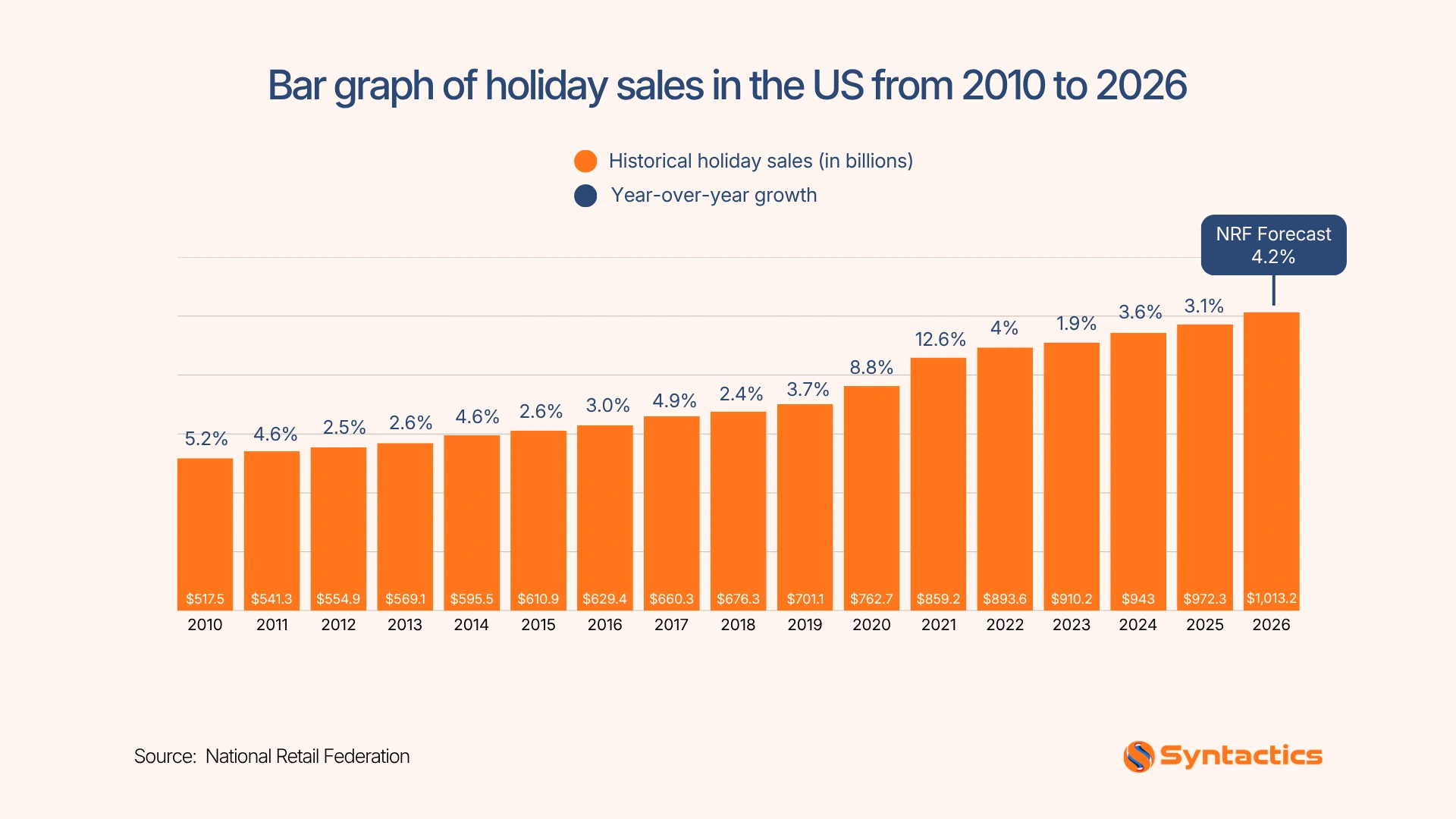
Holiday campaigns can bring more visitors to your website, but missing conversion data can make your ad results harder to trust. The National Retail Federation forecasts 4.2% growth in U.S. holiday sales in 2026, increasing the stakes for businesses investing in seasonal promotions.
When Google Ads and Meta receive incomplete conversion signals, their automated bidding systems have less information to guide spending. You can improve measurement by sending hashed first-party customer data through Google Enhanced Conversions and Meta Conversions API. As such, a reliable conversion tracking setup helps you evaluate campaign performance using more complete data.
Source: National Retail Federation
Key Takeaways
- Advertisers who implement Enhanced Conversions saw an average 8% incremental ROAS on Google Search campaigns (Google).
- Enhanced Conversions supplement Google Ads conversion tags with hashed first-party customer data.
- Meta Conversions API sends events from your server alongside browser events from Meta Pixel.
- Matching event IDs prevent duplicate counting when both Meta tracking methods report the same action.
- Test event delivery, conversion values, and consent settings before increasing ad spend.
Why Conversion Data Goes Missing
Several issues can prevent advertising platforms from recording purchases, leads, and other valuable actions. Understanding these causes helps you identify tracking problems before increasing your holiday ad budget.
- Browser restrictions and ad blockers: Privacy features and ad-blocking tools can prevent tracking requests from reaching advertising platforms. In fact, Gartner reports that 52% of U.S. adults take steps to actively block ads, including paying for ad-free content or using tools such as ad blockers and VPNs. However, ad avoidance doesn’t automatically mean conversion tracking has failed, but blocked requests can contribute to missing data.
- Cross-device shopping journeys: A shopper might click a Facebook ad on a phone, browse products, and complete the purchase later on a laptop. If tracking relies on browser cookies or a single device, Meta may struggle to connect the purchase to the original ad interaction.
- Consent choices: When visitors decline optional tracking, your website needs to respect their choices. This can limit the customer data available to advertising platforms for measurement and matching.
- Incomplete conversion signals: Google Ads and Meta use conversion data to optimize campaigns for purchases, form submissions, and qualified leads. When events go unreported or lack useful information, automated bidding has less data to guide its decisions.
- Reporting and attribution differences: Google Ads, Meta, GA4, and your order system may report different conversion totals because they use different attribution rules, reporting windows, and modeling methods. Compare the data to identify unexplained discrepancies rather than assuming every difference signals a tracking error.
Before increasing your holiday budget, check for missing events, duplicate conversions, and attribution issues. Fixing these problems early gives you better information for evaluating campaign performance.

What Each Tool Does
Once you understand where tracking breaks down, you can choose tools that help recover useful measurement signals across customer journeys.
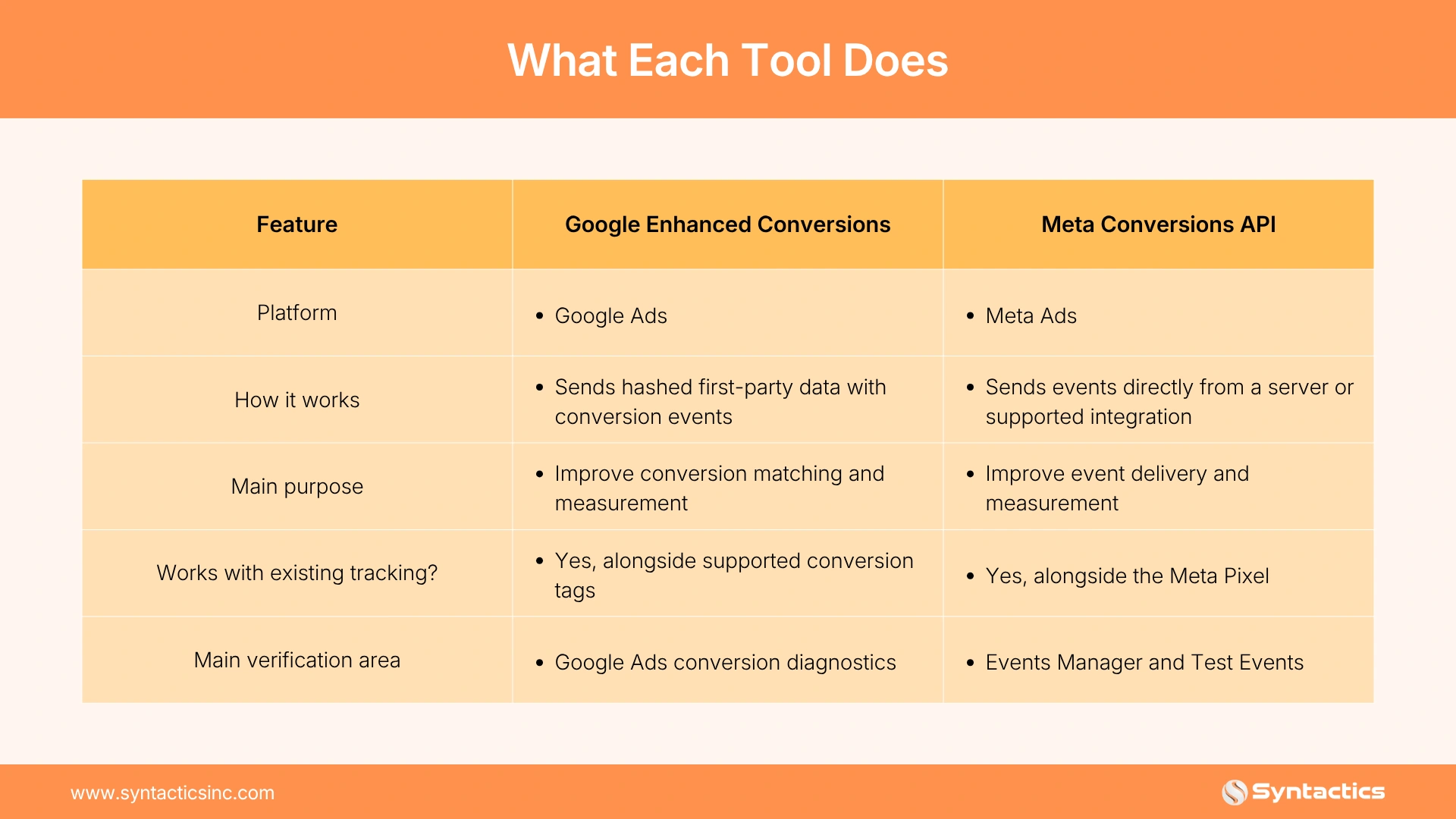
Google Enhanced Conversions for web supplements existing conversion tracking by sending hashed first-party customer data, such as an email address, alongside conversion information. Google can use this data to match conversions to signed-in Google accounts, improving measurement when conventional identifiers are unavailable.
Meta Conversions API sends events directly from your server or another supported integration to Meta. You can send purchase, lead, and other conversion events alongside those collected by the Meta Pixel.
However, neither tool replaces Google Analytics 4 (GA4). GA4 helps you analyze website activity and user journeys, while Google Ads and Meta report conversions according to their respective attribution systems.
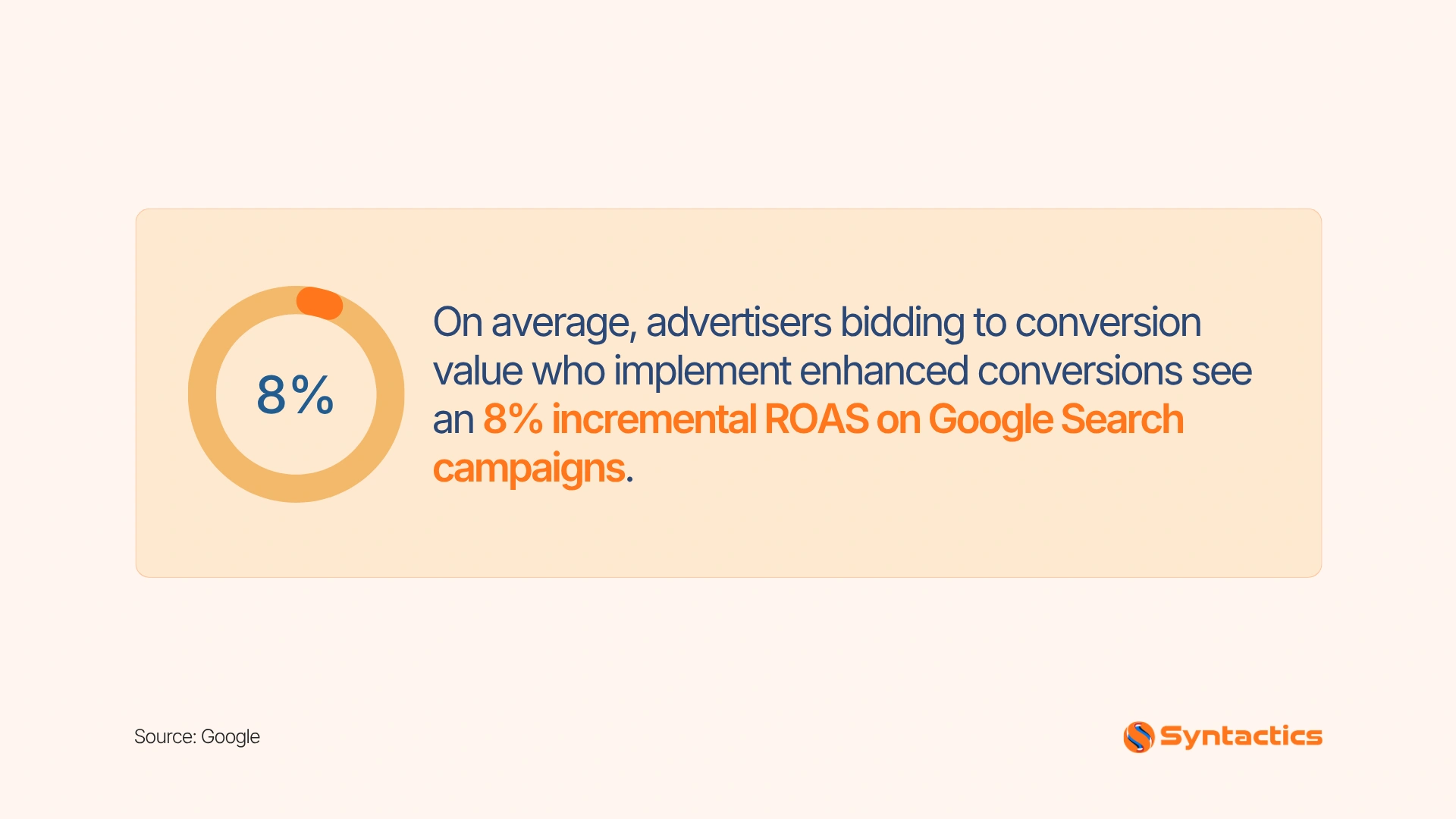
Google reports that advertisers bidding to conversion value who implement Enhanced Conversions saw an average 8% incremental return on ad spend (ROAS) on Google Search campaigns.
This platform-reported result suggests that better conversion measurement can support campaign performance, although results vary by account. By combining enhanced measurement with Meta Conversions API and continuing to monitor GA4, you can identify which campaigns deserve more of your holiday ad spend.
Source: Google
Set Up Conversion Tracking in Five Steps
After selecting the appropriate tools, follow a consistent implementation process. A reliable conversion tracking setup helps you catch configuration problems before they affect your busiest sales period.
1. Audit Your Existing Tags and Conversion Actions
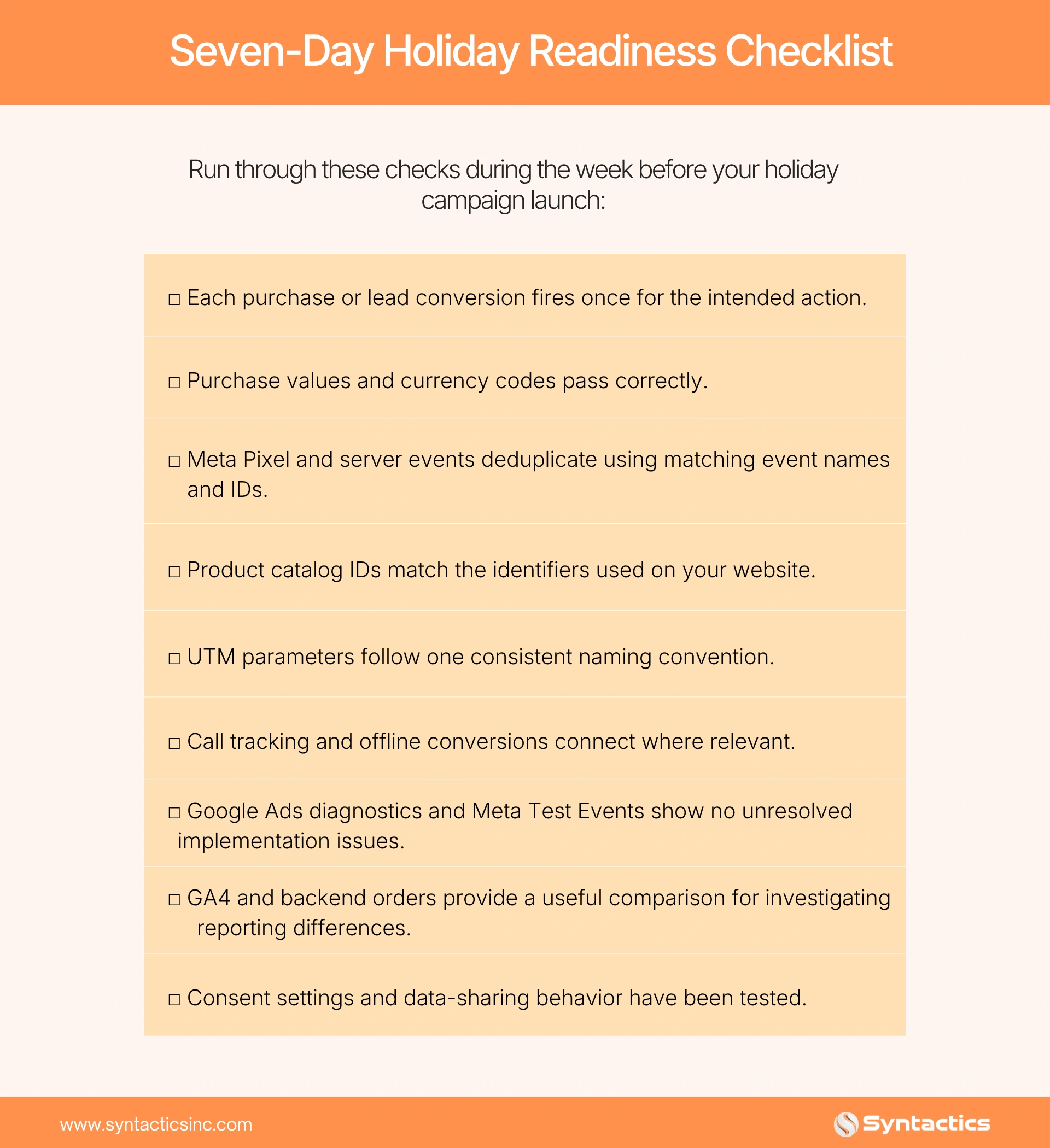
List the events that matter to your business, including purchases, qualified leads, calls, and completed forms. Check that each event fires when the intended action occurs and that purchase values and currencies pass correctly.
Then, review your Google Ads conversion actions and Meta Pixel events. Remove obsolete tags and identify duplicate events before adding new integrations.
2. Standardize UTMs and Event Names
Use consistent UTM parameters to distinguish campaign sources, mediums, and names. Apply the same naming convention across holiday promotions instead of creating different labels for similar campaigns.
Keep event names consistent between browser and server implementations. This makes testing and deduplication easier later. For help building consistent campaign URLs, use Google’s Campaign URL Builder.
3. Enable Google Enhanced Conversions
Configure Enhanced Conversions through a supported Google tag, Google Tag Manager, or API implementation. Follow Google’s current instructions for collecting and transmitting the required first-party data.
Google states that conversions imported from Google Analytics goals are not supported for Enhanced Conversions for web. Use a supported Google Ads conversion action instead, and verify the configuration in Google Ads diagnostics.
4. Deploy Meta Conversions API
Connect Meta Conversions API through a supported platform integration, plugin, or server-side container. Choose an approach that fits your technical resources and how much control you need over event data.
Next, test purchase events and confirm that the integration sends the intended parameters before relying on them for campaign optimization.
5. Deduplicate Browser and Server Events
When the Meta Pixel and Conversions API report the same action, configure both to send the same event name and event ID. Meta uses these identifiers to recognize and deduplicate matching events.
Start implementation well before your holiday campaigns launch. Google says Enhanced Conversions can take up to 30 days to train before impact appears in reporting. Begin in early October when your holiday calendar allows, so you have time to test and troubleshoot before major promotions.
Platform Paths
Your website platform affects how quickly you can implement these tools and how much control you have over data collection. The right approach depends on your existing integrations, technical resources, and reporting requirements.
- Shopify: Native Google and Meta sales channels can simplify integration and reduce manual configuration. You still need to verify event delivery, consent behavior, and deduplication.
- WooCommerce: Plugins can help you connect Google tags, Meta Pixel, and server-side events. Review plugin compatibility, update practices, and whether the plugin sends duplicate or unnecessary events.
- Custom websites: Google Tag Manager and direct API integrations offer greater flexibility. They also require more technical oversight to manage event parameters, server requests, access permissions, and testing.
A simpler integration can reduce setup time, while a custom implementation may offer greater control over event handling and data quality. If you need assistance comparing these options, a reliable PPC management service can help you coordinate tracking implementation with your advertising objectives.

Verifying Before You Spend
Once the tools are active, test them before raising your budgets. This helps you identify errors before they affect campaign reporting or optimization.
- Check Google Ads conversion diagnostics. Look for tag issues, missing signals, and configuration warnings. Confirm that each conversion action records the correct events and values.
- Test Meta Conversions API events. Use Test Events in Meta Events Manager to confirm that browser and server events arrive as expected. Review Event Match Quality to identify potential data quality issues, keeping in mind that a higher score doesn’t guarantee better campaign performance.
- Compare reports across platforms. Review conversion data in Google Ads, Meta Ads, GA4, and your backend order system. Expect some differences because each platform uses its own attribution windows, modeling, and reporting rules.
- Investigate unexplained discrepancies. Look for duplicate purchases, missing conversion values, unexpected reporting gaps, and unusual changes in performance trends instead of expecting every platform’s totals to match exactly.
- Work with tracking specialists when needed. Trusted PPC management experts can help identify implementation errors and distinguish them from normal reporting differences.
- Document your tests. Keep a record of test results and configuration changes so your team can monitor tracking accuracy and compare performance over time.
Consent and Privacy
Accurate measurement also depends on responsible data handling. Before sending customer information to advertising platforms, review your consent mechanism and the rules that apply to your business and audience.
Google Consent Mode can communicate users’ consent choices to supported Google tags and influence how those tags behave. It doesn’t replace a valid consent process or determine your legal obligations.
If you serve customers in the European Economic Area or California, review applicable requirements under the GDPR and CCPA. Businesses operating in the Philippines also need to consider the Data Privacy Act of 2012 and relevant guidance from the National Privacy Commission.
Hashing converts supported customer information into a coded representation before transmission, but it doesn’t automatically anonymize personal data or remove privacy obligations. Thus, collect consent where required, limit data collection to appropriate purposes, and confirm your implementation with legal counsel familiar with your markets.
Conclusion
Reliable conversion data helps you evaluate which campaigns generate purchases, leads, and revenue. Audit your tags, configure enhanced measurement, and test event matching before holiday traffic increases. A well-planned conversion tracking setup helps you make better-informed decisions as you scale your holiday campaigns.
As a reputable digital marketing company in the Philippines, Syntactics, Inc. can help you review advertising measurement, identify tracking gaps, and evaluate campaign performance before you increase spend. Our PPC campaign management services can improve tracking accuracy, make more informed budget decisions, and get a clearer picture of your holiday campaign performance.

FAQs About Conversion Tracking Setup
How to check if conversion tracking is working?
Complete a test conversion and confirm that the expected event appears in the relevant platform’s testing or diagnostics tools. Then check your website records to verify that the action, value, and currency were recorded correctly.
Do you still need the Meta Pixel with the Conversions API?
In most standard implementations, the Pixel and Conversions API work together to send browser and server events. You need to configure event matching and deduplication to avoid counting the same action twice.
How long until data improves?
Timing varies by platform, traffic volume, implementation quality, and available customer data. Google indicates that Enhanced Conversions can take up to 30 days to show its impact in reporting, so test early and monitor results consistently.

About Jalou Batilong
Related News:

The Photoshop AI Generative Fill Tool










Comment 0