

Google Dropped Spark. What Happens to OpenClaw?
AI agents are software tools that help you by monitoring your inbox, drafting updates, browsing the web, and handling tasks automatically. OpenClaw is a version you install on your own hardware with full control over your data. Meanwhile, Spark is Google’s managed version that runs in the cloud and connects directly with Gmail, Docs, and Calendar.
The main question is not about which tool is more powerful. It is about who you trust to handle your business workflows.
What Is OpenClaw?
OpenClaw is a flexible, open-source AI agent and development framework built for modern web and app projects. Created by Peter Steinberger, it’s one of the fastest-growing repositories in GitHub history, surpassing 300,000 GitHub stars by April 2026.
OpenClaw is built to support modular, API-first systems that connect with the tools your business already uses. This includes customer management systems, analytics platforms, and third-party services, so you do not have to replace your current setup.
As a personal agent, it runs on your own computer and works quietly in the background. You choose what it connects to, what it can access, and how it works. Nothing leaves your system unless you set it up that way.
OpenClaw uses a standard protocol called MCP (Model Context Protocol). You can think of it as a universal connector that lets the agent communicate with different tools and services. This is the same standard now used by OpenAI, Google DeepMind, and Microsoft.
What Is Google Spark?
Google launched Gemini Spark at Google I/O 2026. It is a 24/7 AI agent that runs completely on Google’s infrastructure, so you never have to install anything or manage any hardware.
Spark keeps working even when you are away from your devices. Google is designing it to accept instructions by text or email; as such, it can handle tasks even if your computer is off. Since Google owns Gmail, Docs, Sheets, and Calendar, Spark connects to all of them right away without any setup.
The trade-off is about access. For Spark to work for you, it needs ongoing, real-time access to your email, calendar, and documents. That access is controlled by Google, not by you.
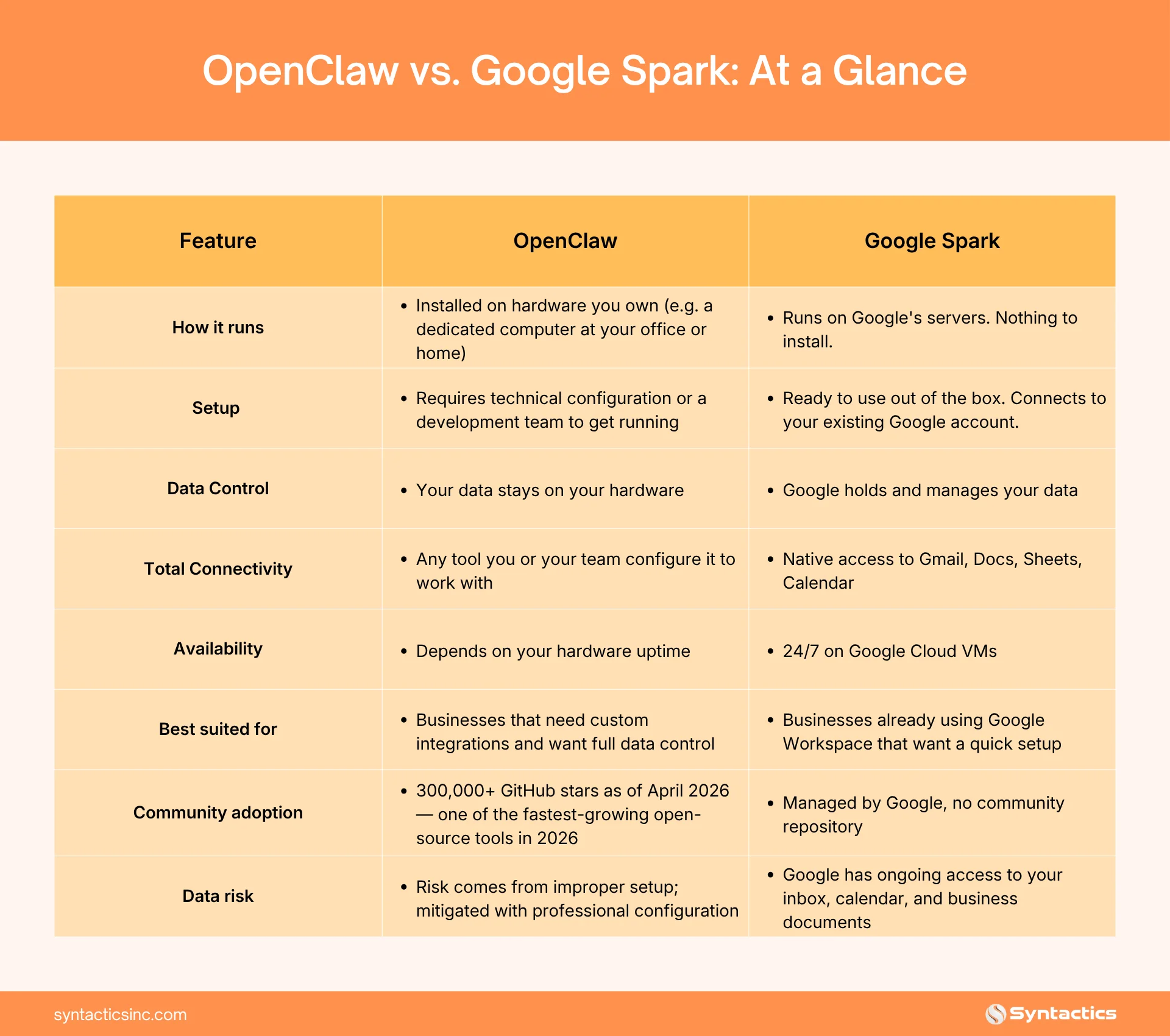
OpenClaw vs. Google Spark: At a Glance
The Real Difference: Control vs. Convenience
Both tools handle the same main tasks. They monitor your inbox, manage recurring tasks, browse the web, and act for you. The technology behind them is similar.
The main difference comes down to a business choice. OpenClaw gives you control, while Google Spark gives control to Google. Setup time, cost, flexibility, and data risk all depend on this difference.
If your business deals with sensitive client data, has compliance requirements, or just wants to keep workflows in-house, this difference is more important than comparing features.
Why Some Businesses Choose Google Spark
Google Spark takes away all the setup work. You do not need to buy hardware, set up anything technical, or handle ongoing maintenance. If your team already uses Gmail and Google Workspace, Spark connects to everything on its own.
That is a real advantage. Most businesses already use Google’s tools. A tool that connects directly to Gmail, Docs, and Calendar from the start means there is no learning curve and no need to migrate data.
Convenience usually wins. Most businesses use Gmail instead of running their own email server, and many will find a managed agent easier than installing one themselves. For teams without much technical support, ease of use often makes the decision.
Why Some Businesses Choose OpenClaw
OpenClaw keeps your data on your own hardware. Nothing goes through a third-party server unless you choose to connect it. For businesses with confidential client information, financial records, or proprietary data, this separation is important.
Setting up OpenClaw takes technical work. A 2026 security analysis found that tens of thousands of OpenClaw installations were exposed to the internet because they were not set up correctly. This is not a problem with OpenClaw itself, but it shows that self-hosted tools need professional setup to stay secure.
This is where a web design and development team can help. The right partner will handle the technical setup, connect OpenClaw to your current systems, and take care of maintenance. You get full control without having to manage the complexity on your own.
OpenClaw is also free and open source. There are no subscription fees, no vendor lock-in, and no risk that a price increase or policy change will affect your operations.
What Happens to Your Business Data?
A file storage service just holds documents. An AI agent is different because it reads your email, checks your calendar, reviews your documents, and acts on what it finds. This is a much deeper level of access.
With Google Spark, that access is ongoing and real-time. Google can always see your inbox, scheduled meetings, and business documents. The main questions are how that data is stored, how long it is kept, and whether it might be used to improve future AI models.
With OpenClaw, your data stays on your own system. However, security researchers have found that many installations are left exposed without proper access controls. Self-hosted does not always mean protected. It means you or your development partner are responsible for keeping it secure.
The right choice depends on your business. Some organizations are fine with Google having access, while others are not. Neither option is wrong, but it should be a conscious decision, not just the default.
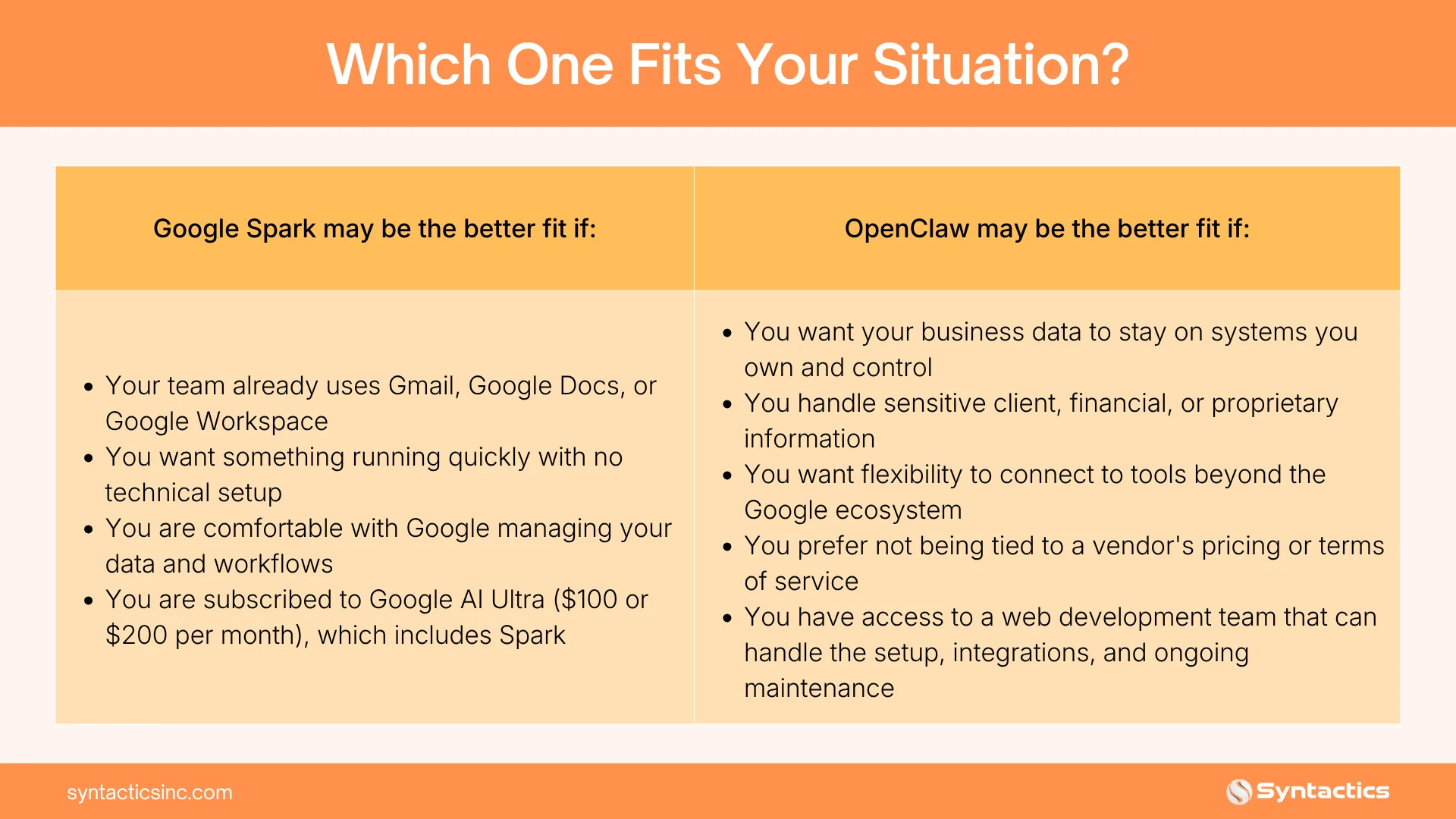
Which One Fits Your Situation?
The Bottom Line
OpenClaw and Google Spark are both strong AI agents. They handle the same main tasks. The real difference is who runs them and who can access your data.
Google Spark is the simpler choice. There is no setup, it integrates instantly with Google tools, and there is nothing to maintain. This is a strong option for teams that want speed and ease.
OpenClaw gives you more control. Your data and workflows stay private on your own systems. The setup takes more work, but with the right support, that effort leads to long-term flexibility and independence.
The real question is not which tool is better, but which trade-off your business is willing to make: give your workflows to Google, or build a system you fully own. Whether you prefer OpenClaw or are still deciding, having the right web platform makes a big difference.
That is where Syntactics, Inc. can help. As a trusted web design and development agency in the Philippines, we take care of setup, integration, and maintenance so you can focus on and successfully run your business.
Get Design and Functionality
Specific to your Brand!
Frequently Asked Questions
Do I need a technical background to use either tool?
Google Spark does not require any technical knowledge. It connects to your existing Google account and is ready to use right away. OpenClaw needs technical setup, either by your own developer or a web development partner. Once set up, both tools work in the background without needing regular input.
Can both tools handle the same tasks?
Yes, in most cases. Both can monitor inboxes, handle recurring tasks, browse the web, and manage workflows automatically. Google Spark works especially well with Google Workspace. OpenClaw gives more flexibility for businesses that use different tools and platforms.
What kinds of tasks can an AI agent handle for a business?
Common uses include monitoring and sorting email, scheduling and following up on meetings, creating draft responses and reports, tracking recurring workflows, and connecting data across different business tools. The exact tasks depend on how the agent is set up and what systems it connects to.

About Ladymieh Naallatan
Related News:









Comment 0