


Website Health: 5 Key Factors Affecting Performance and SEO
A business website is often the most trusted source of information for both new and returning customers, making website health critical to the overall user experience. Visitors come to learn about your brand, explore your offerings, and see how your business is evolving.
When performance issues arise, that experience quickly breaks down. Navigation becomes frustrating, performance declines, and visitors leave before taking action. Understanding what affects site performance helps reduce drop-offs and maintain consistent performance.
What Is Website Health?
Website health describes how well your site performs, functions, and supports user experience across devices and platforms. It reflects the combined state of speed, accessibility, security, stability, and technical performance.
A healthy website loads quickly, works seamlessly on mobile, stays secure, and remains easy to navigate. These factors directly influence user trust, engagement, and search visibility. When website health declines, usability issues and performance gaps can affect traffic and conversions.
5 Factors That Affect Your Site’s Performance and SEO
Your site health is shaped by multiple technical and user-facing elements working together. The following factors play a direct role in determining your site’s performance, stability, and overall effectiveness.
Search Engine Optimization (SEO)
Having multiple dead links across your site is a clear sign of poor website health. Search engines recognize that users become frustrated when they repeatedly encounter broken links. To prevent this, regularly check your site for technical issues and optimize your content:
- Fix dead links, missing images, and outdated information.
- Review metadata: avoid duplicate title tags, create unique meta descriptions, and use appropriate keywords.
- Inspect backlinks to identify quality sources and avoid spam.
- Avoid writing thin content; focus on providing relevant, in-depth information, practical insights, and useful advice
Addressing these areas helps maintain strong website performance, improves user experience, and supports SEO effectiveness.
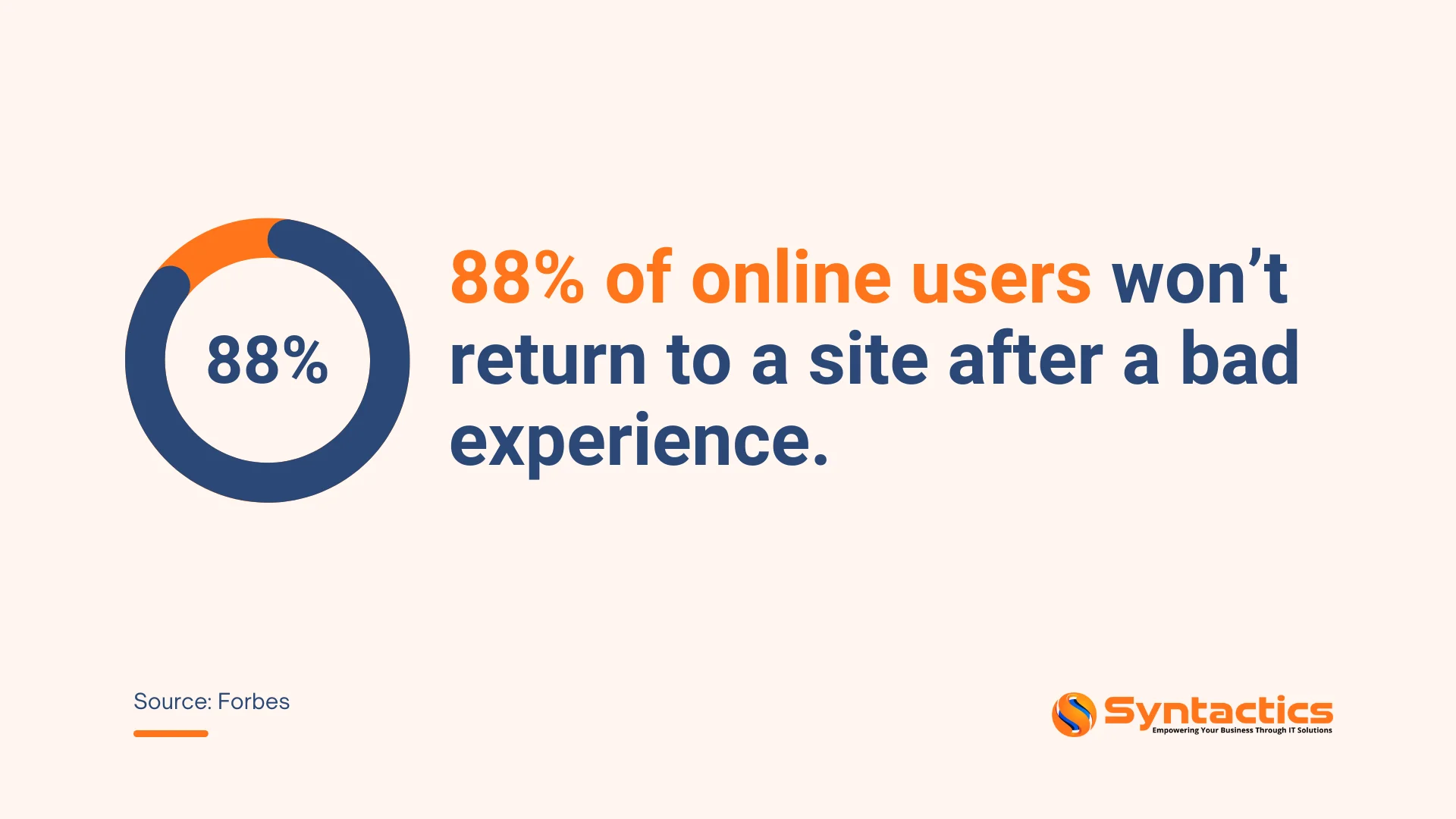
Source: Forbes.
Speed
The average loading time for a website page can only take up to 2.5 seconds. So, regardless of other improvements, if your website takes longer than 3 seconds to load, Google considers its speed index suboptimal.
Slow loading affects both users and search engines, and visitors may leave before exploring your content, and search engines may lower your rankings if bounce rates rise.
To maintain strong website health and user experience, focus on keeping your site lightweight by:
- Compressing media files
- Reducing unnecessary external scripts
- Maximizing caching across devices
These steps improve load times, keep visitors engaged, and help maintain visibility in search results.
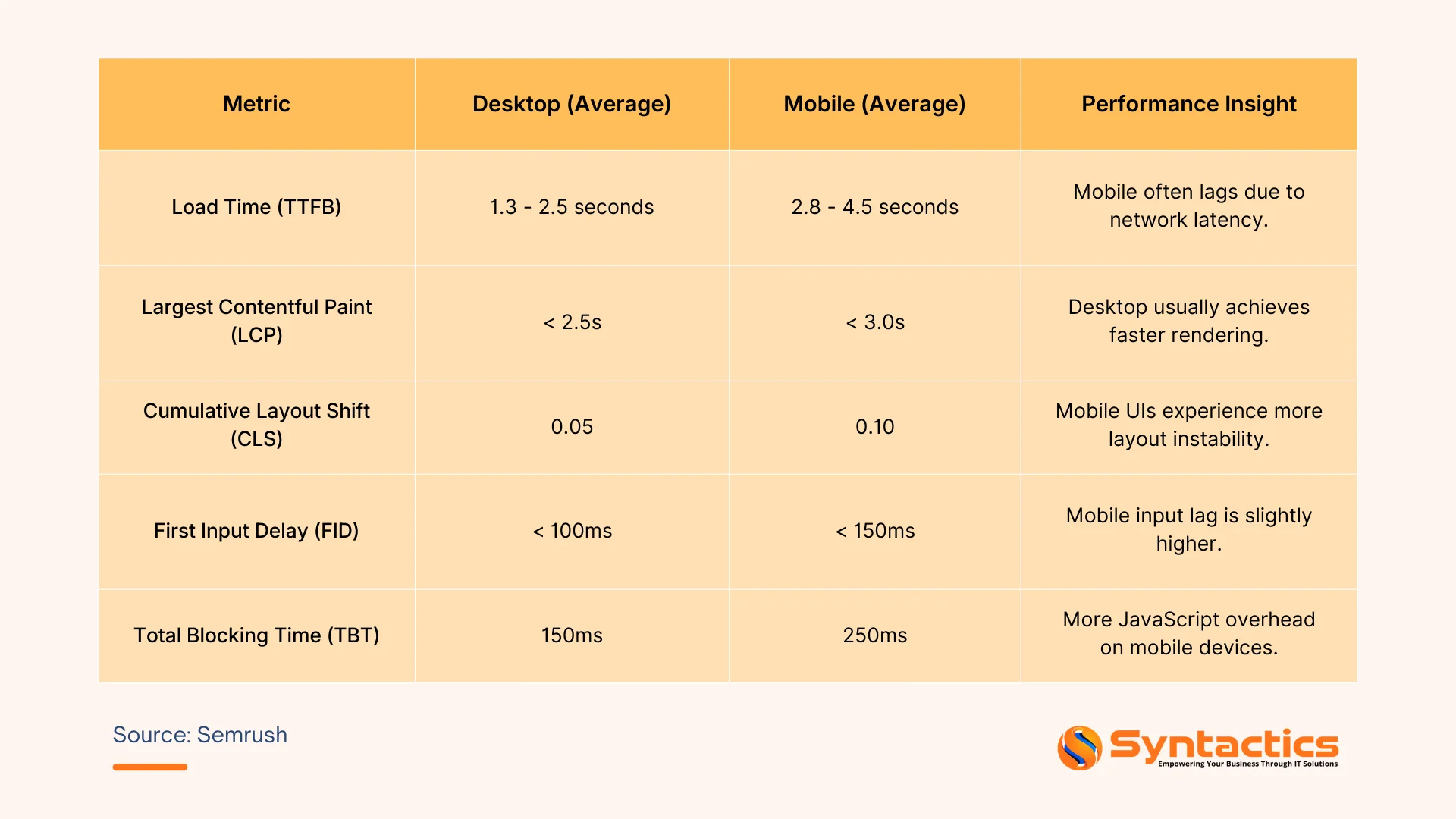
Source: Semrush.
Maintenance
Regular website maintenance is just as important as having a clean, user-friendly interface. Remove unnecessary themes and plugins as they add clutter, take up space, and slow down your site.
At the same time, make sure everything else stays up to date:
- PHP version and modules
- Database management system
- Active plugins
Updates can be handled automatically or manually. Check with your dedicated web developer to see which approach would best suit your needs.
Mobile-Friendly
Your visitors use a variety of devices, and website health depends on how well your site performs across all of them. Run tests to see if your site is truly mobile-friendly.
Both desktop and mobile traffic significantly impact overall site performance. Responsive web design, pages that adjust to different screen sizes, can make a big difference in user experience, engagement, and retention.

Hosting
Choose a trusted web hosting provider to keep your website secure and performing well. Set a regular backup schedule for all site content as this ensures you can quickly restore your site after breaches or technical issues.
Plan maintenance periods in advance to minimize disruption for visitors. Frequent unscheduled downtime can harm your website health. If your site goes down often, consult your hosting provider and consider upgrading to a plan that supports higher traffic.
Conclusion
Maintaining your website’s health should be a top priority for any business. Focus on optimizing load times, monitoring performance, ensuring responsiveness across devices, and minimizing both scheduled and unscheduled downtime. These practices help retain visitors, improve user experience, and maintain strong search engine visibility.
Take proactive steps to preserve your website’s health for long-term performance. Partner with expert web design and development services in the Philippines to ensure your site stays fast, reliable, and fully optimized for your audience.
Get Design and Functionality
Specific to your Brand!
- Build a website that's mobile-friendly and responsive.
- Custom designs aligned with your brand.
- Optimized for SEO and user experience.
- Scalable and feature-rich solutions.

This article was updated on February 2, 2026.
Frequently Asked Questions (FAQs)
What is website health and why does it matter?
Website health refers to how well your site performs, functions, and delivers a positive user experience. Good website health improves load times, security, responsiveness, and overall search visibility.
How can I check my website’s health?
You can assess website health using tools that monitor page speed, Core Web Vitals, mobile responsiveness, broken links, uptime, and security issues. Regular audits help identify areas for improvement.
How often should website health be monitored?
Website health should be checked regularly, ideally monthly or after major updates. Consistent monitoring ensures quick resolution of issues and maintains optimal performance. Get in touch with our web development team for consultation.

About Xenia Labis
Related News:
![[New] Syntactics - OMT - May - Visual Search & Tips for Optimizing Site Images (1)](https://www.syntacticsinc.com/wp-content/uploads/2023/05/New-Syntactics-OMT-May-Visual-Search-Tips-for-Optimizing-Site-Images-1-346x195.png)
Visual Search & Tips for Optimizing Site Images

Create with Canva: Designing Social Media Graphics

Mastering iOS and Android App Development

Business Websites: Operating During A Pandemic









Comment 0