

Why Fix Broken Links on Your Business Website
Broken links hurt user experience and can quietly harm your SEO. Website owners should fix them as soon as they are found. This article explains how to fix broken links, why it matters for search rankings, and what regular maintenance involves.
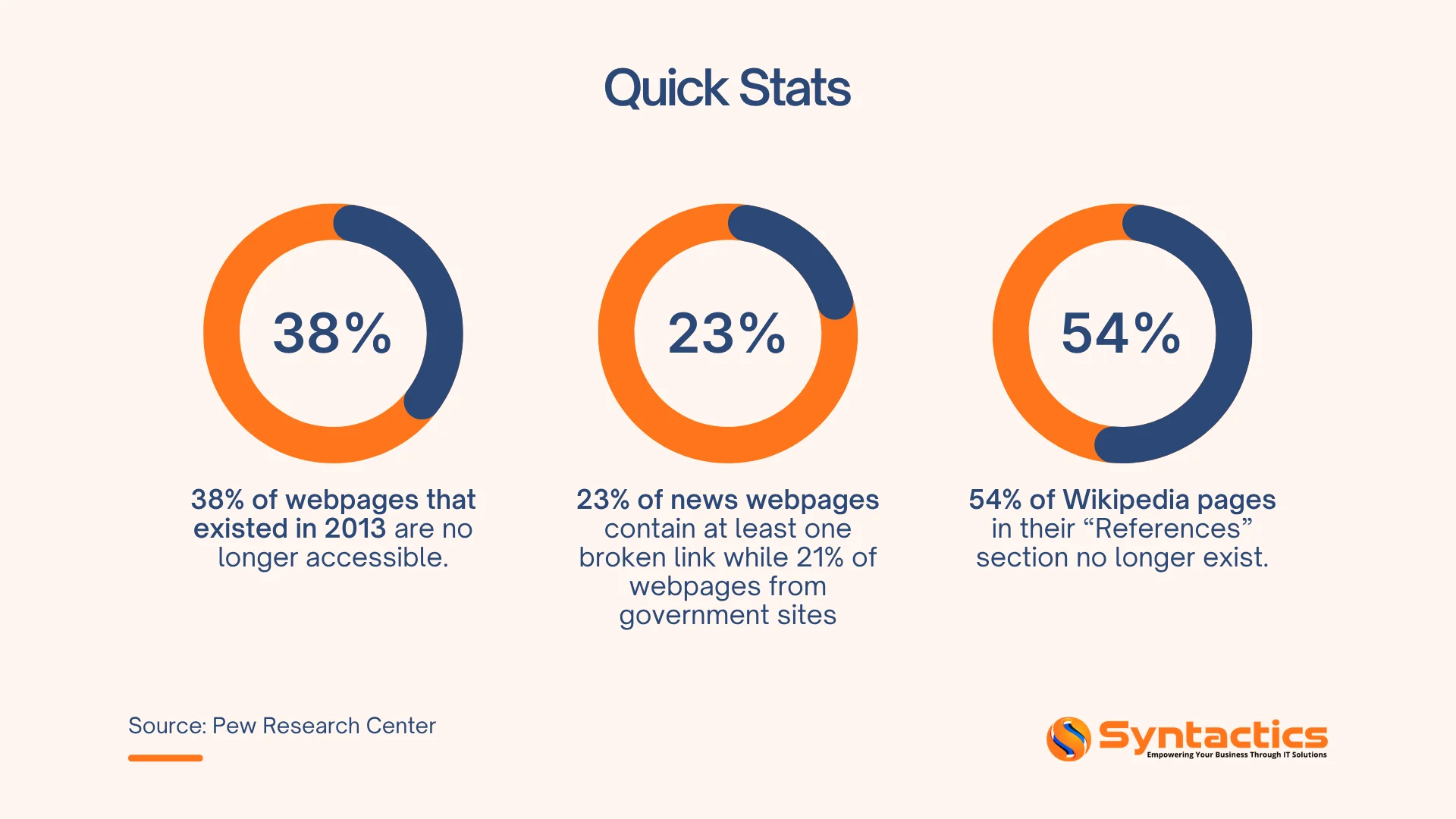
Source: Pew Research Center.
What are Broken Links?
A broken link is a link on your website that no longer works. Also called a dead link, it usually happens when the target page is deleted or moved to a new URL without a proper redirect. The server then shows a “404 Not Found” error instead of the content.
Links often break when you move your site to a new domain, change your URL structure, delete a post or page, or make a typo in a URL. According to Ahrefs, more than 66% of links created in the past nine years are now dead. This means broken links are a regular maintenance issue, not just a one-time problem.
On your business website, you might come across these types of broken links:
Internal Links: These connect one page on your website to another. Because you control internal links, they should be your first priority when checking for broken links. They directly affect how search engines crawl your site and how link equity is shared.
External Links: Also known as outbound links, these send users to other websites. Check them regularly, because you do not control those pages. If search engines find a broken external link, it can lower your page’s authority and ranking in search results.
You can explore these SEO link-building strategies to help improve your website.
What Do Broken Links Affect?
Bounce Rate
A “404 error page” frustrates users. According to the Baymard Institute, 88% of online users are less likely to return to a website after seeing one. When visitors leave right after landing on a broken page, search engines see this as a sign of low quality and may lower your rankings.
Research shows that websites with broken links have a 38% higher bounce rate than those without. Keeping your links working helps users stay engaged and lowers this risk.
Indexing and Ranking
Search engines give each website a limited crawl budget, which is the number of pages Googlebot will crawl in a set time. Every broken link wastes a crawl request that could have been used to find or re-index important content.
This is even more costly for larger sites. If 5% of your internal links are broken, about 5% of your crawl budget is wasted. Broken internal links also stop Google from fully indexing your site, so important pages might never show up in search results.
Conversion and Revenue
Broken links can directly hurt your revenue. Studies show that 70% of users abandon their purchase if they find a broken checkout link. Over time, this can add up to a big loss.
Forrester Research estimates that businesses lose about $2.6 billion each year because of broken links. Most of this loss comes from lost sales and lower engagement.
Link Equity & Domain Authority
When valuable backlinks from other websites lead to broken pages on your site, you lose the SEO benefits those links offer. This lost “link juice” can lower your domain authority. By fixing or redirecting broken pages, you can recover that link equity and spread it across your site.

How to Fix Broken Links on a Website
The best way to manage broken links is to combine regular audits with proactive maintenance. Each time you fix a broken link, you improve user experience, crawl efficiency, and link equity. Here are the most effective methods:
Use an SEO Auditing Tool
Tools like Ahrefs, Screaming Frog, and SEMrush can scan your whole website and automatically find broken links. Screaming Frog and Ahrefs are the most popular, with 58% of SEO professionals using them for this task. Automated tools can cut detection time by up to 60% compared to checking manually.
Check Google Search Console
Google Search Console’s “Coverage” and “Pages” reports show 404 errors that Googlebot finds on your site. This is one of the most reliable free tools for spotting broken internal links and indexing problems from Google’s perspective.
Apply 301 Redirects
Setting up 301 redirects is a key way to fix broken links. If you delete or move a page, always create a 301 redirect from the old URL to the most relevant new page. This keeps link equity and stops users and search engines from reaching dead ends.
Update or Remove Dead Outbound Links
For broken external links, update them to a current, relevant source. If you cannot find a good replacement, remove the link. Dead outbound links tell search engines your content is outdated, which can hurt trust and rankings over time.
Schedule Regular Link Audits
Right now, only 43% of businesses check for broken links every month. Most leave SEO problems unchecked for too long. Make link audits a regular habit, and always run them after site updates, redesigns, or migrations.
Websites that keep their links in good shape see 28% better SEO performance than those that do not.

Fix Broken Links to Improve SEO
As your site grows, it becomes even more important to keep an eye on your links. If you catch a broken link early, you can fix it before Google notices. If you wait too long, you risk losing rankings, traffic, and user trust.
Here’s a quick summary of why fixing broken links matters:
- They increase bounce rates by up to 38%
- They waste crawl budget and limit indexing
- They reduce domain authority by leaking link equity
- They cost real revenue; eCommerce businesses feel this most acutely
- They signal to search engines that your site is outdated
If you are planning to redesign or update your business website, consider working with a trusted SEO company in the Philippines. They can manage your site structure, set up redirects, fix broken links, and keep your site healthy for both users and search engines.

This article was updated on April 30, 2026.
Frequently Asked Questions
How many broken links are too many?
There is no set number, but a useful benchmark exists. Sites with more than 2% broken links often see ranking drops. If over 5% of your links are broken, you are likely losing a lot of traffic. Even one broken link on a popular or important page can cost you link equity and conversions.
Aim for zero broken links. Regular audits help you stay close to that goal.
Do broken links directly hurt Google rankings?
Not always directly, but the indirect effects matter. Google says a few broken links will not ruin your site. Still, broken internal links disrupt crawling and stop link equity from spreading. Broken external links hurt user experience and show neglect.
All these factors together can lower your rankings over time. The more broken links you have, the bigger the impact.
How often should I check for broken links?
For most business websites, checking for broken links once a month is enough. Run an extra check right after any site migration, redesign, URL change, or large content update. Big eCommerce or news sites that update often may need weekly automated scans.
You can set up Google Search Console to alert you when new 404 errors appear. This helps you catch broken links between your regular audits. For a deeper analysis, reach out to our SEO experts.

About Jalou Batilong
Related News:

Optimizing Web Apps with API-First Development


Top Advantages When Using Cloud Backups

How To Speed Up WooCommerce WordPress Websites










Comment 0