


What You Must Know About “User Experience”
User experience (UX) is how your website makes visitors feel the moment they land on it. It covers everything from load speed and navigation to content clarity and visual layout. Every design decision on your site either supports or undermines that experience.
Businesses that prioritize UX see lower bounce rates, longer session times, and higher conversion rates. Those who ignore it lose customers to competitors before the first scroll. Below, we break down the core components of UX and what each one means for your business website.
What is User Experience?
As a business, you should consider user experience when planning, designing, developing, and implementing your digital marketing campaigns. Provide your target audience with a unique user experience. Ensure that their interaction with you is memorable and worth sharing with their friends. This includes building a business website that ushers an excellent user experience.
Thus, you can set user experience as the basis for your decisions regarding your website design, development, architecture, and content marketing strategy. SEO optimizers even make user experience part of their strategy to rank higher on search engine results pages (SERPs).
According to the Interaction Design Foundation, user experience (UX) design is used to “create products that provide meaningful and relevant experiences to users.” It is a design process that encompasses the product’s branding, usability, and functionality.
In this context, user experience design encompasses a website’s findability, usability, and accessibility.

Findability
A website’s findability or convenience is how quickly someone can locate it online. So, if someone is searching for a product online and cannot find it, it affects user experience. Thus, many SEO companies ensure their websites have the right tools so users can find their products quickly.
To do this, they ensure that search engines have successfully indexed their web pages. You can determine a website’s findability through tree testing, a usability technique for evaluating the searchability of topics on a particular website.
Usability
A website’s ease of use plays a crucial part in cultivating an excellent user experience for visitors. Achieve positive usability by ensuring that the system is easy to learn, efficient to use, pleasant, and more.
Moreover, you can analyze a website’s usability by evaluating its effectiveness, efficiency, learnability, memorability, error prevention and handling, and user satisfaction. You can measure a website’s usability through formative and summative usability testing.

Accessibility
Perceived loading time is more important to searchers than the actual loading time. Thus, you need to make sure that your website’s loading time is quick. You have to fix loading issues on your website to ensure your website’s accessibility.
Also, because time is of the essence, you must place your most important information on your landing page, preferably above the fold. When you do this, you immediately provide visitors with an idea of what your site offers at first glance. One way to evaluate a website’s accessibility is through search engine spiders or site crawlers.
Aside from the three mentioned above, you also need to consider your website’s responsiveness, page speed, and messaging features.
Responsiveness
When you build websites, you need to consider that people nowadays use different kinds of devices. These devices use different types of screen sizes. So, to ensure an excellent user experience, you need to build a website that adapts to various devices and screens.
You can employ this through responsive web design. With this, you can scale images, fonts, and other HTML elements on your site to your user’s screen size.

Page Speed
Google uses the Largest Contentful Paint (LCP), which is a Core Web Vitals metric that measures the loading performance of a page. Ideally, LCP should occur within 2.5 seconds after the page starts loading. LCP considers IMG elements, image elements within an SVG, and video elements.
Moreover, LCP also considers elements with a background image loaded via the URL() function, as well as block-level elements with text nodes and other inline-level text elements’ children.
Google also measures Interaction to Next Paint (INP), a Core Web Vitals metric that tracks how quickly a page responds to user interactions. Optimizing for INP is now just as critical as improving load times. Thus, you need to emphasize page speed and interactivity when designing your website to ensure an excellent user experience.
Messaging
Another way to improve user experience for your site is to employ a live chat feature on your website. Through this, you provide a quick and convenient way for your site visitors to communicate with you without leaving the website. You can ask a web developer to help you integrate a chat solution on your business web pages.
For instance, you can deploy AI-powered chatbots and live messaging features that appear directly within the browser window. These tools respond to visitors instantly, handle common queries automatically, and keep customers engaged without requiring them to log into a third-party platform.
Here is a comprehensive guide by Neil Patel on measuring a website’s user experience.
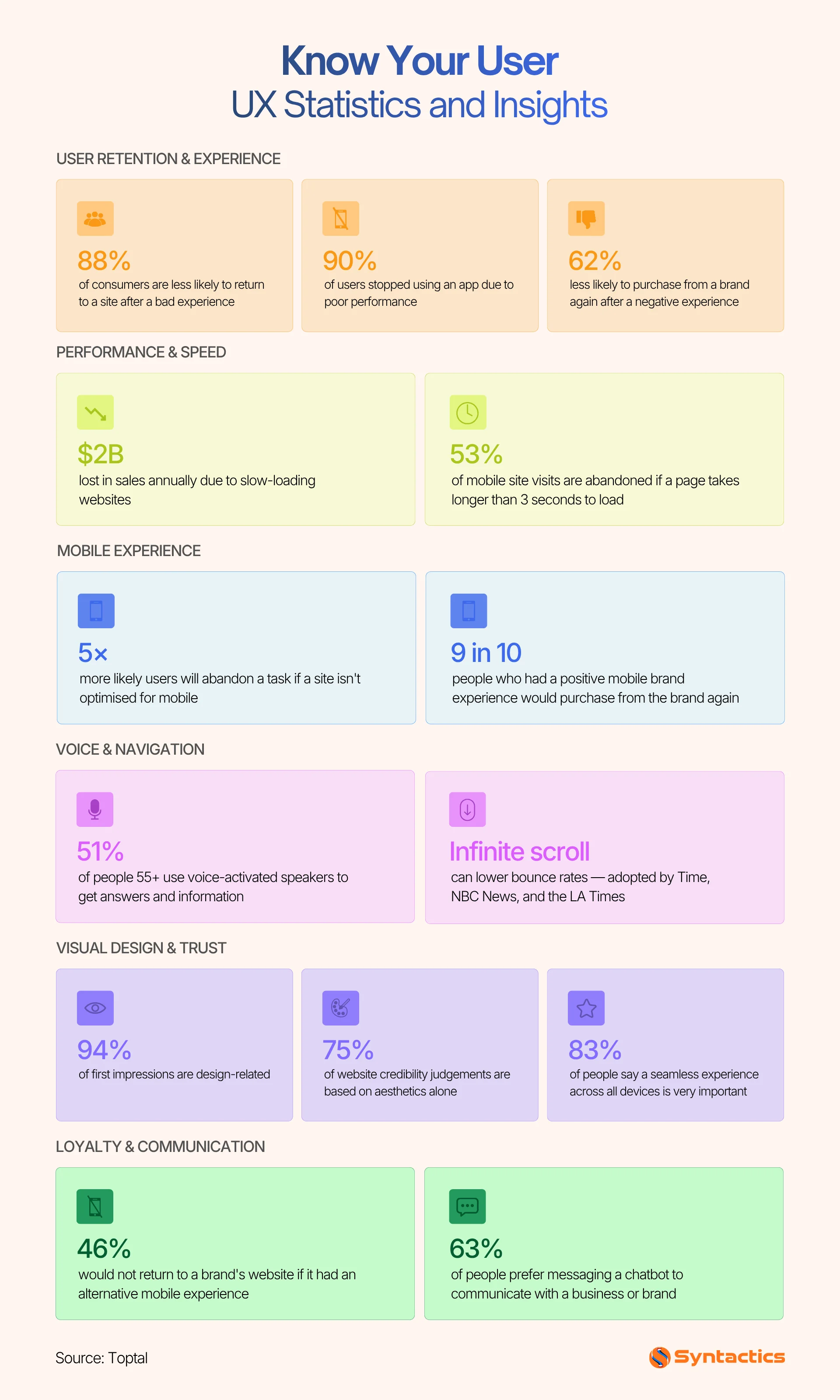
Source: Toptal
User Experience (UX) Design Principles
Hubspot summarized the fundamental user experience (UX) design principles that you should always keep in mind when designing and developing your website. Check them out below:
Be Findable
As mentioned above, you should not waste your site users’ time while browsing your website. As such, you should create a web design with elements and content that are easy to find and navigate through.
Be Contextual
Users should know where they are while browsing your site. Your design should guide them in the right direction rather than leaving them feeling lost or overwhelmed.
Be Easy
When building a website, ensure a streamlined, consistent web design. An easy-to-use system will help provide an excellent user experience to your site visitors and potential customers.
Be Simple
Get straight to the point, especially in the content of your landing pages and product pages. Keep in mind that not all of your site visitors will have the whole day to browse your website. You should help them quickly find the product or service that they need.
Be Human
Being authentic in the content you publish makes users feel they are interacting with humans rather than devices. Show them your brand’s personality and eventually gain their trust.

Build Websites with Excellent User Experience
A website that delivers strong UX earns repeat visits, builds brand trust, and supports your broader digital marketing goals. Start by identifying where your site creates friction, whether that is slow load times, poor mobile responsiveness, or unclear navigation. From there, prioritize fixes by impact.
If you need a partner to handle the build or redesign, Syntactics, Inc. offers web design and development services tailored to business goals, not just aesthetics.
Get Design and Functionality
Specific to your Brand!
- Build a website that's mobile-friendly and responsive.
- Custom designs aligned with your brand.
- Optimized for SEO and user experience.
- Scalable and feature-rich solutions.

This article was updated on May 19, 2026.
Frequently Asked Questions
What is the difference between UX design and UI design?
UX design focuses on the overall experience a user has when interacting with a product, covering usability, accessibility, and findability. UI design is a subset of that process, dealing specifically with the visual and interactive elements users see on screen. Good UI supports good UX, but the two are not interchangeable.
Why does page speed matter for user experience?
Users form judgments about a site within seconds. A slow-loading page raises bounce rates and signals poor performance to both users and search engines. Google’s Core Web Vitals metrics, including LCP for load time and INP for interaction responsiveness, directly tie page speed and interactivity to search rankings.
How does UX affect SEO performance?
Search engines use behavioral signals like dwell time, bounce rate, and page interaction data to assess content quality. A site with strong UX keeps users engaged longer and signals relevance to search engines. Core Web Vitals scores are a direct UX-based ranking factor in Google’s algorithm.














Comment 0