


SEMRush Site Audit: A Guide to Website Quality Control
A Semrush site audit allows you to check how well your company website is performing. Also known as an SEO audit, it analyzes overall site health and identifies technical issues that may affect search visibility. Through Semrush, businesses can uncover crawlability problems, HTTPS implementation errors, and performance concerns.
With clear diagnostics and actionable recommendations, the Semrush Site Audit helps improve your website’s technical foundation and support stronger search engine rankings.

Source: Analyzify.
How Semrush Site Audit Identifies Technical SEO Issues
“Scan your website for over 140+ technical and SEO mistakes,” states the Semrush Site Audit page. The tool crawls your website and provides a detailed report highlighting issues that require attention. Addressing these findings can help strengthen your site’s technical SEO foundation.
The Semrush Site Audit identifies critical site health issues and shows how many pages are affected by each one. It also provides guidance and recommendations to help resolve detected problems, making it easier to prioritize fixes and improve overall performance.
Key Areas Analyzed by the Semrush Site Audit
Semrush gives you Thematic Reports. Hence, it gives you the most common website issues, some of which include:
- Crawlability. Ensures search engine bots can properly access and index your website.
- HTTPS Implementation. Identifies issues related to secure protocol setup, including problems during the transition from HTTP to HTTPS.
- International SEO. Provides insights for global ranking, including issues with hreflang implementation.
- Performance. Evaluates site loading speed and related performance factors such as file minification.
- Internal Linking. Reviews internal link structure to prevent orphaned pages and improve site architecture.
- Markups. Assesses structured data implementation and assigns a grade based on detected markup quality.
- Core Web Vitals. Measures loading performance, interactivity, and visual stability — key factors influencing search rankings.
Semrush Site Audit: Common Issues It Detects
Errors
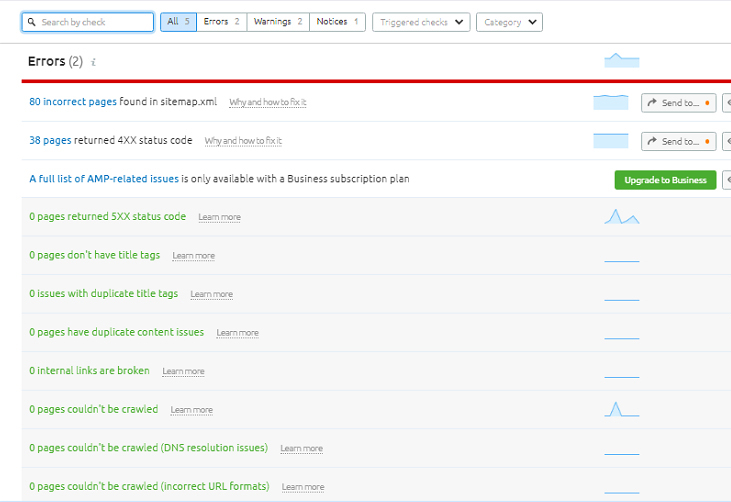
Errors are highlighted in red and represent the most critical issues on your website that should be addressed promptly.
- Incorrect pages found in sitemap.xml
- Pages returned 4XX or 5XX status code
- Pages without title tags
- Duplicate title tags
- Duplicate content issues
- Internal links are broken
- Pages couldn’t be crawled
- … due to DNS resolution issues
- … due to incorrect URL formats
- Internal images are broken
- Duplicate meta descriptions
- Robots.txt file has format errors
- Sitemap.xml files have format errors
- Pages with WWW resolve issue
- No viewport tag
- Pages with too large HTML size
- AMP pages have no canonical tag
- Issues with hreflang values
- hreflang conflicts within page source code
- Issues with incorrect hreflang links
- Non-secure pages
- Expiring or expired certificate issues
- Old security protocol issues
- Incorrect certificate name issues
- Mixed content issues
- No redirect or canonical tags to HTTPS homepage from HTTP homepage
- Redirect chains and loops
- Pages with a broken canonical link or have multiple canonical URLs
- Pages have a meta refresh tag
- Issues on broken internal JavaScript and CSS files
- Subdomains don’t support secure encryption algorithms
- Sitemap.xml files are too large
- Links couldn’t be crawled (incorrect URL formats)
- Structured data items are invalid
- Pages have slow load speed
Warnings
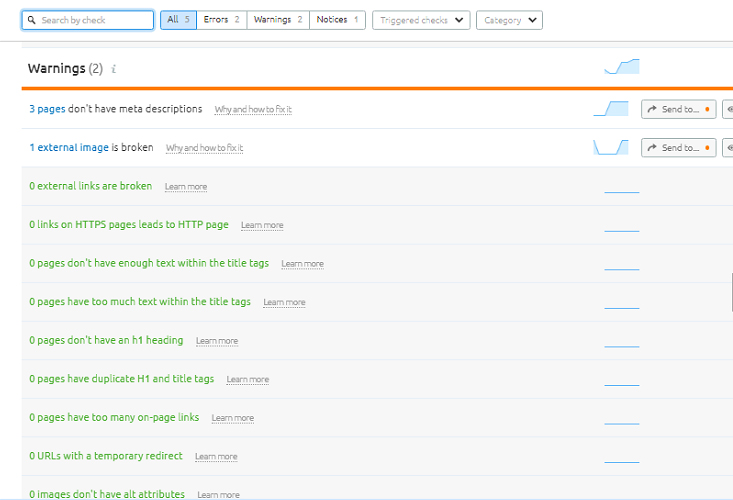
Warnings are highlighted in orange and aren’t as serious as Errors. However, they are still website problems that you need to address! Site issues under Warnings can still impact your SEO score.
- Pages don’t have meta descriptions
- External image is broken
- External links are broken
- Links on HTTPS pages lead to HTTP page
- Pages don’t have enough text or have too much text within the title tags
- Pages don’t have an h1 heading or have duplicate H1 and title tags
- Too many on-page links
- URLs with a temporary redirect
- Images don’t have alt attributes
- Too many parameters in page URLs
- No hreflang and lang attributes on pages
- Pages don’t have character encoding declared or don’t have doctype declared
- Low word count on pages
- Pages use Flash or contain frames
- Pages have underscores in the URL
- Outgoing internal links contain nofollow attribute
- Sitemap.xml not indicated in robots.txt
- Sitemap.xml not found
- Homepage does not use HTTPS encryption
- Subdomains don’t support SNI
- HTTP URLs in sitemap.xml for HTTPS site
- Uncompressed pages
- Issues with blocked internal resources in robots.txt
- Issues with uncompressed or uncached JavaScript and CSS files
- Pages have too large JavaScript and CSS total size
- Pages use too much JavaScript and CSS files
- Issues with unminified JavaScript and CSS files
- Link URLs are too long
Notices
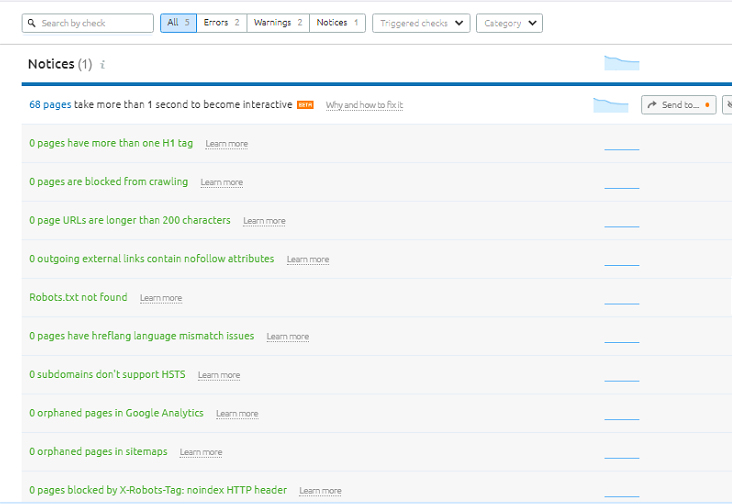
Notices are outlined in blue. This type is the least important of the three and does not impact your website’s health at all! Nevertheless, they are still necessary for making your site look good.
- Pages take more than 1 second to become interactive
- Pages have more than one H1 tag
- Page URLs are longer than 2 characters
- Pages are blocked from crawling
- Outgoing external links contain nofollow attributes
- Robots.txt not found
- Pages have hreflang language mismatch issues
- Subdomains don’t support HSTS
- Orphaned pages in Google Analytics
- Orphaned pages in sitemaps
- Pages blocked by X-Robots-Tag: noindex HTTP header
- Issues with blocked external resources in robots.txt
- Issues on broken external JavaScript and CSS files
- Pages need more than 3 clicks to be reached
- Pages have only one incoming internal link
- URLs with a permanent redirect
- Resources are formatted as page link
- Links have no anchor text or have non-descriptive anchor text
- Links to external pages and resources return a 43 HTTP status code
Use Semrush to Control Your Website’s Quality
All in all, the Semrush Site Audit is a reliable and versatile tool. It helps analyze site health, evaluate competitors’ performance, and audit your SEO. By identifying and addressing technical issues, the tool supports stronger search engine rankings and overall website optimization.
Furthermore, the primary purpose of a Semrush Site Audit is to improve search visibility. Your website can achieve a more solid technical foundation and enhanced performance by resolving the issues it identifies.
Also, the Semrush Site Audit specifically checks for issues related to Crawlability, HTTPS Implementation, International SEO, Website Performance, Internal Linking, Markups, and Core Web Vitals. Addressing these areas ensures that your website meets technical standards and maintains high-quality performance.
Fortunately, working with a professional web design and development services agency in the Philippines can optimize your site and ensure SEO best practices are met.
Get Design and Functionality
Specific to your Brand!

This article was updated on February 20, 2026.
Frequently Asked Questions
How often should I run a Semrush Site Audit?
For most websites, running a site audit monthly or after major updates ensures ongoing optimization and early detection of technical issues.
Can a Semrush Site Audit improve my search rankings?
Yes. By fixing the technical and SEO issues it highlights, you strengthen your website’s foundation, which supports better search engine performance.
Does Semrush Site Audit check competitor websites?
No. Semrush Site Audit focuses on your site’s health, but Semrush offers other tools for competitor analysis separately.

About Axel May Rivera
Related News:

How CLS Score Affects Your SEO Rankings











Comment 0